
1.製品オーバーview
The havit GK59 Gaming Microphone is designed for clear audio capture during gaming, streaming, and voice communication. It features a condenser microphone for high-quality sound and a versatile design for ease of use.

図1.1: 前面 view of the havit GK59 Gaming Microphone, showcasing its main body, stand, and control buttons.
主な特徴:
- 使いやすい: Simple plug-and-play functionality.
- Good Performance: Delivers clear and consistent audio.
- Good Quality: 信頼性の高い使用を可能にする耐久性のある構造。
- ポータブルデザイン: コンパクトで持ち運びも簡単。
- 調整可能なスタンド: Allows for flexible positioning.
2. セットアップ手順
2.1 パッケージ内容
パッケージに以下の項目が含まれているか確認してください。
- havit GK59 Gaming Microphone
- USB接続ケーブル
- ユーザーマニュアル(このドキュメント)
2.2 マイクの接続
The GK59 microphone offers versatile connectivity options for various devices.
- USB接続: Connect the provided USB cable to the USB-C port on the back of the microphone and the other end to an available USB port on your computer or gaming console. The microphone is plug-and-play and should be automatically recognized by most operating systems.
- 3.5mmジャック接続: For devices supporting a 3.5mm auxiliary input, connect a 3.5mm audio cable (not included) to the 3.5mm jack on the back of the microphone and to your device's audio input.
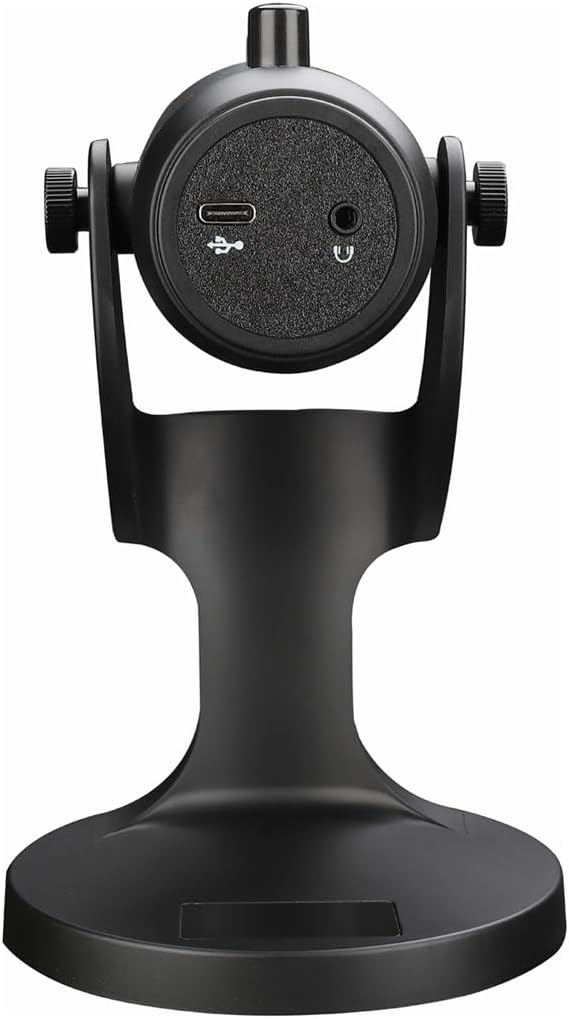
図2.1:背面 view of the havit GK59 Gaming Microphone, highlighting the USB-C port for data and power, and the 3.5mm headphone jack for monitoring.
After connecting, ensure the microphone is selected as the default input device in your system's sound settings or your gaming/streaming software.
3. 操作手順
3.1 基本的な制御
The havit GK59 features intuitive controls located on the front of the microphone body:
- 消音ボタン: Press to mute or unmute the microphone. An indicator light will typically show the mute status.
- MIC +/-ボタン: Adjust the microphone input sensitivity (gain). Press '+' to increase, '-' to decrease.
- VOL +/- ボタン: Adjust the headphone output volume for monitoring. Press '+' to increase, '-' to decrease.
- ECHO +/- ボタン: Adjust the echo effect level. Press '+' to increase, '-' to decrease.
図3.1:詳細 view of the microphone's control panel, including the mute button, microphone gain, volume, and echo adjustment buttons.
3.2 マイクの位置調整
The microphone is equipped with an adjustable stand, allowing you to optimize its position for best sound capture and comfort.
- Gently hold the microphone body and the base of the stand.
- Tilt the microphone forward or backward to achieve the desired angle. The stand's design helps reduce vibration and abnormal sounds during use.
- Position the microphone approximately 6-12 inches (15-30 cm) from your mouth for optimal voice clarity.

Figure 3.2: The havit GK59 microphone demonstrating its adjustable tilt feature on the stand, designed for anti-vibration.
4. メンテナンス
4.1 クリーニング
マイクの性能と外観を維持するには:
- Disconnect the microphone from its power source before cleaning.
- 外側の表面を拭くときは、柔らかく乾いた布を使用してください。
- 液体クリーナー、エアゾール、溶剤は、仕上げや内部コンポーネントを損傷する恐れがあるため、使用しないでください。
4.2 ストレージ
When not in use, store the microphone in a cool, dry place away from direct sunlight and extreme temperatures. Protect it from dust and moisture.
5。 トラブルシューティング
If you encounter issues with your havit GK59 Gaming Microphone, please refer to the following table for common problems and solutions:
| 問題 | 考えられる原因 | 解決 |
|---|---|---|
| No sound input from microphone | マイクが正しく接続されていません 間違った入力デバイスが選択されました マイクがミュートされています | USB ケーブルがしっかりと接続されていることを確認してください。 Check system sound settings and select GK59 as input. Press the Mute button on the microphone to unmute. |
| マイクの音量が小さい | マイクのゲインが低すぎる システム入力音量が低すぎます | Press the 'MIC +' button on the microphone. Adjust input volume in your system's sound settings. |
| 音声が歪んでいる、または不明瞭である | Microphone gain too high マイクが口に近すぎる 環境騒音 | Press the 'MIC -' button on the microphone. マイクの位置を調整します(口から6〜12インチ)。 環境内のバックグラウンドノイズを低減します。 |
| No headphone monitoring sound | ヘッドフォンが接続されていません ヘッドホンの音量が低すぎる | Ensure headphones are plugged into the 3.5mm jack. Press the 'VOL +' button on the microphone. |
6. 技術仕様
Below are the technical specifications for the havit GK59 Gaming Microphone:
| 特徴 | 仕様 |
|---|---|
| ブランド | 習慣 |
| モデル番号 | GK59 |
| 接続技術 | USB, 3.5 mm Jack (Auxiliary) |
| 推奨用途 | ゲーム |
| 極性パターン | 一方向 |
| マイクフォームファクター | Handheld (with desktop stand) |
| アイテム重量 | 429グラム |
| インピーダンス | 250オーム |
| 信号対ノイズ比 | 18デシベル |
| 可聴ノイズ | 18デシベル |
| 電源 | コード式電気(USB経由) |
| 対応デバイス | ゲーム機、PC |
| アイテムの寸法(LxWxH) | 5.59 x 4.92 x 9.06インチ |
| 色 | 黒 |
7. 保証とサポート
7.1 保証情報
The havit GK59 Gaming Microphone comes with a standard manufacturer's warranty. Please refer to the warranty card included in your product packaging or visit the official havit web詳細な保証条件については、サイトをご覧ください。
7.2 カスタマーサポート
For technical assistance, troubleshooting not covered in this manual, or warranty claims, please contact havit customer support through their official channels. You can find more information and contact details on the Amazonのhavitストア またはそのオフィシャル webサイト。