
導入
This manual provides detailed instructions for the installation, operation, and maintenance of your Tiandy TC-C38XS 8MP IR Turret Camera. Please read this manual thoroughly before using the product to ensure correct usage and to prevent damage.
安全情報
- Ensure the power supply meets the camera's requirements (DC 12V or PoE).
- カメラを極端な温度、湿度、腐食性の環境にさらさないでください。
- カメラを長時間にわたって強い光源に直接向けないでください。
- 物理的な損傷を防ぐためにカメラを慎重に取り扱ってください。
- 設置は地域の電気規則に従って資格のある人が行う必要があります。
パッケージ内容
パッケージにすべてのコンポーネントが含まれていることを確認します。
- Tiandy TC-C38XS IR Turret Camera
- 取り付けネジと壁プラグ
- イーサネットケーブル用防水コネクタ
- クイックスタートガイド(該当する場合)
- ドリルテンプレート(該当する場合)
製品終了view
The Tiandy TC-C38XS is an 8MP IR Turret Camera designed for outdoor surveillance, featuring a full metal housing and advanced imaging capabilities.
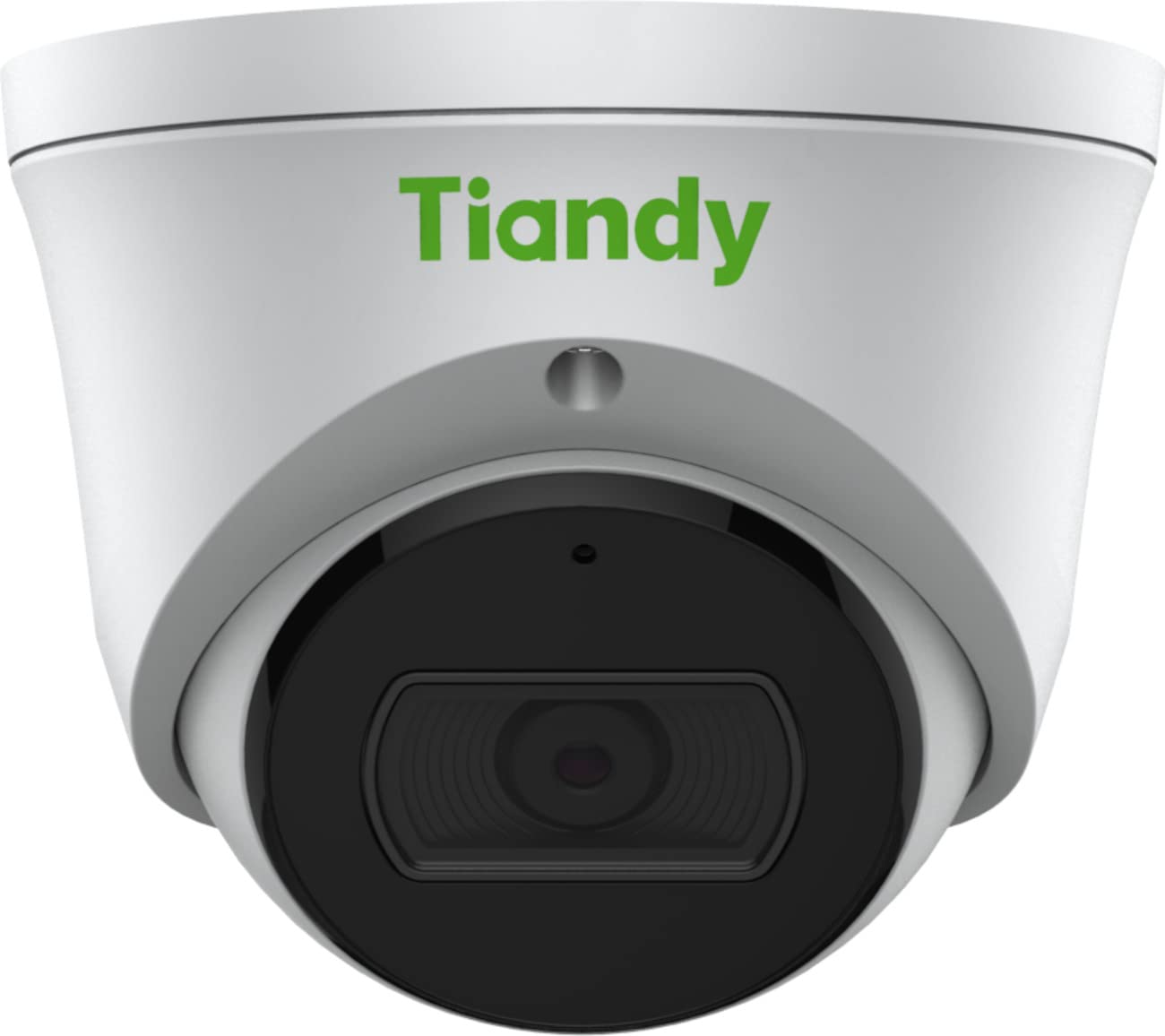
図1: フロント view of the Tiandy TC-C38XS IR Turret Camera, showing the lens and IR illuminators.

図2: 角度付き view of the Tiandy TC-C38XS IR Turret Camera, highlighting its compact turret design.

図3: Technical drawing showing the dimensions of the Tiandy TC-C38XS IR Turret Camera (approx. 116.6mm diameter, 96mm height).
主な特徴:
- 8メガピクセル解像度: Captures video at up to 3840x2160 at 20fps.
- 1/2.8" CMOS Sensor: Provides clear images even in low-light conditions.
- スマート IR: Infrared illumination up to 30 meters (98.42 feet) for night vision.
- 120dB WDR: Wide Dynamic Range for balanced images in high-contrast scenes.
- 内蔵マイク: オーディオモニタリング用。
- オンボードストレージ: Supports MicroSD cards up to 512 GB.
- フルメタルハウジング: 屋外使用に耐える耐久性のある構造。
設定
1.カメラの取り付け
The TC-C38XS is designed for wall mounting. Choose a suitable location that provides the desired field of view and is within reach of network and power cables.
- Use the provided drill template (if included) to mark the screw holes on the mounting surface.
- Drill pilot holes and insert wall plugs if mounting on masonry or drywall.
- 付属のネジを使用して、カメラベースを取り付け面に固定します。
- Adjust the camera's angle: The camera supports pan 0 to 340°, tilt 0 to 75°, and rotate 0 to 360° for optimal positioning. Loosen the adjustment screws, position the camera, and then tighten the screws to secure it.
2. 配線と電源接続
The camera supports Power over Ethernet (PoE) or a DC 12V power supply.
- PoE接続: Connect a standard Ethernet cable from a PoE-enabled switch or NVR to the camera's RJ45 port. This provides both power and data connectivity. Ensure the waterproof connector is properly installed to protect the Ethernet port from moisture.
- DC 12V接続: If PoE is not used, connect a DC 12V power adapter (not included) to the camera's power input port. Then, connect a standard Ethernet cable from your network to the camera's RJ45 port for data.
After connecting, the camera will power on and begin its startup sequence.
オペレーティング
1. 初期ネットワーク構成
カメラにアクセスするには web interface for configuration, you will need to find its IP address on your network. This can typically be done using a manufacturer-provided IP search tool or by checking your router's connected devices list.
- コンピュータをカメラと同じネットワークに接続します。
- 開く web ブラウザでカメラのIPアドレスを入力します。
- Log in using the default username and password (refer to the Quick Start Guide or manufacturer's documentation for default credentials). It is highly recommended to change the default password immediately for security.
2.基本機能
- ライブ View: ライブビデオフィードにアクセスするには、 web interface or compatible NVR/VMS software.
- 録音: Configure recording schedules and methods (continuous, motion-triggered) to the on-board MicroSD card (up to 512 GB) or a connected NVR.
- モーション検出: Set up motion detection zones and sensitivity. The camera can trigger alarms (e.g., email notifications) upon detection.
- スマート IR: The camera automatically adjusts IR intensity to prevent overexposure in night vision, ensuring clear images up to 30 meters.
- 画像設定: Adjust saturation, brightness, contrast, and sharpness via the client software or web browser to optimize image quality.
- オーディオ: Utilize the built-in microphone for audio monitoring.
メンテナンス
1. 清掃
定期的にクリーニングすると、最適な画質を維持できます。
- Gently wipe the camera lens with a soft, clean cloth. If necessary, use a mild lens cleaning solution.
- Do not use harsh chemicals or abrasive materials, as they can damage the lens coating or housing.
- Periodically clean the camera housing to remove dust and debris.
2. ファームウェアのアップデート
定期的にメーカーの webファームウェアのアップデートについては、こちらのサイトをご覧ください。ファームウェアをアップデートすると、パフォーマンスの向上、新機能の追加、セキュリティの強化などが可能になります。ファームウェアアップデートパッケージに付属の指示をよく読んで従ってください。
3. MicroSDカードの管理
If using on-board storage, regularly check the status of the MicroSD card. Format the card periodically to maintain performance and prevent data corruption. Back up important recordings before formatting.
トラブルシューティング
| 問題 | 考えられる原因 | 解決 |
|---|---|---|
| 画像なし/電源なし | Incorrect power supply; Loose cable connection; PoE issue. | Check power adapter (DC 12V) or PoE switch. Ensure all cables are securely connected. |
| ネットワーク経由でカメラにアクセスできません | Incorrect IP address; Network configuration error; Firewall blocking. | Verify IP address. Check network cable. Disable temporary firewall for testing. Ensure camera and computer are on the same subnet. |
| 画質が悪い | Dirty lens; Insufficient lighting; Incorrect image settings. | Clean the lens. Adjust image settings (brightness, contrast, WDR). Ensure IR is functioning correctly at night. |
| モーション検出が機能しない | 感度設定が正しくありません。検出ゾーンが設定されていません。障害物があります。 | Review モーション検出設定 web interface. Adjust sensitivity and redraw detection zones. Clear any obstructions in the camera's view. |
| MicroSDカードに記録されない | Card full; Card not formatted; Card faulty; Recording schedule not set. | Check card capacity. Format the MicroSD card via the camera's interface. Replace card if faulty. Verify recording schedule. |
仕様
| 特徴 | 詳細 |
|---|---|
| モデル | TC-C38XS |
| イメージセンサー | 1/2.8インチCMOS |
| 最大解像度 | 3840x2160 (8MP) |
| フレームレート | Up to 20fps (3840x2160), 30fps (1080p) |
| 最小照度 | Color: 0.003Lux@ (F1.6, AGC ON), B/W: 0Lux with IR |
| レンズ | 固定2.8mm |
| 分野 View (FOV) | 水平: 100.1° |
| IR範囲 | Up to 30m (98.42 feet) with Smart IR |
| ワイドダイナミックレンジ(WDR) | 120デシベル |
| ビデオ圧縮 | S+265/H.265/H.264/M-JPEG |
| オーディオ | 内蔵マイク |
| オンボードストレージ | 最大512GBのMicroSDカード |
| ネットワーク·インタフェース | 1つのRJ45M / 10M自己適応型イーサネットポート |
| 電源 | DC 12V、PoE(802.3af) |
| 材料 | フルメタルハウジング |
| 寸法 | Approx. 4.59 x 4.59 x 3.77 inches (116.6mm diameter, 96mm height) |
| 重さ | 約0.88 ポンド (0.4 kg) |
| 動作条件 | 屋外での使用 |
| プロトコル | TCP/IP, HTTP, HTTPS, DHCP, DNS, RTP, RTSP, etc. |
| アラームトリガー | Motion Detection, Mask Alarm, Disk Full, etc. |
| ビデオ分析 | Tripwire, Perimeter |
保証情報
Tiandy products typically come with a limited manufacturer's warranty. For specific warranty terms and conditions, please refer to the warranty card included with your product or visit the official Tiandy webサイトでご確認ください。保証請求の際は購入証明として領収書を保管してください。
サポート
If you encounter any issues or have questions regarding your Tiandy TC-C38XS camera that are not covered in this manual, please contact your authorized Tiandy reseller or visit the official Tiandy support website for further assistance. You may also find FAQs and additional resources online.
- メーカー: ティアンディ
- モデル番号: TC-C38XS
- 国際コード: 785249841675