
WGP WGP Smart Watch GTS2
WGPスマートウォッチGTS2 ユーザーマニュアル
Model: GTS2 | Brand: WGP
導入
This manual provides detailed instructions for the setup, operation, maintenance, and troubleshooting of your WGP Smart Watch GTS2. Please read this manual carefully before using the device to ensure proper functionality and to maximize your user experience.

画像: 正面 view of the WGP Smart Watch GTS2, displaying various health and time metrics.
1. セットアップ
1.1デバイスの充電
Before first use, fully charge your WGP Smart Watch GTS2. Connect the magnetic charging cable to the charging points on the back of the watch and plug the USB end into a compatible power adapter (not included) or a computer USB port. A full charge typically provides up to 12 days of battery life.
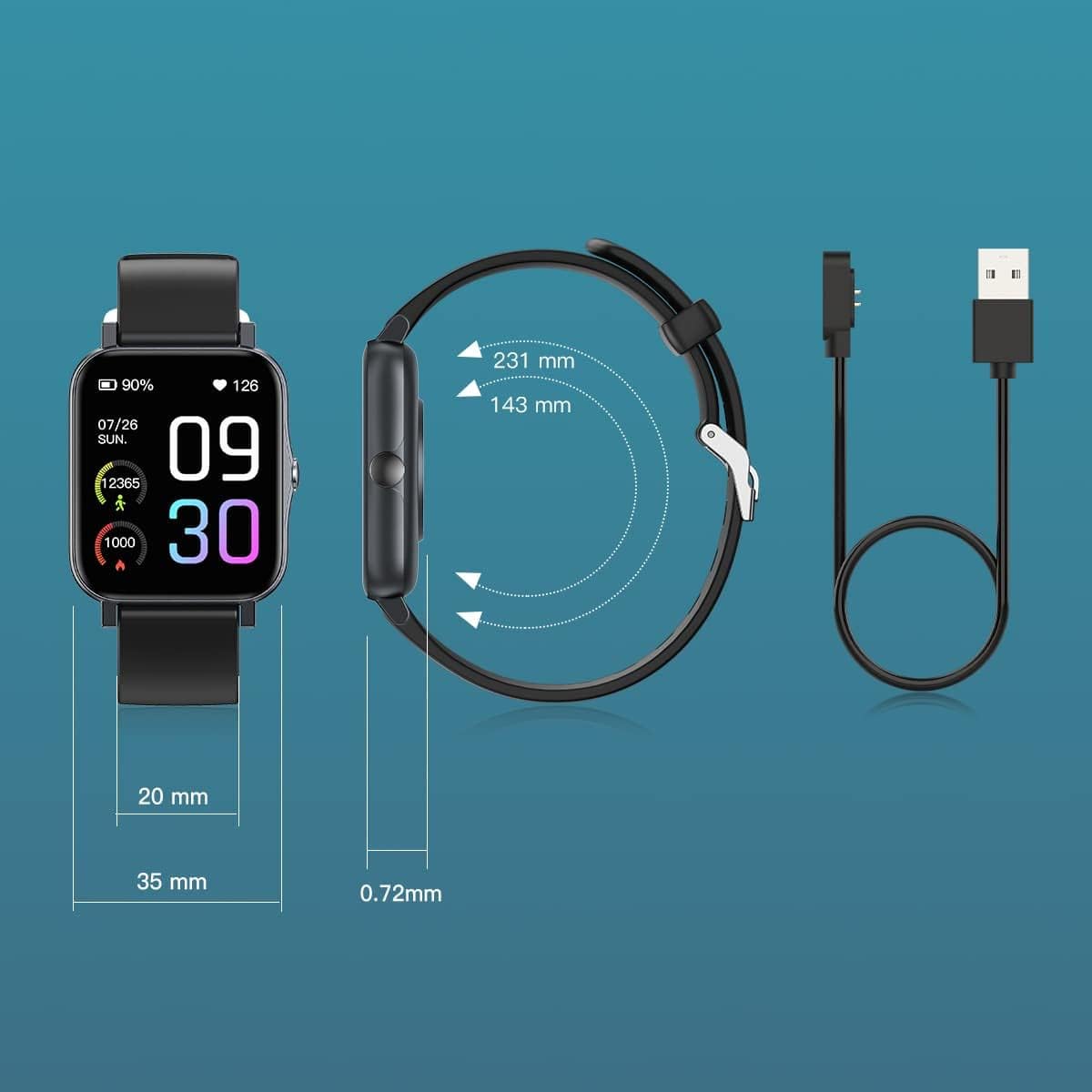
Image: Diagram illustrating the watch dimensions and the magnetic charging cable for power input.
1.2 アプリのインストールとペアリング
To unlock the full features of your smart watch, download the companion application. The recommended application is ランミフィット, available on both Android and iOS app stores. Follow these steps:
- Scan the QR code provided in the watch's packaging or search for "Runmifit" in your device's app store.
- スマートフォンにアプリケーションをインストールします。
- Open the Runmifit app and follow the on-screen instructions to create an account or log in.
- スマートフォンでBluetoothを有効にします。
- Within the app, navigate to the device pairing section and select "WGP Smart Watch GTS2" from the list of available devices.
- 時計とスマートフォンの両方でペアリング要求を確認します。

Image: A smartphone screen showing a QR code for pairing the watch with the Runmifit application.
2. スマートウォッチの操作
2.1 基本的なナビゲーション
The WGP Smart Watch GTS2 features a 1.7-inch full-screen display. Navigate through menus and functions by swiping left, right, up, or down, and tap to select options. The side button typically serves as a power button or a back button, depending on the context.
2.2種類のスポーツモード
The watch supports over 100 built-in sports modes, catering to various indoor and outdoor activities. To access sports modes:
- Swipe on the watch face to find the "Sports" or "Workout" icon.
- Tap to enter the sports mode selection.
- Scroll through the list and select your desired activity (e.g., running, cycling, football, basketball, hiking, yoga, climbing).
- Tap to start the activity tracking. The watch will record relevant data such as duration, calories burned, and heart rate.

Image: Visual representation of the 100+ sports modes supported by the watch.
2.3 健康状態のモニタリング
The WGP Smart Watch GTS2 is equipped with three professional sensors for comprehensive health monitoring, including heart rate, blood oxygen, and sleep tracking. Data can be viewed directly on the watch or in more detail within the Runmifit app.
- 心拍数モニタリング: The watch continuously monitors your heart rate. Access the heart rate interface on the watch to view リアルタイムデータ。
- 血中酸素モニタリング: 血中酸素飽和度を測定します。
- 睡眠モニタリング: 時計は深い睡眠、浅い睡眠、起きている時間など、睡眠パターンを自動的に記録します。view アプリで睡眠の質をチェックしましょう。


Image: Visuals demonstrating heart rate monitoring and an overview of the watch's health and fitness features.
2.4 通知
Once paired with your smartphone, the watch can display call and message reminders, as well as notifications from various applications (e.g., text messages, emails, social media). Ensure notification permissions are enabled in both your phone's settings and the Runmifit app.

画像: 接続されたスマートフォンからの着信メッセージ通知を表示する時計。
3. メンテナンス
3.1 クリーニング
Regularly clean your smart watch to ensure optimal performance and hygiene. Use a soft, lint-free cloth to wipe the screen and watch body. For stubborn dirt, slightly damp布に水を含ませてください。刺激の強い化学薬品や研磨剤の使用は避けてください。
3.2 耐水性
The WGP Smart Watch GTS2 features IP68 waterproof rating, utilizing double-layer waterproof ring technology. This means you can wear it while washing hands or swimming in a pool. However, it is not suitable for hot showers, saunas, or diving. After exposure to water, especially saltwater, rinse the watch with fresh water and dry it thoroughly.

Image: The watch being splashed with water, illustrating its IP68 waterproof rating.
3.3 ストレージ
長期間使用しない場合は、直射日光や極端な温度を避け、涼しく乾燥した場所に保管してください。バッテリーの寿命を延ばすため、定期的に充電することをお勧めします。
4。 トラブルシューティング
If you encounter issues with your WGP Smart Watch GTS2, please refer to the following common solutions:
| 問題 | 考えられる解決策 |
|---|---|
| 時計の電源が入らない、または充電できない。 | 充電ケーブルが時計と電源の両方にしっかりと接続されていることを確認してください。別のUSBポートまたは電源アダプターをお試しください。時計の電源を入れる前に、少なくとも30分間充電してください。 |
| スマートフォンとペアリングできません。 | Make sure Bluetooth is enabled on your phone and the watch is within range. Restart both the watch and your phone. Ensure you are using the correct app (Runmifit). Forget the device in your phone's Bluetooth settings and try pairing again. |
| Inaccurate health readings (e.g., heart rate, blood pressure). | Ensure the watch is worn snugly on your wrist, about one finger's width above the wrist bone. Avoid excessive movement during measurements. Note that smart watch health data is for reference only and not intended for medical diagnosis. |
| 通知が表示されません。 | Check notification permissions in your phone's settings for the Runmifit app. Also, verify notification settings within the Runmifit app itself. Ensure the app is running in the background. |
| Watch face/skin issues or inability to save multiple faces. | Ensure the Runmifit app is updated to the latest version. Some watch faces may require more memory or specific app versions. Try restarting the app and watch. |
5. 仕様
| 特徴 | 詳細 |
|---|---|
| モデル | WGP Smart Watch GTS2 |
| 表示サイズ | 1.7インチ(4.3 cm) |
| バッテリー容量 | 230 mAh リチウムイオン(付属) |
| バッテリー寿命 | 最大12日間(通常の使用) |
| 防水等級 | IP68 |
| 接続性 | ブルートゥース |
| センサー | Heart Rate Monitor, Blood Oxygen Monitor, Sleep Monitor, Activity Tracker |
| スポーツモード | 100以上のモード |
| 互換性 | AndroidおよびiOSシステム |
| アイテム重量 | 3.52オンス(99.8グラム) |
| パッケージ寸法 | 10.67 x 3.78 x 0.67 インチ (27.1 x 9.6 x 1.7 cm) |
| メーカー | WGP |
| 初回利用可能日 | 31年2022月XNUMX日 |
6. 保証とサポート
For warranty information and customer support, please refer to the documentation included with your product packaging or contact the retailer from whom you purchased the WGP Smart Watch GTS2. Keep your proof of purchase for warranty claims.
Ask a question about this manual
Ask about setup, troubleshooting, compatibility, parts, safety, or missing instructions. Manuals+ will review the question and use this page’s manual context to help answer it.