
1.製品オーバーview
The VANTRUE E2 Dual Dash Cam is designed to provide comprehensive front and rear vehicle recording with advanced features for enhanced safety and convenience. This manual provides instructions for proper installation, operation, and maintenance of your device.

Figure 1: VANTRUE E2 Dual Dash Cam Main Unit
2. パッケージ内容
下記のすべての品目がパッケージに含まれていることをご確認ください。不足または破損している品目がある場合は、カスタマーサポートまでご連絡ください。

図2: 含まれるコンポーネント
- VANTRUE E2 Main Dash Cam Unit
- リアカメラ
- Magnetic GPS Mount
- ワイヤレスリモコン
- カーチャージャー
- Rear Camera Cable (Standard 6m)
- タイプC USBケーブル(1m)
- インストールツール
- 3M粘着テープ
- 静電フィルム
- クイックスタートガイド
3. セットアップとインストール
Follow these steps to properly install your VANTRUE E2 Dual Dash Cam.
3.1 ドライブレコーダーの取り付け
The compact design and magnetic mount allow for flexible installation on the front windshield, dashboard, or rear window.

Figure 3: Mounting Options (Front Glass, Dashboard, Rear Window)

図4: 簡単なインストール図
- Clean the desired mounting area on your windshield or dashboard.
- Attach the electrostatic film to the windshield first, then attach the magnetic mount to the film.
- Secure the main dash cam unit to the magnetic mount.
- Connect the rear camera to the main unit using the provided rear camera cable.
- Route the cables neatly using the installation tool to hide them along the vehicle's interior trim.
- Connect the car charger to your vehicle's cigarette lighter socket and the dash cam.
3.2 SDカードの挿入とフォーマット
Insert a high-speed Micro SD card (Class 10 or higher, up to 1TB, sold separately) into the dash cam. It is crucial to format the SD card within the dash cam before its first use and periodically thereafter to ensure optimal performance and prevent recording errors.
4. 操作手順
The VANTRUE E2 offers various operating modes and control methods.
4.1 電源オン/オフ
車のイグニッションをオンにすると、ダッシュカムは自動的に電源が入り、録画を開始します。イグニッションをオフにすると、自動的に電源が切れます。
4.2 録音モード
The E2 records simultaneously from both front and rear cameras at 1944P (2.7K) resolution, utilizing STARVIS IMX335 sensors for clear footage.

Figure 5: Front and Rear 2.7K Recording
4.3 ナイトビジョンとWDR
Equipped with STARVIS night vision and WDR technology, the E2 captures clear images in low-light conditions and balances exposure in high-contrast environments.
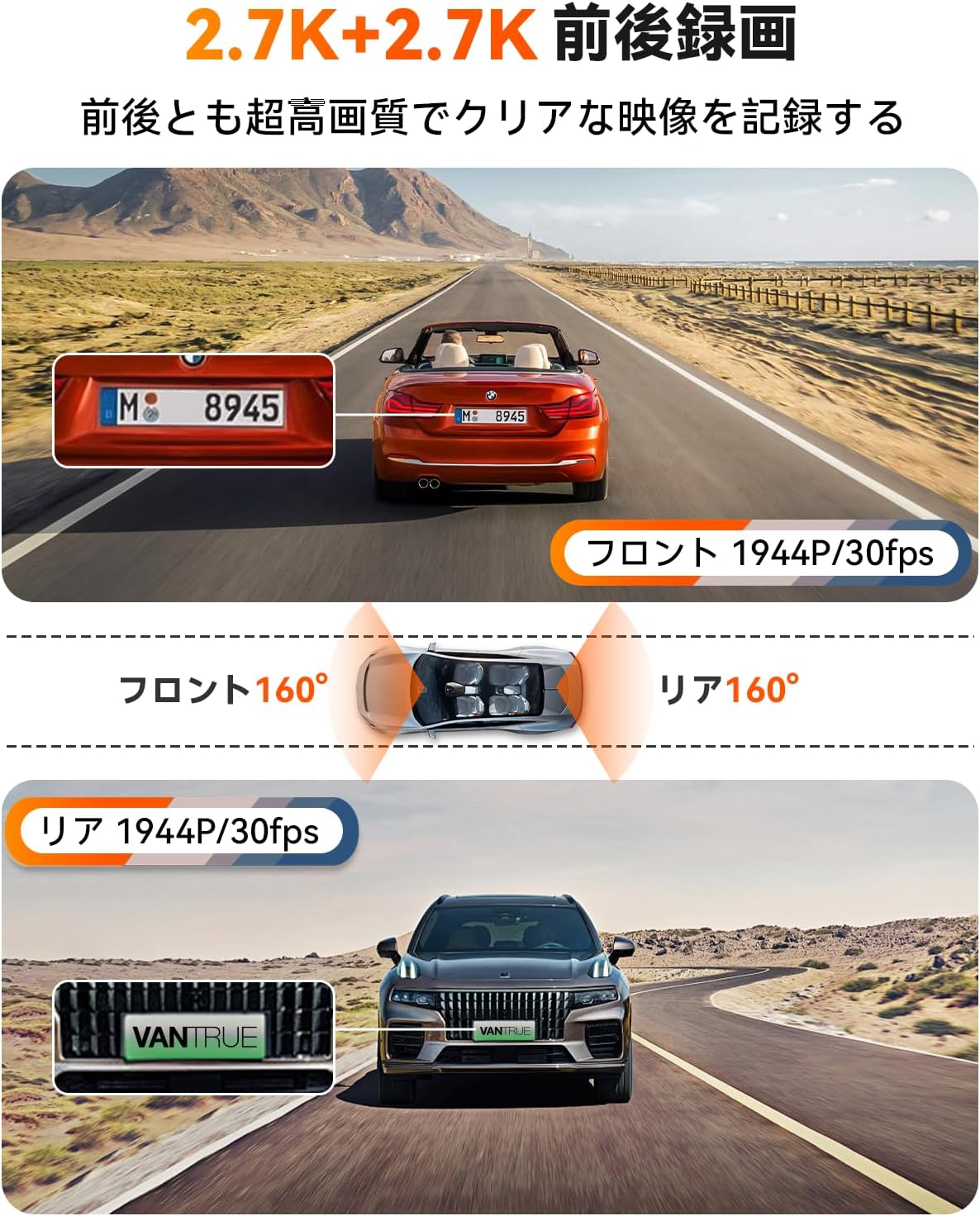
Figure 6: Enhanced Night Vision and WDR

Figure 7: WDR in Action
4.4 GPS機能
The built-in GPS module records your vehicle's speed, location (latitude and longitude), and driving route, embedding this data into the video fileこの情報は viewed using the dedicated VANTRUE app or desktop viewえー。
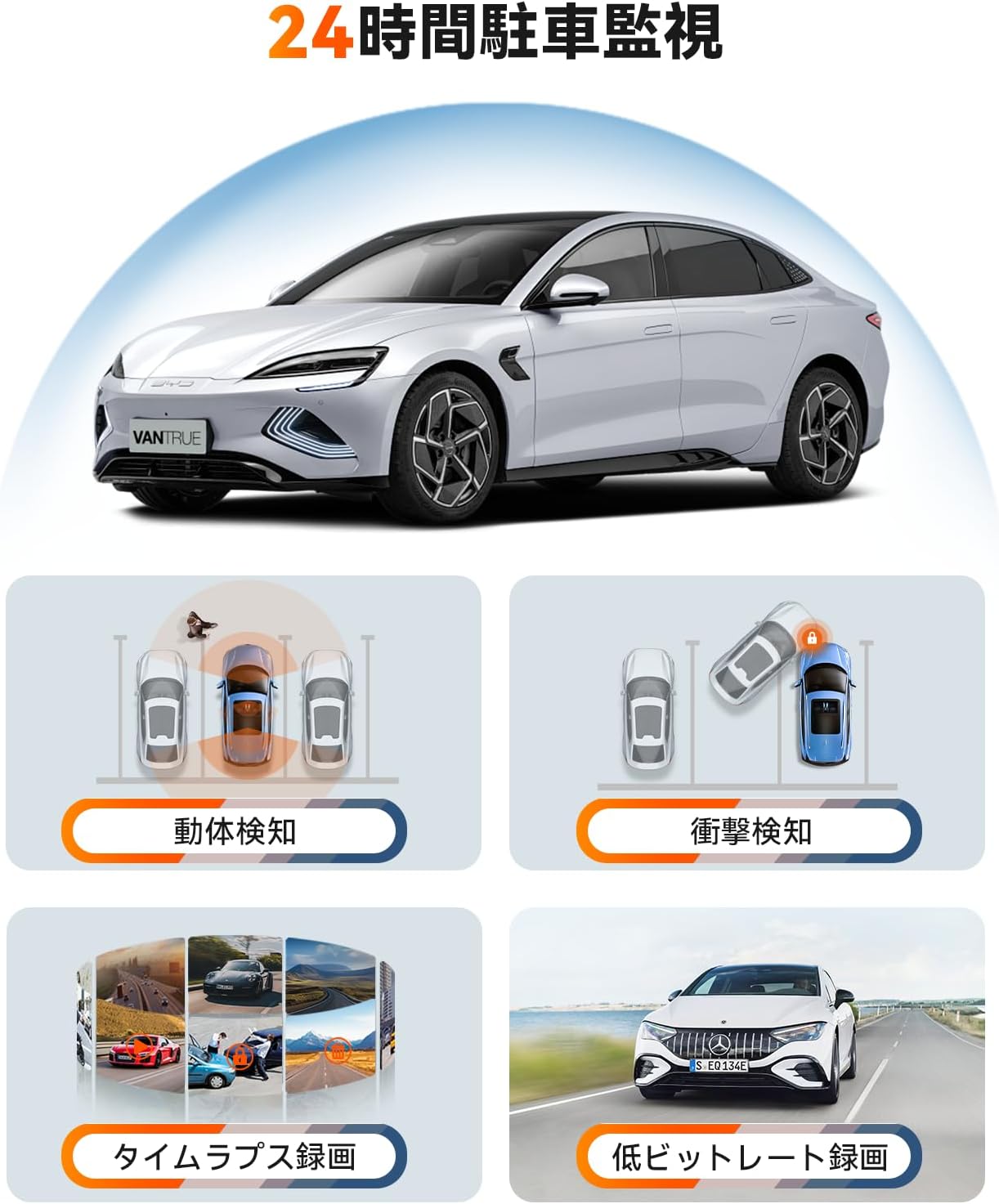
図8: GPSトラッキング
4.5 音声制御
Control your dash cam hands-free using simple voice commands. This allows you to perform actions like taking photos, locking videos, or toggling audio recording without diverting your attention from the road.
Video 1: Demonstration of Voice Commands for VANTRUE E2.

図9: 音声制御機能
4.6ワイヤレスリモコン
The included wireless remote allows for quick actions such as capturing photos or locking important video segments with a single press.

図10: リモートコントロール機能
4.7 5.8GHz WiFi and App Control
Connect your smartphone to the dash cam via high-speed 5.8GHz WiFi using the VANTRUE app. This enables live streaming, video playback, downloading, editing, and sharing of recorded footage, as well as adjusting device settings.

Figure 11: WiFi App Control Interface
ビデオ2: 終了view of VANTRUE E2 features including wide-angle, resolution, night vision, GPS, G-sensor, remote, 5GHz WiFi, parking modes, and CPL filter.
4.8 駐車監視モード
The E2 offers four distinct parking surveillance modes to protect your vehicle when parked. Note: A separately sold direct-wire power cable (ASIN: B094882TJC) is required to enable these functions.

Figure 12: 24-Hour Parking Surveillance
- モーション検出: Records 15 seconds before and 30 seconds after motion is detected, saving the footage to a normal folder.
- Impact Detection (Low Power Consumption): Automatically starts recording when an impact is detected while the vehicle is parked (power off).
- Low Bitrate Recording (Space Saving): Records at 1080P@15FPS or 720P@15FPS, optimizing storage space.
- Time-Lapse Recording (Space Saving): Captures images at a low frame rate and stitches them into a time-lapse video, condensing long periods into short, view可能なクリップ。
5. メンテナンス
定期的なメンテナンスにより、ダッシュ カメラの寿命が長くなり、最適なパフォーマンスが確保されます。
5.1 SDカードの取り扱い
To prevent data corruption and ensure continuous recording, format your Micro SD card within the dash cam at least once a month. Use a high-quality, reputable brand of Micro SD card (Class 10 or higher).
5.2デバイスのクリーニング
ドライブレコーダーのレンズと画面を拭く際は、柔らかく乾いた布を使用してください。機器を損傷する可能性のある研磨剤入りのクリーナーや溶剤の使用は避けてください。
6。 トラブルシューティング
If you encounter issues with your VANTRUE E2, refer to the following common solutions:
- ダッシュカムの電源が入らない: Check the power connection to the car charger and ensure the vehicle's ignition is on. Verify the car charger is functioning correctly.
- 記録エラー: Format the SD card within the dash cam. Ensure you are using a compatible high-speed SD card. Replace the SD card if errors persist.
- ビデオ品質が悪い: Clean the camera lenses. Ensure the protective film has been removed from the lenses. Check that the resolution settings are appropriate.
- WiFi接続の問題: Ensure the dash cam's WiFi is enabled. Restart both the dash cam and your smartphone. Reinstall the VANTRUE app if necessary.
- 駐車モードが機能しない: Confirm that the optional direct-wire power cable (ASIN: B094882TJC) is correctly installed and connected.
For further assistance, please contact VANTRUE customer support.
7. 仕様
Detailed technical specifications for the VANTRUE E2 Dual Dash Cam.
| 特徴 | 仕様 |
|---|---|
| ブランド | VANTRUE |
| モデル番号 | Element 2 (E2) |
| ビデオ解像度 | Front: 1944P (2.7K), Rear: 1944P (2.7K) |
| 分野 View | 160度(フロント&リア) |
| 絞り | F1.8 |
| 表示タイプ | 液晶 |
| 画面サイズ | 2.45インチ |
| 接続性 | 5.8GHz Wi-Fi |
| GPS | 内蔵GPSモジュール |
| Gセンサー | はい |
| 駐車モード | Motion Detection, Impact Detection, Low Bitrate, Time-Lapse |
| 制御方法 | App, Push Button, Voice, Wireless Remote |
| ストレージ | Micro SD card (up to 1TB, sold separately) |
| 寸法(D x W x H) | 2.9 x 7.4 x 4.4 cm |
| 重さ | 0.88キロ |
| 原産国 | 中国 |
8. 保証とサポート
The VANTRUE E2 Dual Dash Cam comes with a standard 12-month warranty. You can extend this warranty to 18 months by registering your product on the official VANTRUE web購入後 6 か月以内にサイトにアクセスしてください。
For any questions, concerns, or technical support, please contact VANTRUE customer service through Amazon or visit our official webサイト。