
OTL Technologies PK0980
OTL Technologies ポケモン ピカチュウ ワイヤレス Bluetooth キッズヘッドホン PK0980 取扱説明書
モデル: PK0980
1. はじめに
This manual provides essential information for the safe and effective use of your OTL Technologies Pokemon Pikachu Wireless Bluetooth Kids Headphones, model PK0980. Please read this manual thoroughly before using the product and retain it for future reference.
2. 安全情報
安全な操作を確保し、損傷を防ぐために、次の注意事項を守ってください。
- 年齢の適正: このヘッドフォンは3歳以上の子供に適しています。
- 音量コントロール: The headphones feature two safe volume settings: 85 dB and 95 dB. Always select the appropriate volume level for the listening environment to protect hearing. Prolonged exposure to loud noise may cause hearing damage.
- 耐水性: この商品は 耐水性ではない損傷を防ぐため、水や湿気にさらさないでください。
- クリーニング: Do not use harsh chemicals or strong detergents to clean the headphones. Use a soft, dry cloth.
- 分解: Do not attempt to disassemble, repair, or modify the headphones. This will void the warranty and may cause damage or injury.
- 環境への意識: Do not use headphones in situations where an inability to hear surrounding noise may present a danger (e.g., while cycling, driving, or near operating machinery).
- バッテリーの安全性: The headphones contain a Lithium-ion battery. Do not expose to extreme temperatures or dispose of in fire.
3. パッケージ内容
パッケージにすべてのアイテムが揃っていることを確認します。
- 1x OTL Technologies Pokemon Pikachu Wireless Bluetooth Kids Headphones
- USB Type-C充電ケーブル x 1
- 3.5mmオーディオ共有ケーブル×1
- 1x Instruction Leaflet (this manual)

Image: Headphones and accessories neatly packaged in the box.
4.製品オーバーview
ヘッドフォンのコンポーネントとコントロールについて理解しておきましょう。
4.1 Headphone Structure

画像: 正面 view of the headphones, showcasing the Pikachu design on the earcups and the adjustable headband.

画像: 上 view of the headphones, showing the foldable design and the headband's cushioning.
4.2 コントロールとポート

Image: Close-up of the right earcup, displaying the power button, volume controls, and charging port.

画像: 詳細 view of the volume limit switch, allowing selection between 85 dB and 95 dB.
- 電源ボタン: ヘッドフォンのオン/オフや Bluetooth のペアリングに使用します。
- 音量ボタン: リスニング音量を調整します。
- 音量制限スイッチ: Toggle between 85 dB and 95 dB maximum volume levels.
- USB Type-Cポート: ヘッドホンの充電用。
- 3.5mmオーディオジャック: 付属のオーディオケーブルを使用して有線接続します。
- マイクロフォン: ハンズフリー通話用に統合されています。
調節可能なヘッドバンド4.3個

Image: Close-up of the extendable headband, showing numbered adjustment points for a customized fit.
The headband is extendable to provide a flexible and customized fit for various head sizes. Adjust both sides evenly for optimal comfort.
5. セットアップ
5.1 ヘッドホンの充電
初めて使用する前に、ヘッドフォンを完全に充電してください。
- USB Type-C充電ケーブルをヘッドフォンの充電ポートに接続します。
- USB ケーブルのもう一方の端を互換性のある USB 電源 (コンピューターの USB ポート、USB 壁アダプタなど) に接続します。
- LEDインジケーターが充電状態を示します。フル充電には約2時間かかります。
- Once fully charged, the LED indicator will change (refer to the instruction leaflet for specific LED behavior) and the headphones will provide up to 24 hours of playback time.
5.2Bluetoothペアリング
ヘッドフォンをデバイスにワイヤレスで接続するには:
- ヘッドフォンが充電されていることを確認してください。
- LED インジケーターが点滅してペアリング モードを示すまで、電源ボタンを押し続けます。
- デバイス(スマートフォン、タブレット、ラップトップなど)で Bluetooth を有効にし、利用可能なデバイスを検索します。
- Select "OTL Pikachu" or a similar name from the list of found devices.
- Once connected, the LED indicator will change (e.g., solid blue) and a confirmation tone may sound.
- The headphones have a working distance of up to 10 meters from the paired device.
5.3 有線接続(オプション)
You can use the headphones with the included 3.5mm audio cable for devices without Bluetooth or when the battery is depleted.
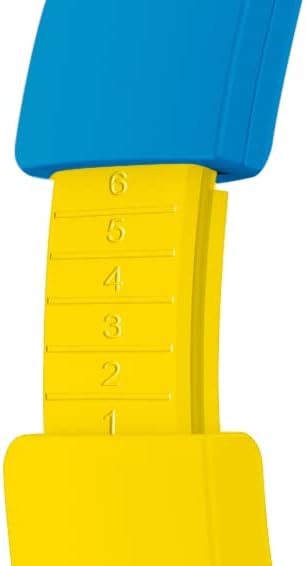
Image: The included 3.5mm audio cable for direct connection to devices.
- 3.5mmオーディオケーブルの一方の端をヘッドフォンのオーディオジャックに差し込みます。
- もう一方の端をデバイスの 3.5 mm オーディオ出力に差し込みます。
- ヘッドフォンはパッシブモードで動作し、Bluetooth 機能は無効になります。
6. ヘッドホンの操作
6.1 電源オン/オフ
- 電源を入れるには: 電源ボタンを約3秒間押し続けます。LEDインジケーターが点灯します。
- 電源を切るには: 電源ボタンを約3秒間押し続けます。LEDインジケーターが消灯します。
6.2 音量の調整
- ボリュームアップ: 「+」ボタンを押します。
- ボリュームダウン: 「-」ボタンを押します。
- Setting Maximum Volume: Use the volume limit switch (85 dB / 95 dB) located on the earcup to set the desired maximum safe listening level.
6.3 音楽の再生と通話
- 再生/一時停止: Press the Power button once during music playback.
- 次のトラック: 「+」ボタンを長押しします。
- 前のトラック: 「-」ボタンを長押しします。
- 通話の応答/終了: Press the Power button once during an incoming call or to end an active call.
- 通話を拒否: Press and hold the Power button during an incoming call.
6.4 Using the Sharing Cable
The included sharing cable allows two pairs of headphones to listen to the same audio source simultaneously.
- Connect the main 3.5mm audio cable from your audio source to the first pair of headphones.
- Connect one end of the sharing cable to the available 3.5mm audio jack on the first pair of headphones.
- Connect the other end of the sharing cable to the 3.5mm audio jack on the second pair of headphones.
- 両方のヘッドフォンが同じソースからのオーディオを受信するようになります。
7. メンテナンス
- クリーニング: Wipe the headphones with a soft, dry, lint-free cloth. Do not use liquid cleaners or aerosols.
- ストレージ: 使用しない時は、直射日光や極端な温度を避け、涼しく乾燥した場所に保管してください。折りたたみ式なので、コンパクトに収納できます。
- バッテリーのケア: バッテリーの寿命を延ばすには、バッテリーを頻繁に完全に放電させないでください。頻繁に使用しない場合でも、定期的にヘッドホンを充電してください。
8。 トラブルシューティング
| 問題 | 考えられる原因 | 解決 |
|---|---|---|
| ヘッドホンの電源が入りません。 | 電池が消耗しています。 | 付属のUSB Type-Cケーブルを使用してヘッドフォンを充電します。 |
| Bluetooth経由でペアリングできません。 | ヘッドフォンがペアリングモードになっていない、デバイスの Bluetooth がオフになっている、デバイスから遠すぎる。 | Ensure headphones are in pairing mode (flashing LED). Turn Bluetooth on your device. Move headphones closer to the device (within 10 meters). Try restarting both devices. |
| 接続しても音が出ません。 | Volume too low; incorrect audio source selected; wired cable not fully inserted. | Increase headphone and device volume. Check if the correct audio output is selected on your device. Ensure the 3.5mm cable is fully inserted if using wired mode. Check the volume limit switch. |
| 音が歪んだり途切れたりする。 | Low battery; interference; too far from device. | Charge the headphones. Move away from other wireless devices. Reduce distance to the paired device. |
9. 仕様
| モデル番号 | PK0980 |
| 接続技術 | ワイヤレス(Bluetooth) |
| 無線通信技術 | ブルートゥース |
| 年齢範囲(説明) | Children (3+ years) |
| 材料 | プラスチック |
| 充電時間 | 約2時間 |
| 推奨用途 | パーソナルオーディオ |
| 対応デバイス | Laptop, Smartphones, Tablets (Bluetooth enabled) |
| コントロールタイプ | 音量コントロール、リモコン |
| アイテム重量 | 160グラム |
| 耐水性レベル | 耐水性はありません |
| 追加機能 | Microphone included, Foldable design |
| 平均バッテリー寿命 | 24時間 |
| バッテリーセルの構成 | リチウムイオン |
| 色 | 黄色 |
| 耳の位置 | オンイヤー |
| フォームファクター | オーバーイヤー |
| インピーダンス | 32オーム |
| 騒音制御 | ノイズ遮断 |
| 周波数応答 | 20000Hz |
| 感度 | 85デシベル |
| ヘッドホンジャック | 3.5mmジャック |
| 製品寸法 | 16 x 7 x 17 cm |
Ask a question about this manual
Ask about setup, troubleshooting, compatibility, parts, safety, or missing instructions. Manuals+ will review the question and use this page’s manual context to help answer it.