
WANGCL IND26864
WANGCL Multimeter LCD Digital USB Tester User Manual
モデル: IND26864 | ブランド: WANGCL
1. はじめに
The WANGCL Multimeter LCD Digital USB Tester is a versatile diagnostic tool designed for monitoring and testing various electrical parameters of electronic devices. It is capable of measuring voltage, current, power, resistance, and capacity, making it ideal for assessing the performance of mobile phone chargers, data cables, and mobile power supplies. This device provides real-time data to help identify and troubleshoot charging issues.

図1.1: 前面 view of the WANGCL Multimeter LCD Digital USB Tester, displaying its color screen and various input/output ports.
2. 安全情報
Please read all safety instructions carefully before using the device. Failure to follow these instructions may result in electric shock, fire, or damage to the device or connected equipment.
- 電源: Always use a compliant and stable power supply. Ensure the input voltage and current do not exceed the device's specified limits.
- 温度: Avoid exposing the device to extreme heat or direct sunlight. Operate within the specified temperature range (0~80°C).
- 換気: 過熱を防ぐため、操作中はデバイスの周囲に適切な換気を確保してください。
- 水分: デバイスを乾燥した状態に保ってください。水やその他の液体にさらさないでください。
- 取り扱い: デバイスは丁寧に取り扱ってください。落としたり、強い衝撃を与えたりしないでください。
- 分解: 本装置の分解、修理、改造は行わないでください。修理は必ず資格のある専門家にご依頼ください。
- 繋がり: Ensure all connections are secure and correct before applying power. Incorrect connections can cause damage.
Note: This safety information is derived from standard product safety guidelines and typical product packaging warnings.
3 製品の特徴
The WANGCL Multimeter LCD Digital USB Tester offers a comprehensive set of features for detailed electrical analysis:
- 幅広い用途: Suitable for testing mobile phone chargers, data cables, and mobile power supplies.
- リアルタイム監視: Continuously monitors charging parameters of electronic devices.
- 複数のインターフェース: Equipped with 8 types of interfaces for broad compatibility:
- Type-C male input
- Type-C female input
- Type-C female chassis output
- 5525/5521 female input
- 5525/5521 male output
- USB3.0 male input
- USB3.0 female header output
- マイクロUSB
- Bluetooth接続: Supports Bluetooth remote control for setting and measuring via a mobile phone application.
- Multifunctional Protections: Includes overload protection, power-off memory, timer charging, and battery full power-off functions.
- カラースクリーン: Features a 1.8-inch 128*160 color screen for clear display of data.
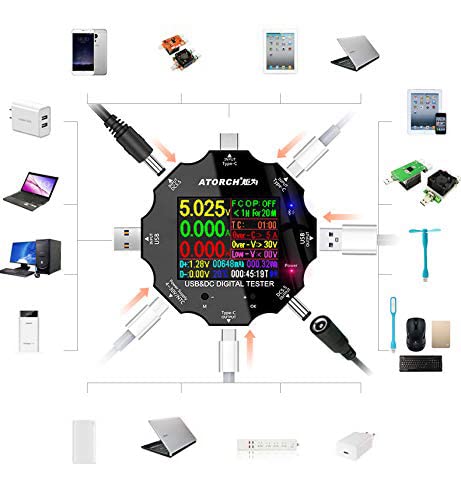
Figure 3.1: Diagram illustrating the various input and output interfaces of the USB tester and its broad compatibility with different devices.
4. 仕様
| パラメータ | 価値 |
|---|---|
| 巻tag測定範囲 | 3.60V〜32.00V |
| 現在の測定範囲 | 0.00〜5.10A |
| USB Load Limit | 5V 1A/2A/3A (Max 15W) |
| Capacity/Power Accumulation Range | 0~99999mAh / 0~999.99Wh |
| 電力測定範囲 | 000.00〜163.00W |
| インピーダンス測定範囲 | 1~999.9Ω |
| 温度測定範囲 | 0〜80℃ |
| タイミング範囲 | 999時間59分59秒 |
| 入力インターフェース | Type-C / Micro USB / USB / DC5.5 |
| USB D+ D- Voltage範囲 | 0V〜2.99V |
| スクリーンタイプ | 1.8 inches 128*160 color screen |
| Self-consumption Current | <0.025A |
| 動作温度 | -10〜+60°C |
| 寸法 | 6.2 x 6.2 x 1.4 cm |
| アイテム重量 | 65グラム |
5. セットアップ
Follow these steps to set up your WANGCL USB Tester for first use:
- 開梱: Carefully remove the USB tester from its packaging. Inspect the device for any signs of damage.
- 初回電源投入: Connect the tester to a USB power source (e.g., a wall charger, power bank, or computer USB port) using one of its input interfaces (Type-C, Micro USB, or USB). The screen should light up, displaying the current measurements.
- コントロールに慣れる: Locate the physical buttons on the device. These are typically used for navigating menus and changing display modes.
6. 操作手順
The USB tester is designed for straightforward operation. Here are the basic steps for common measurements:
- 電源を接続します: Plug the tester's input port (e.g., USB-A male, Type-C male) into your power source (e.g., wall charger, power bank, computer USB port).
- テスト対象デバイスを接続します: Plug the device you wish to test (e.g., smartphone, tablet, USB fan) into one of the tester's output ports (e.g., USB-A female, Type-C female).
- 測定値を読み取る: The color screen will immediately display real-time measurements such as voltage (V), current (A), power (W), accumulated capacity (mAh), and accumulated energy (Wh).
- Navigate Display Modes: Use the physical buttons (usually labeled 'M' for Mode and 'OK' or '+' for selection/next) to cycle through different display screens or measurement parameters. This may include detailed views of D+/D- voltage, temperature, timing, and impedance.
- データのリセット: To clear accumulated capacity and energy data, typically press and hold a specific button (refer to on-screen prompts or specific model instructions if available) while on the main display.
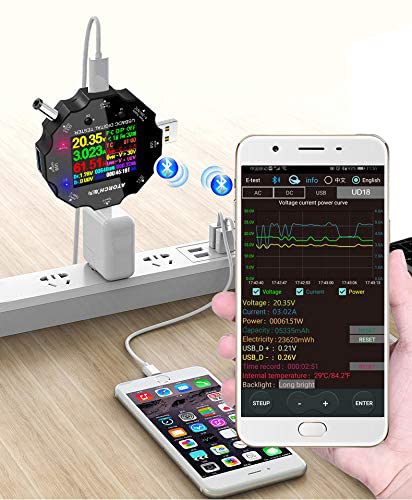
Figure 6.1: The USB tester actively measuring power flow between a wall charger and a mobile phone, with Bluetooth enabled.
7. Bluetooth Connectivity and Mobile App
The WANGCL USB Tester supports Bluetooth connectivity, allowing you to monitor and control the device remotely via a dedicated mobile application. This feature provides a more detailed view of data and additional control options.
- アプリをダウンロード: 検索する the "E_Test" application in your mobile device's app store (e.g., Apple App Store for iOS, Google Play Store for Android). Download and install the application.
- Bluetoothを有効にする: モバイルデバイスでBluetoothが有効になっていることを確認します。
- 電源オンテスター: Connect the USB tester to a power source to turn it on.
- ペアリング: Open the "E_Test" app. The app should automatically detect nearby WANGCL USB testers. Select your device from the list to initiate pairing. Follow any on-screen prompts within the app to complete the connection.
- モニターデータ: 接続すると、次のことができます view real-time data, historical graphs, and adjust settings directly from your mobile phone.
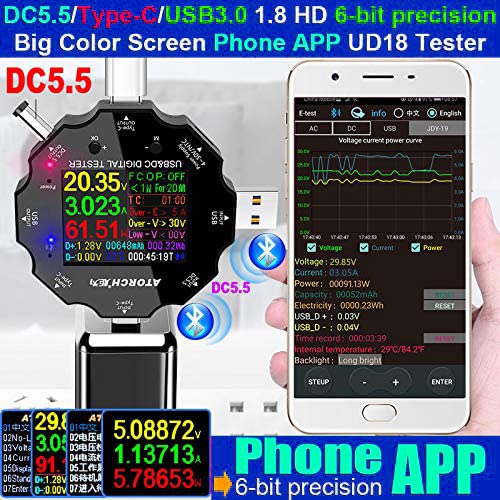
Figure 7.1: The USB tester displaying data on its screen while simultaneously transmitting data to a connected smartphone app for detailed analysis.
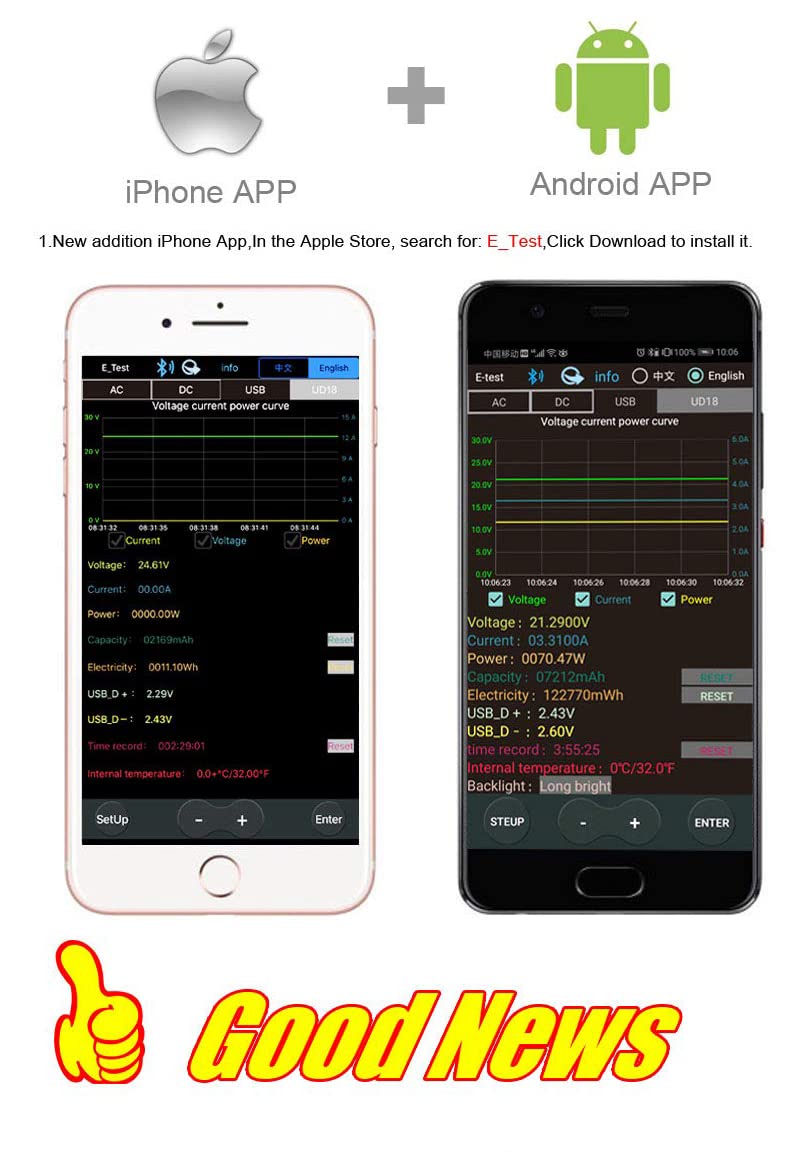
Figure 7.2: Screenshots of the "E_Test" application interface on both iPhone and Android devices, showing similar data display capabilities.
8. メンテナンス
Proper maintenance ensures the longevity and accuracy of your WANGCL USB Tester:
- クリーニング: デバイスの清掃には、柔らかく乾いた布をご使用ください。研磨剤入りの洗剤、溶剤、または刺激の強い化学薬品は使用しないでください。
- ストレージ: デバイスは、直射日光、極端な温度、高湿度を避け、涼しく乾燥した場所に保管してください。
- 取り扱い: デバイスを落としたり、強い振動を与えたりしないでください。
- ポートケア: Keep the USB and other ports free from dust and debris.
9。 トラブルシューティング
If you encounter issues with your WANGCL USB Tester, refer to the following common problems and solutions:
| 問題 | 考えられる原因 / 解決策 |
|---|---|
| デバイスの電源が入りません。 |
|
| No readings displayed. |
|
| Bluetooth 接続に失敗します。 |
|
| 不正確な測定値。 |
|
10. 保証とサポート
WANGCL is committed to providing quality products. For specific warranty details and support, please refer to your purchase documentation or contact the seller directly.
- 返品規則: This product typically comes with a 30-day return policy from the date of purchase. Please check the specific terms and conditions of your retailer.
- テクニカルサポート: For technical assistance, troubleshooting beyond this manual, or warranty claims, please contact the seller, WANGCL EU, through the Amazon messaging system or the platform where the product was purchased.
Ask a question about this manual
Ask about setup, troubleshooting, compatibility, parts, safety, or missing instructions. Manuals+ will review the question and use this page’s manual context to help answer it.