1. はじめに
The AeroCool Blade is an ATX semi-tower PC case designed for optimal airflow and aesthetic appeal. It features an RGB front panel with preset lighting modes, a full tempered glass side window, and ample space for component installation. This manual provides essential information for the proper setup, operation, and maintenance of your PC case.
安全情報: Always disconnect power from your system before performing any installation or maintenance. Handle components with care to avoid damage. Refer to individual component manuals for specific installation instructions.
2. パッケージ内容
- AeroCool Blade ATX Semi-Tower PC Case
- 1 x 120mm RGB Rear Fan (pre-installed)
- 3 x 120mm Front Fans (pre-installed)
- アクセサリキット(ネジ、スタンドオフ、ケーブルタイ)
3. セットアップとインストール
3.1 ケースの準備
Carefully remove the case from its packaging. Place it on a stable, flat surface. Remove the tempered glass side panel by unscrewing the thumb screws at the rear of the case and gently pulling the panel away.

図3.1:内部 view of the AeroCool Blade PC case, illustrating the layout for component installation.
3.2マザーボードの取り付け
- Install the necessary motherboard standoffs into the motherboard tray according to your motherboard's form factor (ATX, Micro-ATX, Mini-ITX).
- I/O シールドをケースの背面開口部に取り付けます。
- ネジ穴を合わせながら、マザーボードをスタンドオフの上に慎重に置きます。
- 付属のネジでマザーボードを固定します。
3.3電源ユニット(PSU)の設置
The AeroCool Blade supports bottom-mounted PSUs. Slide your PSU into the dedicated compartment at the bottom rear of the case. Secure it with screws from the rear of the case.
3.4 ストレージドライブのインストール
- 3.5インチHDD: Install 3.5" hard drives into the drive cage located beneath the PSU shroud.
- 2.5インチ SSD/HDD: Install 2.5" drives onto the dedicated mounting points on the motherboard tray or behind it.

図3.2: 背面内部 view, highlighting cable management routes and 2.5-inch drive mounting locations.
3.5 Expansion Card (GPU) Installation
Remove the necessary expansion slot covers from the rear of the case. Insert your graphics card or other expansion cards into the PCIe slots on your motherboard and secure them with screws.
3.6 ファンと冷却装置の設置
The case comes with one 120mm RGB fan pre-installed at the rear and three 120mm fans pre-installed at the front. Ensure all fan cables are connected to appropriate headers on your motherboard or fan controller.

Figure 3.3: A 120mm RGB fan, similar to those pre-installed in the AeroCool Blade case.
3.7 フロントパネルのI/O接続
Connect the front panel cables (USB 3.0, USB 2.0, HD Audio, Power Switch, Reset Switch, LED Switch, Power LED, HDD LED) to the corresponding headers on your motherboard. Refer to your motherboard manual for exact pin configurations.
4. 操作手順
4.1電源オン
Once all components are installed and connected, replace the side panel. Connect your monitor, keyboard, mouse, and power cable to the PSU. Press the Power button located on the top panel of the case to turn on your system.

図4.1: 上部前面 view of the case, indicating the location of the power button and front I/O ports.
4.2 RGB照明制御
The AeroCool Blade features an RGB front panel. Use the dedicated LED button on the top panel to cycle through various preset lighting modes and effects. Pressing the button will change the lighting pattern or color.

図4.2: 前面 view of the AeroCool Blade case with its distinctive RGB lighting.
4.3 フロントパネルポート
上部パネルから以下のものに簡単にアクセスできます。
- USB 1 ポート x 3.0
- USB 2 ポート x 2.0
- HD Audio output
- マイク入力
Connect your USB devices, headphones, and microphone to these ports as needed.
5. メンテナンス
5.1 ダストフィルターのクリーニング
Regularly check and clean the dust filters to maintain optimal airflow and prevent dust buildup inside the case. Dust filters are typically located at the top, front, and bottom (under the PSU). Gently remove them and clean with compressed air or rinse with water (ensure they are completely dry before re-installation).
5.2 外装清掃
ケースの外側の表面を柔らかくて乾いた布で拭いてください。amp 布で拭いてください。表面や強化ガラスにダメージを与える可能性のある、刺激の強い化学薬品や研磨剤の使用は避けてください。
6。 トラブルシューティング
- システムが電源を入れない:
Ensure the PSU is switched on and properly connected to the wall outlet. Verify all power cables from the PSU are correctly connected to the motherboard and components. Check the front panel power switch connection to the motherboard. - RGB 照明が機能しない:
Ensure the RGB controller (if applicable) and fan RGB cables are securely connected. Press the LED button on the top panel to cycle through modes. If connected to a motherboard header, check motherboard software settings. - ファンが回転しない:
Verify that all fan power cables are securely connected to the motherboard fan headers or a fan controller. Check BIOS/UEFI settings for fan speed control. - フロントパネルのUSB/オーディオが機能しない:
Ensure the USB and HD Audio cables from the front panel are correctly connected to the corresponding headers on your motherboard.
7. 仕様
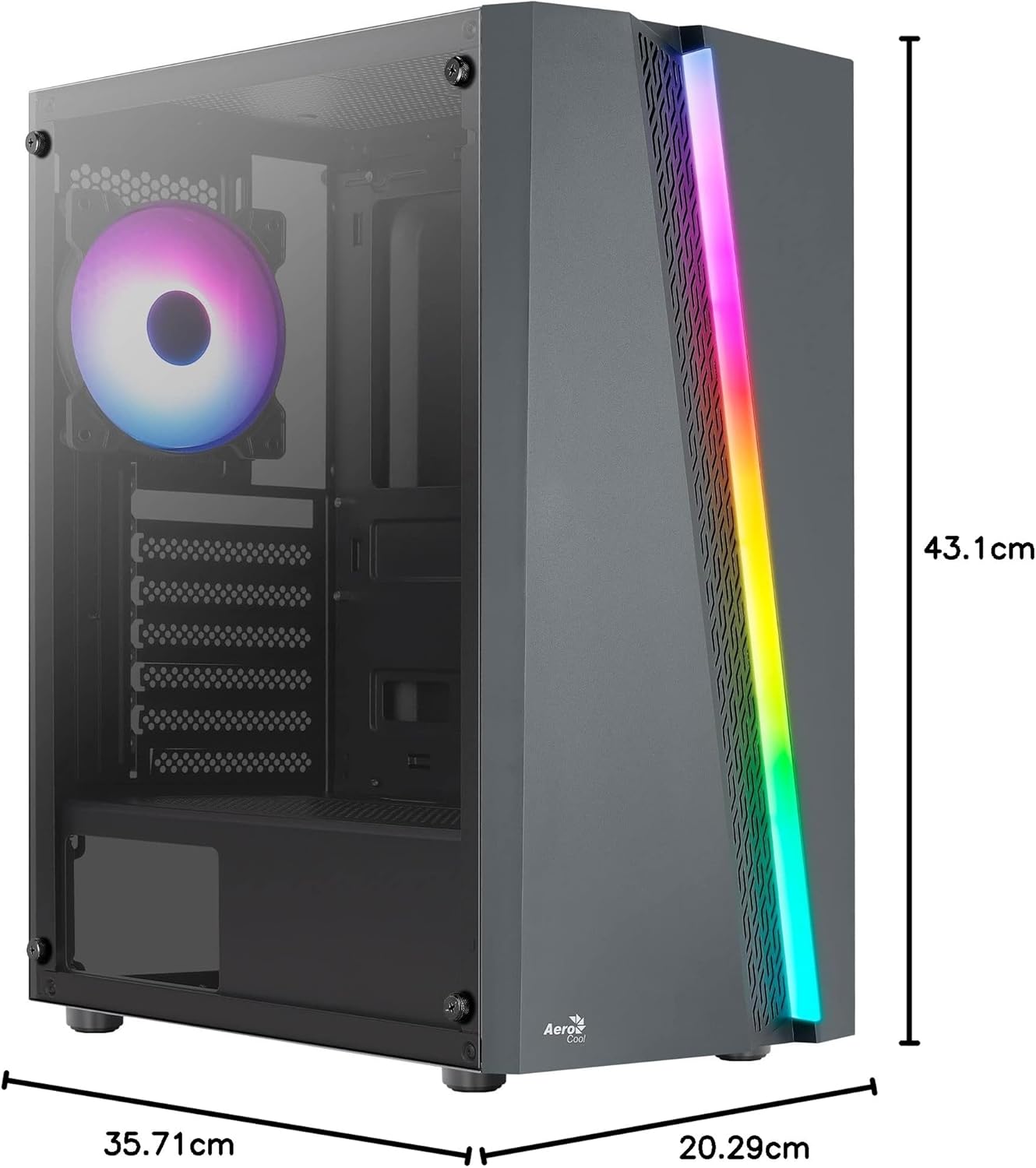
Figure 7.1: Dimensions of the AeroCool Blade PC Case.
| 特徴 | 仕様 |
|---|---|
| ブランド | エアロクール |
| モデル名 | BLADEBK |
| ケースタイプ | Semi-Tower |
| マザーボードの互換性 | ATX、Micro-ATX、Mini-ITX |
| 材料 | Tempered Glass (Side Panel) |
| 製品寸法(長さ x 幅 x 高さ) | 43.1 x 20.3 x 35.7 cm |
| アイテム重量 | 4キロ |
| ドライブベイ | 2 x 3.5インチ、2 x 2.5インチ |
| GPU クリアランス | 最大307mm |
| CPUクーラーの高さ | 最大155mm |
| フロントI / Oポート | 1 x USB 3.0, 2 x USB 2.0, HD Audio, Mic, LED Control, Power |
| プレインストールされたファン | 1 x 120mm RGB Rear, 3 x 120mm Front |
| 冷却方法 | 空気 |
8. 保証とサポート
For warranty information and technical support, please refer to the official AeroCool webご購入の際は、サイトをご覧いただくか、お近くの販売店にお問い合わせください。保証請求の際に必要となりますので、購入証明書を保管してください。
連絡先: さらにサポートが必要な場合は、次の URL をご覧ください。 www.aerocool.io.