
1. はじめに
This manual provides detailed instructions for the safe and efficient use of your MECHEN HIFI MP3 Player M30. Please read this manual thoroughly before operating the device and retain it for future reference.
The MECHEN M30 is a dedicated HIFI lossless audio player designed for high-fidelity sound reproduction. It features advanced DSD decoding technology and supports a wide range of audio formats. Please note that this device does not support Bluetooth, FM radio, recording, video playback, e-books, photos, or alarm functions.

Figure 1: MECHEN M30 HIFI MP3 Player Overview
2 製品の特徴
- ハイファイオーディオ: Equipped with a high-quality DSP chip and advanced DSD decoding technology for immersive, low-distortion sound.
- 拡張可能なストレージ: Comes with a 64GB microSD card and supports expansion up to 256GB, allowing for extensive music libraries.
- Durable Design & Intuitive Controls: Constructed from a high-quality zinc alloy for durability. Features a unique scroll control wheel and simple physical buttons for easy navigation and operation.
- 多彩な接続性: Includes a 3.5mm headphone jack and a line-out port, enabling connection to wired headphones, AUX speakers, and car audio systems.
- 長いバッテリー寿命: Built-in 1500mAh battery provides approximately 30 hours of music playback on a 2.5-hour full charge.
- ワイドフォーマットのサポート: Compatible with numerous audio formats including MP3, WMA, WAV/PCM, APE, FLAC, AAC, OGG, DSF, AIFF, ALAC, IMA/MS-ADPCM, DFF, and DSD 128. (Note: AAC files play in mono.)

Figure 2: High-Quality DSD and DAC Chips
3. セットアップ
3.1. パッケージ内容
パッケージにすべてのアイテムが揃っていることを確認します。
- MECHEN HIFI MP3 Player M30
- 64GB MicroSD Memory Card
- USBケーブル
- ユーザーマニュアル(このドキュメント)

図3: 含まれるコンポーネント
3.2. デバイスの充電
- 付属のUSBケーブルをプレーヤーの充電ポートに接続します。
- USB ケーブルのもう一方の端を USB 電源アダプタ (別売) またはコンピュータの USB ポートに接続します。
- 画面上のバッテリーインジケーターに充電状態が表示されます。フル充電には約2.5時間かかります。
3.3. MicroSDカードの挿入
- プレーヤーの側面にある microSD カード スロットを見つけます。
- Gently insert the provided 64GB microSD card (or another compatible card up to 256GB) into the slot until it clicks into place.
- 取り外すには、カチッと音がするまでカードを押し込み、放すとカードが出てきます。
3.4. 音楽の転送 Files
- USBケーブルを使用してプレーヤーをコンピューターに接続します。
- The player will appear as a removable disk (or prompt you to select 'Mass Storage' mode).
- 希望のオーディオをドラッグアンドドロップします files into the appropriate folders on the microSD card. Organizing files into folders (e.g., by Artist, Album) is recommended for easier navigation.
- Safely eject the player from your computer before disconnecting the USB cable.
4. 操作手順
4.1. 電源のオン/オフ
- 電源オン: 画面が点灯するまで電源ボタンを押し続けます。
- 電源を切る: デバイスがシャットダウンするまで電源ボタンを押し続けます。
4.2. ナビゲーションとメニュー
- スクロールホイール: Rotate the scroll wheel to navigate through menus and lists.
- メニューボタン: Press to enter the main menu or confirm a selection.
- 戻るボタン: Press to return to the previous screen or cancel an action.
- 再生制御ボタン: Use the dedicated buttons for Play/Pause, Next Track, Previous Track.
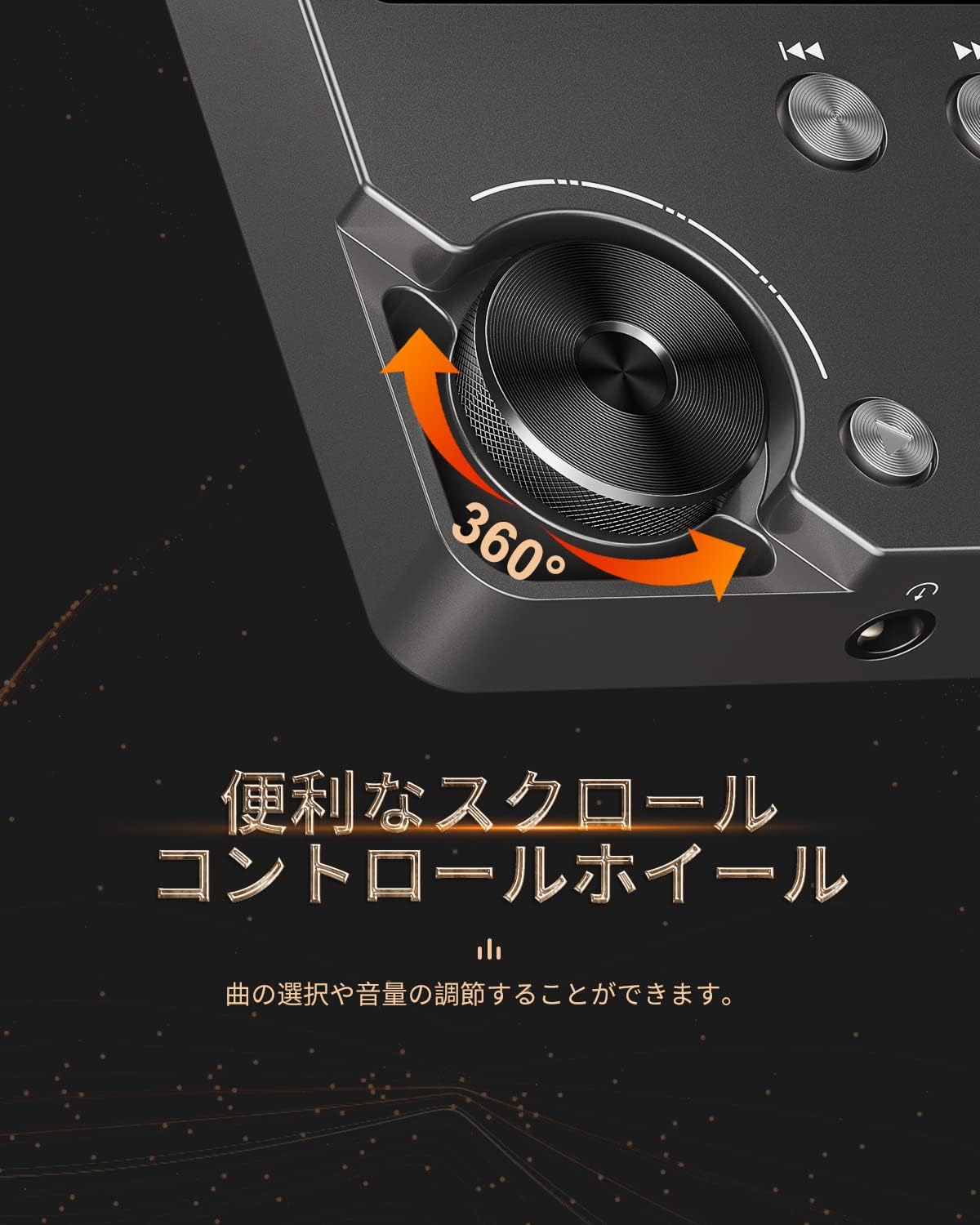
Figure 4: Scroll Control Wheel
4.3.音楽の再生
- Navigate to the 'Music' section from the main menu.
- Browse your music by folder, artist, album, or all songs.
- Select a track and press the MENU button to start playback.
- 再生を制御するには、再生/一時停止ボタンを使用します。
- Press Next Track or Previous Track buttons to skip songs. Hold these buttons for fast forward or rewind.
4.4. 音量コントロール
Rotate the scroll wheel during music playback to adjust the volume level. It is recommended to set the initial maximum volume to a low level to prevent sudden loud sounds.
4.5. イコライザーの設定
The player features an equalizer with various presets (e.g., Rock, Pop, Jazz, Classical, Soft, Techno) and a custom setting. Access the equalizer settings from the playback screen or system settings to adjust the sound profile あなたの好みに合わせて。

Figure 5: Equalizer Function
4.6. Repeat and Shuffle Modes
During playback, access the options menu to select repeat modes (e.g., repeat one, repeat all) or enable shuffle playback for a randomized song order.
4.7. 外部デバイスへの接続
The MECHEN M30 can connect to various audio output devices:
- 有線ヘッドフォン: Plug your 3.5mm headphones into the headphone jack.
- 外部スピーカー/カーオーディオ: Use an AUX cable (not included) to connect the player's line-out port to your speakers or car's AUX input.

Figure 6: Connecting to Various Devices
5. メンテナンス
5.1. 清掃
Wipe the device with a soft, dry cloth. Do not use liquid cleaners or abrasive materials, as they may damage the finish or internal components.
5.2. バッテリーのお手入れ
バッテリーの寿命を延ばすため、バッテリーを頻繁に完全に放電することは避けてください。長期間使用しない場合でも、定期的に充電してください。デバイスは涼しく乾燥した場所に保管してください。

図7: バッテリー情報
5.3. ストレージ
When storing the player for a long time, ensure it is fully charged and then power it off completely. Recharge it every few months to prevent deep discharge.
6。 トラブルシューティング
- デバイスの電源が入らない: Ensure the battery is charged. Connect the player to a power source using the USB cable and try again. If the issue persists, perform a reset by pressing the reset button (if available) or holding the power button for an extended period.
- 音が出ない: Check the volume level. Ensure headphones or external speakers are properly connected. Test with different headphones or speakers if possible.
- 音楽 file認識されません: 音楽を確認する files are in a supported format (refer to Specifications). Ensure the microSD card is properly inserted and the files are not corrupted. Re-transfer the file■必要に応じて。
- Screen is unresponsive or erratic: Try restarting the device. If the problem continues, ensure the device is not exposed to extreme temperatures or moisture.
- Album art or metadata not displayed: Ensure that the metadata (ID3 tags) for your music files are correctly embedded. While the player supports folder-based navigation, correct tags enhance the browsing experience.
- Playback stops unexpectedly: Ensure the battery is sufficiently charged. If connected to a car audio system via USB, playback might pause when the engine is turned off or on due to changes in the USB host communication.
7. 仕様
| 特徴 | 説明 |
|---|---|
| モデル名 | M30 |
| ブランド | メヘン |
| 画面 | 2インチ液晶 |
| メモリストレージ | 64GB MicroSD card included (expandable up to 256GB) |
| 接続性 | AUX (3.5mm headphone jack, Line Out) |
| バッテリー容量 | 1500mAh |
| バッテリー寿命 | 約30時間の再生 |
| 充電時間 | 約2.5時間 |
| 製品寸法(奥行き×幅×高さ) | 1.6 x 5.6 x 8.8 cm |
| 製品重量 | 176グラム |
| サポートされているオーディオ形式 | MP3 (8-48KHz, 16bits), WMA (8-192KHz, 16/24bits), WAV/PCM (8-192KHz, 8/16/24/32bits), APE (8-192KHz, 16/24bits), FLAC (8-192KHz, 16/24bits), AAC (8-96KHz, 16bits - mono playback), OGG (8-48KHz, 10-500bits), DSF (2822.4KHz, 1bit), AIFF (8-192KHz, 8/16/24/32bits), ALAC (8-192KHz, 16/24bits), IMA/MS-ADPCM (8-48KHz, 8/16bits), DFF (3072KHz, 1bit), DSD 128 (5.6MHz) |
| 特集 | Equalizer, Shuffle Play, Hi-Res Audio, Repeat Play, Auto Power-Off |
| 原産国 | 中国 |
| 欧州連合 | 607469642453 |

図8: サポートされているオーディオ形式
8. 保証とサポート
8.1. 製造元の保証
The MECHEN HIFI MP3 Player M30 comes with a one-year manufacturer's warranty from the date of purchase. This warranty covers defects in materials and workmanship under normal use. It does not cover damage caused by misuse, accidents, unauthorized modifications, or normal wear and tear.
8.2. カスタマーサポート
For technical assistance, warranty claims, or any questions regarding your MECHEN M30 player, please contact your retailer or the MECHEN customer support team. Refer to the contact information provided with your purchase documentation or visit the official MECHEN webサポート詳細のサイト。