
WEYMIC CT-60
WEYMIC CT-60 Professional 6-Channel Mixer User Manual
モデル: CT-60
1. はじめに
ご購入ありがとうございますasing the WEYMIC CT-60 Professional 6-Channel Mixer. This device is designed for various audio applications including recording, DJ performances, stage events, and karaoke. It features a low-noise, high-precision preamplifier, USB input for computer recording, Bluetooth connectivity, XLR microphone jacks, 48V phantom power, and RCA outputs. This manual provides detailed instructions for setup, operation, and maintenance to ensure optimal performance and longevity of your mixer.
2. 重要な安全上の注意事項
- デバイスを操作する前に、すべての指示をよくお読みください。
- このマニュアルは将来の参照用に保管してください。
- この機器を雨や湿気にさらさないでください。
- 通気口を塞がないでください。メーカーの指示に従って設置してください。
- ラジエーター、暖房レジスター、ストーブ、その他の機器(以下を含む)などの熱源の近くに設置しないでください。 amp熱を発生する装置。
- メーカー指定のアタッチメント/アクセサリのみを使用してください。
- 雷雨の際や長期間使用しない場合は、この装置のプラグを抜いてください。
- すべての修理は資格のあるサービス担当者に依頼してください。電源コードやプラグが破損している、液体がこぼれた、装置内に物が落ちた、装置が雨や湿気にさらされた、正常に動作しない、装置を落としたなど、装置が何らかの損傷を受けた場合は修理が必要です。
- 電源のボリュームを確認してくださいtage はユニットに指定された要件を満たしています。
- 電源コードやプラグが損傷した状態で装置を操作しないでください。
3.製品オーバーview
The WEYMIC CT-60 is a compact yet powerful 6-channel mixer designed for versatility and ease of use. Below is an overview 主なコンポーネントと機能について説明します。

図3.1: 前面 view of the WEYMIC CT-60 Professional 6-Channel Mixer, showing all controls and inputs/outputs.
3.1 主な特徴
- 6-Channel audio mixer with low noise and high-precision preamplifiers。
- Ultra-thin design for portability.
- Integrated MP3/USB input with built-in Bluetooth wireless connectivity.
- Compatible with USB drives, flash readers, and MP3 devices for playback and recording.
- XLR microphone jacks and line inputs for various devices.
- コンデンサー マイク用の 48V ファンタム電源。
- RCA outputs for versatile connectivity.
- All-metal body with sealed rotary controls for durability.
3.2 コントロールパネルのレイアウト
The mixer's control panel is intuitively designed for easy access to all functions. Refer to the images below for a detailed breakdown of inputs, outputs, and controls.
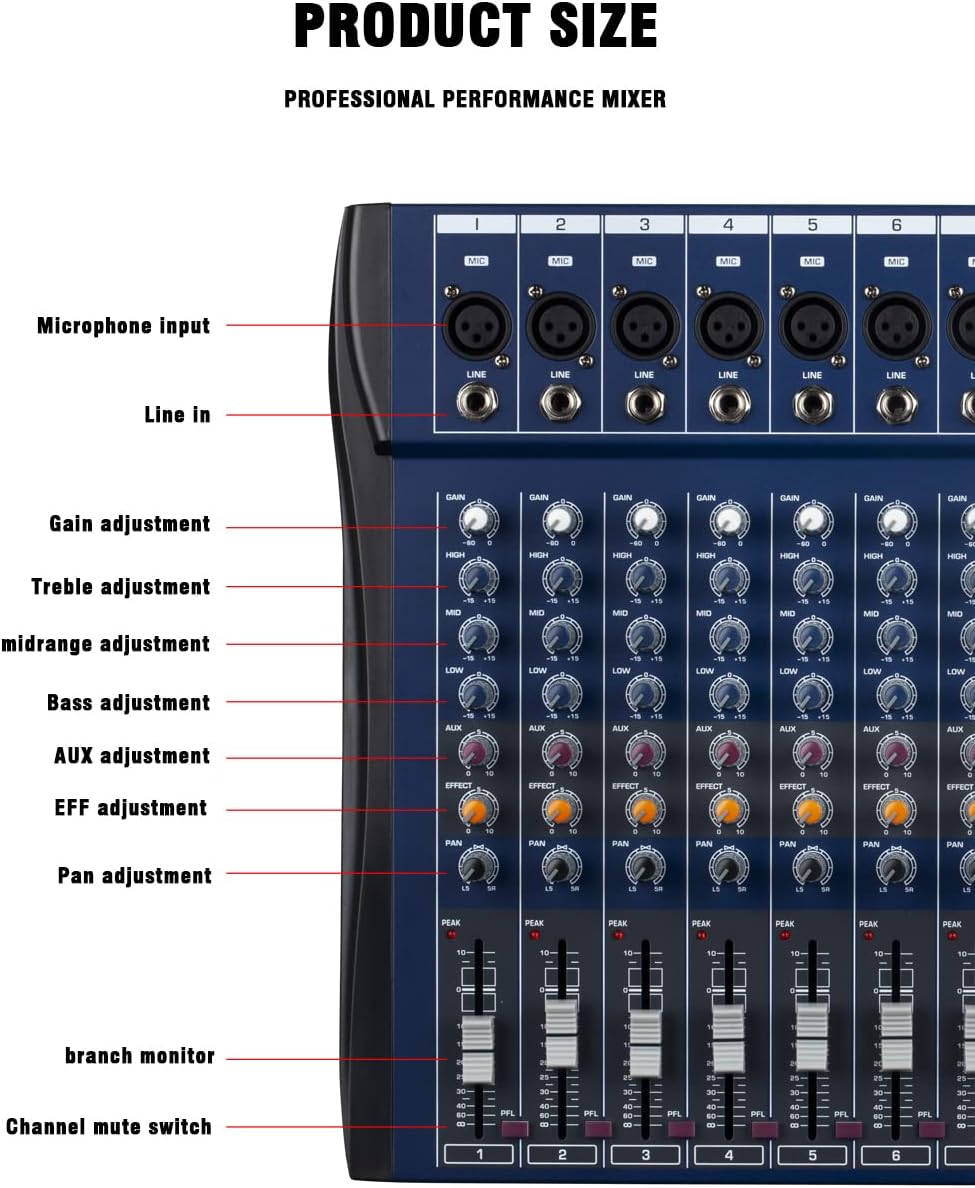
図3.2:詳細 view of the left side of the mixer, highlighting individual channel controls such as Microphone Input, Line In, Gain Adjustment, Treble, Midrange, Bass, AUX Adjustment, EFF Adjustment, Pan, Branch Monitor, and Channel Mute Switch.
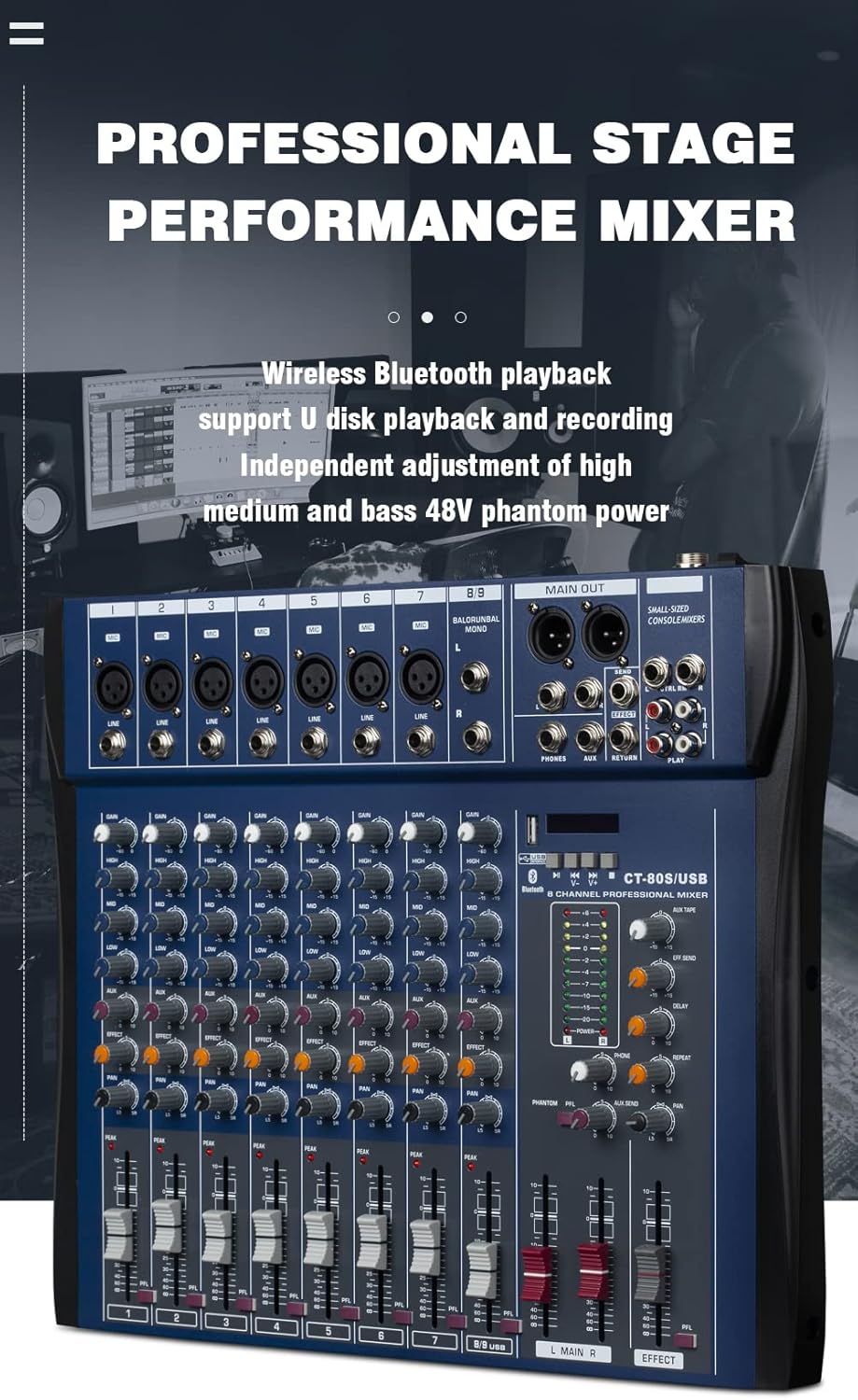
図3.3:詳細 view of the right side of the mixer, highlighting main output controls and the MP3 Control Area, including XLR Main Output, 6.35 Main Output, Send Jack, Auxiliary Output Jack, Lotus Input/Output, Return Output Jack, Monitor Headphone Jack, Auxiliary Recording Volume Adjustment, Effects Send Volume Adjustment, Delay Adjustment, Repeat Adjustment, Monitor Headphone Volume, Pan Adjustment, Auxiliary Return Adjustment, Phantom Power Switch, Reverb Volume Adjustment, and Master Channel Volume Adjustment.

図 3.4: 拡大図 view of the multiple microphone and line inputs on the WEYMIC CT-60 mixer, demonstrating the XLR and 1/4" jack compatibility for various instruments and microphones.
4. セットアップ手順
4.1電源接続
- ミキサーの電源スイッチがオフになっていることを確認します。
- Connect the included 110V power adapter to the mixer's power input.
- 電源アダプターを適切なコンセントに差し込みます。
4.2 オーディオソースの接続
- マイク: Connect XLR microphones to the MIC inputs (Channels 1-5). For condenser microphones requiring phantom power, ensure the 48V PHANTOM POWER switch is engaged after connecting the microphone and before increasingゲイン。
- 楽器/ラインレベルデバイス: Connect instruments or line-level devices (e.g., keyboards, CD players) to the LINE inputs using 1/4" TS/TRS cables.
- USBドライブ: MP3オーディオが入ったUSBフラッシュドライブを挿入します files into the USB port in the MP3 Control Area.
- Computer/External Device: Connect a computer via USB for recording or playback, or use Bluetooth for wireless audio streaming.
4.3 出力の接続
- 主な出力: Connect the MAIN OUT (XLR or 6.35mm) to your amp充電器、パワードスピーカー、または録音インターフェース。
- ヘッドフォン: モニタリングするには、PHONES ジャックにヘッドフォンを接続します。
- RCA出力: Use the RCA (Lotus) outputs for additional recording or monitoring connections.
5. 操作手順
5.1 基本的なチャネル操作
- ゲイン調整: Use the GAIN knob at the top of each channel strip to adjust the input sensitivity. Set it so the PEAK LED flashes only occasionally during the loudest parts of the signal.
- イコライゼーション (EQ):
- 高い: 高音域(トレブル)を調整します。
- 中: 中音域の周波数を調整します。
- 低い: 低音域(ベース)を調整します。
- AUX/EFF Send: The AUX knob controls the level of the channel's signal sent to the internal effects processor or external auxiliary send.
- PAN: Adjusts the stereo position of the channel's signal (left to right).
- チャンネルフェーダー: Use the vertical fader at the bottom of each channel strip to control the channel's volume in the main mix.
- PFL(プリフェーダーリッスン): Press the PFL button to monitor the channel's signal through headphones before it reaches the main mix.
5.2 マスターセクションのコントロール
- MAIN L/R フェーダー: Control the overall volume of the main stereo output.
- エフェクトセクション:
- EFF送信: Adjusts the overall level of the signal sent to the internal effects.
- ディレイ/リピート: Controls parameters of the built-in delay effect.
- リバーブ: リバーブ効果のレベルを調整します。
- EFF FADER: Controls the overall volume of the processed effect signal in the main mix.
- ファンタム電源(48V): Activates 48V phantom power for condenser microphones connected to XLR inputs. Ensure microphones are connected before activating.
- 電話: Headphone output with dedicated volume control for monitoring.
5.3 USB/MP3/Bluetooth操作
- USB再生: MP3 が入った USB ドライブを挿入します files. Use the controls in the MP3 Control Area (PLAY/PAUSE, SKIP TRACKS, MODE) to navigate and play audio.
- Bluetooth接続: Press the MODE button to switch to Bluetooth mode. The mixer will appear as "WEYMIC CT-60" (or similar) on your device. Pair your smartphone or tablet to stream audio wirelessly.
- コンピューター録画/再生: Connect the mixer to a computer via USB. The mixer should be recognized as an audio interface. You can then use your computer's recording software to record the main mix or play audio through the mixer.
6. メンテナンス
- クリーニング: ミキサーの外側を拭く際は、柔らかく乾いた布をご使用ください。液体洗剤や溶剤は使用しないでください。
- 防塵: Keep the mixer covered when not in use to prevent dust accumulation, especially in the faders and rotary controls.
- ストレージ: ミキサーは直射日光や極端な温度を避け、涼しく乾燥した場所に保管してください。
- ケーブルのお手入れ: Regularly check all cables for damage. Replace frayed or damaged cables immediately to prevent electrical hazards or signal loss.
7。 トラブルシューティング
| 問題 | 考えられる原因 | 解決 |
|---|---|---|
| メインスピーカーから音が出ません。 |
|
|
| 特定のチャンネルから音が出ません。 |
|
|
| マイクがファンタム電源で動作しません。 |
|
|
| Bluetoothデバイスを接続できません。 |
|
|
8. 仕様
| モデル | CT-60 |
| チャンネル数 | 6 |
| アイテム重量 | 6.6ポンド(3kg) |
| 製品寸法(WxHxD) | 14.9インチ x 13.7インチ x 2.7インチ (380 x 350 x 70 mm) |
| ハードウェアインターフェイス | USB |
| 電源 | Corded Electric (External 110V power adapter included) |
| 巻tage | Input: 110V AC (via included adapter) |
| 接続技術 | ブルートゥース、USB |
| ファントムパワー | 48V(選択可能) |
9. 保証とサポート
WEYMIC products are designed for reliability and performance. For specific warranty information, please refer to the warranty card included with your purchase or visit the official WEYMIC webサイト。
If you encounter any issues or have questions regarding your WEYMIC CT-60 mixer, please contact WEYMIC customer support through the retailer where the product was purchased or via the contact information provided on the official WEYMIC website. Please have your product model number (CT-60) and purchase details ready when contacting support.