
導入
ご購入ありがとうございますasing the Polarlander 9602G 1 Din Car Stereo. This manual provides detailed instructions for the installation, operation, and maintenance of your new multimedia player. Please read this manual thoroughly before use to ensure proper functionality and to prevent damage.
The Polarlander 9602G features a 7-inch retractable HD touchscreen, GPS navigation, Bluetooth connectivity, FM radio, USB/TF/AUX input, Mirror Link for Android/iOS devices, steering wheel control compatibility, and support for DVR and rear view カメラ。
セットアップとインストール
1. パッケージ内容
インストールする前に、すべてのコンポーネントが揃っていることを確認してください。
- メインユニット(カーステレオ)
- ユーザーマニュアル
- インストールキー(2)
- 電源コード (3)
- リモートコントロール
- GPSアンテナ
- 後方 View カメラ
- ビデオ
2. 配線図終了view
The unit requires a 12V DC power supply. Ensure all connections are secure and correctly matched to your vehicle's wiring harness. Incorrect wiring can cause damage to the unit or vehicle electrical system.
- 力: 黄色のワイヤーを定電圧 12V 電源に接続し、赤色のワイヤーをアクセサリ 12V 電源 (イグニッションで切り替え) に接続し、黒色のワイヤーをアースに接続します。
- 講演者: Connect the speaker wires to your vehicle's speakers. Ensure correct polarity for optimal sound.
- GPSアンテナ: Connect the GPS antenna to the dedicated port on the rear of the unit and mount it in a location with a clear view 空の。
- 後方 View カメラ: Connect the camera's video output to the 'CAM IN' port and its power to the reverse light circuit for automatic activation.
- DVR: Connect the DVR to the designated USB port or input.
- ステアリングホイールコントロール: Connect the steering wheel control wires to your vehicle's steering wheel control interface, if applicable.
3. 物理的な設置
Install the 1 Din unit into your vehicle's dashboard opening. Secure it using the provided installation keys or mounting hardware. Ensure the retractable screen mechanism has sufficient clearance to operate freely.

Image: Unit dimensions for installation reference. The unit measures approximately 18.8cm (width) x 5cm (height) x 16.5cm (depth) with the screen retracted, and the screen extends to 7 inches.
操作手順
1. 基本的な操作
- 電源オン/オフ: 電源ボタンを押して、ユニットの電源をオンまたはオフにします。
- 音量: 音量を調整するには、回転ノブまたはタッチスクリーン コントロールを使用します。
- スクリーンの引き込み: The 7-inch screen is retractable. Use the dedicated button or touchscreen option to extend or retract the display.
- タッチスクリーン: 画面をタッチしてメニューを移動し、機能を制御します。
2. GPSナビゲーション
The unit comes with built-in GPS functionality. Access the navigation application from the main menu. Ensure the GPS antenna is properly installed for accurate positioning.

Image: The car stereo displaying GPS navigation, showing a map with route guidance and traffic information.
3. Bluetooth接続
Pair your mobile phone via Bluetooth for hands-free calling and audio streaming.
- カーステレオの Bluetooth メニューに移動します。
- 携帯電話で Bluetooth を有効にして、利用可能なデバイスを検索します。
- Select 'Topway(3A30)' or similar device name from your phone's list.
- Enter the PIN '0000' if prompted.
- ペアリングすると、ワイヤレスで通話や音楽の再生ができるようになります。
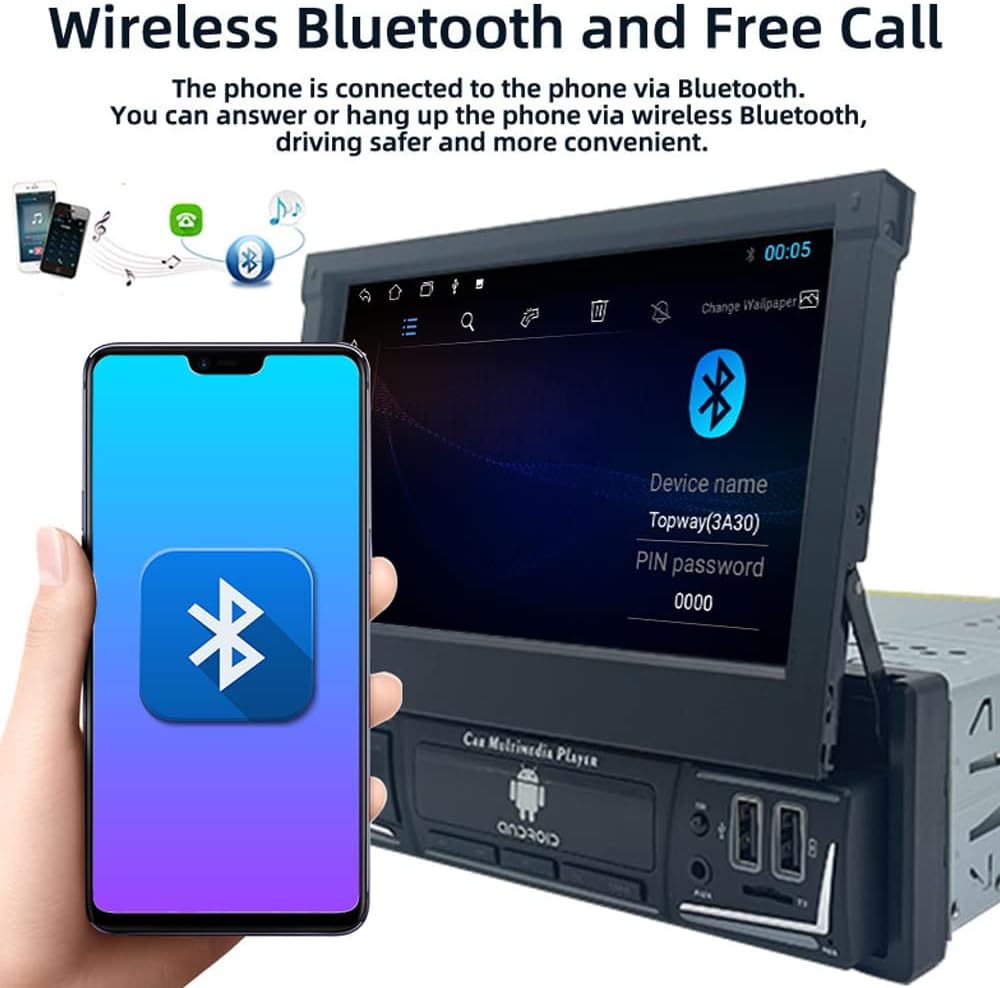
Image: The car stereo displaying the Bluetooth pairing screen, indicating a device name and PIN for connection.
4. FMラジオ
Access the FM radio function to listen to your favorite stations.
- 自動スキャン: Use the 'AS' button to automatically search and store available stations.
- 手動チューニング: Use the arrow buttons to manually tune to frequencies.
- プリセット: Store up to 18 FM stations across three bands (FM1, FM2, FM3).

Image: The car stereo displaying the FM radio interface, showing the current frequency and preset options.
5. メディア再生(USB/SD/AUX)
The unit supports various media sources for audio and video playback.
- USB: Insert a USB flash drive into the USB port. The unit will automatically detect and play compatible media files.
- TFカード: Insert a TF (microSD) card into the TF card slot.
- オーキシン: Connect external audio devices using a 3.5mm audio cable to the AUX-in port.

Image: The car stereo displaying music playback, with icons representing USB, SD card, and AUX input options.
6. ミラーリンク機能
Mirror Link allows you to display your smartphone's screen on the car stereo's display and control it from the stereo.
- Connect your Android or iOS phone to the unit via a USB cable.
- Follow the on-screen prompts to enable Mirror Link.
- For Android, you may need to enable USB debugging in developer options.

Image: The car stereo screen mirroring a smartphone, demonstrating the Mirror Link feature.
7. ステアリングホイールコントロール
車両がステアリングホイール コントロールをサポートしている場合は、カーステレオを操作するように設定できます。
- ユニットのメニューで「ステアリングホイールコントロール」設定にアクセスします。
- Follow the on-screen instructions to program each button on your steering wheel to a corresponding function on the stereo.

Image: The car stereo displaying its main menu with app icons, illustrating the use of steering wheel controls to navigate functions.
8. Backlight Button Colors
Customize the backlight color of the physical buttons on the unit.
- Navigate to the 'Settings' menu and find 'Button Backlight' or similar option.
- Choose from 7 available colors or set it to cycle automatically.

Image: The car stereo unit showcasing its buttons illuminated in various colors, demonstrating the 7-color backlight feature.
9. リア View カメラとDVR
ユニットは後部 view camera and DVR for enhanced safety and recording.
- 後方 View カメラ: 車両を後退させると、画面には自動的に後方映像が表示されます。 view カメラ映像。
- DVR: If a DVR is connected, access its functions through the dedicated app on the stereo's interface to record and manage footage.
メンテナンス
- 画面の掃除: 柔らかく糸くずの出ない布でタッチスクリーンを優しく拭いてください。研磨剤入りの洗剤や溶剤は使用しないでください。
- ソフトウェアアップデート: 定期的にメーカーの web最適なパフォーマンスと新機能へのアクセスを確保するために、利用可能なソフトウェアまたはファームウェアの更新をサイトから確認してください。
- 一般的なケア: ユニットを極端な温度、長時間の直射日光、過度の湿気にさらさないでください。
トラブルシューティング
問題が発生した場合は、次の一般的な問題と解決策を参照してください。
- 電源なし:
- Check all power connections (yellow, red, black wires) for proper contact and voltage.
- 車両のステレオのヒューズが正常であることを確認します。
- 音が出ない:
- スピーカーの配線が正しく接続されており、短絡していないことを確認します。
- 音量レベルとミュート設定を確認してください。
- オーディオ ソースの選択を確認します。
- Bluetoothが接続されない:
- ステレオと携帯電話の両方で Bluetooth が有効になっていることを確認します。
- 以前のペアリングを削除して、再度ペアリングをお試しください。
- 両方のデバイスを再起動します。
- GPSが機能しない/不正確:
- GPSアンテナが正しく接続され、クリアな view 空の。
- Check GPS settings in the unit's menu.
- 画面が応答しない:
- Perform a soft reset by pressing the reset button (if available) or turning the unit off and on.
- 画面がきれいでゴミなどがないことを確認してください。
If problems persist, consult a qualified technician or contact customer support.
仕様
| モデル番号 | 9602G |
| 画面サイズ | 7 Inch Retractable HD Touch Screen |
| 電源 | 12V直流 |
| 接続性 | Bluetooth, Wi-Fi, USB, Auxiliary |
| コントローラータイプ | Android, iOS (via Mirror Link) |
| 特集 | Touchscreen, GPS Navigation, FM Radio, Mirror Link, Steering Wheel Control, DVR & Rear View カメラサポート |
| 無線周波数 | FM 87.5MHz - 108MHz |
| オーディオ出力モード | ステレオ |
| サポートされている形式 | MPEG, WAV, WMA (and others via MP5 player) |
| 寸法(約) | 18.8cm x 5cm x 16.5cm (unit body) |
保証情報
This product is covered by a manufacturer's warranty against defects in materials and workmanship. The specific terms and duration of the warranty may vary. Please retain your proof of purchase for warranty claims. For detailed warranty information, refer to the documentation included with your purchase or contact the seller.
カスタマーサポート
If you require further assistance, have questions not covered in this manual, or need technical support, please contact the seller or manufacturer directly. Provide your product model number (9602G) and purchase details when seeking support.
一般的なお問い合わせは、 Polarlander brand page on Amazon.