
Bucktool DP25016A2
BUCKTOOL 10インチドリルプレス ユーザーマニュアル
Model: DP25016A2
ブランド: Bucktool
1. 重要な安全情報
Always observe basic safety precautions to reduce the risk of fire, electric shock, and personal injury when operating power tools. Read all instructions before operating this product.
- 目の保護: Always wear ANSI-approved safety goggles or a face shield when operating the drill press.
- 安全なワークピース: 常にclamp the workpiece securely to the drill press table to prevent rotation or movement during drilling.
- 適切な服装: Do not wear loose clothing, gloves, neckties, rings, bracelets, or other jewelry that could get caught in moving parts. Secure long hair.
- 作業エリアをクリア: 作業エリアを清潔に保ち、明るくしてください。雑然とした場所や暗い場所は事故を招きます。
- 強制を避ける: Do not force the tool. It will do the job better and more safely at the rate for which it was designed.
- 使用しないときはプラグを抜いてください: Disconnect the drill press from the power source before making adjustments, changing accessories, or storing the tool.
- メンテナンスツール: 切削工具を鋭く清潔に保ちます。適切にメンテナンスされた鋭い刃先を備えた工具は、固着しにくく、制御が容易になります。
- 正しいツールを使用する: Do not use the drill press for purposes other than those for which it was intended.
2. セットアップと組み立て
2.1 開梱と検査
Carefully remove all components from the packaging. Inspect for any damage that may have occurred during shipping. Report any damage immediately to the retailer.
2.2 コンポーネントの識別
Familiarize yourself with the main parts of your BUCKTOOL 10-Inch Drill Press.

図2.1:以上view of the BUCKTOOL 10-Inch Drill Press, showing its main components including the head, column, table, and base, with the laser guide active.

Figure 2.2: BUCKTOOL 10-Inch Drill Press with a detailed specification table highlighting key features such as motor, speed, swing, chuck capacity, spindle travel, table size, table movement, and overall height.
2.3組み立て手順
- 柱をベースに取り付ける: Securely fasten the column to the heavy-duty cast iron base using the provided hardware. Ensure all bolts are tightened for stability.
- Install Table Assembly: Slide the table assembly onto the column. The table can be adjusted vertically and secured with the tightening knob.
- マウントヘッドアセンブリ: Carefully place the head assembly onto the top of the column. Secure it firmly with the designated fasteners.
- Chuck をインストールします。 Insert the 1/2-inch keyed chuck into the spindle. Ensure it is seated properly for secure bit retention.

図2.3:詳細 view of the drill press highlighting the main controls including the safety key, power switch, laser switch, work light switch, and the 6.0A induction motor.

図2.4:詳細 view of the drill press highlighting the heavy-duty work table with precise drilling fence, height adjustment mechanism, and the robust heavy-duty base.
3. 操作手順
3.1 Power and Controls
The drill press features user-friendly controls for power, laser, and work light.

図 3.1: 拡大図 view of the control panel, showing the safety key, main power switch, and separate switches for the laser guide and LED work light.
- 安全キー: Insert the safety key into the main power switch to enable operation. Remove it when not in use to prevent accidental starts.
- 電源スイッチ: Use the main power switch to turn the drill press ON or OFF.
- Laser & Work Light Switches: Separate switches control the integrated LED work light and the laser guide for enhanced visibility and precision.
3.2 速度調整
The BUCKTOOL drill press offers 5 different speeds (650/1100/1700/2300/3100 RPM) to suit various materials and drilling tasks.
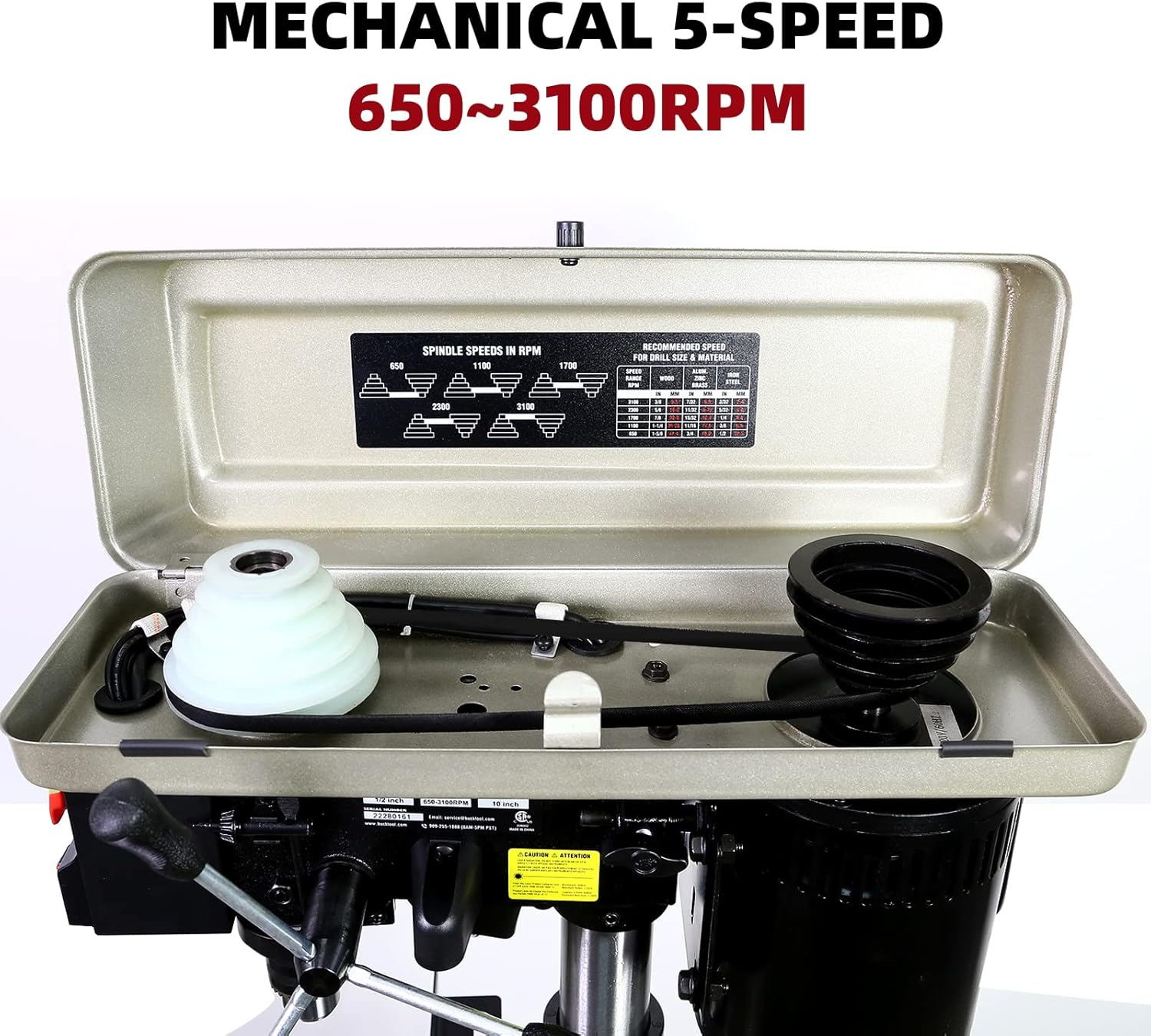
図3.2: View inside the drill press head, illustrating the belt and pulley system used to adjust the spindle speed. A speed chart is typically located on the inside cover for reference.
To change speeds, open the top cover and adjust the belt position on the pulleys according to the desired RPM. Refer to the speed chart inside the cover for optimal settings for different materials (wood, plastic, metal).
3.3 Workpiece Preparation and Drilling
- 安全なワークピース: 常にclamp your workpiece firmly to the drill press table using appropriate clamps. This prevents the material from spinning or shifting during drilling, ensuring safety and accuracy.
- Adjust Table: The worktable can be tilted up to 45 degrees and adjusted vertically to accommodate different workpiece sizes and angles. Use the table height adjustment handle and locking mechanism to set the desired position.
- Use Drilling Fence: The included drilling fence helps support stock on the edge and provides clearance for the chuck. Position and secure it as needed for precise alignment.
- 深度停止の設定: The drill press features a 2-inch spindle travel and an adjustable depth stop for consistent drilling depth.
- Utilize Laser and Work Light: Turn on the laser guide for accurate bit placement and the LED work light for improved visibility of your workpiece.
- 掘削: Once the workpiece is secured and settings are adjusted, slowly lower the drill bit into the material using the feed handle. Apply steady, even pressure.

Figure 3.3: The drill press table equipped with the precise drilling fence, designed to aid in accurate positioning and support of the workpiece.
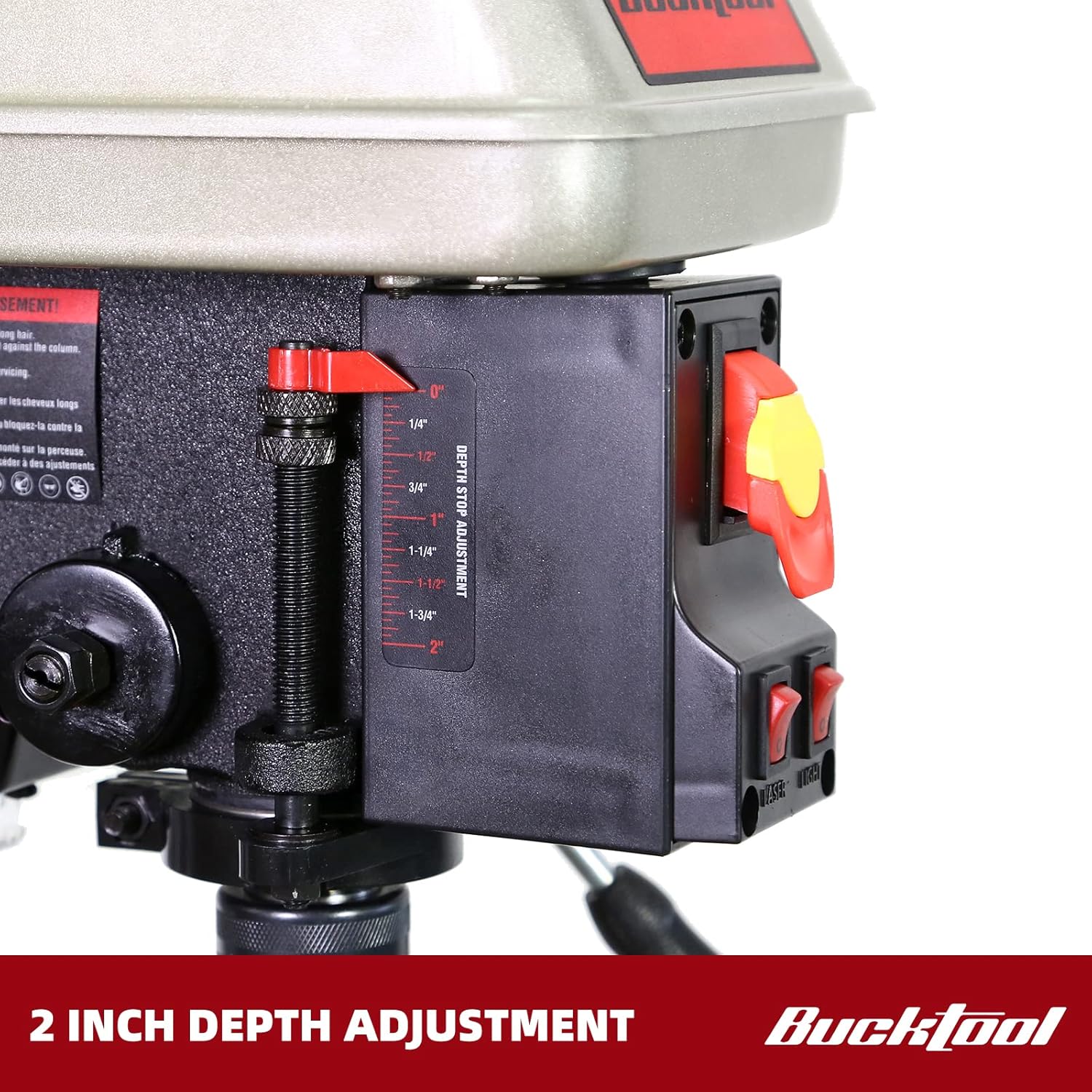
Figure 3.4: Close-up of the 2-inch depth stop adjustment mechanism, allowing for precise control over drilling depth.
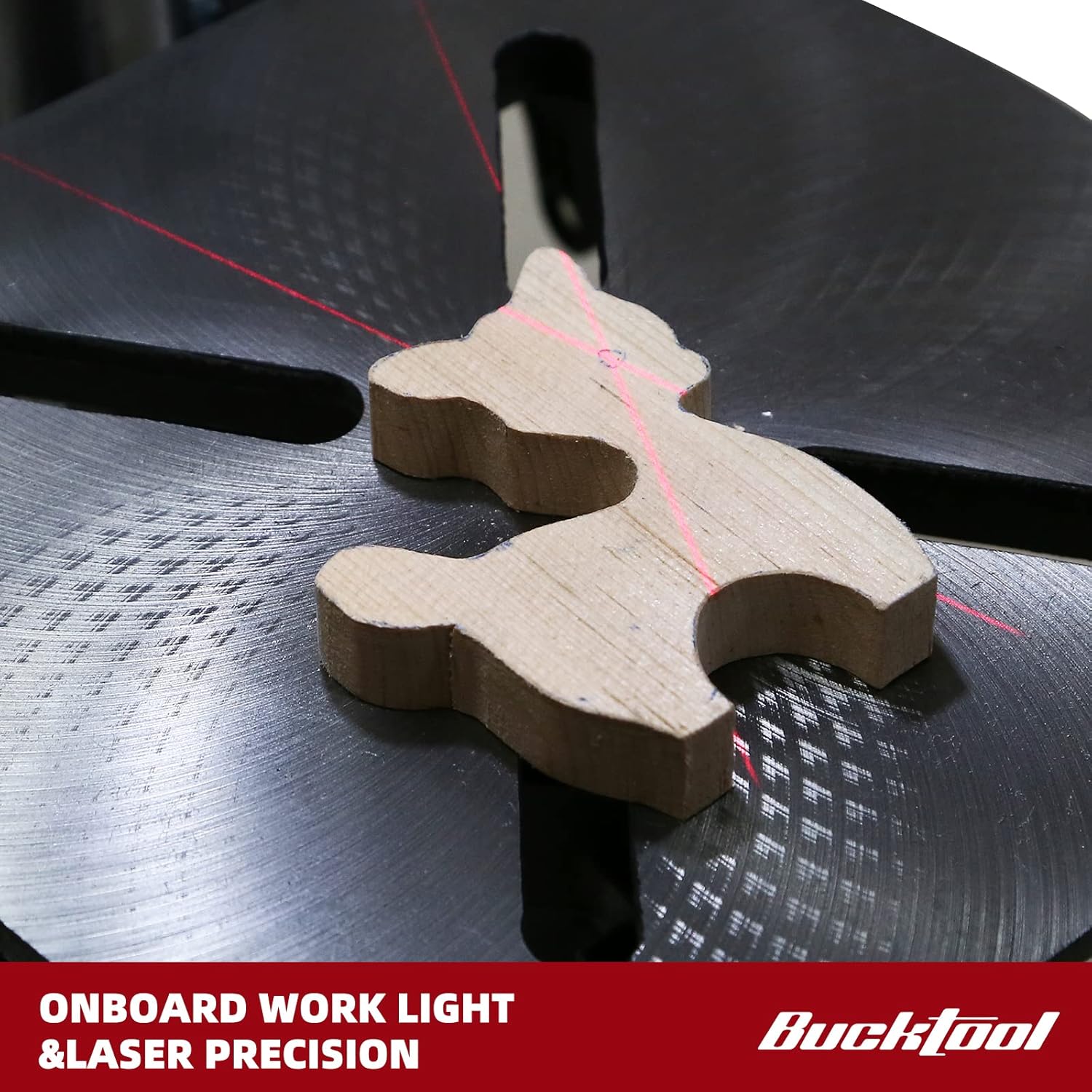
Figure 3.5: A workpiece illuminated by the onboard work light, with the laser guide projecting crosshairs for precise drilling alignment.
4. メンテナンス
定期的なメンテナンスにより、ドリルプレスの寿命が長くなり、最適なパフォーマンスが確保されます。
- クリーニング: After each use, clean the drill press to remove dust, chips, and debris. Use a brush or vacuum. Do not use solvents that may damage painted surfaces or plastic parts.
- 潤滑: 錆を防ぎ、スムーズな動作を確保するために、コラムやその他の可動部分に定期的に機械油を薄く塗布してください。
- ベルトの検査: Check the drive belt for wear, cracks, or stretching. Replace if necessary. Ensure proper belt tension for efficient power transfer.
- チャックのメンテナンス: Keep the chuck jaws clean and free of debris. Lubricate the chuck jaws occasionally with a light oil.
- 電気コード: Inspect the power cord for any damage. Do not use the drill press if the cord is frayed or damaged.
5。 トラブルシューティング
| 問題 | 考えられる原因 | 解決 |
|---|---|---|
| ドリルプレスが始動しません。 | No power, safety key not inserted, faulty switch. | Check power connection, ensure safety key is fully inserted, inspect power switch. |
| 運転中の過度の振動。 | 緩んだコンポーネント、アンバランスなビット、摩耗したベルト。 | Ensure all assembly bolts are tight. Check the chuck and bit for proper seating. Inspect and adjust belt tension. |
| Inconsistent drilling depth. | Depth stop not securely tightened, table movement. | Ensure the depth stop is firmly locked. Verify the table is securely clamped to the column. |
| モーターが過熱します。 | 過負荷、換気不足。 | Reduce feed pressure. Ensure motor vents are clear. Allow motor to cool down. |
| Bit wobbles or runs out of true. | Bit not properly seated in chuck, damaged chuck, bent spindle. | Re-seat the bit. Inspect chuck for damage. If problem persists, contact customer support. |
6. 仕様
| 特徴 | 詳細 |
|---|---|
| ブランド | バックツール |
| モデル番号 | DP25016A2 |
| 電源 | コード式電気 |
| モーター | 3/4 HP、6.0 Amp 誘導モーター |
| 巻tage | 120ボルト |
| 速度の数 | 5 (650/1100/1700/2300/3100 RPM) |
| スイング | 10インチ |
| スピンドルトラベル | 2インチ |
| チャックサイズ | 1/2 inch keyed chuck |
| 作業台の傾き | 45度まで |
| 特集 | LED Work Light, Laser Guide |
| 製品寸法(長さ x 幅 x 高さ) | 9.45インチ x 18.9インチ x 28.74インチ |
| アイテム重量 | 54.2ポンド |
7. 保証とサポート
7.1 保証情報
The BUCKTOOL 10-Inch Drill Press comes with a 2年間の限定保証. Please refer to the official user manual for full details regarding warranty terms and conditions.
7.2 カスタマーサポート
For any problems or inquiries regarding your product, please contact Bucktool customer service before returning the product.
- メールアドレス: service@bucktool.com
- Webサイト: https://www.bucktool.com
- 電話: 909-255-1088 (8AM-5PM PST)
You can also find the official User Manual in PDF format for detailed instructions and diagrams:
Ask a question about this manual
Ask about setup, troubleshooting, compatibility, parts, safety, or missing instructions. Manuals+ will review the question and use this page’s manual context to help answer it.