
1. はじめに
This manual provides essential instructions for the installation, operation, and maintenance of your PowMr MPPT 60A Solar Charge Controller. This controller is designed to efficiently manage power flow from your solar panels to your battery bank, ensuring optimal charging and system protection. Please read this manual thoroughly before installation and use to ensure safe and correct operation.
パッケージ内容:
- 1 x PowMr MPPT 60A Solar Charge Controller
- ユーザーマニュアル(英語)1冊
2. 安全に関する注意事項
人身傷害やコントローラまたはその他のコンポーネントの損傷を防ぐために、常に次の安全上の注意事項を守ってください。
- 電源を入れる前に、すべての接続が正しく安全であることを確認してください。
- The correct connection sequence for the solar controller is to connect the battery first, then the solar panel. Always adhere to this specific order. When disconnecting, follow the reverse order: disconnect solar panel, then battery.
- コントローラーをご自身で分解したり修理したりしないでください。修理が必要な場合は、資格のある担当者にご連絡ください。
- コントローラーは、可燃性物質や直射日光を避け、換気の良い場所に設置してください。
- The solar charge controller is equipped with electronic protections against overcharge, over-discharge, overload, and short circuit. It also features battery temperature compensation, enhancing overall operational safety.
- Use appropriate circuit breakers or fuses for all connections to prevent damage from overcurrent.
3 製品の特徴
- 高度なMPPTテクノロジー: The 60A MPPT solar charge controller features automatic battery voltage detection for 12V, 24V, 36V, and 48V systems. It utilizes advanced Maximum Power Point Tracking (MPPT) technology, ensuring a tracking efficiency of no less than 99.5% and a maximum conversion efficiency of up to 97%.
- ユニバーサルバッテリー互換性: Supports various battery types for charging, including sealed, gel, flooded, LiFePO4, and Li(NiCoMn)O2 cells. User-defined battery parameters are available for custom battery types.
- 包括的な保護: Equipped with electronic protections against overcharge, over-discharge, overload, and short circuit. Includes battery temperature compensation for enhanced safety and battery longevity.
- 多機能LCDディスプレイ: Provides real-time system information, including solar panel voltage/power, charging current, battery voltage、および負荷ステータス。
- 効率的な冷却: Features forced air cooling with an aluminum alloy construction for effective heat dissipation, maintaining optimal performance even under high temperatures.
- Dual PV and Battery Connection: Designed for straightforward connection of both photovoltaic arrays and battery banks.
- Multiple Load Working Modes: Offers various load control options, including Load OFF, Load always ON, and Time Control.
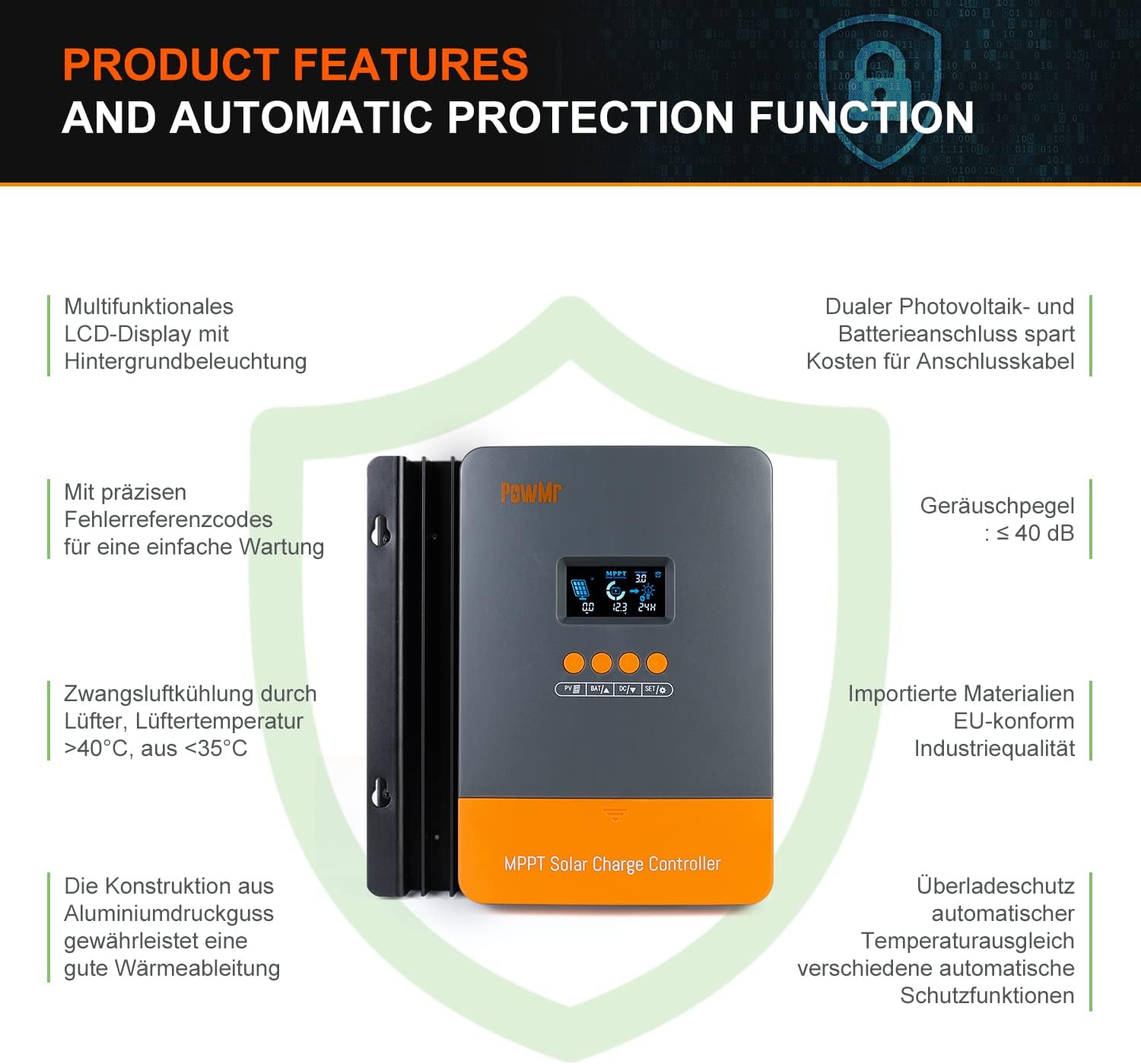
Image: Product features and automatic protection functions. Highlights include a multifunctional LCD display, dual PV and battery connection, precise error codes, forced air cooling, aluminum alloy construction for heat dissipation, and electronic protections.
4.製品オーバーview

Image: PowMr MPPT 60A Solar Charge Controller dimensions (165mm x 230mm x 72mm) and its LCD display interface. The display shows solar panel voltage/power, charging current, battery voltage, and load information. Key buttons for PV, Battery, DC Load, and Settings are also visible.
The controller features an intuitive LCD display and control buttons for easy monitoring and configuration. The display provides real-time data on solar input, battery status, and load output.
- 昼夜を示すアイコン
- Battery icon and SOC (State of Charge)
- 作業モード
- State and Warning indication
- ソーラーパネル量tage/power/current
- Charging power/charging current/battery voltage
- Load working Mode / Load power / Load current / Load voltage
5. インストールとセットアップ
5.1コントローラーの取り付け
- Choose a dry, well-ventilated location, protected from direct sunlight, high temperatures, and water.
- Ensure there is sufficient airflow around the controller for proper cooling.
- Mount the controller vertically on a wall or suitable surface using appropriate fasteners.
5.2配線接続
重要: 必ず最初にバッテリー、次にソーラーパネル、最後に負荷を接続してください。取り外しは逆の順序で行ってください。
- バッテリーを接続します。 Connect the positive and negative terminals of your battery bank to the corresponding battery terminals on the controller. Ensure correct polarity. The controller will automatically detect the battery voltage(12V / 24V / 36V / 48V)。
- ソーラーパネルを接続します。 Connect the positive and negative terminals of your solar panel array to the corresponding PV input terminals on the controller. Ensure correct polarity. The maximum open circuit voltage (Voc) from the PV array should not exceed 160V.
- DC負荷を接続する(オプション): If using a DC load directly from the controller, connect its positive and negative terminals to the load terminals on the controller.

Image: Diagram illustrating recommended wiring configurations for 12V, 24V, 36V, and 48V battery systems, including corresponding input solar power and voltage ranges. Also shows the three load working modes (Load OFF, Load always ON, Time control).
5.3 電池の種類の選択
The controller supports various battery types. You can select the appropriate type through the controller's settings menu. For lithium batteries (LiFePO4, Li(NiCoMn)O2), it is essential to set the specific start and end charging voltages according to the battery manufacturer's specifications. Refer to the detailed instructions in the user manual for proper configuration.

Image: Illustration detailing the supported battery types (Sealed, GEL, Flooded, AGM, Lithium, User Custom Battery) and a graph depicting the four-stage battery charging process: Bulk Charge, Constant Charging (Boost/Equalize), and Float Charge.
6. 操作手順
6.1 LCDディスプレイとボタン
The LCD display provides real-time system status. Use the buttons (PV, BAT, DC, SET) to navigate through menus and adjust parameters. Refer to the detailed manual for specific button functions and menu navigation.
6.2 充電Stages
コントローラーはマルチSを採用tagバッテリー寿命とパフォーマンスを最適化する充電アルゴリズム:
- バルクチャージ: 最大電流でバッテリーを充電します。tage は吸収レベルまで上昇します。
- Constant Charging (Boost/Equalize): 一定のボリュームを維持tage, allowing the current to gradually decrease. Equalization is a controlled overcharge for flooded batteries to balance cell voltages。
- フロートチャージ: ボリュームを減らすtage to a lower level once the battery is fully charged, maintaining it at a safe level to prevent self-discharge.
6.3 負荷動作モード
The DC load output can be configured with different working modes:
- 負荷OFF: 負荷出力は常にオフになります。
- Load Always ON: 負荷出力は連続的にオンになります。
- 時間制御: The load output operates for a specified duration after sunset.
7. メンテナンス
定期的なメンテナンスにより、ソーラー充電コントローラーの最適なパフォーマンスと寿命が確保されます。
- すべての配線接続部の締め付け具合と腐食を定期的に点検してください。
- Clean the controller's exterior with a dry cloth. Do not use liquids or solvents.
- Ensure the ventilation openings are clear of dust and debris to allow for proper heat dissipation.
- LCD ディスプレイにエラー コードや異常な表示がないか監視します。
8。 トラブルシューティング
If you encounter issues, refer to the following common problems and solutions. For more complex issues, contact customer support.
| 問題 | 考えられる原因 | 解決 |
|---|---|---|
| ディスプレイなし/電源なし | バッテリーが接続されていないか、電圧が低いtage; reversed polarity. | バッテリーの接続と容量を確認してくださいtage. 正しい極性を確認します。 |
| バッテリーが充電されない | Solar panel not connected; low solar input; PV reversed polarity; battery type misconfigured. | Check solar panel connections and polarity. Verify sufficient sunlight. Confirm correct battery type settings. |
| ロードが機能しない | Load mode set to OFF; overload; short circuit; low battery voltage. | Check load mode settings. Reduce load. Inspect for short circuits. Charge battery. |
| エラーコードが表示されました | 特定のシステム障害。 | エラー コードとその解決策の一覧については、完全なユーザー マニュアルを参照してください。 |
9. 仕様
| パラメータ | 価値 |
|---|---|
| モデル番号 | POW-M60-PRO |
| ブランド | パウミスター |
| 定格充電電流 | 60A |
| システム巻tage | 12V/24V/36V/48V Auto-Identify |
| 最大PV入力ボリュームtage(Voc) | 160V直流 |
| Max. Solar Panel Power (for 48V system) | 2880W (12V: 720W, 24V: 1440W, 36V: 2160W) |
| 追跡効率 | ≥99.5% |
| 変換効率 | 最大97% |
| サポートされているバッテリーの種類 | Sealed, Gel, Flooded, LiFePO4, Li(NiCoMn)O2, User-defined |
| 表示タイプ | バックライト付きLCD |
| 製品寸法(長さ x 幅 x 高さ) | 16.5 cm x 7.1 cm x 23.1 cm |
| 製品重量 | 1.3キロ |
| 動作温度 | -20°C to +50°C (Max. 60°C ambient) |

Image: Universal compatibility of the PowMr 60A MPPT controller compared to other controllers. It highlights higher maximum input solar power and voltage for 12V, 24V, 36V, and 48V systems, supporting SLA, SLD, GEL, AGM, and LiFePO4 battery types.
10. 保証とサポート
For warranty information, technical support, or any questions regarding your PowMr MPPT 60A Solar Charge Controller, please contact PowMr customer service. Refer to the product packaging or the official PowMr web連絡先の詳細についてはサイト。