
1. はじめに
The Zenwire Portable External CD/DVD Drive with SD Card Reader and USB-C Hub (Model SY885) is a versatile 4-in-1 device designed to enhance your computer's capabilities. It functions as a CD/DVD player and recorder, an SD card reader, and a USB hub. This device features USB 3.0 for fast data transfer and offers Plug & Play functionality, eliminating the need for driver installation. Its compact design makes it suitable for both stationary and mobile use, providing convenient data and multimedia management across various operating systems.
2. パッケージ内容
パッケージにすべてのアイテムが揃っていることを確認します。
- Zenwire Portable External CD/DVD Drive (Model SY885)
- USB-A - USB-C ケーブル
- USB-A-USB-Aケーブル
- ユーザーマニュアル
- SDカードアダプター
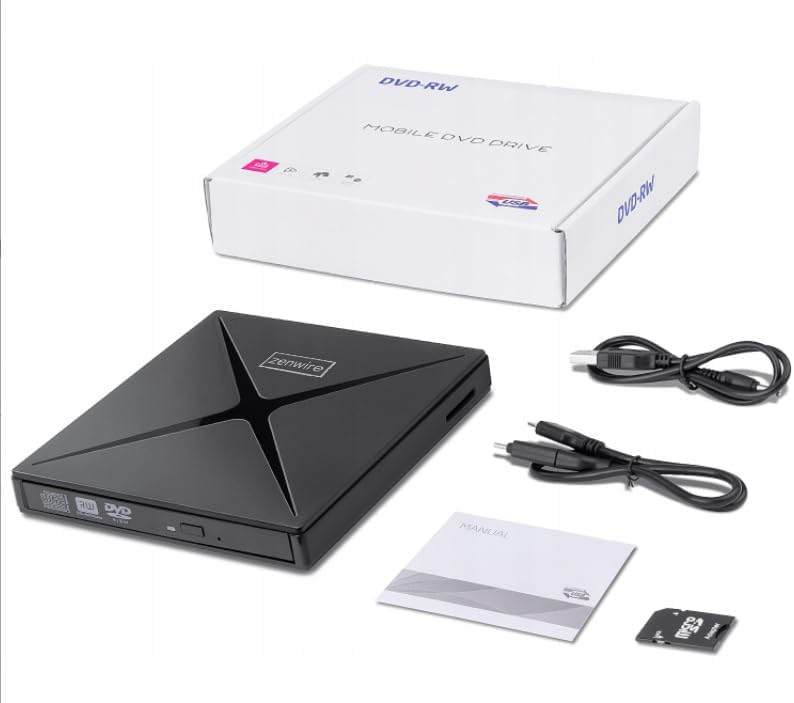
図2.1: パッケージ内容
3.製品オーバーview
The Zenwire SY885 combines multiple functionalities into one compact device. It features a CD/DVD drive, an SD card reader, and two USB ports for expanded connectivity.
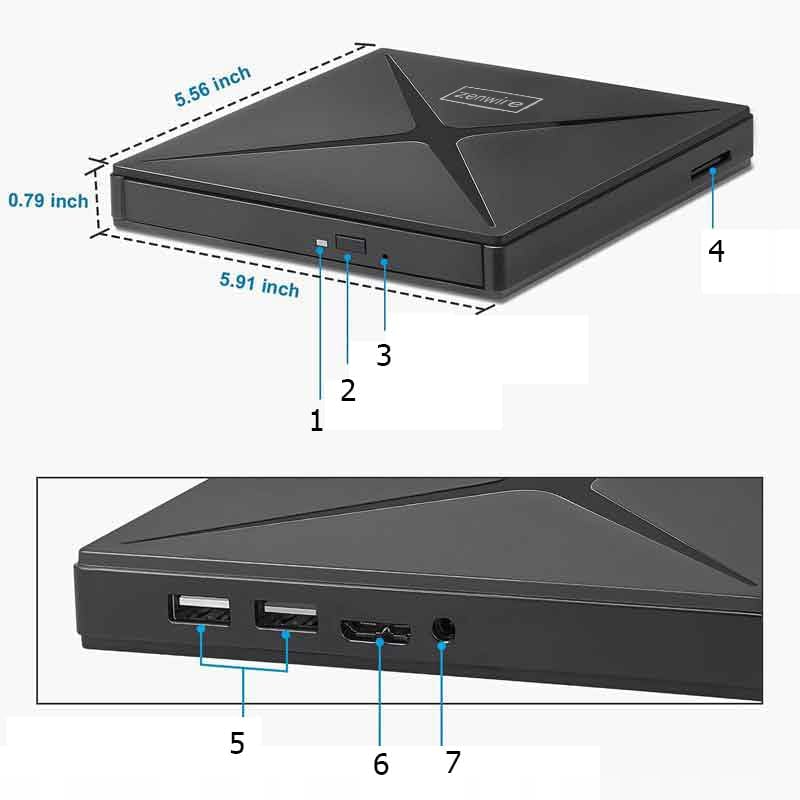
Figure 3.1: Device Ports and Features
- 取り出しボタン: 押すとディスクトレイが開きます。
- インジケーターライト: Illuminates when the device is powered on or active.
- USB-A ポート (2 個): USB周辺機器を接続します。
- SDカードスロット: For inserting SD and Micro SD cards (with adapter).
- USB-Cポート: Main connection to your computer.

図3.2: デバイスの寸法
4. セットアップ
The Zenwire SY885 features Plug & Play functionality, requiring no driver installation for most operating systems.
4.1デバイスの接続
- Connect the provided USB-C cable to the USB-C port on the Zenwire drive.
- Connect the other end of the USB-C cable to an available USB-C port on your computer. If your computer only has USB-A ports, use the provided USB-A to USB-A cable and connect it to a USB-A port on your computer.
- The indicator light on the drive will illuminate, confirming power. Your operating system should automatically detect and configure the device.

図4.1: ドライブをラップトップに接続する
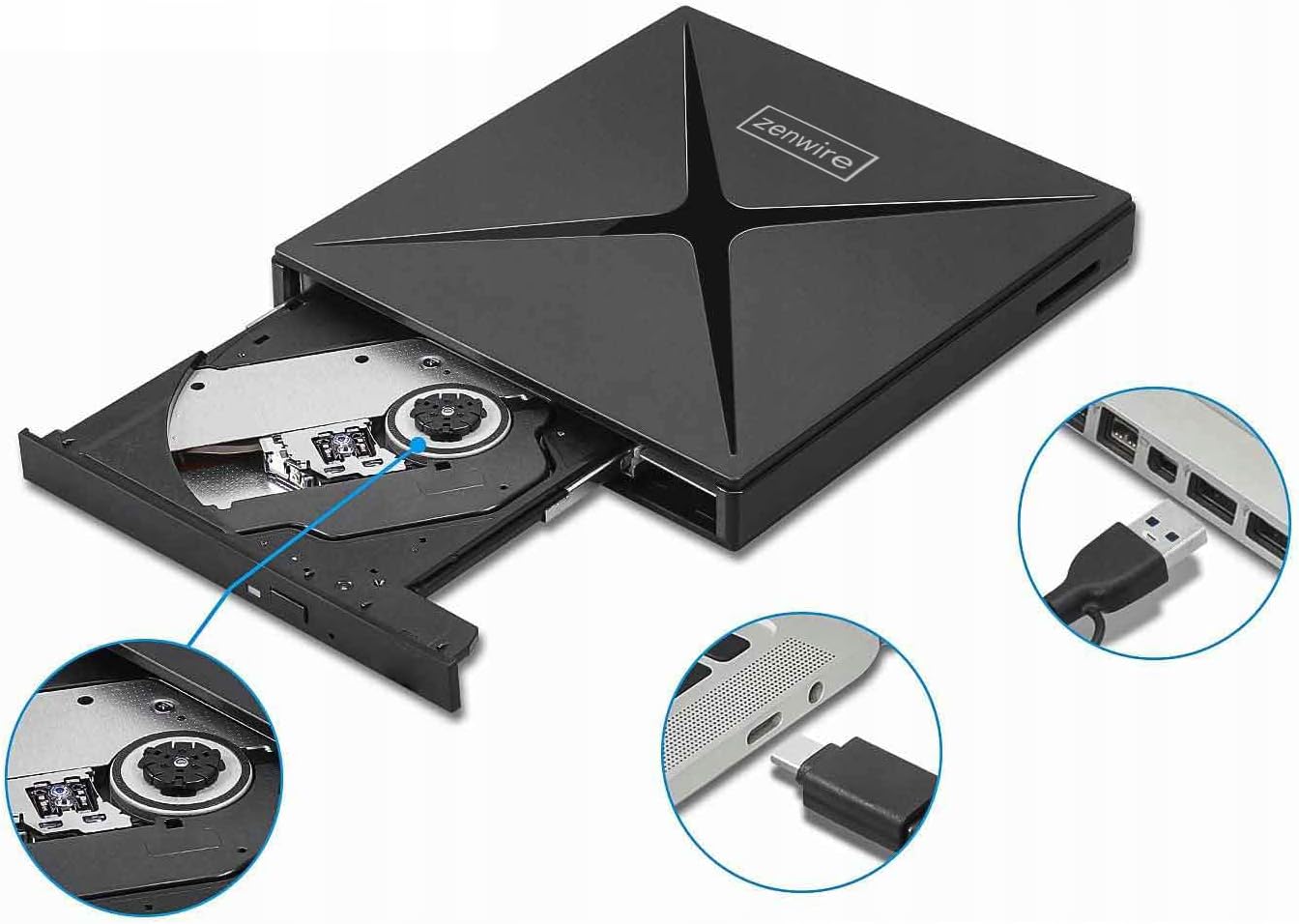
Figure 4.2: USB-A and USB-C Connection Options
5. 操作手順
5.1 Using the CD/DVD Drive
- ドライブがコンピューターに接続されていることを確認してください。
- Press the Eject button on the front of the drive to open the disc tray.
- CD または DVD をトレイの中央に慎重に置きます。
- カチッと音がするまでトレイをゆっくりとドライブに戻します。
- Your computer's operating system should detect the disc. You can then access its contents through File エクスプローラー (Windows) または Finder (Mac)。
- To eject the disc, press the Eject button again or use the software eject function in your operating system.
5.2 SDカードリーダーの使用
- ドライブがコンピューターに接続されていることを確認してください。
- Insert an SD card directly into the SD card slot on the side of the drive. For Micro SD cards, use the provided SD card adapter.
- カチッと音がして所定の位置に収まるまで、カードを押し込みます。
- Your computer will recognize the SD card as a removable storage device.
- To safely remove the SD card, eject it through your operating system's software function before physically pulling it out.
5.3 USBハブの使用
- ドライブがコンピューターに接続されていることを確認してください。
- Connect USB peripherals such as a mouse, keyboard, USB flash drive, or external hard drive to the two USB-A ports on the side of the Zenwire drive.
- The connected devices will function as if they were directly connected to your computer.

Figure 5.1: Data Transfer via the Drive
6. 互換性
The Zenwire SY885 is designed for broad compatibility with various operating systems and computer types.
- オペレーティング システム: Windows 11/10/8/8.1/7/Vista/XP, Mac OS (10.14 Mojave or higher), Linux.
- ハードウェアプラットフォーム: Laptops, Desktop PCs, All-in-One PCs.

図6.1: オペレーティングシステムの互換性

Figure 6.2: Device Compatibility with Various Computers
7. メンテナンス
To ensure the longevity and optimal performance of your Zenwire SY885, follow these maintenance guidelines:
- クリーニング: Use a soft, dry cloth to clean the exterior of the drive. Do not use liquid cleaners or abrasive materials. For the disc tray, use a specialized CD/DVD lens cleaner if necessary, following its instructions.
- ストレージ: ドライブは直射日光や極端な温度を避け、涼しく乾燥した場所に保管してください。使用しないときは、ほこりがたまらないようにディスクトレイを閉じてください。
- 取り扱い: Handle the drive carefully to avoid physical damage. Do not drop or expose it to excessive force.
- ディスクケア: Always use clean, scratch-free CDs and DVDs. Avoid touching the data surface of discs.
8。 トラブルシューティング
If you encounter issues with your Zenwire SY885, refer to the following common problems and solutions:
| 問題 | 考えられる原因 | 解決 |
|---|---|---|
| ドライブがコンピュータで検出されない | Loose connection, insufficient power, incompatible USB port. | Ensure the USB cable is securely connected to both the drive and the computer. Try a different USB port on your computer. Ensure the USB port provides sufficient power (e.g., a direct port on the computer, not an unpowered hub). |
| Disc not reading/writing | Dirty or scratched disc, incorrect disc type, drive lens dirty. | Clean the disc with a soft cloth. Try a different disc. Ensure the disc type is supported (CD-R, CD-RW, DVD-R, DVD-RW). Consider using a CD/DVD lens cleaner. |
| SD カードが検出されない | Card not inserted correctly, damaged card, incompatible card format. | Reinsert the SD card firmly. Try a different SD card. Ensure the card is not locked (write-protected). Check if the card format is supported by your operating system. |
| USB peripherals not working via hub | Insufficient power, faulty peripheral, drive not fully connected. | Ensure the main drive is properly connected and receiving power. Try connecting the peripheral directly to the computer. Some high-power devices may require a powered USB hub. |
| データ転送速度が遅い | USB 2.0 ポートに接続され、システムが過負荷になっています。 | Ensure the drive is connected to a USB 3.0 or USB-C port on your computer for optimal speeds. Close unnecessary applications to free up system resources. |
9. 仕様
| 特徴 | 説明 |
|---|---|
| モデル番号 | SY885 |
| ブランド | ゼンワイヤー |
| ハードウェアインターフェイス | USB 2.0、USBタイプC |
| Optical Memory Write Speed | 12倍 |
| Optical Memory Read Speed | 8倍速DVD |
| データ転送速度 | 60 Megabits per second (USB 3.0) |
| プラットフォーム | ノートパソコン、デスクトップパソコン |
| 材料 | Drive + SD Card Reader + USB-C Hub |
| オペレーティングシステムの互換性 | Windows 11/10/8/8.1/7/Vista/XP, macOS 10.14 Mojave or higher, Linux |
| 寸法(約) | 15cm x 14cm x 1.8cm (5.91インチ x 5.56インチ x 0.79インチ) |
10. 保証とサポート
Zenwire products are designed for reliability and performance. For warranty information and technical support, please refer to the documentation included with your purchase or visit the official Zenwire webサイトでご確認ください。保証請求に備えて購入証明書を保管してください。