
1. はじめに
Welcome to the VTech M200E Marble Rush Racing Set! This educational toy allows children aged 4 to 10 years to construct exciting marble tracks with light and sound effects. With 73 colorful pieces, you can follow detailed assembly instructions or unleash creativity to design unique marble runs. This manual provides essential information for setup, operation, maintenance, and safety to ensure an enjoyable experience.

Image 1.1: The VTech M200E Marble Rush Racing Set in a complete assembly, showcasing various track elements and marbles.
2. 安全情報
Please read and follow these safety guidelines carefully before use:
- 成人の監督: Always ensure adult supervision during assembly and play, especially for younger children.
- 窒息の危険: The set contains small parts (marbles). Keep them away from children under 3 years of age to prevent choking.
- アイコンタクト: Avoid direct contact with eyes, particularly with any electronic components or small parts.
- 熱源: Keep the product away from open flames or direct heat sources to prevent damage or injury.
- バッテリーの安全性: Follow battery installation instructions carefully. Do not mix old and new batteries, or different types of batteries. Remove batteries if the toy is not used for an extended period.
3. パッケージ内容
箱を慎重に開梱し、以下の品目がすべて揃っていることを確認してください。
- 1 x VTech M200E Marble Rush Racing Set Electronic Piece (with light and sound effects)
- 73 x Colorful Track Building Pieces
- ビー玉5個
- Batteries (2 AA batteries are included for the electronic piece)
- 取扱説明書(本書)
4. バッテリーの取り付け
The electronic piece of your Marble Rush Racing Set requires 2 AA batteries. These are included with the product.
- Locate the battery compartment on the electronic piece. This is typically secured with a small screw.
- Using a screwdriver (not included), loosen the screw and open the battery compartment cover.
- 電池ボックス内の指示に従って、極性 (+/-) が正しいことを確認して、新しい AA 電池 2 本を挿入します。
- 電池カバーを元に戻し、ネジをしっかりと締めます。
- 使用済みのバッテリーは責任を持って廃棄してください。
5. セットアップと組み立て
The VTech M200E Marble Rush Racing Set offers various building possibilities. You can follow the included detailed construction instructions or create your own unique designs.
5.1 Basic Assembly Steps:
- コンポーネントを解凍します: Lay out all 73 colorful track pieces and the electronic unit on a flat, stable surface.
- ベースピースを接続します。 Start by connecting the base grid pieces to form a stable foundation for your track.
- Build Supports: Attach the support pillars to the base grid as per your chosen design or the instruction guide.
- Construct Track Sections: Connect the various track pieces, including straight sections, curves, ramps, and special features like the half-pipe and 360-degree loop. Ensure all connections are secure.
- Integrate Electronic Unit: Place the electronic unit in its designated position within the track layout. This unit provides interactive light and sound effects.
- Add Special Features: Incorporate the obstacle platform and the launcher mechanism into your track.
- 最終チェック: Before playing, gently test the track to ensure all pieces are firmly connected and marbles can roll freely without getting stuck.
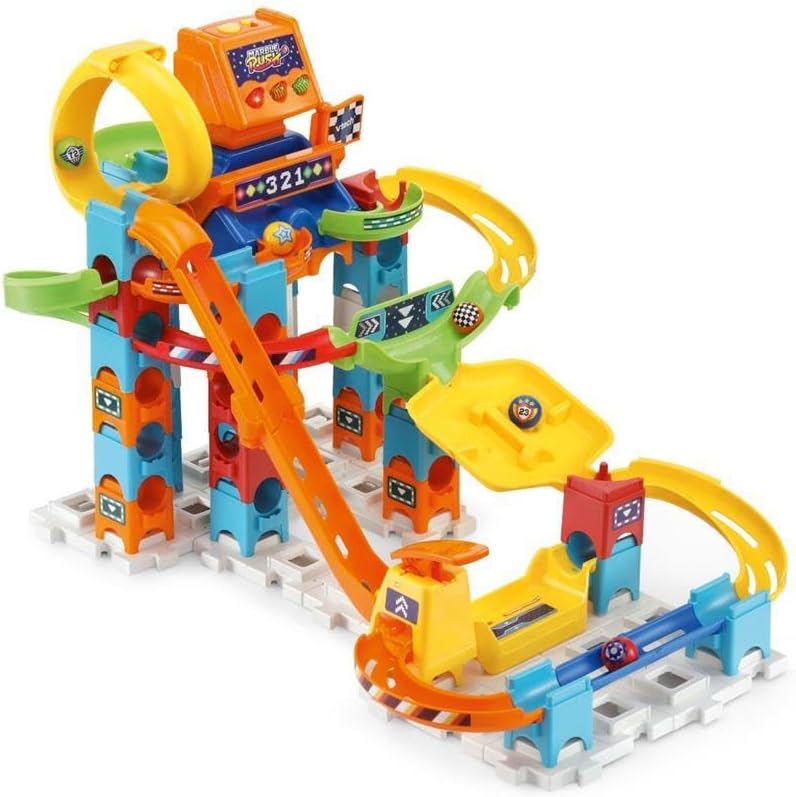
図5.1: 代替案 view of the assembled VTech M200E Marble Rush Racing Set, highlighting track complexity.

Image 5.2: A simpler track configuration of the VTech M200E Marble Rush Racing Set, demonstrating versatility.
6. 操作手順
Once your VTech M200E Marble Rush Racing Set is assembled and batteries are installed, you are ready to play!
- 電源オン: Locate the ON/OFF switch on the electronic unit and slide it to the 'ON' position. You should hear sounds and see lights activate.
- ビー玉を配置する: Position the included 5 marbles at the starting point of your track.
- Launch Marbles: Pull back and release the flag or lever at the starting point to launch the marbles down the track.
- レースを観戦する: Watch as the marbles race through the track, navigating curves, ramps, the half-pipe, and the obstacle platform. The electronic unit will provide interactive light and sound effects as marbles pass through certain points.
- Use the Launcher: If your track includes the launcher, it will bring marbles back into action, allowing for continuous play.
- 実験: Try different track configurations to see how the marbles behave and to discover new racing challenges.
- 電源を切る: When finished playing, slide the ON/OFF switch to the 'OFF' position to conserve battery life.
7. メンテナンス
Proper care will extend the life of your VTech M200E Marble Rush Racing Set.
- クリーニング: おもちゃを軽く拭きますamp cloth. Do not immerse the electronic unit in water. Avoid using harsh chemicals or abrasive cleaners.
- ストレージ: Store the toy in a cool, dry place away from direct sunlight when not in use. Disassemble the track for compact storage if desired.
- バッテリーのケア: Remove batteries from the electronic unit if the toy will not be used for an extended period to prevent leakage.
8。 トラブルシューティング
If you encounter any issues with your Marble Rush Racing Set, please refer to the following common solutions:
- No Sound/Lights from Electronic Unit:
- オン/オフスイッチが「オン」の位置にあることを確認します。
- Check battery polarity and ensure batteries are correctly inserted.
- 古い電池を新しい単三電池と交換してください。
- ビー玉が詰まる:
- Verify that all track pieces are securely connected and properly aligned.
- Ensure there are no foreign objects obstructing the track.
- Check for any loose or bent track pieces that might impede marble movement.
- しっかりと接続されていないピース:
- Ensure you are using the correct pieces for the intended connection points.
- Apply gentle, firm pressure until you hear or feel a click.
9. 仕様
| 特徴 | 詳細 |
|---|---|
| モデル番号 | 80-519323 |
| 製品寸法(長さ x 幅 x 高さ) | 13.3 x 38 x 30 cm(5.2 x 15 x 11.8インチ) |
| 製品重量 | 1.85 kg (4.08 ポンド) |
| 推奨年齢 | 4 - 10歳 |
| 電池が必要 | 2 x AA(付属) |
| 材料 | プラスチック |
| 教育目標 | Concentration, Imagination Development |
| 含まれるコンポーネント | Electronic unit, 73 building pieces, 5 marbles, batteries |
10. 保証情報
VTech products are manufactured to high-quality standards. For specific warranty details, please refer to the warranty card included in your product packaging or visit the official VTech webお住まいの地域のウェブサイトをご覧ください。購入証明書としてレシートを保管してください。
11. カスタマーサポート
If you have any questions, require assistance with assembly, or need troubleshooting help that is not covered in this manual, please contact VTech Customer Support. Contact information can typically be found on the VTech official webサイトまたは製品パッケージに記載されています。
詳細については、 AmazonのVTechストア.