
1. はじめに
Thank you for choosing the COMAOGO T002-W Mini Projector. This manual provides essential information for setting up, operating, and maintaining your projector to ensure optimal performance and longevity. The T002-W is a versatile projector featuring 9500 Lumens brightness, 1080P support, 5G WiFi, and Bluetooth 5.1 connectivity, designed for an immersive view220インチまで体験できます。
2. パッケージ内容
パッケージに以下の項目が含まれているか確認してください。
- 1 x COMAOGO T002-W Mini Projector
- リモコン x 1
- 電源ケーブル x 1
- HDMIケーブル x 1
- 1 x AVケーブル
- ユーザーマニュアル x 1
3.製品オーバーview
プロジェクターのコンポーネントとインターフェースについて理解しておきましょう。

Image: COMAOGO T002-W Projector with 5G and 2.4G WiFi capabilities, showing wireless screen synchronization with a tablet and smartphone.
The projector features various ports for connectivity, including HDMI, USB, VGA, AV, and a TF card slot, along with a 3.5mm audio output. It also supports dual-band 5G and 2.4G WiFi for stable wireless connections and Bluetooth 5.1 for audio devices.

Image: COMAOGO T002-W Projector connected to various devices including a laptop, game console, and streaming stick, highlighting its multiple input ports (AV, HDMI, USB, TF, VGA).
4. セットアップ
4.1 配置
Position the projector on a stable, flat surface or mount it on a tripod. Ensure there are no obstructions to the ventilation vents. For optimal viewing, the projection distance should be between 1.5 meters and 5.5 meters, yielding a screen size from 45 inches to 220 inches.
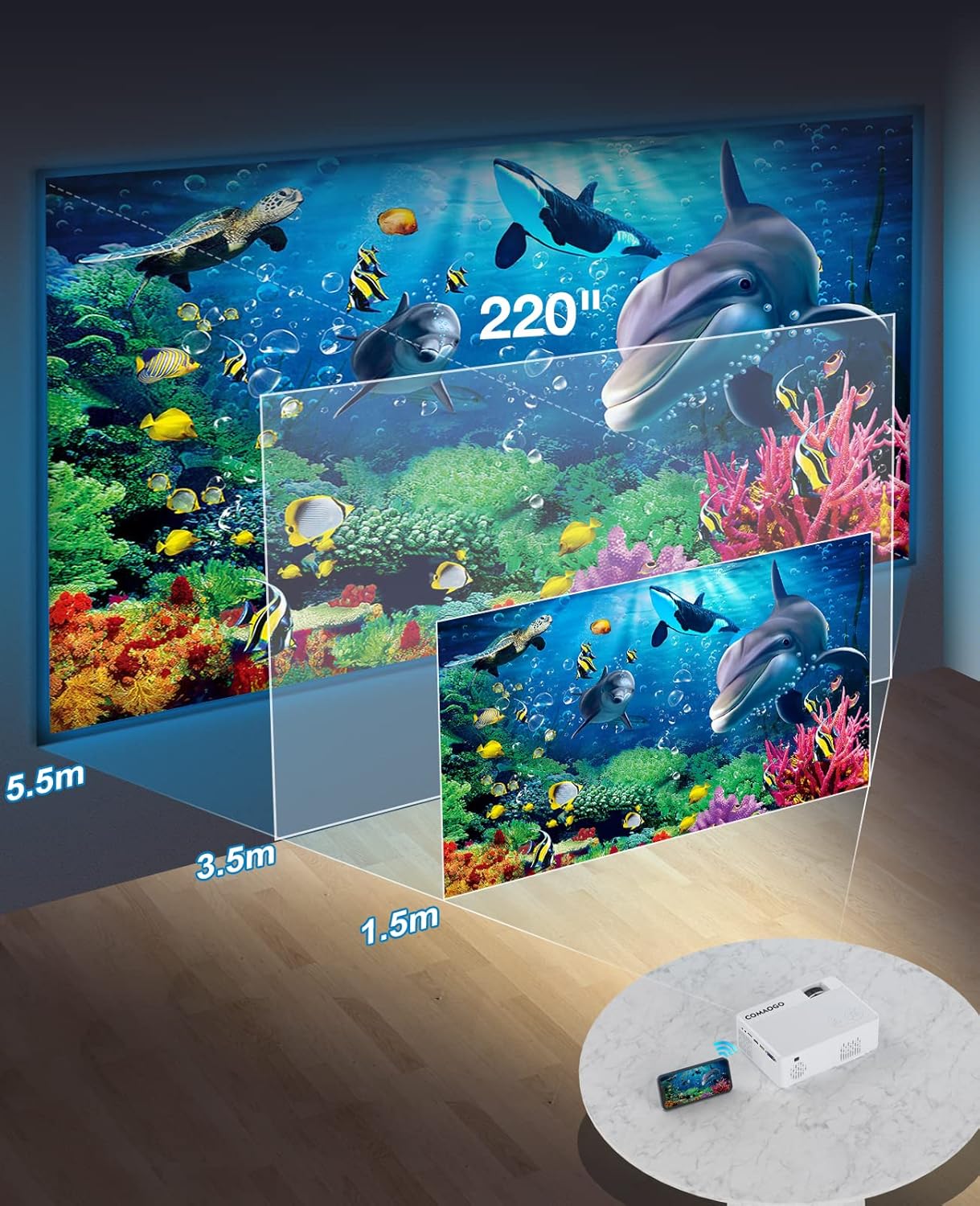
Image: Diagram illustrating the projection distances (1.5m to 5.5m) and corresponding screen sizes (45 to 220 inches) for the COMAOGO T002-W Projector.
4.2電源接続
Connect the power cable to the projector's power input and then plug it into a power outlet (AC 220V).
4.3 フォーカスとキーストーン補正
鮮明で長方形の画像を実現するには:
- フォーカス調整: 画像が鮮明になるまでプロジェクター レンズのフォーカス リングを回転させます。
- キーストーン補正: Adjust the keystone correction dial (if available, or via menu settings) to correct trapezoidal distortion, ensuring the image is rectangular. The projector supports ±15° keystone correction.

Image: Illustration of keystone correction and focus adjustment for the COMAOGO T002-W Projector, showing how to achieve a clear, rectangular image.
5. 操作手順
5.1 電源オン/オフ
- 電源オン: プロジェクターまたはリモコンの電源ボタンを押します。
- 電源を切る: プロジェクターの電源をオフにするには、電源ボタンをもう一度押します。
5.2 入力ソースの選択
Use the "Source" button on the remote control or the projector's control panel to select the desired input source (e.g., HDMI, USB, VGA, AV).
5.3 ワイヤレス接続(WiFi)
The projector supports dual-band 5G and 2.4G WiFi for stable screen mirroring.
- Navigate to the WiFi settings on the projector's menu.
- Select your desired WiFi network (5G for faster, more stable connection; 2.4G for longer range and better penetration).
- パスワードを入力して接続します。
- For screen mirroring, select the appropriate option (e.g., "iOS Cast" or "Android Cast") on the projector and follow the on-screen instructions to connect your smartphone or tablet.
5.4 Bluetooth接続
Connect external Bluetooth audio devices like speakers or headphones.

Image: COMAOGO T002-W Projector demonstrating Bluetooth 5.1 connection with a speaker and headphones.
- プロジェクターのメニューの Bluetooth 設定に移動します。
- Bluetooth デバイスがペアリング モードになっていることを確認します。
- リストからペアリングするデバイスを選択します。
- Note: The projector's Bluetooth function is for connecting output devices (speakers, headphones) only.
5.5 有線接続
利用可能なポートを使用してさまざまなデバイスを接続します。
- HDMI: Connect laptops, PCs, game consoles (Xbox), TV sticks (Roku, Chromecast), DVD players.
- USB: メディアを再生する fileUSB ドライブから直接転送します。
- VGA: 古いコンピューターやラップトップを接続します。
- AV: Connect legacy video devices.
- TFカード: メディアを再生するにはTFカードを挿入してください files.
- Important: Copyright-protected content from services like Netflix or Disney+ is not directly supported via screen mirroring. For these services, use an HDMI connection with a compatible adapter (e.g., Lightning Digital AV Adapter for iOS devices) or a streaming stick.
6. メンテナンス
6.1 レンズのクリーニング
Use a soft, lint-free cloth or lens cleaning paper to gently wipe the projector lens. Avoid using abrasive materials or harsh chemicals that could damage the lens coating.
6.2冷却システム
The projector features an updated cooling system designed to reduce noise and maintain optimal operating temperature. Ensure the ventilation vents are clear of dust and obstructions to prevent overheating. Regular cleaning of the vents with a soft brush or compressed air is recommended.
7。 トラブルシューティング
プロジェクターで問題が発生した場合は、次の一般的な解決策を参照してください。
- 写真なし:
- 電源接続を確認し、プロジェクターがオンになっていることを確認します。
- Verify the input source selection matches your connected device.
- Ensure all cables (HDMI, VGA, etc.) are securely connected.
- フォーカスとキーストーン補正を調整します。
- 音が出ない:
- プロジェクターの音量を調整します。
- 外部スピーカーを使用する場合は、正しく接続され、電源がオンになっていることを確認してください。
- Check Bluetooth connection for external audio devices.
- Ensure the audio output from your source device is enabled.
- WiFi/Screen Mirroring Issues:
- プロジェクターとデバイスの両方が同じ WiFi ネットワークに接続されていることを確認します。
- Check for strong WiFi signal.
- Restart both the projector and your source device.
- For Android devices, ensure "Wireless Projection" or "Screen Mirroring" is enabled. For iOS, use "Screen Mirroring" from Control Center.
- 画像がぼやけています:
- レンズのフォーカスリングを調整します。
- 投影距離が推奨範囲内であることを確認してください。
- 画像は台形です:
- キーストーン補正ダイヤルまたは設定を調整します。
For further assistance or software updates, please contact COMAOGO customer support.
8. 仕様
| 特徴 | 仕様 |
|---|---|
| ブランド | コモゴ |
| モデル | T002-W |
| 輝度 | 9500ルーメン(220 ANSI) |
| コントラスト比 | 6000:1 |
| ネイティブ解像度 | 1280×720 |
| サポートされている解像度 | 1080P |
| 投影サイズ | 45インチ~220インチ |
| 投影距離 | 1.5m~5.5m |
| キーストーン補正 | ±15° |
| WiFi接続 | デュアルバンド(5G + 2.4G) |
| ブルートゥース | ブルートゥース5.1 |
| ハードウェアインターフェイス | 3.5mm Audio, TF Card, USB 2.0, VGA, HDMI |
| 内蔵スピーカー | はい |
| 騒音レベル | 45デシベル |
| 消費電力 | 48ワット |
| 寸法 | 20.32 x 15.24 x 7.62 cm |
| 重さ | 1キログラム |
9. 公式製品ビデオ
Watch this video for a visual guide on the COMAOGO T002-W Mini Projector's features and operation.
Video: An official product video demonstrating the features and usage of the COMAOGO T002-W Mini Projector, including connectivity and display capabilities.
10. 保証とサポート
The COMAOGO T002-W Mini Projector comes with a standard manufacturer's warranty. For warranty claims, technical support, or inquiries regarding software updates, please contact COMAOGO customer service through the retailer where you purchased the product or visit the official COMAOGO webサイト。
SOFTWARE UPDATES can be provided; please contact us if needed.