
1. はじめに
The eppfun AK3040R is a versatile Bluetooth 5.3 audio receiver designed to upgrade your existing wired audio systems, such as home speakers or car stereos, with wireless Bluetooth capabilities. It allows you to stream music from your smartphone or other Bluetooth-enabled devices. Featuring NFC for quick pairing, multiple audio output options (3.5mm AUX, RCA), and a TF card slot for direct music playback, the AK3040R offers a convenient and enhanced audio experience.
2 製品の特徴
- ブルートゥース 5.3 テクノロジー: Incorporates the latest low-energy Bluetooth Ver 5.3 chip, providing a longer transmission distance and faster speed compared to Bluetooth 4.0, while maintaining compatibility with older versions.
- NFC機能: Supports one-touch pairing with NFC-enabled mobile phones for quick and convenient connection.
- 複数のオーディオ出力: Equipped with 3.5mm AUX and RCA ports for broad compatibility with various audio systems.
- TFカードスロット: Allows direct playback of music fileTF (MicroSD) カードから。
- コンパクトで軽量なデザイン: Portable and easy to integrate into any audio setup.
3. パッケージ内容
パッケージに以下の項目が含まれているか確認してください。
- eppfun AK3040R Bluetooth 5.3 Audio Receiver
- USB充電ケーブル(タイプC)
- 3.5mmオーディオケーブル
- RCAオーディオケーブル
- ユーザーマニュアル
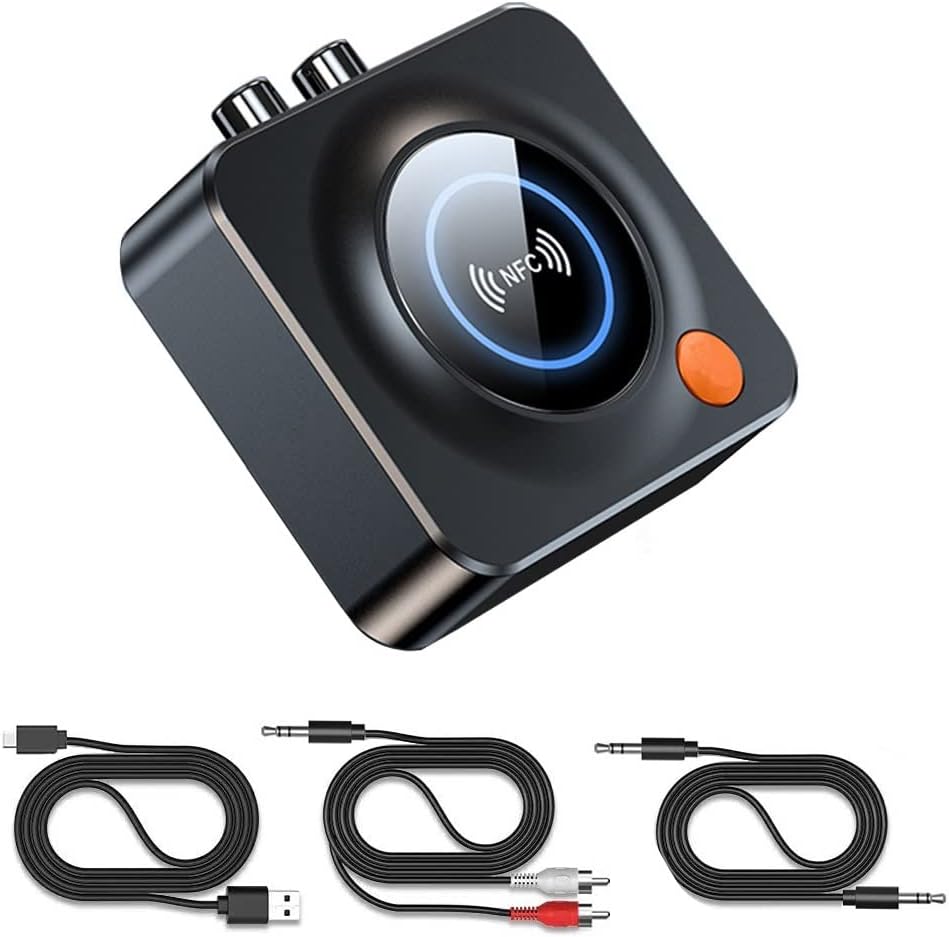
Image: The eppfun AK3040R Bluetooth receiver shown with its included USB charging cable, 3.5mm audio cable, and RCA audio cable.
4. デバイスのレイアウト

画像: トップダウン view of the eppfun AK3040R Bluetooth receiver. The top surface features a circular NFC sensing area with an NFC logo and a blue LED ring. An orange power button is visible on the side. The rear panel shows RCA (red and white) audio output ports, a 3.5mm AUX output, and a USB-C power input. A TF card slot is on the right side.
デバイスのポートとコントロールについて理解しておきましょう。
- NFC検知エリア: NFC 対応デバイスとの素早いペアリングを実現します。
- 電源ボタン: To turn the device on/off and initiate pairing.
- 3.5mm AUX出力: Connects to speakers or headphones via a 3.5mm audio cable.
- RCA出力: Connects to home stereo systems or amplifiers via RCA cables.
- TFカードスロット: ローカルで音楽を再生するには、TF (MicroSD) カードを挿入します。
- USB-C電源入力: 電源ケーブルを接続します。
5. セットアップ
Follow these steps to set up your eppfun AK3040R Bluetooth receiver:
- 接続電源: Plug the USB charging cable into the USB-C power input on the AK3040R and connect the other end to a USB power adapter (not included) or a powered USB port. The device will automatically power on and enter pairing mode.
- オーディオシステムに接続:
- For speakers or headphones with a 3.5mm input, use the provided 3.5mm audio cable to connect the AK3040R's 3.5mm AUX output to your audio device's input.
- For home stereo systems or amplifiers with RCA inputs, use the provided RCA audio cable to connect the AK3040R's RCA outputs to your audio system's RCA inputs.

Image: A diagram illustrating the connection process. It shows a USB-C cable and RCA/3.5mm audio cables being plugged into the receiver's ports. A smartphone is shown pairing with the device, and the receiver is connected to a home theater system.
6. 操作手順
6.1.Bluetoothペアリング
The AK3040R will automatically enter pairing mode when powered on. The LED indicator will flash, indicating it's ready to pair.
- 標準 Bluetooth ペアリング:
- Enable Bluetooth on your smartphone or other audio source device.
- 検索する available Bluetooth devices and select "AK3040R" from the list.
- Once connected, the LED indicator on the receiver will turn solid blue.
- NFC One-Touch Pairing:
- 携帯電話で NFC が有効になっていることを確認してください。
- Gently tap your NFC-enabled phone on the NFC sensing area of the AK3040R.
- Confirm the pairing request on your phone. The devices will connect automatically.
6.2.音楽を再生する
Once successfully paired, you can start playing music:
- From a Bluetooth Device: Play music on your paired smartphone or tablet. The audio will be streamed wirelessly to the AK3040R and output through your connected speakers.
- From TF Card: Insert a TF (MicroSD) card containing music files into the TF card slot. The receiver will automatically detect and begin playing music from the card.

Image: A visual representation of a smartphone streaming music wirelessly via Bluetooth to the eppfun AK3040R receiver, which is then connected to a pair of wired speakers, enhancing the audio experience.
7. メンテナンス
To ensure the longevity and optimal performance of your AK3040R:
- デバイスを乾燥した状態に保ち、湿気を避けてください。
- 柔らかく乾いた布でデバイスを拭いてください。刺激の強い化学薬品や研磨剤入りの洗剤は使用しないでください。
- 極端な温度を避けてください。
- ご自身でデバイスの分解や修理を試みないでください。保証が無効になります。
8。 トラブルシューティング
| 問題 | 考えられる原因 | 解決 |
|---|---|---|
| デバイスの電源が入りません。 | 電源が供給されていないか、ケーブルに障害があります。 | Ensure the USB-C cable is securely connected to a working power source. Try a different cable or power adapter. |
| Bluetooth デバイスとペアリングできません。 | Bluetooth is off on your device; AK3040R is not in pairing mode; too many devices connected. | Ensure Bluetooth is enabled on your phone/tablet. Confirm the AK3040R LED is flashing (pairing mode). Disconnect other Bluetooth devices from your phone. Restart both devices. |
| 接続しても音が出ません。 | Incorrect audio cable connection; volume too low; wrong input selected on audio system. | Check that audio cables are firmly connected to the correct input/output ports. Increase volume on both the AK3040R and your audio system. Select the correct input source on your ampライター/スピーカー。 |
| NFCペアリングに失敗します。 | NFC is off on your phone; phone not placed correctly. | Ensure NFC is enabled on your phone. Place your phone directly over the NFC sensing area on the AK3040R. |
| TF カードの音楽が再生されません。 | TFカードが正しく挿入されていません。サポートされていません。 file フォーマット; カードが破損しています。 | Ensure the TF card is fully inserted. Check if music fileサポートされている形式(例:MP3)です。別のTFカードをお試しください。 |
9. 仕様
| 特徴 | 詳細 |
|---|---|
| モデル | AK3040R |
| Bluetoothバージョン | 5.3 |
| オーディオ出力モード | ステレオ |
| 接続技術 | Bluetooth、3.5mm AUX、RCA |
| 特集 | NFC, Hands-free calling, Low latency |
| 対応デバイス | Android Smartphones, iPhones, iPads, Laptops, Wired Speakers |
| 受信距離 | Up to 10m (indoors) |
| 入力ボリュームtage | 4.8V〜5.25V |
| 製品寸法 | 6.9 x 6.9 x 2.4 cm(2.7 x 2.7 x 0.94インチ) |
| アイテム重量 | 45g(1.59オンス) |
| 材料 | ABS、金属 |
10. 保証とサポート
eppfun provides a 12ヶ月保証 for this product. We are committed to ensuring a positive customer experience.
If you encounter any issues or have questions regarding your eppfun AK3040R Bluetooth 5.3 Audio Receiver, please do not hesitate to contact our customer support. You can typically reach us through your purchase platform via your order history (e.g., on Amazon: [Order History] - [Contact Seller]). We aim to resolve your concerns as quickly as possible.