
導入
This manual provides detailed instructions for the proper setup, operation, and maintenance of your TOMLOV DM04 Digital Microscope. Please read this manual thoroughly before using the device to ensure optimal performance and longevity.
The TOMLOV DM04 is a versatile digital microscope featuring a 9-inch LCD screen, 16MP camera, and up to 1300X digital magnification. It is designed for various applications including coin inspection, circuit board repair, and general observation of small objects. It is compatible with Windows and Mac OS for advanced functions.
パッケージ内容
以下にリストされているすべてのアイテムがパッケージに含まれていることを確認してください。
- 9インチ顕微鏡ユニット
- ベースプレート(Base Plate)
- 10-inch Stand Pole
- リモートコントロール
- USB Cable for Microscope (Micro USB)
- USB Cable for Base (USB-C)
- ライトバリア
- ユーザーマニュアル
- 32GB SD カード (プリインストールまたは別途付属)

Image: All components included in the TOMLOV DM04 Digital Microscope package, including the microscope unit, stand, base, cables, remote, and manual.
セットアップ手順
- スタンドを組み立てる: Attach the 10-inch stand pole to the base plate. Ensure it is securely fastened.
- 顕微鏡を取り付けます。 Slide the microscope unit onto the stand pole and tighten the securing screw at the desired height.
- 接続電源:
- Connect the Micro USB cable to the microscope unit and a power source (e.g., USB adapter, computer USB port).
- Connect the USB-C cable to the base plate (for auxiliary lights) and a separate power source.
- SDカードを挿入します: If not pre-installed, insert the provided 32GB SD card into the slot on the back of the microscope unit.
- Position Auxiliary Lights: Adjust the flexible auxiliary lights on the base to illuminate your observation area as needed.
- 電源オン: Press and hold the power button on the microscope unit to turn it on.
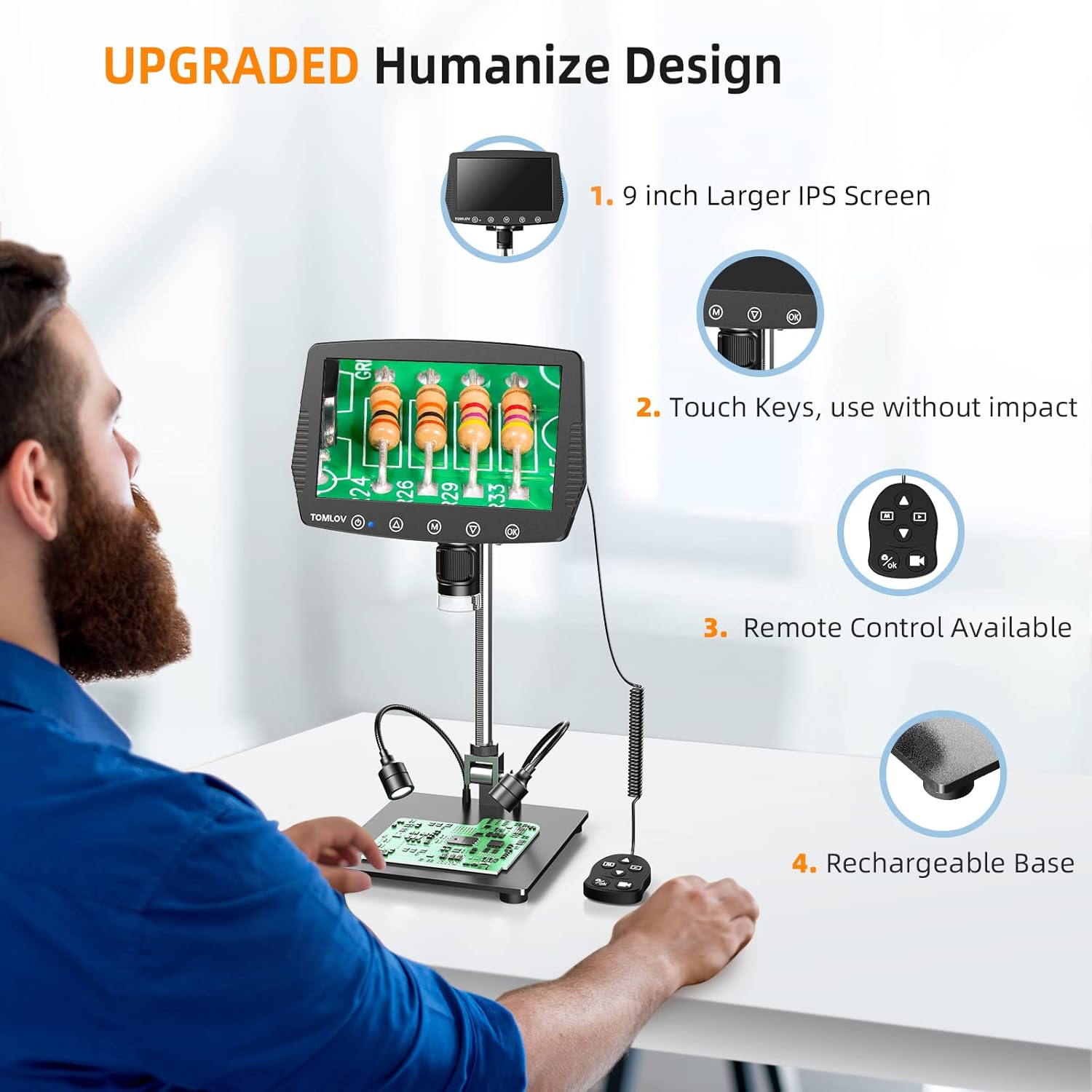
Image: A user setting up the TOMLOV DM04 microscope, demonstrating the assembly of the stand and placement of the microscope unit.
操作手順
基本操作
- 電源オン/オフ: 電源ボタン(⑂)をクリックしてデバイスの電源をオンまたはオフにします。
- フォーカス調整: Rotate the focus wheel on the microscope unit to achieve a clear image on the 9-inch LCD screen.
- 倍率: The microscope offers digital magnification up to 1300X. Adjust the height of the microscope on the stand and use the digital zoom functions (if available via menu) to change magnification.
- 点灯:
- 内蔵LEDライト: The microscope head has built-in LED lights. These can be adjusted via the menu or dedicated buttons.
- Auxiliary Base Lights: The two flexible lights on the base can be adjusted independently using their respective controllers to provide additional illumination.
- 画像/ビデオをキャプチャ:
- を押す OK button on the microscope or remote control to take a picture.
- を押し続けます OK ビデオ録画を開始/停止するボタン。
- Captured images and videos are saved to the inserted SD card.
高度な機能
- メニューナビゲーション: 使用 M (Menu) button and arrow buttons (▲, ▼) to navigate through settings and options on the LCD screen.
- リモートコントロール: The included remote control allows for stable operation, reducing image shake during capture.
- Rotatable Screen & Bracket Pole: The screen can be rotated up to 80 degrees and the bracket pole up to 180 degrees for flexible view角度を変える。
- PC Connection (Windows/Mac OS):
- Connect the microscope to your computer using the appropriate USB cable.
- Select "PC Camera" mode on the microscope's screen.
- Install the dedicated software (refer to the included software CD or manufacturer's website for download) to enable measurement and marking functions, and to view コンピューター上のライブフィード。
- Files can be transferred directly from the SD card when connected to a PC.

Image: The TOMLOV DM04 microscope connected to a laptop, showing the "PC Camera" function and measurement capabilities on the computer screen.

画像: クローズアップ view of the TOMLOV DM04 microscope's dual auxiliary lighting system, highlighting the built-in LED ring light and the two flexible base lights.
Video: A demonstration of the TOMLOV DM04 digital microscope's capabilities, showing a detailed view of a fly. This video illustrates the clarity and magnification achievable with the device.
メンテナンス
- クリーニング:
- Use a soft, dry cloth to clean the exterior of the microscope and screen.
- レンズには、レンズクリーニングクロスと専用のレンズクリーニング液を使用してください。研磨剤は使用しないでください。
- Do not use liquid cleaners directly on the screen or lens.
- ストレージ: 顕微鏡は直射日光や極端な温度を避け、清潔で乾燥した環境に保管してください。
- バッテリーのケア: For optimal battery life, charge the microscope regularly and avoid fully discharging it for extended periods.
- ソフトウェアアップデート: TOMLOV公式ウェブサイトを定期的にチェックしてください website for any available software or firmware updates for your DM04 model.
トラブルシューティング
| 問題 | 考えられる原因 | 解決 |
|---|---|---|
| 画面に画像がありません | デバイスの電源がオンになっていません。レンズキャップが装着されています。フォーカスが調整されていません。 | Ensure device is powered on. Remove lens cap. Adjust focus wheel. |
| 画像がぼやけている | Improper focus; insufficient lighting; dirty lens. | Adjust focus wheel. Increase illumination using built-in or auxiliary lights. Clean the lens. |
| 画像/動画を保存できません | No SD card inserted; SD card full or corrupted; incorrect file フォーマット設定。 | 互換性のあるSDカードを挿入してください。不要なものを削除してください。 files or replace SD card. Check menu settings for file 形式。 |
| PC接続が機能しない | Incorrect USB cable; "PC Camera" mode not selected; driver issues. | Ensure correct USB cable is used. Select "PC Camera" mode on microscope. Install necessary drivers/software. |
仕様
- モデル: DM04
- 画面サイズ: 9インチ液晶
- カメラ解像度: 16メガピクセル
- ビデオ解像度: 1080P
- Digital Magnification: 最大1300倍
- Stand Length: 10インチ
- フォーカス範囲: Up to 8 inches (with enhanced stand)
- 点灯: Built-in 8-LED fill lights, Rechargeable base lights (2)
- コントロール: Touch buttons, Remote control
- ストレージ: Micro SD カードをサポート(32GB 付属)
- PC の互換性: Windows、Mac OS X
- 電源: 電池駆動(5ボルト)
- 材料: 10'' Metal Stand + 9'' LCD Screen + Large Metal Base
保証情報
TOMLOV products typically come with a standard manufacturer's warranty. Please refer to the warranty card included in your product packaging or visit the official TOMLOV web保証期間や請求手続きなどの詳細な保証条件については、こちらのサイトをご覧ください。
カスタマーサポート
For technical assistance, troubleshooting not covered in this manual, or warranty inquiries, please contact TOMLOV customer support:
- Webサイト: www.tomlov.com (注: これはプレースホルダーです URL公式サポートについては、製品ドキュメントを参照してください。 webサイト。)
- メールアドレス: Refer to your product documentation.
- 電話: Refer to your product documentation.
When contacting support, please have your product model (DM04) and purchase information ready.