
導入
Thank you for choosing the Vault Buds Duo Dual Driver Headphones. These in-ear headphones are engineered to deliver a rich and immersive audio experience, featuring dual dynamic drivers for enhanced sound clarity and bass. Designed for comfort and durability, they are compatible with a wide range of devices, making them ideal for everyday listening, gaming, and communication.
製品終了view
The Vault Buds Duo headphones feature a lightweight, in-ear design with a durable cable and an integrated in-line microphone for convenient control and communication.

The Vault Buds Duo headphones, showcasing their sleek black design and in-ear form factor.

クローズアップ view of the dual 6mm dynamic drivers within the earbud housing, responsible for the enhanced audio quality.

The 45-degree angled gold-plated 3.5mm audio jack, designed for durability and optimal connection.
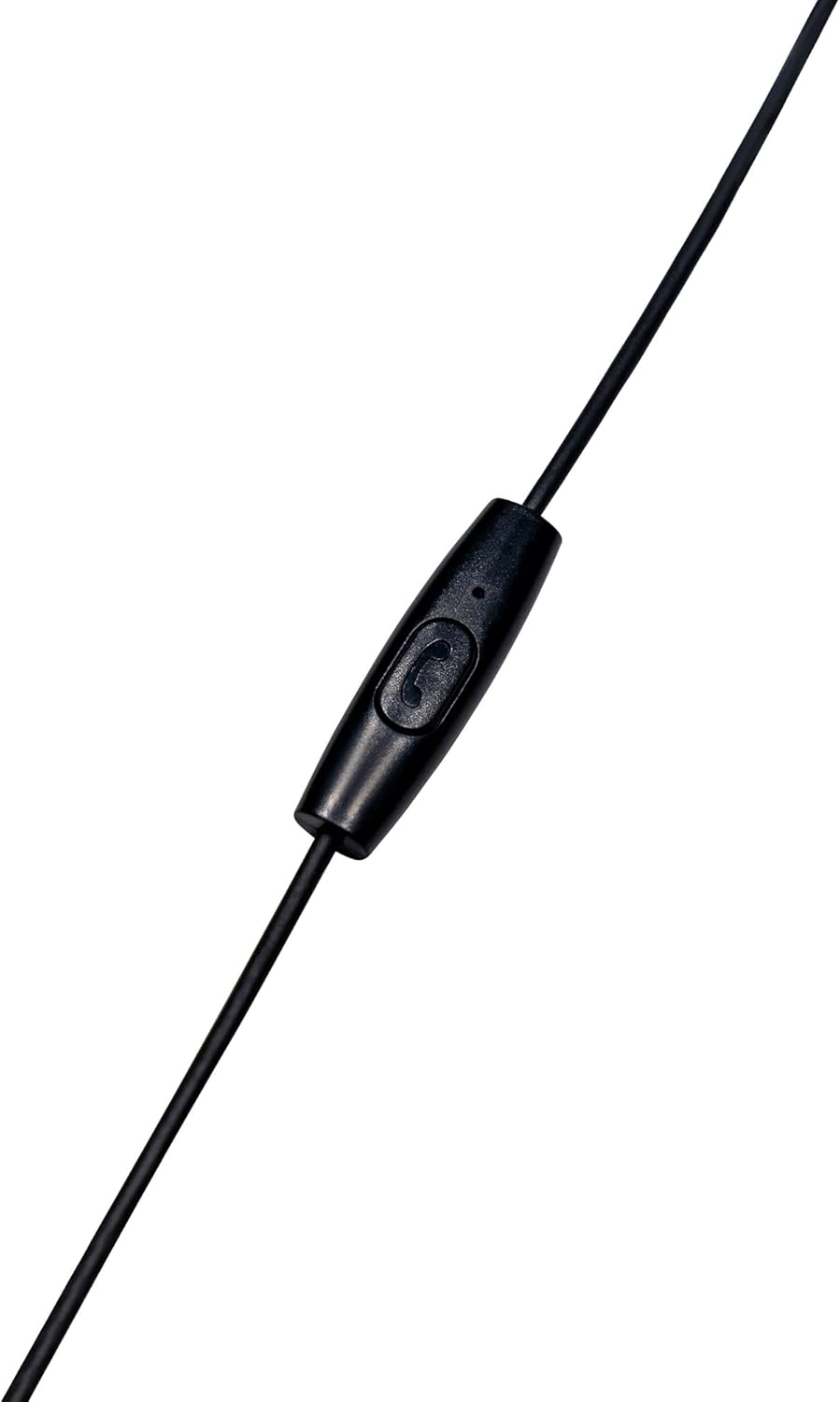
The in-line microphone and control button, allowing for hands-free calls and media management.
公式製品ビデオ
このビデオはオーバーを提供しますview of the Vault Buds Duo Dual Driver Headphones, highlighting key features and design elements.
設定
- イヤーチップを選択: Choose the ear tip size that provides the most comfortable and secure fit for your ears. Multiple sizes are included to ensure optimal comfort and sound isolation.
- イヤホンを挿入します: Gently insert the earbuds into your ears. Ensure a snug fit to maximize sound quality and bass response.
- デバイスに接続します: Plug the 3.5mm audio jack into the compatible audio port of your smartphone, tablet, PC, or laptop.
操作手順
The in-line microphone and control button allow for easy management of calls and media playback.
- 音楽の再生/一時停止: コントロール ボタンを 1 回押すと、オーディオの再生が再生または一時停止されます。
- 通話の応答/終了: コントロール ボタンを 1 回押すと、着信に応答するか、進行中の通話を終了します。
- 通話を拒否: 着信を拒否するには、コントロール ボタンを約 2 秒間押し続けます。
- 次のトラック: Press the control button twice quickly to skip to the next audio track.
- 前のトラック: Press the control button three times quickly to go back to the previous audio track.
メンテナンス
- クリーニング: Regularly clean the ear tips with a soft, dry cloth. For deeper cleaning, remove the ear tips and wash them with mild soap and water, ensuring they are completely dry before reattaching. Do not use harsh chemicals or abrasive materials on the earbuds.
- ストレージ: When not in use, store the headphones in a clean, dry place, preferably in a protective pouch, to prevent tangling and damage to the cable or earbuds.
- ケーブルのお手入れ: Avoid excessive pulling, twisting, or bending of the cable, especially near the connectors, to prolong its lifespan.
トラブルシューティング
- 音が出ない:
- 3.5mm ジャックがデバイスのオーディオ ポートに完全に挿入されていることを確認します。
- デバイスの音量設定を確認してください。
- デバイス固有の問題を排除するために、別のデバイスでヘッドフォンをテストします。
- 音質が悪い:
- Ensure ear tips are correctly sized and seated for a proper seal in your ear canal.
- イヤホンのグリルからゴミを取り除きます。
- マイクが機能しない:
- Ensure the 3.5mm jack is fully inserted. Some devices require a TRRS (Tip-Ring-Ring-Sleeve) jack for microphone functionality, which these headphones provide.
- デバイスのマイク入力設定を確認してください。
仕様
| 特徴 | 説明 |
|---|---|
| モデル名 | EP-1182 |
| オーディオドライバータイプ | デュアルダイナミックドライバー |
| オーディオドライバーのサイズ | 2 * 6 Millimeters |
| 周波数応答 | 20Hz-20KHz |
| インピーダンス | 32オーム |
| 接続技術 | 有線 |
| ヘッドフォンジャック | 3.5ミリジャック |
| ケーブル機能 | Durable TPE Rubber, 1.2m length |
| コントロールタイプ | Media Control (In-line microphone) |
| 対応デバイス | Smartphones, Tablets, PC, Laptop (with 3.5mm audio input) |
| アイテム重量 | 1.13オンス |
保証とサポート
This Vault Buds Duo Dual Driver Headphones product comes with a 2年間保証 from Vault, covering damages and defects. For further assistance, troubleshooting, or warranty claims, please refer to the contact information provided on the product packaging or visit the official Vault webサイト。
For additional information and support, please visit the product detail page on Amazon: Amazon商品ページ