
MINLOVE 108S
MINLOVE 108S 5G WiFi Bluetooth プロジェクター ユーザーマニュアル
モデル: 108S
1.製品オーバーview
The MINLOVE 108S is a high-definition projector designed for both home theater and business presentations. It features native 1080p resolution, 5G and 2.4G WiFi connectivity for seamless screen mirroring, and Bluetooth 5.0 for audio output. With a brightness of 9800 lumens and a 10000:1 contrast ratio, it delivers clear and vibrant images up to 450 inches. This package includes a 100-inch projector screen for immediate use.
パッケージ内容:
- MINLOVE 108S Projector x1
- HDMIケーブルx1
- Remote Control x1 (Batteries not included)
- 3-in-1 AVケーブル×1
- ユーザーマニュアル x1
- 電源コード x1
- 100-inch Projector Screen x1
- レンズキャップ×1

Image 1.1: The MINLOVE 108S Projector, showcasing its compact design and the included 100-inch screen, along with icons representing various streaming services and connectivity options.
2.セットアップガイド
2.1 配置
Position the projector on a stable, flat surface or mount it to the ceiling. Ensure there is adequate ventilation around the unit. The optimal projection distance will vary based on desired screen size, with a maximum display size of 450 inches.
2.2電源接続
- 電源コードをプロジェクターの電源入力に接続します。
- Plug the other end of the power cord into a standard electrical outlet (240 Volts).
2.3初期電源オン
プロジェクターまたはリモコンの電源ボタンを押してデバイスの電源を入れます。インジケーターライトが点灯します。
2.4 フォーカスとキーストーン調整
- 集中: 投影された画像が鮮明になるまで、プロジェクター レンズのフォーカス リングを回転させます。
- キーストーン補正: Use the manual keystone correction dial (typically ±15°) to adjust the image shape if it appears trapezoidal. This corrects for projection angles that are not perfectly perpendicular to the screen.
3. 操作手順
3.1 接続オプション
3.1.1 WiFi Connection (5G/2.4G) for Screen Mirroring
The projector supports dual-band 2.4G and 5G WiFi for wireless screen mirroring from iOS, Android, and Windows devices. Ensure both the projector and your device are connected to the same local WiFi network.
- プロジェクターのメニューで「スクリーンミラーリング」または「WiFi ディスプレイ」オプションに移動します。
- Select your device's operating system (iOS/Android/Windows).
- モバイル デバイスまたはコンピューターで、画面のミラーリング/キャストを有効にし、使用可能なデバイスのリストからプロジェクターを選択します。
注記: Wired screen mirroring is also supported for iOS devices using a USB cable or an HDMI conversion cable.

Image 3.1: Visual representation of 5G and 2.4G WiFi connectivity, demonstrating wireless screen mirroring from laptops, tablets, and smartphones to the projector.
3.1.2 Bluetooth 5.0接続
Connect the projector to external Bluetooth speakers, headphones, or other Bluetooth audio devices for an enhanced audio experience. Bluetooth connection is for audio output only.
- Go to the 'Bluetooth Settings' in the projector's menu.
- Bluetoothを有効にして、利用可能なデバイスを検索します。
- リストからペアリングする Bluetooth オーディオ デバイスを選択します。

Image 3.2: The MINLOVE projector highlighting its built-in HiFi stereo speakers and its ability to connect to external Bluetooth devices like headphones and speakers.
3.1.3 有線接続
The projector offers multiple wired input ports for various devices:
- HDMI(×2): Connect TV boxes, gaming consoles (PS5, Xbox), laptops, PCs, Blu-ray players.
- USB(x1): USB ドライブから直接メディアを再生します。
- AV: Connect older devices using the included 3-in-1 AV cable.
- VGA: コンピューターに接続します。
- マイクロSD: Play media from Micro SD cards.

Image 3.3: An illustration of the MINLOVE projector's universal connectivity, showing its compatibility with a wide range of devices through HDMI, USB, and other ports.
3.2 入力ソースの選択
リモコンまたはプロジェクターのコントロール パネルの [ソース] ボタンを使用して、使用可能な入力ソース (HDMI1、HDMI2、USB、AV、スクリーン ミラーリング) を切り替えます。
3.3メニューナビゲーション
Use the arrow keys and 'OK' button on the remote control to navigate the projector's on-screen menu. Adjust settings such as picture mode, sound mode, aspect ratio, and network settings.

Image 3.4: The projector's home interface, showing various applications and examples of its use in different settings, such as watching movies, exercising, and outdoor entertainment.
4. メンテナンス
4.1 レンズクリーニング
Gently clean the projector lens with a soft, lint-free cloth or a lens cleaning brush. Avoid using abrasive cleaners or excessive force, which can scratch the lens.
4.2 ダストフィルターのクリーニング
Regularly check and clean the dust filter (if accessible) to ensure proper airflow and prevent overheating. Refer to the specific location of the filter in the product diagram if available.
4.3リットルamp 人生
The LED light source in the MINLOVE 108S projector has an estimated lifespan of up to 60,000 hours, providing long-term performance without frequent lamp 交換。
4.4 ストレージ
プロジェクターを使用しない場合は、直射日光や極端な温度を避け、涼しく乾燥した場所に保管してください。レンズキャップを使用して、レンズをほこりや傷から保護してください。
5。 トラブルシューティング
- 電源なし: Ensure the power cord is securely connected to both the projector and the electrical outlet. Check if the outlet is functional.
- 画像無し:
- 正しい入力ソースが選択されていることを確認します。
- Check all connected cables (HDMI, AV, etc.) for secure connections.
- フォーカスリングを調整します。
- 画質が悪い:
- Adjust the focus and keystone correction.
- 投影面が平らで清潔であることを確認してください。
- ソースデバイスの解像度設定を確認してください。
- If a browning or multicolored spot appears, this may indicate overheating. Turn off the unit to cool down or ensure adequate ventilation.
- 音が出ない:
- プロジェクターとソースデバイスの両方の音量を上げます。
- If using Bluetooth, ensure the device is properly paired and selected as the audio output. Note that Bluetooth audio may experience slight latency.
- Check audio cable connections for wired setups.
- リモコンが動作しない: リモコンの電池を交換してください。リモコンとプロジェクターの赤外線受信機の間に障害物がないことを確認してください。
6. 仕様
| 特徴 | 仕様 |
|---|---|
| モデル番号 | 108年代 |
| 標準解像度 | ネイティブ1920 x 1080ピクセル |
| 輝度 | 9800ルーメン |
| コントラスト比 | 10000:1 |
| ズーム機能 | 100% - 75% |
| キーストーン補正 | ±15° 手動 |
| 最大画面サイズ | 450インチ |
| LED寿命 | 60,000時間 |
| 無線機能 | 5G/2.4G WiFi & Bluetooth 5.0 |
| アスペクト比 | 4:3/16:9/自動 |
| 互換性 | iOS, Android, PC, Xbox, PS4/PS5, TV Stick, HDMI, USB |
| 接続タイプ | Wi-Fi, HDMI (x2), USB (x1), AV, VGA, Micro SD |
| 製品寸法 | 29.97 x 19.99 x 10.01 cm |
| アイテム重量 | 3.68キログラム |
| 巻tage | 240ボルト |
| ワットtage | 50ワット |

Image 6.1: Visual comparison illustrating the superior brightness, sharpness, and wider color gamut of the MINLOVE projector compared to traditional models.
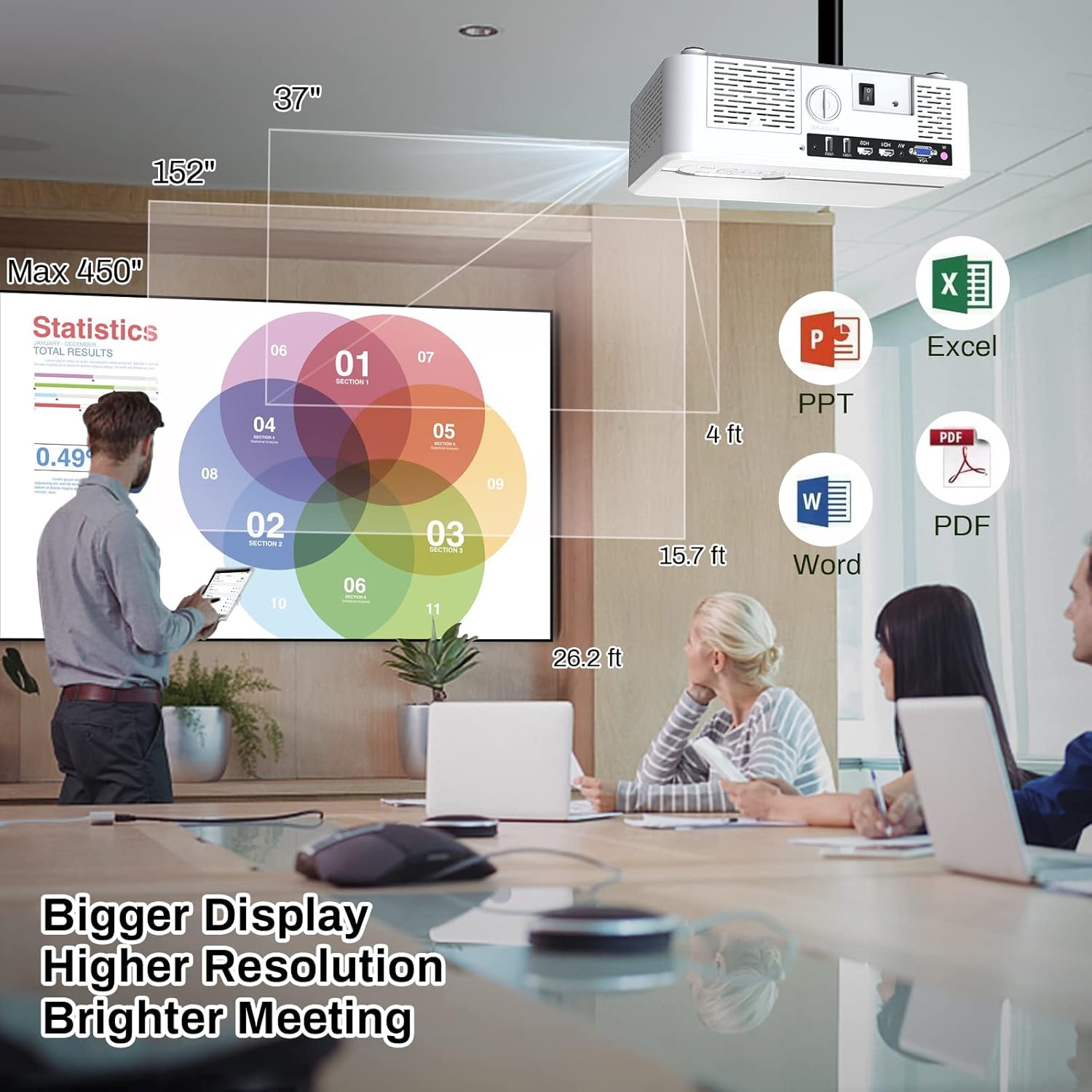
Image 6.2: The MINLOVE projector in a business environment, demonstrating its capability to project large, high-resolution displays for meetings and presentations.
7. 保証とサポート
The MINLOVE 108S projector comes with a 1-year warranty. For any questions, technical assistance, or after-sales service, please contact MINLOVE customer support. Our customer service team is available 24/7 to provide satisfactory solutions.
Ask a question about this manual
Ask about setup, troubleshooting, compatibility, parts, safety, or missing instructions. Manuals+ will review the question and use this page’s manual context to help answer it.