
1. はじめに
This manual provides essential information for the safe and efficient operation of your TechniSat DIGITRADIO 370 IR. Please read these instructions carefully before using the device and retain them for future reference.
2. 安全に関する注意事項
- 火災や感電を防ぐため、装置を雨や湿気にさらさないでください。
- 通気口を塞がないでください。適切な空気の流れを確保するために、デバイスの周囲に十分なスペースを確保してください。
- デバイスに付属の電源アダプタのみを使用してください。
- ラジエーター、暖房口、ストーブ、その他の機器(電気製品を含む)などの熱源の近くにデバイスを置かないでください。 amp熱を発生する装置。
- 特にプラグ、コンセント、および装置から出ている部分で、電源コードが踏まれたり挟まれたりしないように保護してください。
- 雷雨のときや長期間使用しない場合は、この装置のプラグを抜いてください。
- すべての修理は資格のあるサービス担当者に依頼してください。電源コードやプラグが破損している、液体がこぼれた、装置内に物が落ちた、装置が雨や湿気にさらされた、正常に動作しない、装置を落としたなど、装置が何らかの損傷を受けた場合は修理が必要です。
3. パッケージ内容
パッケージにすべてのアイテムが揃っていることを確認します。
- TechniSat DIGITRADIO 370 IR (Black)
- リモートコントロール
- 電源アダプター
- ユーザーマニュアル(このドキュメント)
4. コントロールと接続

図4.1: フロントパネルview
The image above displays the front panel of the DIGITRADIO 370 IR, featuring the central display, volume and tuning/OK rotary knobs, and various control buttons such as Power, Mode, Preset, Scan, and Back.
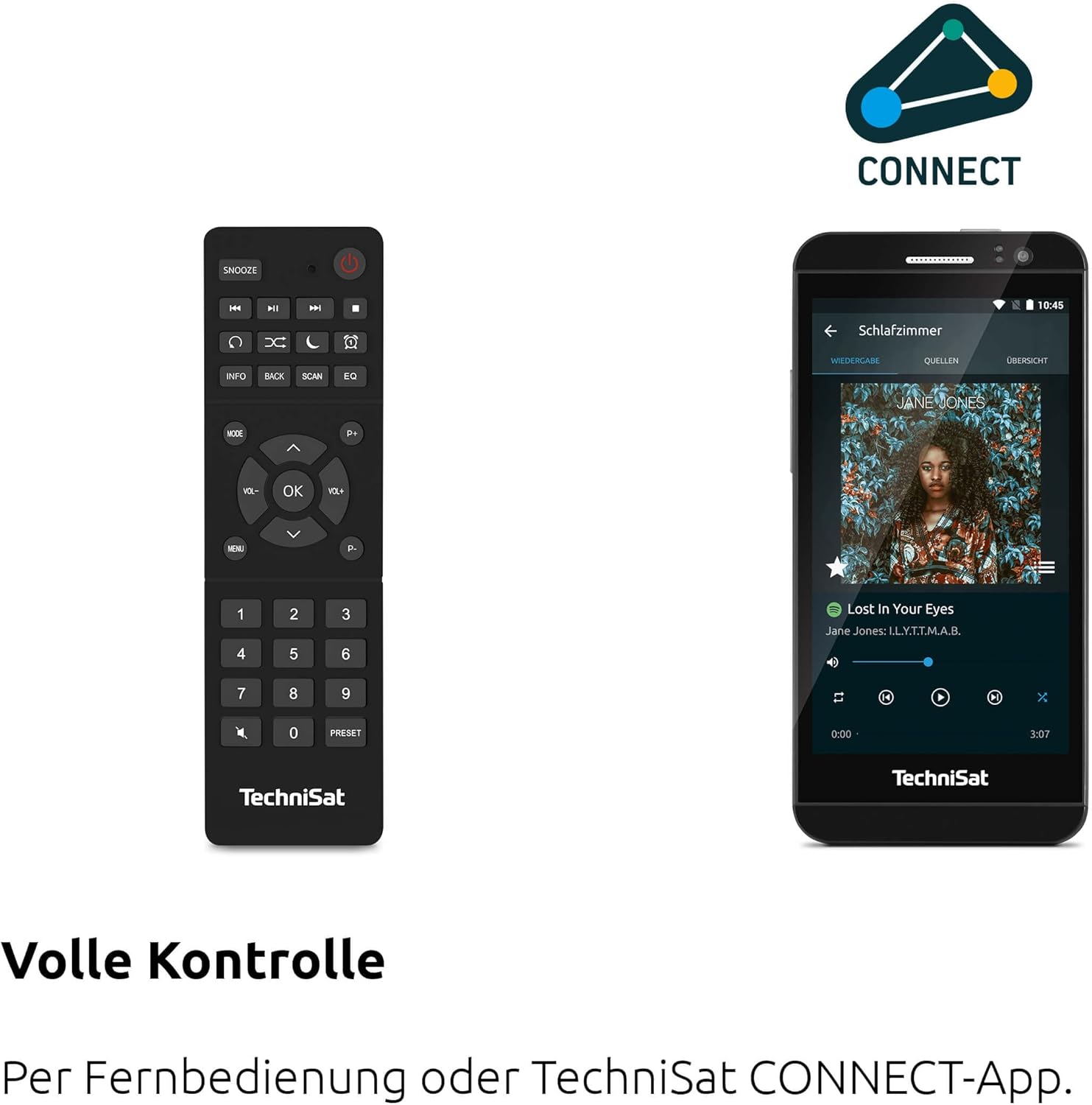
図4.2: リモートコントロールとアプリのインターフェース
This image shows the included remote control with buttons for power, snooze, mode, info, scan, EQ, preset numbers, volume, and navigation. It also illustrates the TechniSat CONNECT app interface on a smartphone, providing an alternative control method.
フロントパネルのコントロール:
- 電源ボタン: デバイスの電源をオン/オフにします。
- モードボタン: Switches between DAB+, FM, Internet Radio, Bluetooth, AUX, and USB modes.
- プリセットボタン: Accesses stored radio station presets.
- ボリュームノブ: 音声出力レベルを調整します。
- Tuning/OK Knob: メニューを移動し、選択を確定します。
- スキャンボタン: Initiates station scanning in radio modes.
- 戻るボタン: 前のメニューまたは画面に戻ります。
- 画面: 2.4-inch TFT color display for information and menu navigation.
リアパネルの接続:
- 電源入力: 付属の電源アダプターを接続します。
- オーキシン: 外部オーディオデバイスを接続するための 3.5mm ジャック。
- ヘッドフォンジャック: プライベートリスニング用の3.5mmジャック。
- USBポート: For MP3 playback from USB drives and charging external devices.
5. セットアップ
5.1 初期電源投入
- Place the DIGITRADIO 370 IR on a stable, flat surface.
- Extend the telescopic antenna for optimal DAB+ and FM reception.
- Connect the power adapter to the DC IN port on the rear of the radio and then to a wall outlet.
- Press the Power button on the front panel or remote control to turn on the device.
- 言語の選択やネットワーク構成などの初期セットアップについては、画面上の指示に従ってください。
5.2 Network Configuration (WLAN)
To access Internet Radio and app control, the device must be connected to a Wi-Fi network.
- Navigate to the 'Settings' menu using the Tuning/OK knob.
- Select 'Network' and then 'Wi-Fi Setup'.
- The radio will scan for available networks. Select your desired network from the list.
- Enter the Wi-Fi password using the on-screen keyboard and the Tuning/OK knob.
- 接続を確認してください。接続されると、ディスプレイにWi-Fiアイコンが表示されます。
6. 操作手順

Figure 6.1: Radio Diversity
This image highlights the multiple radio reception options available: DAB+ Digital Radio, Internet Radio via WLAN, and UKW/FM analog radio.
6.1 DAB+ラジオ
- Press the 'Mode' button until 'DAB+' is selected.
- The radio will automatically scan for available DAB+ stations during the first use. To initiate a scan manually, press the 'Scan' button.
- Use the Tuning/OK knob to scroll through the list of available stations. Press the knob to select a station.
- To save a station as a preset, press and hold the 'Preset' button, then select a preset number and confirm.
6.2FMラジオ
- Press the 'Mode' button until 'FM' is selected.
- Press the 'Scan' button to automatically search for and store FM stations.
- Alternatively, use the Tuning/OK knob to manually tune to a frequency.
- To save a station as a preset, press and hold the 'Preset' button, then select a preset number and confirm.
6.3 インターネットラジオ
無線機が Wi-Fi ネットワークに接続されていることを確認します (セクション 5.2 を参照)。
- 「インターネットラジオ」が選択されるまで「モード」ボタンを押します。
- 場所やジャンル別に放送局を閲覧したり、特定の放送局を検索したりできます。
- Use the Tuning/OK knob to navigate and select stations.
- To save a station as a preset, press and hold the 'Preset' button, then select a preset number and confirm.
6.4 Bluetoothオーディオストリーミング

図6.2: Bluetoothオーディオストリーミング
This image demonstrates a smartphone wirelessly streaming music to the radio via Bluetooth, indicating the device's capability for wireless music enjoyment.
- 「Bluetooth」が選択されるまで「モード」ボタンを押します。ラジオはペアリングモードになります。
- スマートフォンまたはその他の Bluetooth デバイスで Bluetooth を有効にし、利用可能なデバイスを検索します。
- Select 'DIGITRADIO 370 IR' from the list to pair.
- ペアリングすると、デバイスからのオーディオをラジオで再生できるようになります。
6.5 USB再生と充電

Figure 6.3: USB Playback and Charging Function
This image illustrates the dual functionality of the USB port: connecting USB storage devices for MP3 playback and using the port to charge compatible devices like smartphones.
- MP3が入ったUSBフラッシュドライブを挿入します fileラジオの背面にある USB ポートに接続します。
- Press the 'Mode' button until 'USB' is selected.
- Use the Tuning/OK knob to navigate through folders and select tracks for playback.
- The USB port can also be used to charge compatible smartphones and other devices. Connect your device's charging cable to the USB port.
6.6ワイヤレス充電

Figure 6.4: Wireless Charging Function
This image shows a hand placing a smartphone on the top surface of the radio, demonstrating the wireless charging capability for compatible smartphones.
The DIGITRADIO 370 IR features a wireless charging surface on its top panel.
- Ensure your smartphone or device supports Qi wireless charging.
- Place your compatible device centrally on the designated wireless charging area on top of the radio.
- The device should indicate that charging has begun.
6.7 Alarm Clock, Sleep Timer, and Snooze
The radio includes an alarm clock, sleep timer, and snooze function.
- 目覚まし時計: Set up to two independent alarms with customizable sources (buzzer, DAB+, FM, Internet Radio) and volume. Access via the 'Settings' menu.
- 目覚まし時計: Allows the radio to turn off automatically after a set period (e.g., 15, 30, 60 minutes). Access via the 'Settings' menu.
- スヌーズ: When an alarm sounds, press the 'Snooze' button on the remote control to temporarily pause the alarm.
6.8 App Control (UNDOK App)
The DIGITRADIO 370 IR can be controlled via the UNDOK app on your smartphone or tablet.
- Download the 'UNDOK' app from your device's app store.
- スマートフォン/タブレットとラジオが同じ Wi-Fi ネットワークに接続されていることを確認してください。
- Open the UNDOK app; it should automatically detect your DIGITRADIO 370 IR.
- You can now control all major functions of the radio, including mode selection, station tuning, volume, and presets, directly from the app.
7. メンテナンス
7.1 クリーニング
- 清掃する前に必ずデバイスのプラグを電源コンセントから抜いてください。
- 外側の表面を拭くときは、柔らかく乾いた布を使用してください。
- 液体クリーナー、エアゾールクリーナー、または強力な化学溶剤は仕上げを損傷する恐れがあるため使用しないでください。
7.2 ストレージ
デバイスを長期間保管する場合は、電源から外し、直射日光や極端な温度を避け、涼しく乾燥した場所に保管してください。
8。 トラブルシューティング
| 問題 | 考えられる原因 | 解決 |
|---|---|---|
| 電源なし | 電源ケーブルが接続されていない、電源コンセントに障害がある | 電源ケーブルの接続を確認し、別の電源コンセントを試してください。 |
| 音が出ない | 音量が低すぎます。ミュートが有効になっています。ソースが正しく選択されていません。 | Increase volume; Check if mute is active; Select the correct input source (DAB+, FM, Internet, Bluetooth, USB, AUX). |
| ラジオの受信状態が悪い(DAB+/FM) | Antenna not extended; Weak signal; Interference | Fully extend the telescopic antenna; Reposition the radio; Avoid placing near other electronic devices. |
| Internet Radio not working | No Wi-Fi connection; Incorrect Wi-Fi password; Router issue | Check Wi-Fi connection in settings; Re-enter Wi-Fi password; Restart your Wi-Fi router. |
| Bluetoothペアリングに失敗しました | Radio not in pairing mode; Device too far; Bluetooth off on source device | Ensure radio is in Bluetooth mode; Move devices closer; Enable Bluetooth on your source device. |
| ワイヤレス充電が機能しない | Device not Qi-compatible; Device not placed correctly; Phone case too thick | Verify device supports Qi charging; Adjust device position on charging pad; Remove thick phone cases. |
9. 仕様
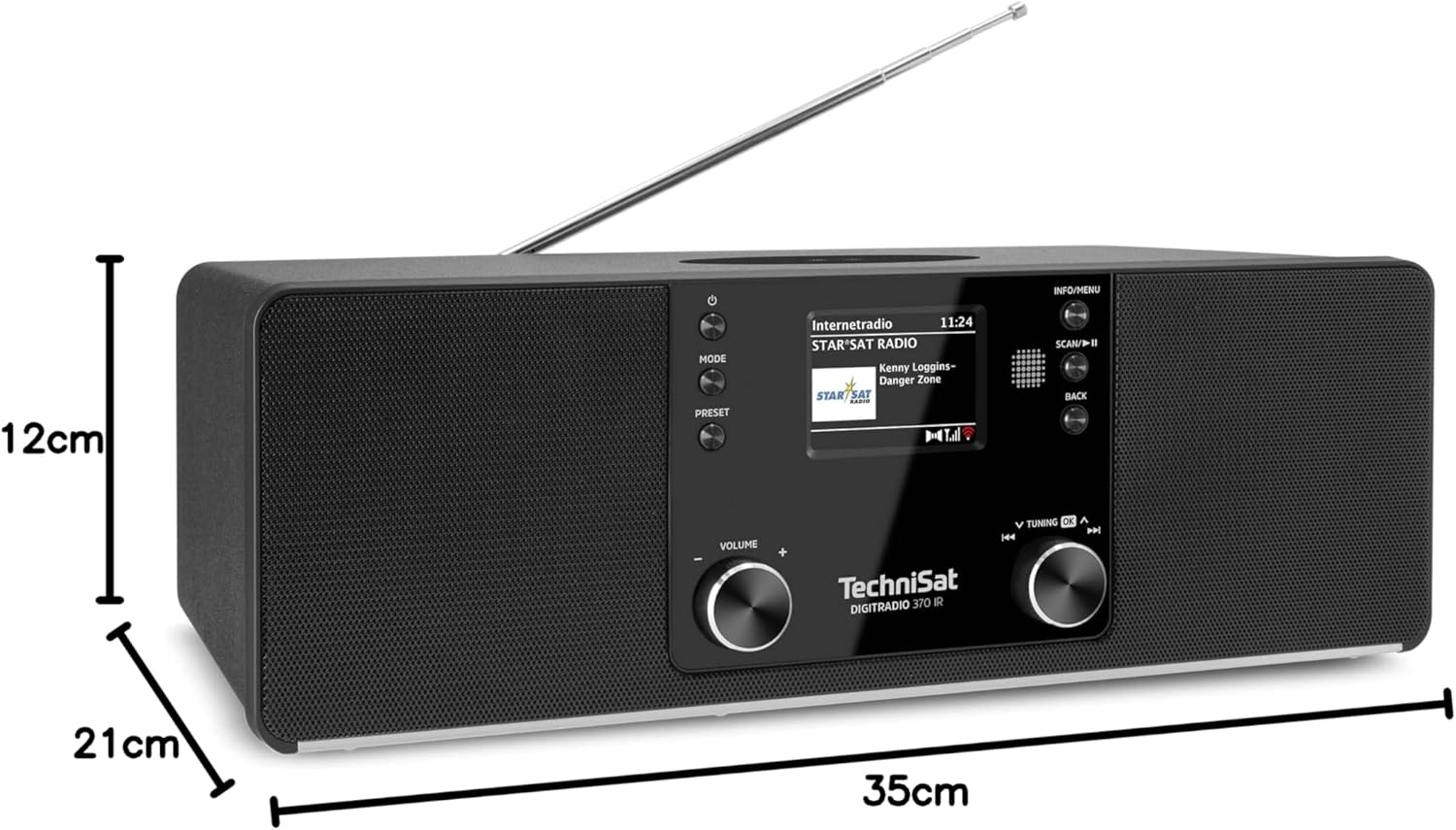
図9.1: 製品寸法
This image provides a visual representation of the radio's dimensions: 35 cm (length), 12 cm (height), and 21 cm (depth).
| 特徴 | 詳細 |
|---|---|
| モデル番号 | 0000/3971 |
| ブランド | テクニサット |
| サポートされている無線帯域 | DAB+、FM、インターネットラジオ |
| 接続技術 | Bluetooth, USB, Wireless-Charging, WLAN (2.4 GHz & 5 GHz) |
| 特集 | Wireless Charging, Bluetooth Audio Streaming, USB Playback & Charging, Alarm Clock, Sleep Timer, Snooze, App Control (UNDOK) |
| オーディオ出力モード | ステレオ |
| スピーカー出力 | 2 x 5 Watts RMS (10 Watts total) |
| 表示タイプ | 2.4インチTFTカラーLCD |
| 電源 | Electric Cord (230 Volts, 60 Hz) |
| 寸法(長さ×幅×高さ) | 35 x 21 x 12 cm |
| 重さ | 2.7キログラム |
| ハウジング材質 | 木材 |
| 対応デバイス | Smartphone, MP3 player, tablet, laptop, headphones |
| インターフェース | 3.5 mm Audio (AUX-IN), USB 2.0, 3.5 mm Headphone |
10. 保証とサポート
10.1 保証情報
This product comes with a 2-year warranty (Gewährleistung) from the date of purchase. Please retain your proof of purchase for any warranty claims. The warranty covers manufacturing defects and malfunctions under normal use. It does not cover damage caused by misuse, accidents, unauthorized modifications, or normal wear and tear.
10.2 カスタマーサポート
For technical assistance, troubleshooting beyond this manual, or warranty inquiries, please contact TechniSat customer support. Refer to the TechniSat official webお住まいの地域に固有の連絡先の詳細については、サイトをご覧ください。
オンラインリソース: Visit the official TechniSat website for updated manuals, FAQs, and support information.