
1. はじめに
ご購入ありがとうございますasing the ELECOM Wi-Fi 6 Wireless LAN Router WRC-X3000GS2-B. This router is designed to provide stable and high-speed internet connectivity for your home or office, supporting the latest Wi-Fi 6 (11ax) standard. It is ideal for environments with multiple connected devices, such as telework setups, online learning, and 4K video streaming.

Image: ELECOM Wi-Fi 6 Wireless LAN Router WRC-X3000GS2-B, a sleek black router designed for modern homes.
2. 主な特徴
- Wi-Fi 6 (11ax) サポート: Ensures stable and high-speed communication, perfect for multiple simultaneous connections in telework and online learning environments.
- OFDMA & 1024QAM: Enhances efficiency for multiple device connections and increases data transmission capacity.
- TWT (ターゲットウェイクタイム): Extends smartphone battery life by optimizing communication schedules.
- IPv6 IPoE Compatibility: Supports next-generation internet connection methods, reducing line congestion for smoother communication. Easy setup by simply connecting a LAN cable to the internet port.
- 4K TV Support: The 5GHz band offers up to 2402Mbps (theoretical value) and is resistant to radio interference, while the 2.4GHz band provides up to 574Mbps (theoretical value) for general use, ensuring comfortable 4K video streaming.
- Security Wi-Fi (Communication Isolation): Reduces the risk of virus infection and information theft between connected devices.
- Rakuraku Migration Function: Simplifies router replacement by automatically copying SSID and encryption keys from your old router with a press of the WPS button.
- 内部アンテナ: Provides a sleek, unobtrusive design while maintaining strong communication performance.
- バンドステアリング: Automatically selects and connects devices to the more optimal frequency band (5GHz or 2.4GHz) for improved performance.
- Beamforming Z: Concentrates radio waves towards compatible devices (e.g., iPhone, Android) for stable connections even at a distance.
- Friend Wi-Fi (Guest SSID): Allows you to provide Wi-Fi access to guests securely, isolating them from your main network (2.4GHz band only).
- Child Net Timer 3: Helps manage children's internet usage by setting time limits.
- WPA3 Personal Security: Supports the latest and strongest security standard for enhanced network protection.
- 自動ファームウェアアップデート: Ensures your router always has the latest features, bug fixes, and security measures.
- Router/AP Mode Switching: Easily switch between Router mode and AP (Access Point) mode using a slide switch.
- 柔軟な設置: Supports both vertical placement and wall mounting to fit various home environments.

Image: A family using laptops and tablets, illustrating the router's capability to support telework and online learning with stable Wi-Fi 6 connectivity.

Image: Diagram explaining the Security Wi-Fi feature, which isolates work devices from personal devices to prevent cross-infection and data theft.

Image: Diagram illustrating OFDMA technology, showing how the router efficiently handles multiple devices simultaneously, improving network performance.
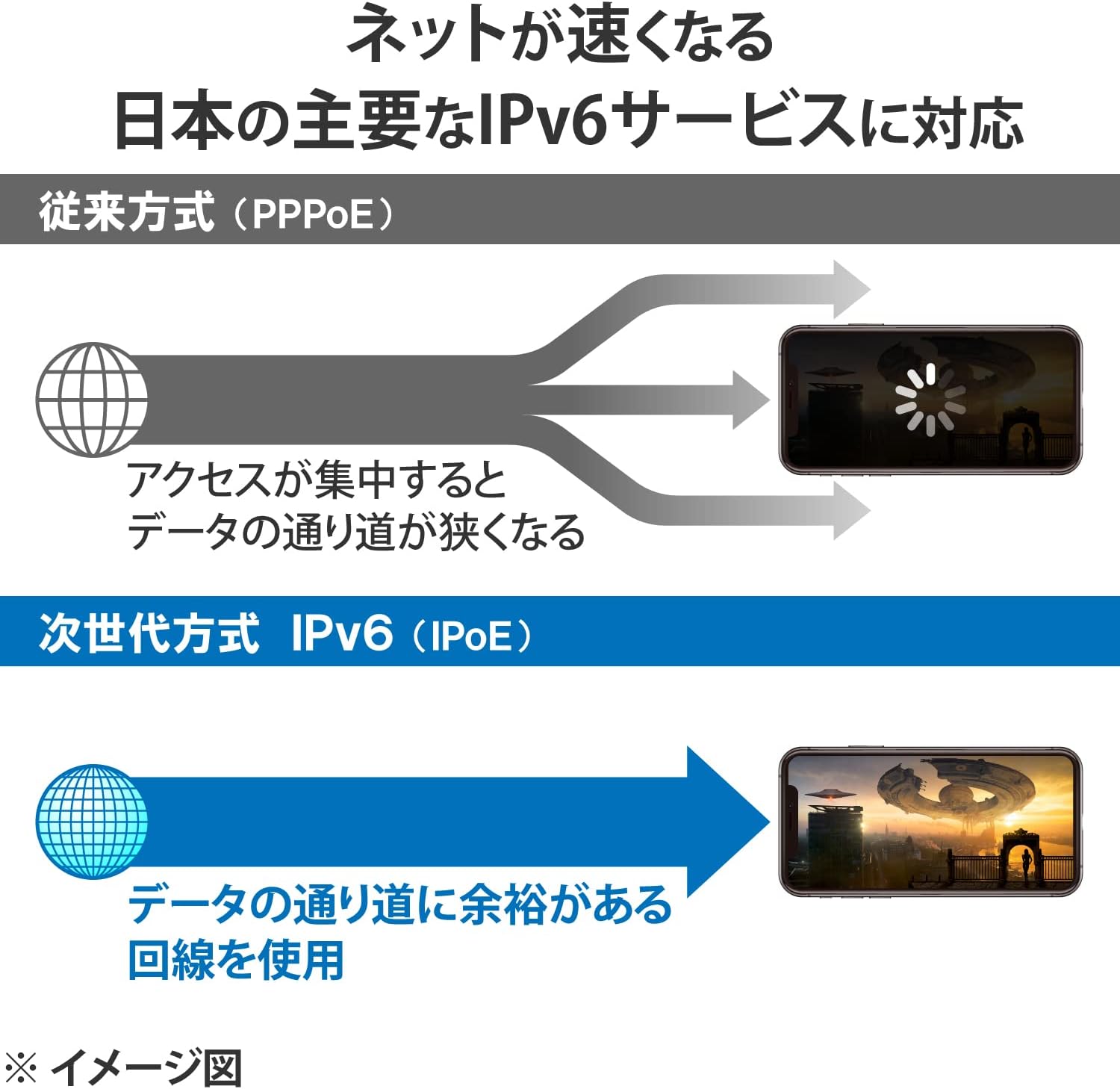
Image: Diagram comparing traditional PPPoE internet connection with IPv6 IPoE, highlighting how IPv6 IPoE provides a wider data path for faster, less congested internet access.
3. パッケージ内容
パッケージに以下のすべてのアイテムが含まれていることを確認してください。
- Router Unit (WRC-X3000GS2-B) x 1
- スタンド×1
- Dedicated AC Adapter x 1
- LAN Cable (approx. 0.5m) x 1
- Various Manuals x 2
- Easy Setup Sheet (Initial Value) x 1
- Wall Mount Anchors x 2
- 壁掛け用ネジ x 2
4.セットアップガイド
Follow these steps for initial setup of your ELECOM Wi-Fi 6 Router:
- 開梱して接続する: Place the router in your desired location. Connect the dedicated AC adapter to the router and plug it into a power outlet. Connect the provided LAN cable from your modem to the router's WAN port.
- 物理的な設置: The router supports both vertical placement using the included stand and wall mounting. For wall mounting, use the provided anchors and screws. Ensure the router is installed vertically for optimal performance.
- Initial Configuration (for IPv6 IPoE): If your internet service provider supports IPv6 IPoE, the router is designed for easy setup. Simply connect the LAN cable from your modem to the router's internet port, and it should automatically configure itself.
- デバイスの接続: Locate the Wi-Fi network name (SSID) and password on the label of your router or the easy setup sheet. Connect your Wi-Fi enabled devices (smartphones, tablets, PCs, gaming consoles) to this network.
- Rakuraku Migration (for Router Replacement): If you are replacing an old router, press the WPS button on your old router and then on the new ELECOM router. The new router will automatically copy the SSID and encryption key from the old router, allowing your existing devices to connect without re-entering credentials.

Image: The ELECOM Wi-Fi 6 router shown in both vertical desktop placement and wall-mounted configurations, demonstrating flexible installation options.
5. 操作手順
- WPS機能: Press the WPS button on the router to easily connect WPS-compatible devices without manually entering the password.
- Guest Wi-Fi (Friend Wi-Fi): To enable a separate Wi-Fi network for guests, access the router's web interface. This feature is available on the 2.4GHz band and isolates guest devices from your main network for security.
- Child Net Timer 3: Configure internet access schedules for specific devices through the router's web interface to manage screen time for children.
- モード切り替え: Use the slide switch on the router to change between Router mode (default) and AP (Access Point) mode, depending on your network requirements.
6. メンテナンス
- 自動ファームウェアアップデート: The router is designed to automatically update its firmware to ensure optimal performance, security, and access to new features. Ensure the router is connected to the internet for these updates.
- クリーニング: Use a soft, dry cloth to clean the router. Do not use liquid cleaners or abrasive materials.
- 配置: Avoid placing the router in direct sunlight, near heat sources, or in areas with high humidity.
7。 トラブルシューティング
If you encounter issues with your router, try the following:
- インターネット接続なし: Check all cable connections (modem to router, router to power). Restart your modem and router. Verify your internet service provider's status.
- Wi-Fi速度が遅い: Ensure your devices are Wi-Fi 6 compatible for optimal performance. Try moving closer to the router. Check for interference from other electronic devices. Utilize the Band Steering feature if available.
- Wi-Fiに接続できません: Double-check the Wi-Fi network name (SSID) and password. Try using the WPS function. Restart the router and your device.
- パスワードを忘れた場合: Refer to the label on the router or the easy setup sheet for the default password. If changed and forgotten, you may need to reset the router to factory settings (this will erase all custom configurations).
If problems persist, please contact ELECOM customer support.

Image: A shield graphic indicating return and refund support if the product cannot be set up or connected, emphasizing customer assurance.
8. 仕様
| 特徴 | 仕様 |
|---|---|
| ブランド | エレコム |
| モデル名 | WRC-X3000GS2 |
| ワイヤレス標準 | IEEE 802.11ax, 802.11ac, 802.11n, 802.11g, 802.11b, 802.11a |
| Data Transfer Rate (Theoretical) | 5GHz: Max 2402Mbps (11ax) 2.4GHz: Max 574Mbps (11ax) |
| 周波数帯域クラス | デュアルバンド(2.4GHz、5GHz) |
| Wired Standards | IEEE 802.3ab (1000BASE-T), IEEE 802.3u (100BASE-TX), IEEE 802.3 (10BASE-T) |
| Wired Connectors | WAN: RJ-45 x 1 port LAN: RJ-45 x 4 ports (All ports Auto MDI/MDI-X, Auto-Negotiation compatible) |
| 有線転送速度 | WAN/LAN: 1000Mbps, 100Mbps, 10Mbps |
| セキュリティプロトコル | WPA3 Personal (AES), WPA2 Personal (AES), WPA Personal (TKIP) |
| 対応OS | Windows 11/10, macOS Monterey 12/Big Sur 11/Catalina 10.15/Mojave 10.14/High Sierra 10.13/Sierra 10.12/OS X El Capitan 10.11/Yosemite 10.10, iOS 15/14/13/12/11, iPadOS 15/14/13, Android 12/11/10/9/8 |
| 対応デバイス | Android, NINTENDO SWITCH(TM), PlayStation(R) 3/4/5, iPad, iPhone, various wireless LAN devices |
| アンテナタイプ | Internal Antenna (2.4GHz: 2 transmit/receive, 5GHz: 2 transmit/receive) |
| 電源入力 | AC100V±10%50 / 60Hz |
| 消費電力 | 11.5W(最大) |
| 寸法(幅×奥行き×高さ) | Approx. 38.8mm × 142.5mm × 178.2mm (excluding protrusions and stand) |
| 重さ | Approx. 365g (main unit only) |
| 動作環境 | Temperature: 0℃~40℃, Humidity: 10%~85% (non-condensing) |
| 認定資格 | VCCI Class B, TELEC, JATE, PSE |
9. 製品ビデオ
ELECOM Wi-Fi Router Comparison and Performance
Video: This video demonstrates the performance of different ELECOM Wi-Fi routers in various home environments (one-room apartment, 3LDK, detached house). It compares Wi-Fi 5 and Wi-Fi 6 routers, showing how router selection based on house size can significantly impact connection speed and stability. The video highlights the importance of choosing the right router for optimal Wi-Fi experience.
ELECOM Wi-Fi 6 Router Overview (WRC-X1800GS-B)
ビデオ: オーバーview of an ELECOM Wi-Fi 6 router, model WRC-X1800GS-B. While not the exact model, it provides general information about Wi-Fi 6 features and benefits applicable to the WRC-X3000GS2-B, such as stable high-speed connectivity for multiple devices.
10. 保証とサポート
この製品には、 1年間のメーカー保証 ご購入日より1年間有効です。保証請求の際は購入証明書を保管してください。
ELECOM Customer Support
電話: 0570-084-465
ファックス: 0570-050-012
営業時間: 10:00 - 19:00 (Year-round)
さらに詳しいサポートについては、 AmazonのELECOMブランドストア.