
1。 オーバーview
The NETVUE Birdfy AI Smart Bird Feeder with Camera offers an advanced way to observe and interact with backyard birds. Equipped with a 1080p HD camera and AI bird species identification, it provides real-time alerts and captures high-quality video and images of your feathered visitors. Its IP65 weatherproof design ensures durability in various outdoor conditions, making it suitable for year-round use.
主な機能は次のとおりです。
- 1080p HD Camera with Night Vision: Captures clear video day and night.
- AI Bird Species Identification: Automatically detects and identifies over 6000 bird species.
- 2.4GHz Wi-Fi & Bluetooth Connectivity: Ensures stable connection and easy setup.
- IP65耐候性: Designed to withstand rain, snow, and sun.
- Manual Squirrel Control: Features flashing lights, warning sounds, and a microphone to deter squirrels.
- 安全なクラウドストレージ: Utilizes Amazon Web Services for encrypted data storage.
2. 箱の中身
Upon unboxing your NETVUE Birdfy AI Smart Bird Feeder, verify that all components are present:
- Birdfy AI Smart Bird Feeder unit
- 1080p HDカメラ内蔵
- Mounting bracket (for pole, tree, or wall installation)
- 取り付けネジとアンカー
- USB充電ケーブル
- ユーザーマニュアル(このドキュメント)
- Note: Solar panel is sold separately.
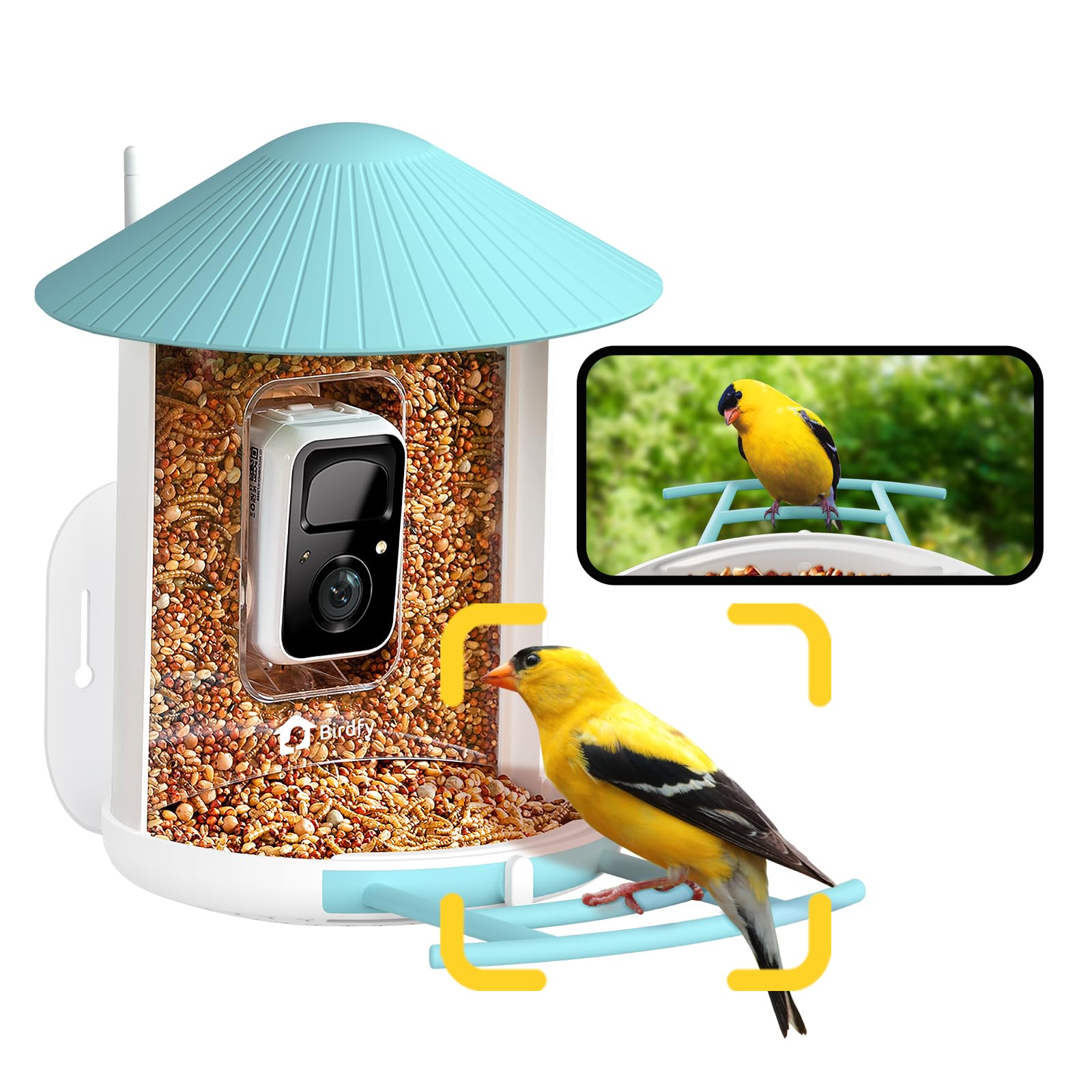
Image: The NETVUE Birdfy AI Smart Bird Feeder with its integrated camera.
3. セットアップ手順
3.1 カメラの充電
Before initial use, fully charge the camera's built-in battery using the provided USB cable. The charging port is typically located on the camera module itself, often protected by a rubber seal to maintain its weatherproof rating. A full charge can last several months depending on activity.
3.2 アプリのインストールとペアリング
- ダウンロード Birdfy App スマートフォンのアプリストア(iOS または Android)から。
- アカウントを作成するか、すでにアカウントをお持ちの場合はログインしてください。
- Follow the in-app instructions to add a new device. This typically involves scanning a QR code located on the camera module. You may need to temporarily remove the camera from the feeder housing to access the QR code.
- Connect the device to your 2.4GHz Wi-Fi network. Ensure your Wi-Fi signal is strong at the intended installation location.

Image: Visual guide for connecting the Birdfy feeder to the mobile application.
3.3 フィーダーの取り付け
The Birdfy feeder offers versatile mounting options:
- 壁掛け: Use the provided bracket, screws, and anchors to secure the feeder to a wall.
- ポールマウント: Attach the feeder to a pole using the appropriate bracket.
- 木に取り付ける: Secure the feeder to a tree trunk or sturdy branch.
明るい場所を選んでください view of the feeder for the camera, is easily accessible for refilling and cleaning, and is away from potential squirrel jumping points. Ensure the camera's field of view (129° horizontal, 67° vertical) captures both the seed tray and the perch.

Image: Various installation methods for the Birdfy feeder.
4. 操作手順
4.1 フィーダーへの充填
The feeder has a 1.5-liter capacity. To fill:
- Turn the antenna away from the top.
- Open the roof of the feeder.
- Pour bird seed into the main compartment until full.
- Close the roof securely.

Image: Instructions for refilling the Birdfy feeder.
4.2 Using the Birdfy App
The Birdfy app is your primary interface for the smart feeder:
- ライブ View: Access real-time video streaming from the camera.
- AI Alerts: Receive instant notifications when a bird visits, with AI identifying the species.
- イベントの再生: Review recorded videos and snapshots of bird activity.
- ナイトビジョン: 暗い場所では、カメラは自動的に赤外線暗視に切り替わります。
- Squirrel Deterrence: If a squirrel is detected, use the app to activate flashing lights, warning sounds, or speak through the two-way microphone.
- 共有: Share captured bird moments with friends and family through the app.

画像: Example of a smart alert notification on the Birdfy app.

Image: The Birdfy app allows users to capture and share bird videos and photos.
5. メンテナンス
5.1 フィーダーの清掃
Regular cleaning is essential to prevent the spread of disease among birds and to ensure the feeder functions correctly. The feeder is designed for easy cleaning:
- Remove the camera module from the feeder housing.
- 残っている鳥の餌を空にします。
- Disassemble the feeder components (roof, seed tray, etc.) as needed.
- Wash all parts with warm, soapy water. Use a brush to remove stubborn debris.
- Rinse thoroughly and allow all parts to dry completely before reassembling and refilling.

Image: A visual representation of the cleaning process for the Birdfy feeder.
5.2 バッテリー管理
Monitor the battery level through the Birdfy app. Recharge the camera when the battery is low. If you have a compatible solar panel (sold separately), ensure it is positioned to receive adequate sunlight for continuous charging.
6。 トラブルシューティング
- Wi-Fi接続なし:
- Ensure the feeder is within range of your 2.4GHz Wi-Fi network.
- Wi-Fiルーターを再起動します。
- カメラとアプリを再度ペアリングします。
- ビデオ品質が悪い:
- Wi-Fi 信号強度を確認してください。
- カメラのレンズを掃除してください。
- レンズの前に障害物がないことを確認してください。
- No Bird Detections/False Alarms:
- アプリでモーション検出の感度を調整します。
- カメラの視野が view is correctly positioned to capture the feeder area.
- Check for moving objects like tree branches or shadows that might trigger false alarms.
- バッテリー寿命が短い:
- Reduce the frequency of recordings or live view セッション。
- カメラが完全に充電されていることを確認してください。
- 購入を検討するasing a compatible solar panel for continuous power.
7. 仕様
| 特徴 | 詳細 |
|---|---|
| ブランド | ネットビュー |
| モデル | Birdfy AI |
| カメラ解像度 | 1080p HD |
| ナイトビジョン | 赤外線 |
| 接続性 | 2.4GHz Wi-Fi、Bluetooth |
| 耐候性評価 | IP65 |
| 材料 | アクリロニトリルブタジエンスチレン(ABS)、ポリカーボネート(PC) |
| 容量 | 1.5 Liters (Bird Seed) |
| 寸法(長さ×幅×高さ) | 長さ8インチ x 幅7インチ x 高さ11インチ |
| アイテム重量 | 2.09キログラム |
| 電源 | Rechargeable Battery (Solar Powered option available separately) |
8.保証とサポート
For warranty information, technical support, or customer service inquiries, please refer to the official NETVUE website or contact their customer support directly. Details are typically available in the product packaging or on the manufacturer's online resources.
NETVUE is committed to providing reliable products and support. If you encounter any issues, please reach out to their dedicated support team for assistance.