
Pknight CR011R-3pin
Pknight CR011R-3pin ArtNet DMX Ethernet 照明コントローラーインターフェース ユーザーマニュアル
Model: CR011R-3pin
1. はじめに
This manual provides comprehensive instructions for the setup, operation, and maintenance of your Pknight CR011R-3pin ArtNet DMX Ethernet Lighting Controller Interface. This device facilitates bi-directional conversion between Art-Net and DMX512 protocols, offering a robust solution for professional lighting control applications.
2.製品オーバーview
The Pknight CR011R-3pin is a compact and durable ArtNet DMX node designed for reliable performance in various lighting environments. It features an OLED display for direct configuration and supports versatile power options.

図1: Pknight CR011R-3pin ArtNet DMX Ethernet Lighting Controller Interface.
2.1 主な特徴
- Bi-directional ArtNet/DMX Conversion: Supports both Art-Net to DMX and DMX to Art-Net modes.
- OLED Control System: Onboard display and buttons for direct device configuration.
- 多用途電源ソリューション: Compatible with 5V DC input and USB Power Delivery (PD) via USB-C.
- リモート構成: Settings can be adjusted remotely using DMX Workshop software.
- 耐久性のある構造: Housed in a sturdy all-metal casing.
2.2 デバイスコンポーネント

図2: 後方 view of the CR011R-3pin showing DMX In/Out, Ethernet, and DC5V ports.
- 青色LEDインジケーター:
- Stays off: Standby mode, waiting for DMX (in/out).
- Stays on (no blinking): DMX-out mode, converts ArtNet to DMX output.
- Blinks continuously: DMX-in mode, converts DMX input to ArtNet.
- Female XLR Port (3-Pin): DMX input/output connection.
- RJ45 Port (ArtNet In/Out): Ethernet connection for Art-Net data.
- Green LED (left): Link LED.
- Green LED (right): Activity LED (blinks fast for data activity, off for no data).
- 電源ポート(タイプC): 5V DC power input. Compatible with USB PD and third-party USB-C cables.
3. セットアップ
3.1電源接続
Connect the device to a 5V DC power source using the provided USB-C cable. The device supports USB Power Delivery (PD) and can be powered by 5V adapters, PC USB ports, or power banks.
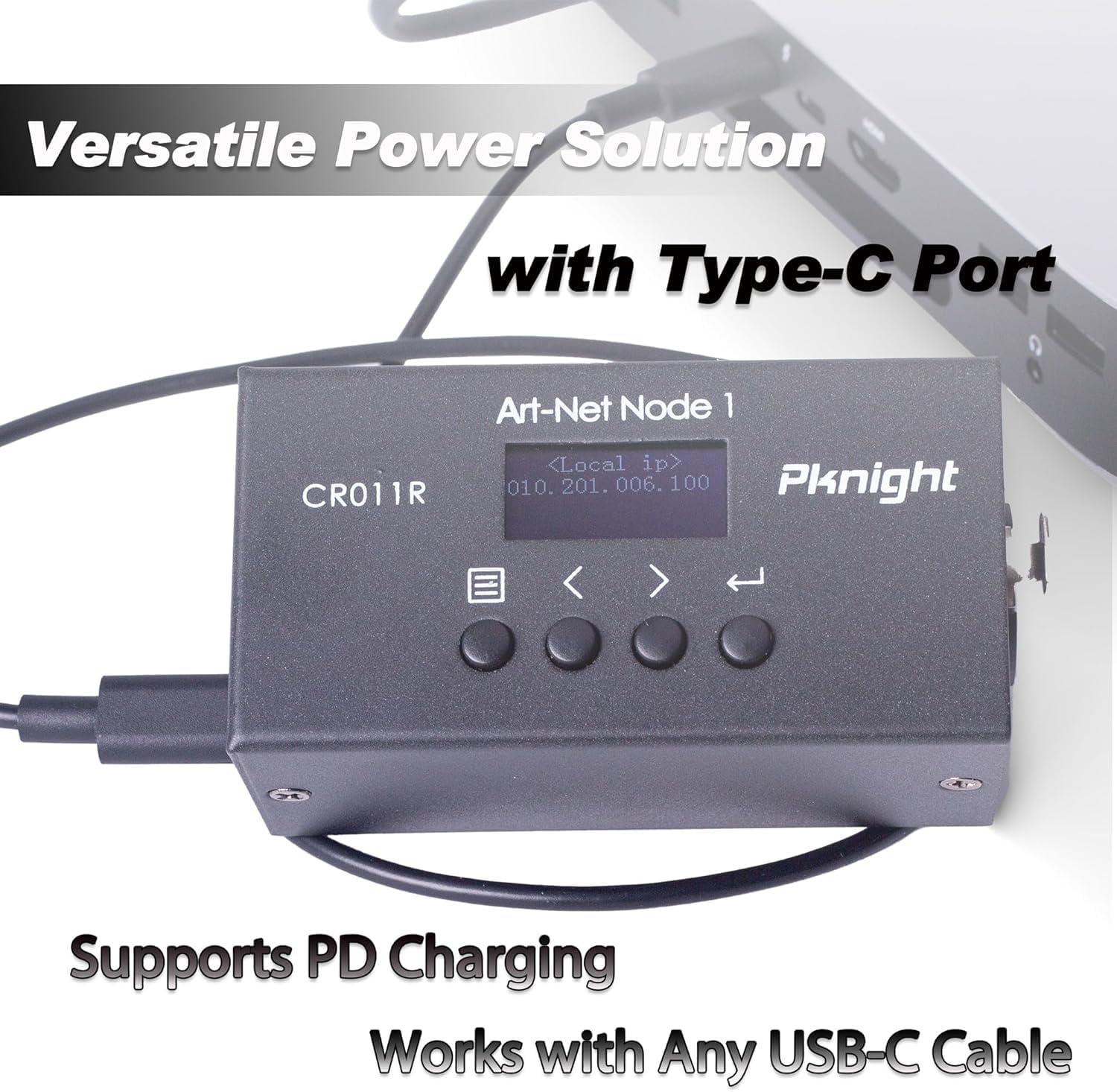
図3: Powering the CR011R-3pin via its USB-C port.
3.2ネットワーク接続
Connect the RJ45 Ethernet port to your network switch or directly to a computer using a standard Ethernet cable. Ensure your network settings are configured to allow Art-Net communication.
3.3 DMX接続
Connect your DMX lighting fixtures or DMX controller to the 3-pin XLR DMX In/Out port. The device will automatically detect the DMX signal direction based on its configured transmit mode.
4. Configuration (OLED Control System)
The CR011R-3pin features an OLED display and four function buttons for direct configuration without external software.

図4: OLED display and control buttons.
- OLEDスクリーン: 現在の設定とメニュー オプションを表示します。
- メニューボタン: Used to switch between menu options.
- Backward or Minus Button: Navigates backward or decreases a selected parameter.
- Forward or Plus Button: Navigates forward or increases a selected parameter.
- 入力ボタン: Clicks to choose a function or parameter. Press and hold for 3 seconds to submit changes.
4.1 Remote Configuration and Naming
You can remotely configure network parameters (IP address, subnet mask, net address, subnet address, port universe) and customize the startup display text using the DMX Workshop application.

図5: Customizing the device name using DMX Workshop.

図6: Diagram illustrating the configuration flow for network and Art-Net parameters.
5。 動作モード
The CR011R-3pin supports bi-directional operation, allowing it to function as both an ArtNet to DMX converter and a DMX to ArtNet converter.
5.1 ArtNet to DMX (DMX Output Mode)
In this mode, the device receives Art-Net data over Ethernet and converts it into DMX512 signals, which are then output through the 3-pin XLR port to control DMX-compatible lighting fixtures. The blue LED indicator will stay on (no blinking).
5.2 DMX to ArtNet (DMX Input Mode)
When configured for DMX input, the device receives DMX512 signals from a DMX controller via the 3-pin XLR port and converts them into Art-Net data, which is then transmitted over Ethernet. This allows DMX consoles to control Art-Net compatible software or devices. The blue LED indicator will blink continuously.
To switch to DMX input mode, set the 'Transmit mode' to 'artnet <- dmx' via the OLED display or DMX Workshop.

図7: Diagram illustrating DMX input mode, converting DMX to ArtNet for software control.
6. アプリケーション
The Pknight CR011R-3pin is suitable for a variety of professional lighting applications, including:
- Stage照明制御
- Pixel LED installations
- Architectural decoration lighting
- Fixed lighting installations

図8: 視覚的な例amples of the CR011R-3pin in various lighting applications.
7. 仕様
| 特徴 | 仕様 |
|---|---|
| モデル番号 | CR011R-3pin |
| アイテム重量 | 13.4オンス |
| 製品寸法 | 4.53 x 2.76 x 2.36インチ |
| DMXポート | 1 (3-pin XLR, bi-directional) |
| イーサネットポート | 1 (RJ45, ArtNet In/Out) |
| 電源入力 | 5V DC via USB-C (supports USB PD) |
| 制御インターフェース | OLED display and 4 function buttons |
| ハウジング材質 | オールメタル |
8。 トラブルシューティング
- DMX出力/入力なし:
- Verify the 'Transmit mode' setting on the device or via DMX Workshop. Ensure it matches your intended operation (ArtNet to DMX or DMX to ArtNet).
- Check DMX cable connections and ensure they are secure.
- Confirm that the DMX universe setting on the device matches your lighting control software. Note that some software may label the first universe as '1' while the device may internally refer to it as '0'. Adjust accordingly.
- ネットワーク接続なし:
- Ensure the Ethernet cable is properly connected and the green Link LED on the RJ45 port is illuminated.
- Check the IP address, subnet mask, and other network parameters configured on the device and your computer/network. Art-Net typically uses a specific IP range (e.g., 2.x.x.x or 10.x.x.x) and subnet mask (e.g., 255.0.0.0).
- If connecting directly to a computer, manually configure your computer's network adapter to be in the same IP range as the device.
- Confirm that your network allows UDP traffic on Art-Net's default port (6454).
- デバイスの電源が入っていない:
- Ensure the USB-C power cable is securely connected to both the device and a functional 5V power source.
- アクセサリの不具合を排除するために、別の USB-C ケーブルと電源アダプターを試してください。
9. メンテナンス
To ensure the longevity and optimal performance of your Pknight CR011R-3pin, follow these maintenance guidelines:
- クリーニング: デバイスの外装を拭く際は、柔らかく乾いた布をご使用ください。液体クリーナーや溶剤は、表面や内部部品を損傷する恐れがあるため、使用しないでください。
- ストレージ: 使用しないときは、デバイスを直射日光や極端な温度を避け、涼しく乾燥した場所に保管してください。
- ケーブル管理 Ensure all cables are routed properly to prevent strain on the connectors and accidental disconnections.
- ファームウェアの更新: 定期的にメーカーの webデバイスに最新の機能とバグ修正が適用されていることを確認するために、サイトで利用可能なファームウェア アップデートを確認してください。
10. 保証とサポート
Pknight products are designed for reliability and performance. For specific warranty information, please refer to the warranty card included with your product or visit the official Pknight website. If you encounter any issues or require technical assistance, please contact Pknight customer support through their official channels.
関連文書 - CR011R-3pin
 |
Pknight WIFI-DMX EasyNode ユーザーマニュアル: ワイヤレスDMXコントロール Pknight WIFI-DMX EasyNode の包括的なユーザー マニュアル。ワイヤレス DMX 照明制御のセットアップ、操作、モード (Easylink、ルーター)、およびトラブルシューティングについて詳しく説明しています。 |
 |
Pknight CR011R Art-Net to DMX512 ネットワークコンバーター ユーザーマニュアル 双方向Art-Net-DMX512ネットワークコンバーター「Pknight CR011R」の包括的なユーザーマニュアルです。セットアップ、技術仕様、OLEDコントロール、フロントパネル/リアパネルの機能、設定、ネットワークパラメータ、トラブルシューティングについて解説します。 |
 |
Pknight CR011R Art-Net to DMX512 ネットワークコンバーター ユーザーマニュアル 双方向Art-Net-DMX512ネットワークコンバーター「Pknight CR011R」のユーザーマニュアル。技術仕様、セットアップ、設定、トラブルシューティング、そしてプロフェッショナルな照明制御を可能にする「Name Your Buddy」などの機能について詳しく説明しています。 |
 |
Tivoli VAST Cove Light - PALETTE: Specifications and Guide Detailed specifications, dimensions, accessories, and wiring diagrams for the Tivoli VAST Cove Light - PALETTE, an RGB+W LED cove lighting system with DMX/RDM control. |
 |
Tivoli VAST Cove Light - PALETTE: 製品仕様とガイド さまざまな CCT と構成で利用できる、DMX/RDM 制御を備えた RGB+W コーブ照明ソリューションである Tivoli VAST Cove Light - PALETTE の詳細な仕様、機能、および注文情報。 |
 |
Tivoli VAST Cove Light - PALETTE: RGB+W LED Specification and Control Guide Comprehensive specification guide for the Tivoli VAST Cove Light - PALETTE, detailing features, dimensions, order options, accessories, DMX control, network hardware, and commissioning services. |
Ask a question about this manual
Ask about setup, troubleshooting, compatibility, parts, safety, or missing instructions. Manuals+ will review the question and use this page’s manual context to help answer it.