
1. はじめに
The UMLIFE STC-1000 is a versatile digital temperature controller designed for precise temperature management in various applications. This device features a clear LED display, NTC 10K thermistor sensor, and dual relay outputs for both heating and cooling control. This manual provides detailed instructions for installation, operation, and maintenance to ensure optimal performance and longevity of your temperature controller.
2.製品オーバーview
2.1 主な特徴
- Digital LED display for clear temperature readings.
- Wide temperature measurement and control range: -50°C to 99°C.
- High control accuracy of 0.1°C.
- Dual relay output for simultaneous heating and cooling control.
- Waterproof NTC 10K thermistor sensor for reliable measurements in various environments.
- 温度校正機能。
- Delay start protection for cooling control.
- ABS flame-retardant shell for enhanced safety.
2.2 コンポーネントとディスプレイ
Familiarize yourself with the main components and display interface of the STC-1000 controller.

図1: Front panel of the STC-1000 controller showing the digital display, power switch, UP button, Setting button, and DOWN button.
- デジタル表示ウィンドウ: Shows current temperature and parameter settings.
- 電源スイッチ: デバイスの電源をオンまたはオフにします。
- 上ボタン(▲): 値を増やしたり、メニューを移動したりします。
- 下ボタン(▼): 値を減らすか、メニューを移動します。
- 設定ボタン(S): パラメータ設定モードに入ります。
- クールインジケーター: Illuminates when cooling relay is active.
- 熱インジケーター: Illuminates when heating relay is active.

図2: Physical dimensions of the STC-1000 controller and the included 1-meter NTC 10K waterproof sensor probe.
3. 仕様
| パラメータ | 価値 |
|---|---|
| モデル | STC-1000 |
| 温度測定範囲 | -50°C ~ 99°C |
| 温度制御範囲 | -50°C ~ 110°C |
| 測定精度 | ±0.2℃ |
| 解決 | 0.1℃ |
| 制御精度 | ±0.1℃ |
| センサー | NTC 10K L=1M 防水プローブ |
| 電源 | DC12V |
| 消費電力 | <3W |
| リレー接点容量 | Cool (10A/220VAC), Heat (10A/220VAC) |
| 周囲温度 | 0℃~60℃ |
| 保管温度 | -30°C ~ 75°C |
| 相対湿度 | 20-84% |
| 取り付けサイズ | 71mm×29mm |
| 製品寸法 | 75mm x 34.5mm x 85mm |
| アイテム重量 | 7オンス(約198g) |
| 材料 | アクリロニトリルブタジエンスチレン(ABS) |
4. セットアップとインストール
重要な安全上の注意: Installation should be performed by qualified personnel. Ensure power is disconnected before wiring to prevent electric shock. Strictly distinguish between power supply, sensor, and relay interfaces. Maintain proper distance between sensor down-lead and power wires to avoid interference.
4.1 配線図
Refer to the following diagram for correct wiring connections. This model operates on DC 12V power supply.
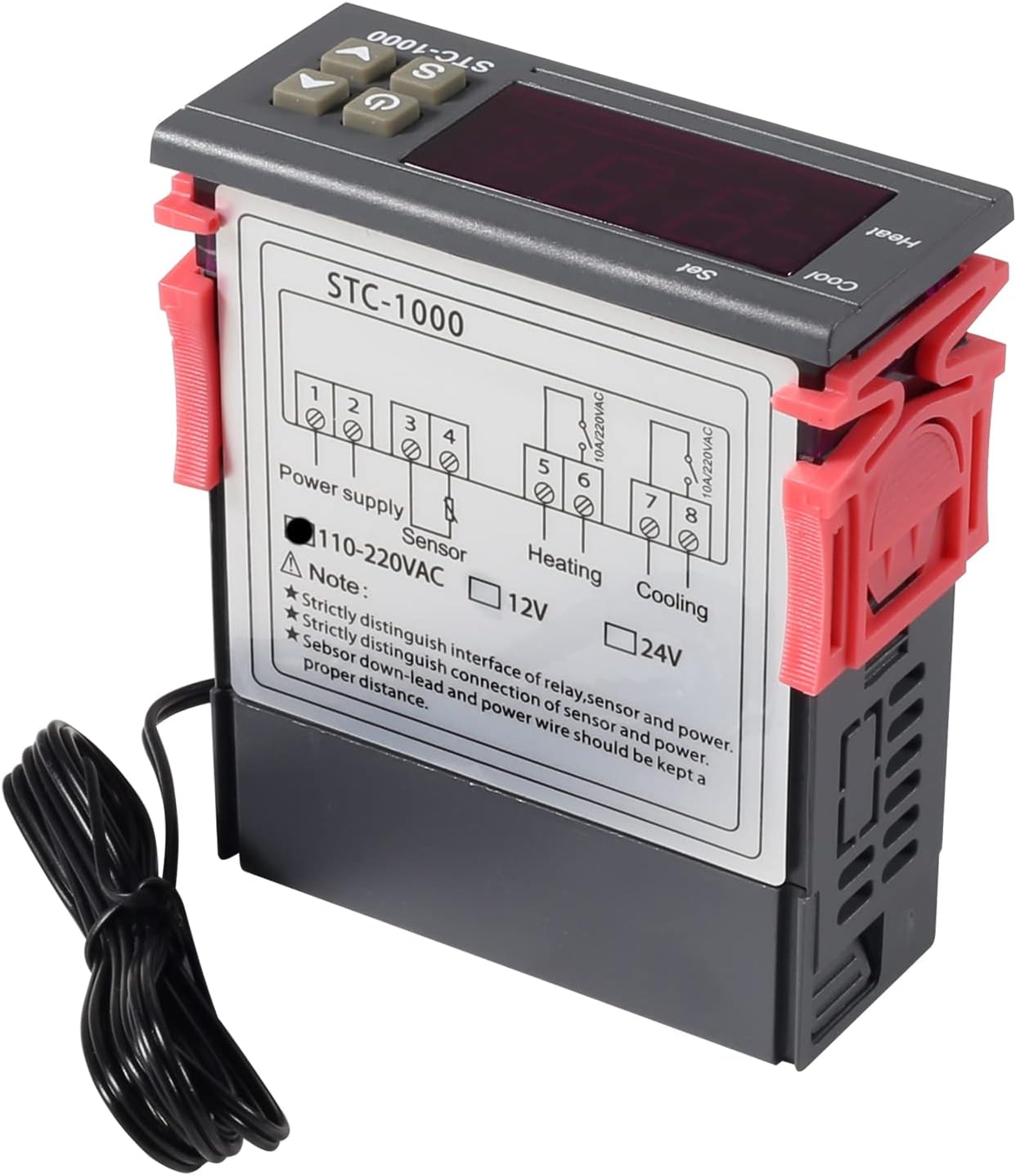
図3: Wiring diagram for the STC-1000 12V temperature controller. Connections are for power supply, NTC sensor, heating relay, and cooling relay.
- ターミナル1と2: Power Supply (DC 12V).
- ターミナル3と4: NTC Sensor connection.
- ターミナル5と6: Heating Relay Output (Connect to heating device).
- ターミナル7と8: Cooling Relay Output (Connect to cooling device).
Ensure all connections are secure and insulated. Verify the power supply voltage matches the controller's requirement (DC 12V for this model).
4.2 取り付け
The STC-1000 is designed for panel mounting. Cut an opening of 71mm x 29mm in your panel. Insert the controller and secure it using the provided clips or mounting brackets.
5. 操作手順
The STC-1000 operates in Celsius only. It cannot be switched to Fahrenheit.
5.1 電源オン/オフ
- を押す 電源スイッチ button (marked with ⏻) to turn the controller on or off.
5.2 温度パラメータの設定
The controller has two main temperature settings: the Set Temperature (ST) そして Difference Temperature (DT), also known as hysteresis.
- に view the Set Temperature (ST): 短く押すと Setting (S) ボタンを押します。ディスプレイに現在の設定温度が表示されます。
- To modify the Set Temperature (ST):
- を押し続けます Setting (S) ディスプレイが点滅するまでボタンを約 3 秒間押し続けます。
- 使用 上へ(▲) or 下へ(▼) buttons to adjust the desired set temperature.
- を押す 電源スイッチ button to save the setting and exit, or wait for 10 seconds for it to save automatically.
5.3 Advanced Parameter Settings (F1-F4)
詳細パラメータにアクセスして変更するには:
- を押し続けます Setting (S) ディスプレイが点滅するまでボタンを約 3 秒間押し続けます。
- ディスプレイが点滅している間に、 Setting (S) button again (do not hold) to cycle through parameters F1, F2, F3, F4.
- 使用 上へ(▲) or 下へ(▼) 選択したパラメータの値を調整するためのボタン。
- を押す 電源スイッチ button to save the setting and exit, or wait for 10 seconds for it to save automatically.
| パラメータ | 説明 | 範囲 | デフォルト |
|---|---|---|---|
| F1 | Difference Temperature (Hysteresis): The difference between the set temperature and the temperature at which the relay switches off. | 0.3℃~10℃ | 2.0℃ |
| F2 | Highest Set Point Limit: Limits the maximum adjustable set temperature. | Set Temp to 110°C | 110℃ |
| F3 | Lowest Set Point Limit: Limits the minimum adjustable set temperature. | -50°C to Set Temp | -50℃ |
| F4 | 温度校正: Adjusts the temperature reading to match a known accurate thermometer. | -10°C ~ 10°C | 0.0℃ |
5.4 暖房と冷房モード
The STC-1000 automatically switches between heating and cooling based on the set temperature (ST) and difference temperature (DT).
- 冷却モード: If the current temperature is higher than (ST + DT), the cooling relay activates. It deactivates when the temperature drops to ST.
- 暖房モード: If the current temperature is lower than (ST - DT), the heating relay activates. It deactivates when the temperature rises to ST.
6. メンテナンス
- クリーニング: コントローラーの表面は柔らかく乾いた布で拭いてください。研磨剤入りの洗剤や溶剤は使用しないでください。
- センサーのケア: Ensure the NTC sensor probe is clean and free from debris. While waterproof, avoid unnecessary physical damage to the probe or cable.
- 接続: Periodically check wiring connections for tightness and signs of corrosion.
- 環境: Operate the controller within the specified ambient temperature and humidity ranges to ensure optimal performance and lifespan.
7。 トラブルシューティング
| 問題 | 考えられる原因 | 解決 |
|---|---|---|
| Display shows "EE" | センサーエラーまたは断線。 | センサーの接続を確認してください。破損している場合はセンサーを交換してください。 |
| ディスプレイに「HHH」と表示される | Temperature exceeds upper limit of measurement range. | Ensure the environment temperature is within the sensor's range (-50°C to 99°C). |
| ディスプレイに「LLL」と表示される | Temperature falls below lower limit of measurement range. | Ensure the environment temperature is within the sensor's range (-50°C to 99°C). |
| コントローラーの電源が入らない | 電源が供給されていないか、ボリュームが正しくありませんtage. | Check power connections and ensure DC 12V is supplied. |
| 暖房/冷房が作動しない | Incorrect temperature settings (ST, DT), wiring error, or device malfunction. | Verify ST and DT settings. Check heating/cooling device wiring. Ensure the device is within operating parameters. |
8. 保証とサポート
UMLIFE products are manufactured to high-quality standards. For warranty information or technical support, please contact UMLIFE customer service through your purchase platform or visit the official UMLIFE website. Please have your product model (STC-1000 12V) and purchase details ready when contacting support.
さらに詳しい情報については、 UMLIFE Store on Amazon.