
1. はじめに
The SteelSeries Arctis Nova 1X Gaming Headset delivers an immersive audio experience across multiple platforms. Designed for comfort and clarity, it features the Signature Arctis Sound and a ClearCast Gen 2 Microphone, making it ideal for Xbox Series X|S, PC, PlayStation, Switch, and mobile gaming.
This manual provides detailed instructions for setting up, operating, and maintaining your Arctis Nova 1X headset to ensure optimal performance and longevity.
2. 箱の中身
Upon unboxing your SteelSeries Arctis Nova 1X Gaming Headset, you should find the following components:
- ArctisNova1Xヘッドセット
- Main Headset Cable (3.5mm)
- Headband (pre-installed or separate, as per packaging)
- 製品情報ガイド

画像: 正面 view of the SteelSeries Arctis Nova 1X Gaming Headset, showcasing its sleek design and microphone.
3. セットアップ
3.1 ヘッドセットの接続
The Arctis Nova 1X is a wired headset designed for universal compatibility. To connect your headset:
- Locate the 3.5mm main headset cable.
- Plug one end of the 3.5mm cable into the audio jack on the left earcup of your Arctis Nova 1X headset.
- Plug the other end of the 3.5mm cable into the corresponding audio port on your gaming device (Xbox Series X|S controller, PC, PlayStation controller, Nintendo Switch, or mobile device).
Note: Ensure the cable is securely connected to both the headset and your device for optimal audio and microphone performance.

Image: Diagram illustrating the multi-platform compatibility of the Arctis Nova 1X headset, showing connections to various gaming devices.
4. ヘッドセットの操作
4.1 ボリュームコントロール
Adjust the audio volume directly from the headset:
- Locate the volume wheel on the left earcup.
- Roll the wheel up to increase the volume or down to decrease it.
4.2 マイクミュート
To mute or unmute your microphone:
- Find the microphone mute button on the left earcup, adjacent to the volume wheel.
- Press the button to toggle the microphone on or off. A red indicator will typically show when the microphone is muted.
4.3 Retractable ClearCast Gen 2 Microphone
The ClearCast Gen 2 microphone is retractable for convenience:
- To use the microphone, gently pull it out from the left earcup until it reaches your desired position.
- To store the microphone, push it back into the earcup until it is fully retracted.
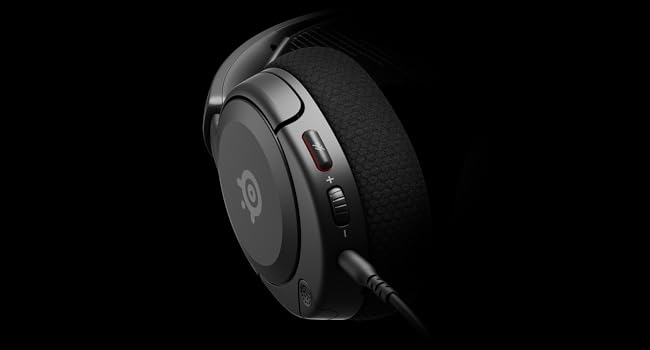
画像: クローズアップ view of the left earcup of the Arctis Nova 1X, highlighting the volume wheel and microphone mute button for easy access during gameplay.
Video: Official SteelSeries video demonstrating the features of the Arctis Nova 1 headset, including its audio capabilities and microphone design.
5. 快適さとフィット感
The Arctis Nova 1X is designed for extended gaming sessions with its ComfortMAX System:
- 超軽量設計: Weighing only 236g, the headset minimizes pressure during long use.
- Height-Adjustable Earcups: The earcups can be adjusted vertically to fit various head sizes comfortably.
- Flexible Suspension Headband: The elastic headband conforms to your head for a secure yet gentle fit.

Image: The Arctis Nova 1X headset highlighting its ultra-lightweight and slim profile, designed for comfort.

Image: The Arctis Nova 1X headset demonstrating its height-adjustable earcups for a personalized and comfortable fit.
6. オーディオ機能
Experience superior sound with the Arctis Nova 1X:
- 全能のオーディオ: The Nova Acoustic System with High Fidelity Drivers delivers crystal-clear highs, precise mids, and deep bass.
- 360°空間オーディオ: Immerse yourself in the game with surround sound that allows you to pinpoint enemy positions and environmental cues.
- Pro-grade Parametric EQ: サウンドプロをカスタマイズfile with the SteelSeries Sonar Audio Software Suite for a competitive edge.

Image: The Arctis Nova 1X headset highlighting its "Almighty Audio" capabilities for a rich sound experience.
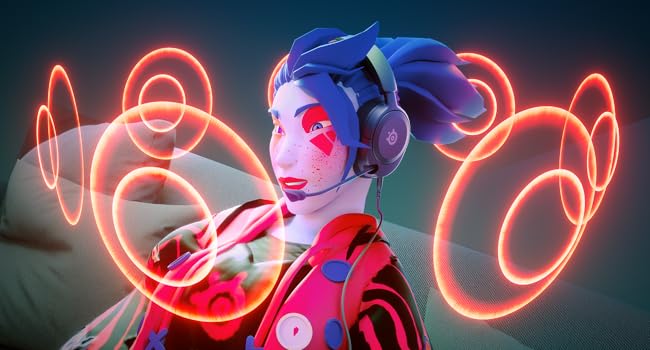
Image: Visual representation of 360° Spatial Audio, showing sound waves surrounding a gamer wearing the Arctis Nova 1X headset.
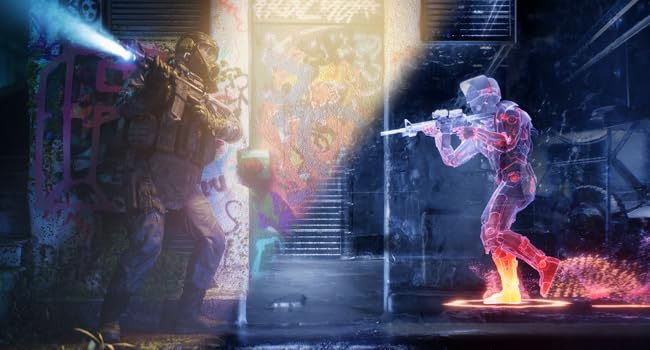
Image: Graphic illustrating the Pro-grade Parametric EQ, suggesting advanced audio customization options available with the headset.
7. マイクの機能
The ClearCast Gen 2 Mic ensures clear communication:
- AIノイズキャンセリング: Advanced AI algorithms filter out background noise, ensuring your voice is heard clearly by teammates.
- 格納式デザイン: The microphone can be fully retracted into the earcup when not in use, maintaining a sleek profile.

Image: The Nova 1 AI Microphone, emphasizing its noise-cancelling capabilities for clear voice communication.
8. メンテナンス
To ensure the longevity and optimal performance of your Arctis Nova 1X headset, follow these maintenance guidelines:
- クリーニング: イヤーカップとヘッドバンドは、柔らかく乾いた布で拭いてください。より深く洗浄するには、軽く湿らせた布を使用してください。amp cloth with mild soap can be used, ensuring no moisture enters the speaker grilles or ports.
- ケーブルのお手入れ: Avoid sharp bends or excessive pulling on the headset cable to prevent internal damage. Store the cable neatly when not in use.
- ストレージ: ヘッドセットは、直射日光や極端な温度を避け、涼しく乾燥した場所に保管してください。
- イヤホンのヒント: If applicable, ensure earbud tips (if using with mobile) fit snugly. Replace worn-out earbud tips to maintain sound quality and comfort.
9。 トラブルシューティング
If you encounter issues with your Arctis Nova 1X headset, try the following solutions:
- 音声なし/音量が低い:
- Ensure the 3.5mm cable is fully inserted into both the headset and your device.
- Check the volume wheel on the headset and your device's system volume.
- デバイス固有の問題を排除するために、別のデバイスでヘッドセットをテストします。
- マイクが機能しない:
- Ensure the microphone mute button is not activated (red indicator off).
- Verify the microphone is fully extended and positioned correctly.
- Check your device's audio settings to ensure the correct microphone input is selected and its volume is not muted.
- 音質が悪い:
- Ensure the 3.5mm cable is not damaged and is securely connected.
- Adjust your device's audio settings or equalizer settings.
10. 仕様
| 特徴 | 詳細 |
|---|---|
| ブランド | スティールシリーズ |
| モデル名 | アークティス ノヴァ 1X |
| モデル番号 | 61616 |
| 接続技術 | 有線(3.5mmジャック) |
| 耳の位置 | オーバーイヤー |
| 騒音制御 | アクティブノイズキャンセリング(マイク) |
| オーディオドライバータイプ | ダイナミックドライバ |
| 周波数範囲 | 20 Hz - 20,000 Hz |
| マイクロフォン | ClearCast Gen 2 (Retractable, AI Noise Cancelling) |
| 対応デバイス | Xbox Series X|S, PC, PlayStation, Switch, Mobile |
| アイテム重量 | 1.1ポンド(約500g) |
| 色 | 黒 |
| 欧州連合 | 850014119737 |
ビデオ: 360度 view of the SteelSeries Arctis Nova 1X headset in black, showcasinあらゆる角度からそのデザインを鑑賞してください。
11.保証とサポート
11.1 保証情報
The SteelSeries Arctis Nova 1X Gaming Headset comes with a 1年間の限定保証 ご購入日から1年間有効です。この保証は製造上の欠陥を保証し、通常の使用状況において製品が想定通りに機能することを保証します。保証請求のために購入証明書を保管してください。
For detailed warranty terms and conditions, please refer to the official SteelSeries webサイトまたは製品パッケージに同梱されている保証カードをご覧ください。
11.2 カスタマーサポート
For further assistance, technical support, or warranty claims, please contact SteelSeries customer support through their official webサイト:
You may also find additional resources, FAQs, and software downloads on their support page.