
1. はじめに
Thank you for choosing the Ctronics RBX-F20 2.5K 4MP Solar WiFi PTZ Outdoor Security Camera. This advanced security camera offers high-resolution surveillance, flexible pan and tilt capabilities, and sustainable solar power. This manual will guide you through the installation, setup, and operation of your camera to ensure optimal performance and security for your property.

Image: The Ctronics RBX-F20 camera with its integrated solar panel, designed for outdoor use.
2. 主な特徴
- 2.5K 4MP Resolution & Color Night Vision: Experience clear 2560x1440 resolution. Equipped with 10 built-in spotlights, the camera provides full-color night vision up to 30 meters, illuminating a wider area.
- 100%ワイヤレス&ソーラー電源: Features a 7800mAh rechargeable battery for extended operation. The integrated solar panel continuously recharges the battery, ensuring uninterrupted power and true wireless functionality.
- PIR Sensor & Human Detection: Utilizes a PIR sensor for accurate human shape detection with a rapid 0.2-second wake-up time. Adjustable alarm sensitivity (low, medium, high) sends precise real-time notifications to your smartphone upon human motion detection.
- 355°パン&95°チルト: Control the camera's rotation remotely via your smartphone, covering a wide area with 355° horizontal pan and 95° vertical tilt.
- 双方向オーディオ: Built-in microphone and speaker allow for real-time communication with family, visitors, or to deter intruders from anywhere.
- IP66耐候性: Designed with a robust IP66-certified weatherproof casing, ensuring reliable operation in various extreme weather conditions.

Image: Comparison of day and color night vision footage from the 2.5K 4MP camera, showing clarity and detail.
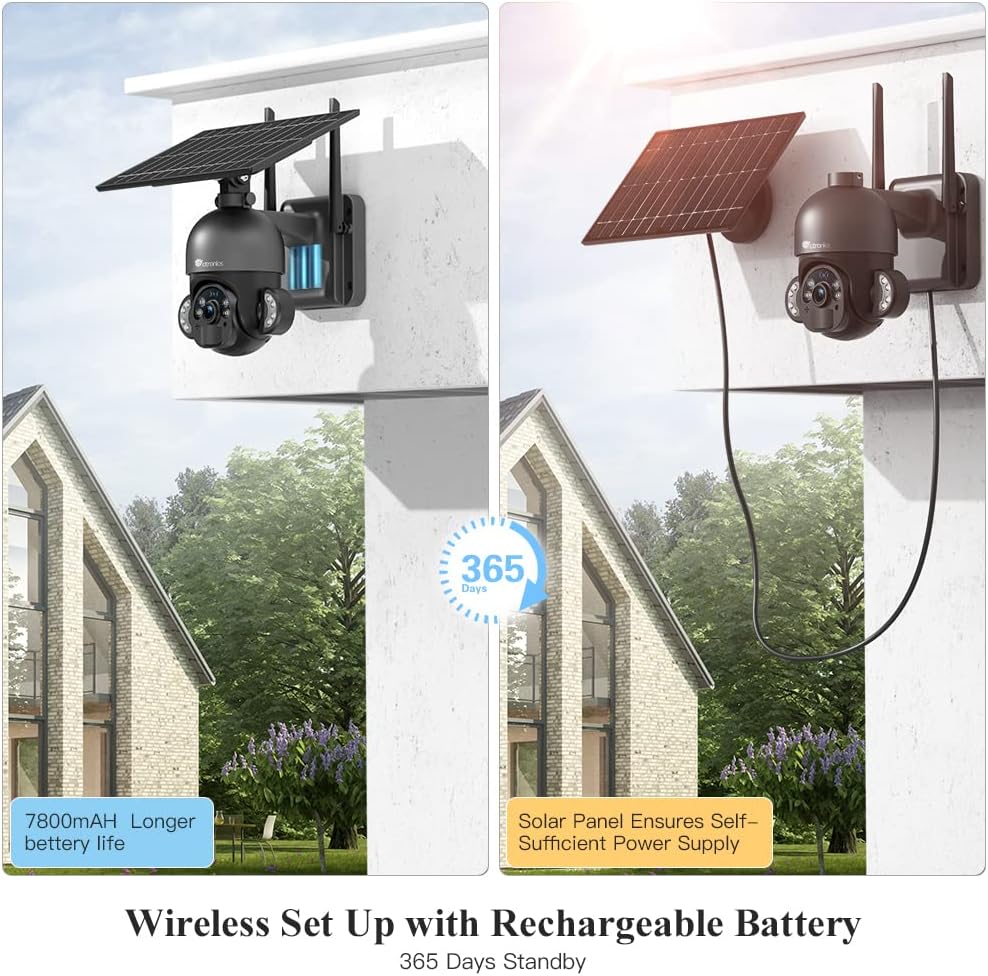
Image: The camera highlighting its 7800mAh battery and the solar panel providing continuous power, indicating 365 days of standby.

Image: A person and a dog in the camera's view, demonstrating the human detection feature distinguishing between human and non-human movement.

Image: The camera mounted on a wall, illustrating its 355-degree pan and 95-degree tilt capabilities for comprehensive coverage.

Image: A person interacting with a delivery driver via the camera's two-way audio feature, shown on a smartphone screen.

Image: The camera mounted outdoors, with rain and clouds indicating its IP66 weatherproof design.
3. パッケージ内容
商品をお受け取りになりましたら、パッケージの内容をご確認ください。不足品や破損品がございましたら、カスタマーサポートまでご連絡ください。
- Ctronics RBX-F20 PTZ Camera with Solar Panel
- 取り付けブラケット
- 取り付けネジと壁プラグ
- USB充電ケーブル
- ユーザーマニュアル
- クイックスタートガイド
4. セットアップとインストール
4.1 初期充電
Before installation, fully charge the camera's built-in 7800mAh battery using the provided USB cable. Connect the cable to a 5V/2A power adapter (not included) and the camera's charging port. The charging indicator will show the status.
4.2 アプリのインストールとアカウント作成
- App Store (iOS) または Google Play Store (Android) から「Ctronics」アプリをダウンロードしてください。
- Open the app and register a new account, or log in if you already have one.
4.3 カメラとアプリのペアリング
- スマートフォンが 2.4GHz Wi-Fi ネットワークに接続されていることを確認してください。(5GHz Wi-Fi はサポートされていません)。
- カメラの電源を入れます。
- Ctronics アプリで、「+」アイコンをタップして新しいデバイスを追加します。
- 画面の指示に従って、カメラの QR コードをスキャンするか、デバイス ID を手動で入力します。
- Wi-Fiネットワークを選択し、パスワードを入力します。
- The camera will attempt to connect. Once connected, you can name your camera and complete the setup.
4.4カメラの取り付け
The camera offers two installation methods: all-in-one (camera and solar panel together) or separated (solar panel mounted separately for optimal sunlight exposure).
- 場所を選択: Select a location with good Wi-Fi signal and sufficient sunlight exposure for the solar panel. Ensure the camera has a clear view 監視したいエリアの
- ドリル穴をマークする: 取り付けブラケットをテンプレートとして使用し、壁にドリル穴の位置をマークします。
- ドリル穴: マークした位置に穴を開け、壁プラグを挿入します。
- ブラケットを固定します。 付属のネジを使用して取り付けブラケットを壁に取り付けます。
- Attach Camera/Solar Panel:
- オールインワン: Attach the camera unit (with the solar panel already connected) to the mounting bracket.
- 分離: Mount the solar panel in a location with maximum sunlight, then connect it to the camera using the extension cable (if needed, not included). Attach the camera to its mounting bracket.
- 角度の調整: Adjust the camera and solar panel angles for optimal coverage and charging efficiency.

Image: Illustrates two installation methods for the camera: integrated solar panel and separate solar panel for flexible placement.
5. 操作
5.1 ライブ View PTZコントロール
Ctronicsアプリを開いてカメラを選択し、ライブにアクセスします view. Use the on-screen controls to pan (355° horizontally) and tilt (95° vertically) the camera lens to monitor different areas.
5.2 双方向オーディオ
ライブでは view interface, tap the microphone icon to speak through the camera's speaker. Tap the speaker icon to listen to audio from the camera's surroundings.
5.3 動きの検出とアラート
The camera uses a PIR sensor for human detection. You can adjust the sensitivity (low, medium, high) in the app settings. When motion is detected, the camera will record and send a push notification to your smartphone.
5.4 ナイトビジョンモード
The camera supports color night vision up to 30 meters using its built-in spotlights. You can configure night vision settings (e.g., automatic, black & white, color) within the app.
5.5 録音と再生
The camera supports local storage via a Micro TF card (not included). Recorded footage can be accessed and played back through the Ctronics app. The camera also supports saving to an FTP server.
6. メンテナンス
- クリーニング: カメラのレンズとソーラーパネルを定期的に柔らかくてきれいな布で拭いてください。amp 鮮明な画像と効率的なソーラー充電を確保するために、布を使用してください。刺激の強い化学薬品は使用しないでください。
- バッテリーのケア: While the solar panel provides continuous charging, ensure the camera receives adequate sunlight. If the camera is installed in a shaded area or during prolonged cloudy periods, occasional manual charging via USB may be necessary.
- ファームウェアの更新: Check the Ctronics app periodically for firmware updates. Keeping your camera's firmware up-to-date ensures optimal performance and security.
- 環境保護: The IP66 rating protects against dust and water jets. Avoid submerging the camera in water or exposing it to extreme physical impact.
7。 トラブルシューティング
| 問題 | 考えられる原因 | 解決 |
|---|---|---|
| カメラがWi-Fiに接続できません。 | Incorrect Wi-Fi password, 5GHz network, weak signal, or MAC address filtering on router. |
|
| False alarms or too many notifications. | High PIR sensitivity, environmental factors (e.g., moving branches, pets). |
|
| バッテリーが充電されない、またはバッテリー残量が少ない。 | 日光不足、ソーラーパネルの汚れ、接続不良。 |
|
| 画質が悪い。 | レンズの汚れ、光量の不足、ネットワーク帯域幅の問題。 |
|
8. 仕様
| モデル名 | RBX-F20 |
| ブランド | クトロニクス |
| 解決 | 2.5K 4MP(2560x1440) |
| 接続技術 | Wireless (Wi-Fi 2.4GHz), Wired (Ethernet, ONVIF, RTSP) |
| 電源 | Solar Powered / Rechargeable Battery (7800mAh) |
| パン/チルト角 | パン355°、チルト95° |
| ナイトビジョン | Color Night Vision up to 30 meters (with 10 spotlights) |
| 人間検出 | PIR Sensor with adjustable sensitivity |
| オーディオ | 双方向オーディオ(内蔵マイクとスピーカー) |
| 耐候性 | IP66認定 |
| ストレージ | Micro TF Card Slot (up to 128GB, not included), FTP Storage |
| 対応デバイス | Smartphone (Android/iOS) |
| 推奨用途 | 屋外セキュリティ |
9. 保証とサポート
Ctronics製品には標準保証が付いています。保証の詳細については、パッケージに同梱されている保証書、またはCtronicsの公式ウェブサイトをご覧ください。 website. If you encounter any issues or have questions regarding your camera, please contact Ctronics customer support. Our team is dedicated to providing prompt and helpful assistance.
連絡先: Please refer to the contact details provided on the Ctronics official web最新のサポート チャネルについては、サイトまたは製品パッケージをご覧ください。