
導入
ご購入ありがとうございますasing the Max Power MPD15EQ Portable Rechargeable PA Speaker. This manual provides important information regarding the setup, operation, and maintenance of your speaker. Please read it thoroughly before using the product to ensure proper function and to maximize its lifespan.
安全に関する注意事項
- 火災や感電の危険を防ぐため、ユニットを雨や湿気にさらさないでください。
- スピーカーキャビネットを開けないでください。内部にはユーザーが修理できる部品はありません。修理はすべて資格のある担当者にご依頼ください。
- 適切な換気を確保してください。通気口を塞がないでください。
- ユニットに付属の電源アダプタのみを使用してください。
- Keep the speaker away from heat sources, direct sunlight, and strong magnetic fields.
- 乾いた布でのみ清掃してください。
パッケージ内容
- Max Power MPD15EQ PA Speaker
- 有線マイク
- リモートコントロール
- 電源アダプター
- ユーザーマニュアル(このドキュメント)
製品終了view
Familiarize yourself with the various parts of your MPD15EQ speaker.
フロントパネル
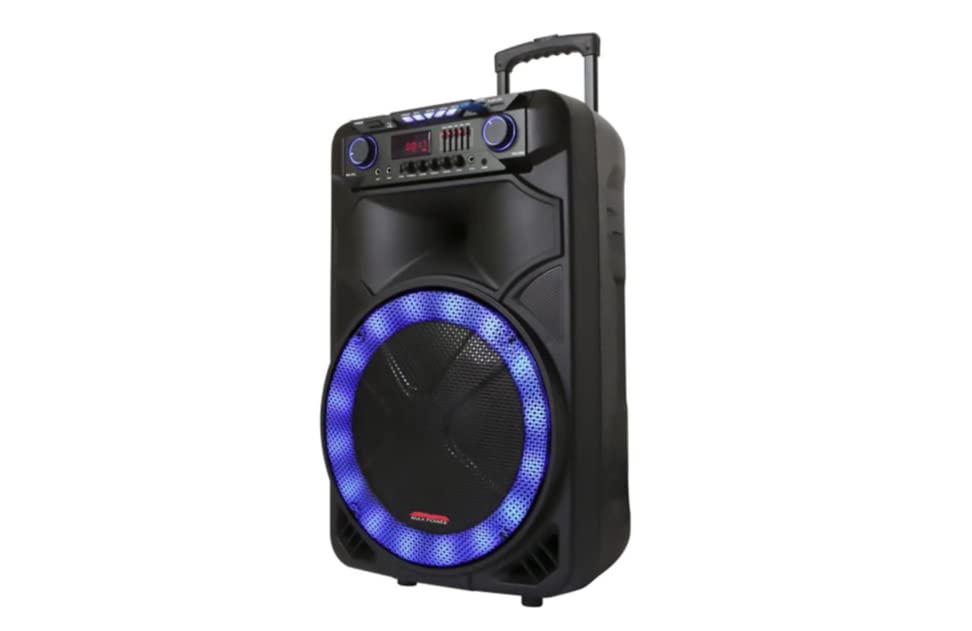
画像の説明: This image displays the front of the Max Power MPD15EQ speaker. It features a large 15-inch woofer at the bottom, a 5-inch horn tweeter above it, and a control panel with an LED display screen. The speaker grille covers the woofer and tweeter, and the overall design is robust and portable.
- 15インチウーファー: Provides powerful bass frequencies.
- 5" Horn Tweeter: Delivers clear high frequencies.
- LED 表示画面: 現在のモード、トラック情報、および設定を表示します。
- コントロールパネル: Buttons and knobs for various functions (volume, EQ, mode, etc.).
- LEDライトオン/オフスイッチ: Controls the integrated LED lighting.
リアパネル(例:ample - specific details not provided in source)
The rear panel typically includes input/output ports and the power connection.
- 電源入力: For connecting the power adapter to charge the battery or operate the unit.
- USBポート: USB ドライブからオーディオを再生します。
- SDカードスロット: SD カードからオーディオを再生します。
- マイク入力: 有線マイクを接続します。
- 補助入力: 3.5mm または RCA ケーブルを介して外部オーディオ デバイスを接続します。
設定
バッテリーの充電
The MPD15EQ features a built-in rechargeable battery. Before first use, fully charge the speaker for approximately 6-8 hours.
- Connect the supplied power adapter to the speaker's power input port.
- 電源アダプタを標準の壁コンセントに差し込みます。
- The LED display or an indicator light will show the charging status.
- 完全に充電されたら、電源アダプターを外します。
初期電源オン
- Ensure the speaker is fully charged or connected to power.
- Locate the power switch (usually on the rear or control panel) and turn it to the "ON" position.
- The LED display will illuminate, indicating the speaker is ready for use.
操作手順
Bluetooth接続
- Turn on the MPD15EQ speaker.
- Press the "MODE" button on the control panel until "BLUETOOTH" or "BT" appears on the LED display.
- スマートフォン、タブレット、その他のオーディオ デバイスで Bluetooth を有効にします。
- 検索する available devices and select "MPD15EQ" from the list.
- Once paired, you will hear a confirmation sound, and you can now play audio wirelessly.
有線マイクの使用
- Connect the supplied wired microphone to the "MIC IN" port on the speaker.
- Adjust the microphone volume knob (if available) on the control panel to your desired level.
- マイクに向かって話してください。
USB / SDカードの再生
- USBフラッシュドライブまたはSDカード(MP3オーディオがプリロードされている)を挿入します files) をそれぞれのポートに挿入します。
- The speaker should automatically switch to USB/SD mode and begin playing. If not, press the "MODE" button.
- Use the playback controls (Play/Pause, Next, Previous) on the control panel or remote control.
5-Band Graphic EQ Adjustment
The MPD15EQ features a 5-band graphic equalizer to fine-tune your audio output.
- Locate the EQ sliders on the control panel.
- Each slider corresponds to a specific frequency band. Adjust them up or down to boost or cut those frequencies.
- Experiment with the settings to achieve your preferred sound profile.
LEDライト
The speaker includes integrated LED lights. Use the "LED Light On/Off Switch" to activate or deactivate them.
リモコンの使用
The included remote control allows for convenient operation from a distance. It typically includes buttons for power, mode selection, volume, track control, and EQ presets.
メンテナンス
クリーニング
- 清掃する前に必ずスピーカーの電源をオフにし、プラグを抜いてください。
- 柔らかく乾いた布を使用して、外部の表面を拭いてください。
- Do not use liquid cleaners, aerosols, or abrasive chemicals.
ストレージ
- スピーカーは直射日光や極端な温度を避け、涼しく乾燥した場所に保管してください。
- If storing for extended periods, charge the battery periodically (e.g., every 3 months) to maintain battery health.
トラブルシューティング
| 問題 | 考えられる原因 | 解決 |
|---|---|---|
| 電源なし | バッテリーが放電しています。電源ケーブルが接続されていません。電源スイッチがオフになっています。 | Charge the battery; Check power cable connection; Turn power switch ON. |
| 音が出ない | 音量が低すぎる、入力モードが正しくない、デバイスがペアリングされていない (Bluetooth)。 | Increase master volume; Select correct input mode (Bluetooth, USB, AUX); Re-pair Bluetooth device. |
| マイクが機能しない | Microphone not connected; Microphone volume low; Microphone switch off. | Ensure microphone is securely plugged in; Increase microphone volume; Check microphone's ON/OFF switch. |
| Bluetooth接続が不安定 | デバイスが遠すぎる、干渉がある、バッテリー残量が少ない。 | Move device closer to speaker; Avoid obstacles; Ensure speaker battery is charged. |
仕様
- ウーファー: シングル15インチ
- ツイーター: Single 5" Horn
- 周波数応答: 40Hz-20KHz
- インピーダンス: 4オーム
- 感度: 93デシベル
- 寸法(幅×奥行き×高さ): 19インチ x 16.75インチ x 32インチ
- 重さ: 約38ポンド
- バッテリー: 内蔵充電式
- 接続性: Bluetooth, USB, SD Card, Microphone Input, Auxiliary Input
- EQ: 5バンドグラフィックEQ
- 画面: LEDディスプレイスクリーン
- 付属品: Wired Microphone, Remote Control
保証とサポート
Max Power products are designed for reliability and performance. For warranty information or technical support, please refer to the warranty card included with your purchase or visit the official Max Power webサイトでご確認ください。保証請求に備えて購入証明書を保管してください。
連絡先: Please refer to the packaging or official webカスタマー サービスの最新の連絡先情報については、こちらのサイトをご覧ください。
公式製品ビデオ
No official product videos from the seller were available for embedding at this time. If available, they would appear here with detailed descriptions.