
導入
This manual provides detailed instructions for the MODESLAB 2 Pack 2.4 GHz Wireless USB SNES Controller Gamepad. It covers setup, operation, compatibility, and maintenance to ensure optimal performance and longevity of your controllers. Please read this manual thoroughly before first use.
パッケージ内容
The MODESLAB Wireless SNES Controller Gamepad package includes the following items:
- 2 x Wireless SNES-style Gamepads
- 2 x USB Receivers
- 2 x SNES Receivers

Image: Contents of the MODESLAB Wireless SNES Controller Gamepad package.
互換性
The MODESLAB Wireless SNES Controller Gamepad is designed for broad compatibility with various systems. Please review 互換性情報は以下の通りです。
サポートされているシステム:
- Windowsパソコン
- Apple Mac (iOS)
- リナックス
- ラズベリーパイ
- Original Super Nintendo Entertainment System (SNES) / Super Famicom / Super Comboy / Super Nintendo
サポートされていないシステム:
- Android TV ボックス
- Commodore 64 (C64)
- Google Chromebook
- アマゾンファイアTV
- Steam (as a standalone platform)
- テスラモデル
- Super NES Classic Edition (also known as Nintendo Classic Mini, Super Nintendo Classic Mini)

Image: Visual guide to system compatibility.
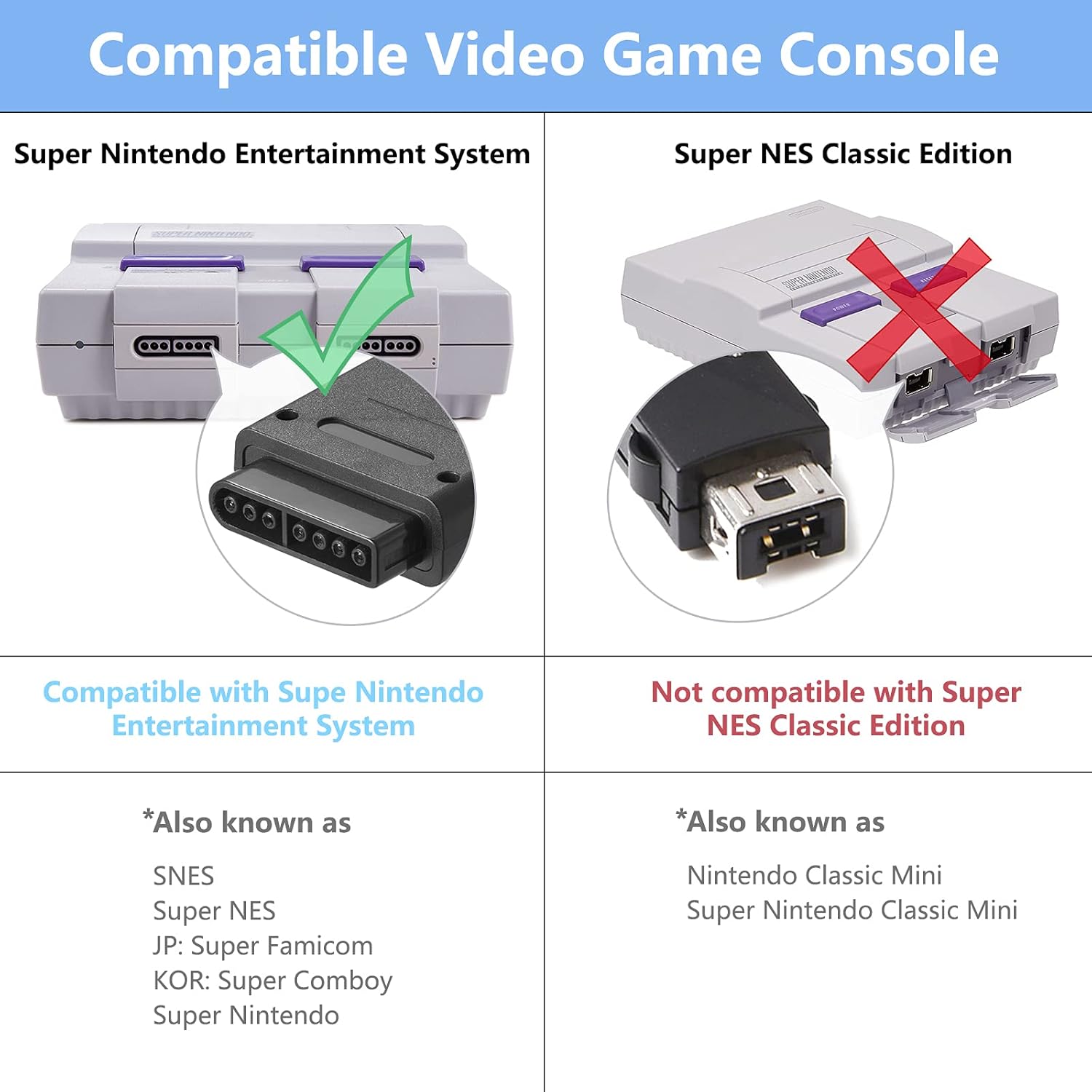
Image: Compatibility details for SNES consoles.
設定
Follow these steps to set up your MODESLAB Wireless SNES Controller Gamepad:
- Initial Controller Reset (Recommended for First Use or Pairing Issues): Before the first use, or if you encounter pairing difficulties, perform a controller reset. Simultaneously press and hold the 選択, 始める、 そして D-PAD DOWN buttons on the controller for a few seconds. This action resets the controller's internal state.
- 受信機を接続します。
- For PC, Mac, Linux, or Raspberry Pi: Insert the USBレシーバー into an available USB port on your device.
- For Original SNES Console: Insert the スーパーファミコン受信機 into a controller port on your SNES console.
- コントローラーの電源オン: を押す 始める button on the controller to power it on. The controller will automatically attempt to pair with the connected receiver.
- ペアリング確認: Once successfully paired, the LED indicator on the controller will typically show a solid light, indicating a stable connection.

Image: Controller buttons for the reset procedure.
操作手順
After successful setup, your MODESLAB Wireless SNES Controller Gamepad is ready for use.
- 電源オン/オフ: を押す 始める button to power on the controller. To power off, hold the 始める button for a few seconds until the LED indicator turns off, or the controller will automatically power off after a period of inactivity to conserve battery.
- ゲームプレイ: Use the D-Pad for movement, and the A, B, X, Y, L, R, SELECT, and START buttons for in-game actions as defined by the game you are playing.
- 複数のコントローラー: If using two controllers, ensure both receivers are connected to the system and each controller is paired individually.

画像: Example of two controllers in use with a SNES console.

Image: Controller in use during gameplay.
バッテリー情報
The MODESLAB Wireless SNES Controller Gamepad is equipped with a high-capacity rechargeable battery for extended gameplay.
- バッテリー容量: 500mAh
- プレイ時間: フル充電で約16時間。
- 充電: Connect the controller to a USB power source using a compatible charging cable (not explicitly listed in package contents, but implied for rechargeable devices). The LED indicator will typically show charging status and turn off or change color when fully charged.
- 節電: The controller features intelligent power-saving technology to maximize battery life during periods of inactivity.

Image: Battery specifications and estimated playing time.
メンテナンス
Proper maintenance ensures the longevity and performance of your controllers:
- クリーニング: Use a soft, dry cloth to clean the surface of the controllers. Avoid using harsh chemicals or abrasive materials.
- ストレージ: コントローラーは、直射日光や極端な温度を避け、涼しく乾燥した場所に保管してください。
- ドロップを避ける: 内部コンポーネントを損傷する可能性のある落下や衝撃からコントローラーを保護します。
- 充電: バッテリーを過充電しないでください。バッテリーが満充電になったら充電ケーブルを外してください。
トラブルシューティング
If you encounter issues with your MODESLAB Wireless SNES Controller Gamepad, refer to the following common solutions:
- コントローラーがペアリングされない:
- Ensure the receiver is securely plugged into the correct port (USB for PC/Mac/Linux/Raspberry Pi, SNES port for SNES console).
- Perform the controller reset procedure: Press and hold SELECT + START + D-PAD DOWN 同時に。
- Ensure the controller is charged. Connect it to a power source and try again.
- Try a different USB port or SNES port.
- 入力遅延または切断:
- Ensure the controller is within range of the receiver (typically up to 10 meters, but can be affected by obstacles).
- Minimize interference from other 2.4 GHz wireless devices.
- コントローラーのバッテリーが十分に充電されていることを確認してください。
- ボタンが反応しない:
- Perform the controller reset.
- コントローラーが正しくペアリングされているかどうかを確認します。
- ゲームまたはアプリケーションがコントローラー入力をサポートしていることを確認します。
仕様
| 特徴 | 詳細 |
|---|---|
| モデル番号 | B09YYB7DQW |
| 接続性 | 2.4GHzワイヤレス |
| バッテリー容量 | 500mAh |
| 推定プレイ時間 | 16時間 |
| パッケージ寸法 | 6.38 x 6.22 x 2.52インチ |
| アイテム重量 | 10.5オンス |
| 初回利用可能日 | 27年2022月XNUMX日 |
保証とサポート
MODESLAB products are designed for reliability and performance. For any questions, technical support, or warranty inquiries, please refer to the seller's contact information or the platform where the product was purchased. Please retain your proof of purchase for warranty claims.