
導入
This manual provides comprehensive instructions for the Miracase Glass Series Full-Body Rugged Bumper Case, specifically designed for the Apple iPhone 11 (6.1 inch). This case offers 360° full-body protection with a built-in 9H tempered glass screen protector and integrated camera lens protection, ensuring your device remains safe from scratches, drops, and dust.
The Miracase Glass Series case is engineered for durability and ease of use, combining robust materials with a sleek design to complement your iPhone's aesthetics while providing superior defense against daily wear and tear.

Figure 1: Miracase Glass Series Case for iPhone 11 (Purple)
This image displays the Miracase Glass Series case in purple, highlighting its two main components: the front frame with integrated screen protector and the clear back panel, alongside an iPhone 11.
セットアップとインストール
Proper installation is crucial for optimal protection and functionality. Please follow these steps carefully:
ステップ1: デバイスを準備する
Before installing the case, ensure your iPhone 11 screen and back are thoroughly cleaned and free of any dust, fingerprints, or smudges. Use the provided cleaning kit (wet wipe, dry wipe, dust absorber) for best results.

Figure 2: Cleaning the iPhone 11 Screen
A person is shown meticulously cleaning the screen of an iPhone 11 using a soft cloth, a critical step before case installation to prevent trapped dust or bubbles.
Step 2: Separate the Case Components
The Miracase Glass Series case consists of two main parts: a front cover with a built-in screen protector and a back case. Gently separate these two parts. Remove any protective films from both the inner and outer surfaces of the case components.
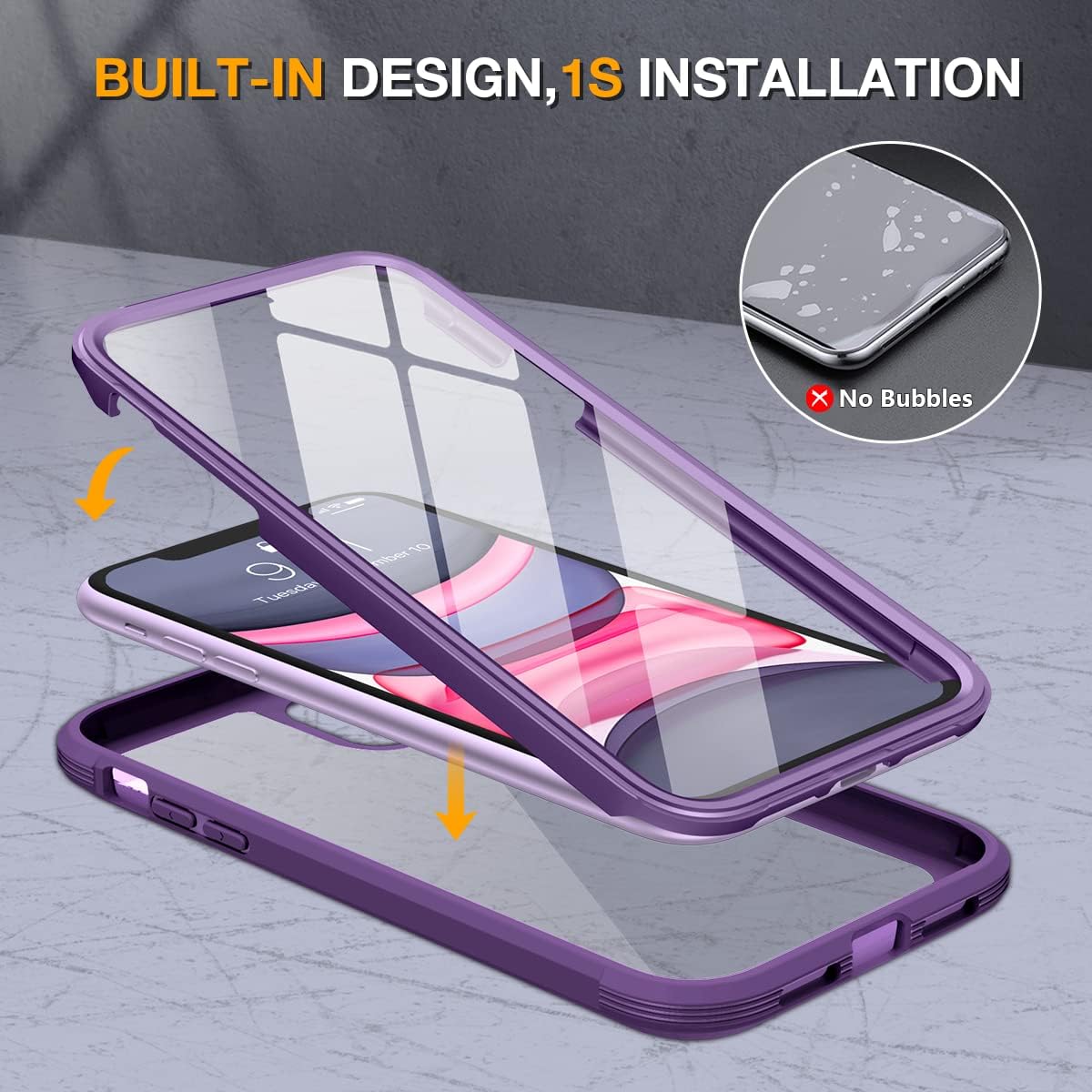
Figure 3: Separating Case Components
This image illustrates the two distinct parts of the Miracase case, demonstrating how they separate for easy installation of the iPhone 11.
Step 3: Install the Front Cover
Carefully place your iPhone 11 into the front cover, ensuring the screen aligns perfectly with the built-in tempered glass screen protector. Press firmly around the edges to secure the phone and remove any potential air bubbles.
Step 4: Assemble the Back Case
Once the front cover is securely in place, fit the back case onto the phone. It is recommended to start from the bottom right corner and then press firmly around all edges until both parts snap together tightly, creating a sealed protective shell.
ビデオインスタレーションガイド
Video 1: Installation for Miracase iPhone 11 Full Body Case
This official video provides a detailed, step-by-step guide on how to properly install the Miracase Glass Series case on your iPhone 11, ensuring a secure and protective fit.
ケースの操作
The Miracase Glass Series case is designed for seamless daily use while providing robust protection for your iPhone 11.
360° Full-Body Rugged Protection
The dual-layer structure of the case provides comprehensive protection against drops, impacts, and scratches. Its flexible TPU materials absorb and deflect impact, while raised bezels around the camera (2.6mm) and screen (1.8mm) offer additional defense against direct surface contact.

Figure 4: Military Standard Drop Protection
This image highlights the case's military-grade drop protection, showing extra cushioning on all four corners designed to protect your iPhone 11 against falls and bumps.
9H Tempered Glass Screen Protector
The built-in 9H tempered glass screen protector offers high-definition clarity and maintains the original response sensitivity and touch-screen accuracy of your iPhone 11. It provides consistent protection against scratches and accidental damage.
ワイヤレス充電の互換性
The Miracase case is designed to be fully compatible with MagSafe chargers and other wireless charging pads. You can conveniently charge your device without the need to remove the case.

図5: ワイヤレス充電サポート
An iPhone 11 encased in the Miracase case is shown charging wirelessly on a charging pad, demonstrating its full compatibility with wireless charging without needing to remove the case.
メンテナンスとケア
To ensure the longevity and optimal performance of your Miracase Glass Series case, regular maintenance is recommended:
- 定期清掃: Use a soft, lint-free microfiber cloth to gently wipe down the exterior surfaces of the case. For smudges or dirt, slightly dampen the cloth with water. Avoid using harsh chemicals, abrasive cleaners, or solvents, as these can damage the case's finish or the integrated screen protector.
- 内部クリーニング: Over time, dust or debris may accumulate between your iPhone and the case. To clean the interior, carefully disassemble the case (refer to the "Setup and Installation" section for disassembly instructions, starting from the bottom right corner). Wipe both your phone and the inside of the case with a dry microfiber cloth before reassembling.
- 極端な状況を避ける: While the case offers rugged protection, avoid exposing it to extreme temperatures or prolonged direct sunlight, which could affect its material integrity.
Video 2: iPhone 11 Case with Tempered Glass Screen Protector Overview
このビデオはオーバーを提供しますview of the iPhone 11 case, demonstrating its features and general handling, which includes aspects relevant to maintaining its condition.
一般的な問題のトラブルシューティング
Here are solutions to common issues you might encounter with your Miracase Glass Series case:
- スクリーンプロテクターの下の気泡: If air bubbles appear during installation, carefully lift the corner of the front cover closest to the bubble and gently reapply, pushing the air out towards the edges. Ensure the screen is completely clean before reapplication.
- タッチ感度の低下: If you experience reduced touch sensitivity, ensure the case is installed correctly and there is no debris or moisture between the screen and the protector. Sometimes, removing and re-installing the case after thoroughly cleaning both surfaces can resolve this.
- Dust Accumulation Inside Case: Dust can occasionally enter the case through the charging port or other openings. To clean, carefully remove the case (starting from the bottom right corner), wipe down both the phone and the inside of the case with a microfiber cloth, and reassemble.
- Foggy Appearance on Screen Protector: This can be caused by moisture or trapped air. Disassemble the case, clean both the phone screen and the inside of the screen protector thoroughly with a dry, lint-free cloth, and ensure they are completely dry before reassembling.
製品仕様
| 特徴 | 詳細 |
|---|---|
| 製品寸法 | 5.91 x 3.15 x 0.79インチ |
| アイテム重量 | 2.82オンス |
| ASIN | B09YPSMJHF |
| 商品型番 | セルラー |
| 特集 | Built-in Screen Protector, Camera Protector |
| その他の表示機能 | 無線 |
| フォームファクター | 基本的なケース |
| 色 | 紫 |
| 互換性のある電話モデル | iPhone 11 |
| 対応デバイス | iPhone 11 |
| メーカー | ミラケース |
| 初回利用可能日 | 24年2022月XNUMX日 |
保証とカスタマーサポート
保証情報
Miracase is committed to product quality and customer satisfaction. This product comes with a lifetime warranty. For detailed information regarding warranty claims, coverage, and terms, please refer to the warranty card included in your product packaging or visit the official Miracase webサイト。
プロフェッショナルサポート
Should you encounter any issues, have questions, or require assistance with your Miracase Glass Series case, our dedicated professional support team is ready to help. Please feel free to contact us for a satisfactory solution. Contact details can typically be found on the product packaging or through the Miracase brand store on Amazon.