
1. はじめに
ご購入ありがとうございますasing the Depusheng U6 Audio Mixer. This 6-channel DJ sound controller is designed for versatile audio mixing, recording, and live streaming applications. It features a built-in USB audio interface, Bluetooth connectivity, and U-Disk playback/recording capabilities. This manual provides essential information for safe operation, setup, and optimal performance of your device. Please read it thoroughly before use and retain it for future reference.
2. 安全情報
- 電源: Use only the specified power adapter or a compatible USB power source. Ensure the voltageはデバイスの要件を満たしています。
- 水と湿気: Do not expose the mixer to water, rain, or excessive moisture. Avoid placing liquid-filled objects on the unit.
- 換気: 適切な換気を確保してください。通気口を塞がないでください。
- 熱: ユニットをラジエーター、暖房送風口、ストーブ、その他の熱を発生する器具などの熱源から遠ざけてください。
- クリーニング: 乾いた布でのみ拭いてください。 液体クリーナーやエアロゾルクリーナーは使用しないでください。
- サービス: この製品を自分で修理しようとしないでください。 すべてのサービスを資格のあるサービス担当者に依頼してください。
- ファントムパワー: When using condenser microphones, ensure +48V phantom power is activated only when necessary and that the microphone is compatible.
3. パッケージ内容
パッケージに以下のすべてのアイテムが含まれていることを確認してください。
- Depusheng U6 Audio Mixer
- USB電源ケーブル
- ユーザーマニュアル
4.製品オーバーview
The Depusheng U6 is a compact 6-channel mixer designed for various audio applications. It features multiple input and output options, integrated effects, and digital connectivity.
4.1 フロントパネルのコントロールと接続
The front panel provides access to all mixing controls and primary input/output ports.

画像の説明: 詳細な view of the Depusheng U6 Audio Mixer's front panel, showing all knobs, faders, buttons, and the digital display for USB/Bluetooth functions. Key controls include GAIN, HIGH, LOW, EFX, PEAK, VOL for each channel, along with DELAY, REPEAT, and MAIN volume controls. The USB port and Bluetooth indicator are also visible.
- MIC/LINE入力(チャンネル1~4) Combo jacks supporting both XLR and 1/4" (6.35mm) inputs for microphones or line-level instruments.
- +48Vファンタム: チャンネル 1 ~ 4 のコンデンサー マイク用の +48V ファンタム電源を有効にするボタン。
- 利得: 各チャンネルの入力感度を調整します。
- 高低: 2-band equalizer for adjusting treble and bass frequencies for each channel.
- エフェクト: Sends signal to the built-in effects processor (DELAY/REPEAT).
- ピークLED: 入力信号が高すぎる場合に点灯し、クリッピングの可能性があることを示します。
- VOL: Channel volume control.
- S/S (Stereo Input 5/6): 1/4" stereo inputs for connecting line-level devices.
- REC/MAIN OUT (RCA): Stereo RCA outputs for recording or connecting to external devices.
- MAIN OUT (1/4"): Stereo 1/4" outputs for connecting to power ampライブ配信者またはアクティブスピーカー。
- USBポート: For U-Disk playback/recording and connection to a computer as an audio interface.
- MODE/BT (Bluetooth): Button to switch between USB, Bluetooth, and other modes.
- PLAY/PAUSE, PREVIOUS, NEXT: Controls for U-Disk and Bluetooth playback.
- ディレイ/リピート: Controls for adjusting the built-in delay effect.
- クリップLED: Indicates output signal clipping.
- 電源LED: ユニットの電源がオンになっていることを示します。
- 主要: メイン出力のマスターボリュームコントロール。
- 電話: ヘッドフォンの音量コントロール。
- ヘッドフォンジャック: 1/4" stereo output for monitoring.
4.2 Input Interface Types

画像の説明: 閉じる view of the input jacks on the Depusheng U6 Audio Mixer, illustrating both the 6.5mm (1/4 inch) and XLR connection types for microphones and line-level devices. This image highlights the versatility of the combo input jacks.
- 6.5mm (1/4") Interface: For connecting instruments or line-level audio sources.
- XLRインターフェース: For connecting microphones, providing a balanced connection.
5. セットアップ
5.1 ミキサーの電源
The Depusheng U6 mixer can be powered via its USB port.

画像の説明: This image demonstrates two methods of powering the Depusheng U6 Audio Mixer via USB: connecting it to a computer's USB port or to a portable power bank. This highlights the flexibility of its power options.
- 付属の USB ケーブルをミキサーの USB 電源入力に接続します。
- Connect the other end of the USB cable to a computer's USB port or a USB power adapter (not included) connected to a wall outlet, or a power bank.
- The POWER LED on the mixer will illuminate when power is supplied.
5.2 基本的な接続
一般的な接続設定については、下の図を参照してください。

画像の説明: A comprehensive diagram illustrating various connection possibilities for the Depusheng U6 Audio Mixer. It shows connections for a computer, condenser microphone, dynamic microphone, wireless microphone receiver, power amplifier, passive speakers, and headphones, demonstrating a complete audio setup.
- マイク: Connect dynamic or condenser microphones to the MIC/LINE inputs (Channels 1-4) using XLR cables. Activate +48V phantom power for condenser microphones.
- 楽器/ラインデバイス: Connect instruments or other line-level devices to the MIC/LINE inputs (Channels 1-4) using 1/4" cables, or to the S/S (Stereo Input 5/6) using 1/4" stereo cables.
- Output to Speakers/Amplifier: Connect the MAIN OUT (1/4") to your power ampライファまたはアクティブスピーカー。
- ヘッドフォン: モニタリングするには、PHONE ジャックにヘッドフォンを接続します。
- コンピューター: Connect the mixer's USB port to your computer for use as an audio interface.
6. 操作手順
6.1 Wireless Bluetooth Streaming
The U6 mixer supports wireless Bluetooth audio streaming from compatible devices.
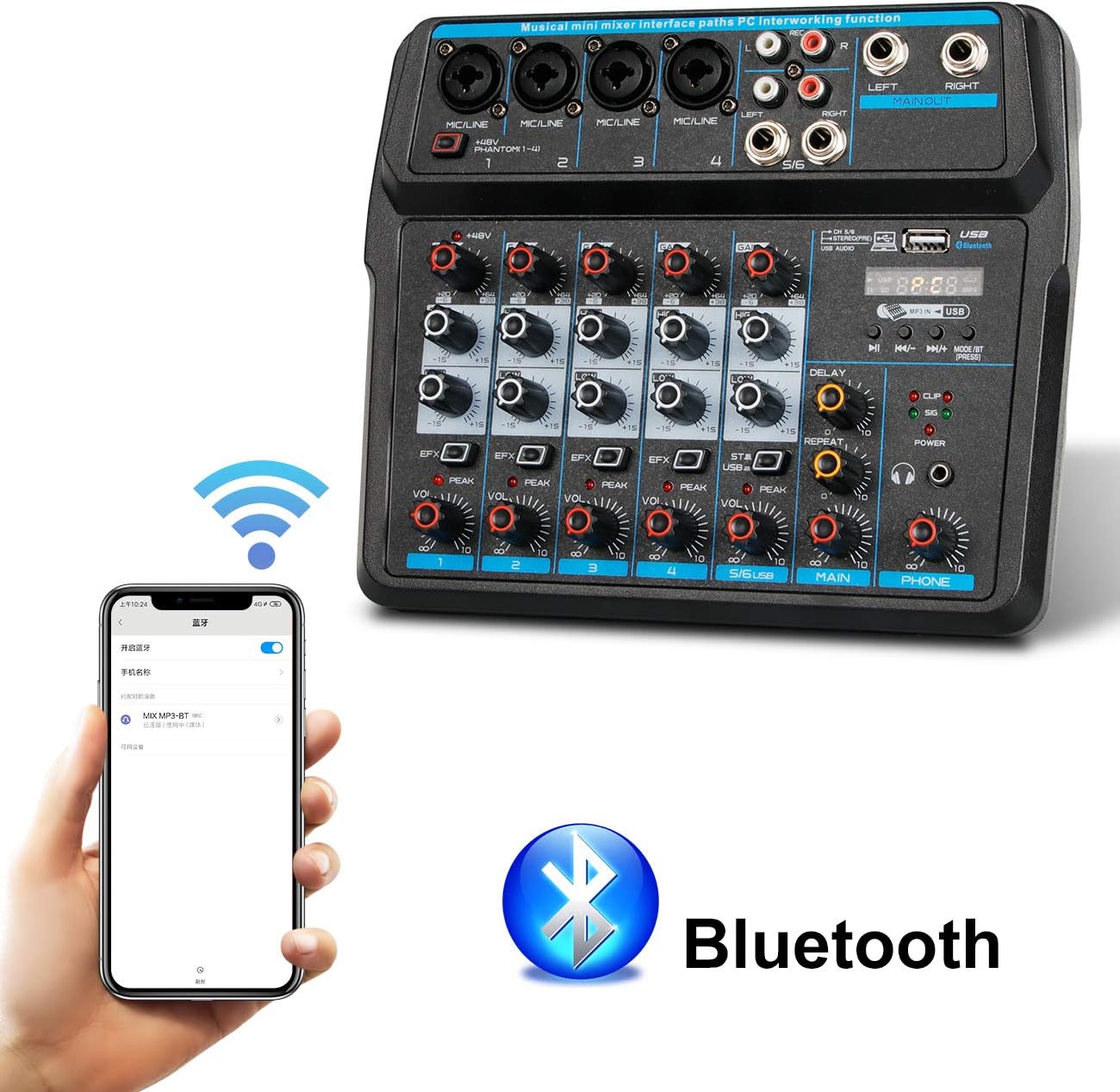
画像の説明: This image shows a smartphone displaying its Bluetooth settings, with the Depusheng U6 Audio Mixer (labeled 'U6 MP3-BT') available for connection. A large Bluetooth logo is also present, indicating the wireless connectivity feature.
- を押す MODE/BT button on the mixer until the Bluetooth indicator lights up and the display shows 'BT'.
- モバイル デバイス (スマートフォン、タブレットなど) で Bluetooth を有効にし、利用可能なデバイスを検索します。
- Select 'U6 MP3-BT' from the list to pair.
- Once paired, you can stream audio wirelessly from your device to the mixer. Bluetooth operates effectively within approximately 1.5 feet.
6.2 USB Audio Interface (PC Recording/Playback)
The U6 mixer can function as an external sound card for your computer.

画像の説明: This diagram illustrates how to connect the Depusheng U6 Audio Mixer to a laptop via USB for both playback and recording. It shows audio signals flowing from the computer to the mixer (background music) and from the mixer to the computer (for recording), with a close-up of the USB connection port on the mixer.
- Connect the mixer to your PC using a USB cable.
- The mixer will be recognized as a USB audio device by your computer.
- In your computer's sound settings or DAW (Digital Audio Workstation) software (e.g., Pro Tools, Logic Pro X, GarageBand, Audacity), select the U6 mixer as the input and output audio device.
- これで、ミキサーの入力からコンピューターにオーディオを録音したり、ミキサーを介してコンピューターからのオーディオを再生したりできるようになりました。
6.3 U-Disk Playback and Recording
The mixer supports direct playback of audio files from a USB flash drive (U-Disk) and recording to it.

画像の説明: This image highlights the U-Disk functionality of the Depusheng U6 Audio Mixer. It shows a USB flash drive inserted into the mixer's USB port, with text indicating its capabilities: 1. Play MP3/WAV/WMA/FLAC files, and 2. Record audio. The mixer's digital display shows '88:88', likely indicating playback time or a menu option.
- 再生: Insert a U-Disk containing audio files (MP3/WAV/WMA/FLAC) into the USB port. The mixer will automatically switch to U-Disk mode or you may need to press MODE/BT. Use the PLAY/PAUSE, PREVIOUS, and NEXT buttons to control playback.
- 録音: To record to a U-Disk, ensure it is inserted and the mixer is in U-Disk mode. Follow the specific recording instructions in the full manual (if available) or typically press and hold the PLAY/PAUSE button to initiate recording.
6.4 Using Effects (DELAY and REPEAT)
The U6 mixer includes built-in DELAY and REPEAT effects to enhance your audio.
- 使用 EFX 各チャンネルのノブを操作すると、そのチャンネルの信号の一部がエフェクト プロセッサに送信されます。
- 調整する 遅れ knob to control the delay time of the effect.
- 調整する 繰り返す knob to control the number of repetitions of the delay effect.
- The overall level of the effects return can be controlled via a dedicated EFX return knob (if present) or integrated into the main mix.
7. メンテナンス
- クリーニング: Use a soft, dry cloth to clean the surface of the mixer. Do not use abrasive cleaners, waxes, or solvents.
- ストレージ: 長期間使用しない場合は、直射日光や極端な温度を避け、涼しく乾燥した場所にミキサーを保管してください。
- ケーブルのお手入れ: Always grasp the connector, not the cable, when unplugging. Avoid bending or kinking cables excessively.
8。 トラブルシューティング
If you encounter issues with your Depusheng U6 Audio Mixer, refer to the following common problems and solutions:
| 問題 | 考えられる原因 | 解決 |
|---|---|---|
| 音声出力なし |
|
|
| マイクが機能しない |
|
|
| Bluetoothが接続されない |
|
|
| USB recording/playback issues |
|
|
9. 仕様
| 特徴 | 仕様 |
|---|---|
| ブランド | デプシェン |
| モデル番号 | U6 |
| チャンネル数 | 6 |
| 接続技術 | ブルートゥース、USB |
| オーディオ入力 | XLR, 1/4" (6.35mm) |
| 電源 | USBケーブル |
| アイテム重量 | 1.02キログラム |
| パッケージ寸法 | 29.3 x 24.3 x 9.2 cm |
| ハードウェアインターフェイス | ブルートゥース |
10. 保証とサポート
Depusheng products are designed for reliability and performance. This product comes with a standard manufacturer's warranty. For specific warranty terms and conditions, please refer to the documentation provided at the time of purchase or contact your retailer.
If you require technical support or have questions not covered in this manual, please contact Depusheng customer service through the retailer where you purchased the product. Please have your model number (U6) and purchase information ready.