
MeLE Quieter3Q
MeLE Quieter3Q Mini PC User Manual
Model: Quieter3Q
1. はじめに
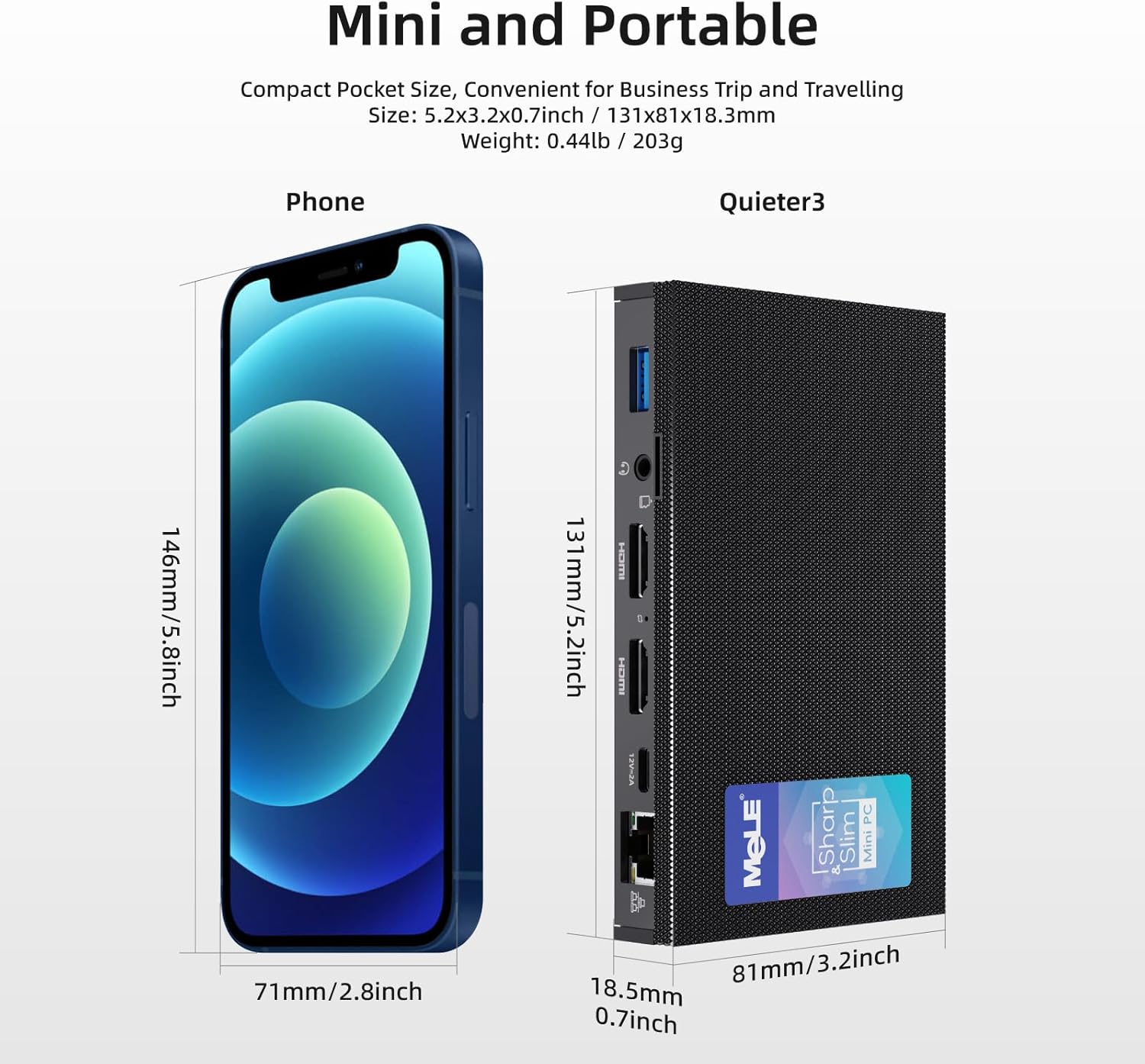
The MeLE Quieter3Q Mini PC is a compact and powerful computing device designed for various applications, including office work, education, home theater, and industrial IoT. This fanless mini PC features an Intel Celeron N5105 processor, 8GB DDR4 RAM, and a 128GB NVMe M.2 2280 SSD, running on Windows 11 Pro. Its small form factor allows for easy portability and flexible installation.
主な機能は次のとおりです。
- プロセッサ: Intel Celeron N5105 (up to 2.90 GHz) for efficient performance.
- メモリとストレージ: 8GB RAM and 128GB ROM, expandable up to 5TB via M.2 SSD (SATA/NVMe 2280).
- 画面: Supports 4K UHD @60 Hz output via HDMI 2.0 for high-definition visuals.
- 接続性: Equipped with Wi-Fi 6.0 (802.11ax), Bluetooth 5.2, Gigabit Ethernet, and multiple USB 3.0 ports.
- デザイン: Fanless design for silent operation, Kensington lock slot for security, and support for Wake on LAN, PXE, Auto Power On, and RTC Wake.
2. パッケージ内容
以下の項目のボックスにチェックを入れてください。
- 1x MeLE Quieter3Q Mini PC
- ユーザーマニュアル x 1
- 1V 12A電源アダプター x 2
- VESAマウントブラケット×1
3.製品オーバーview (Ports and Components)
Familiarize yourself with the ports and components of your MeLE Quieter3Q Mini PC:
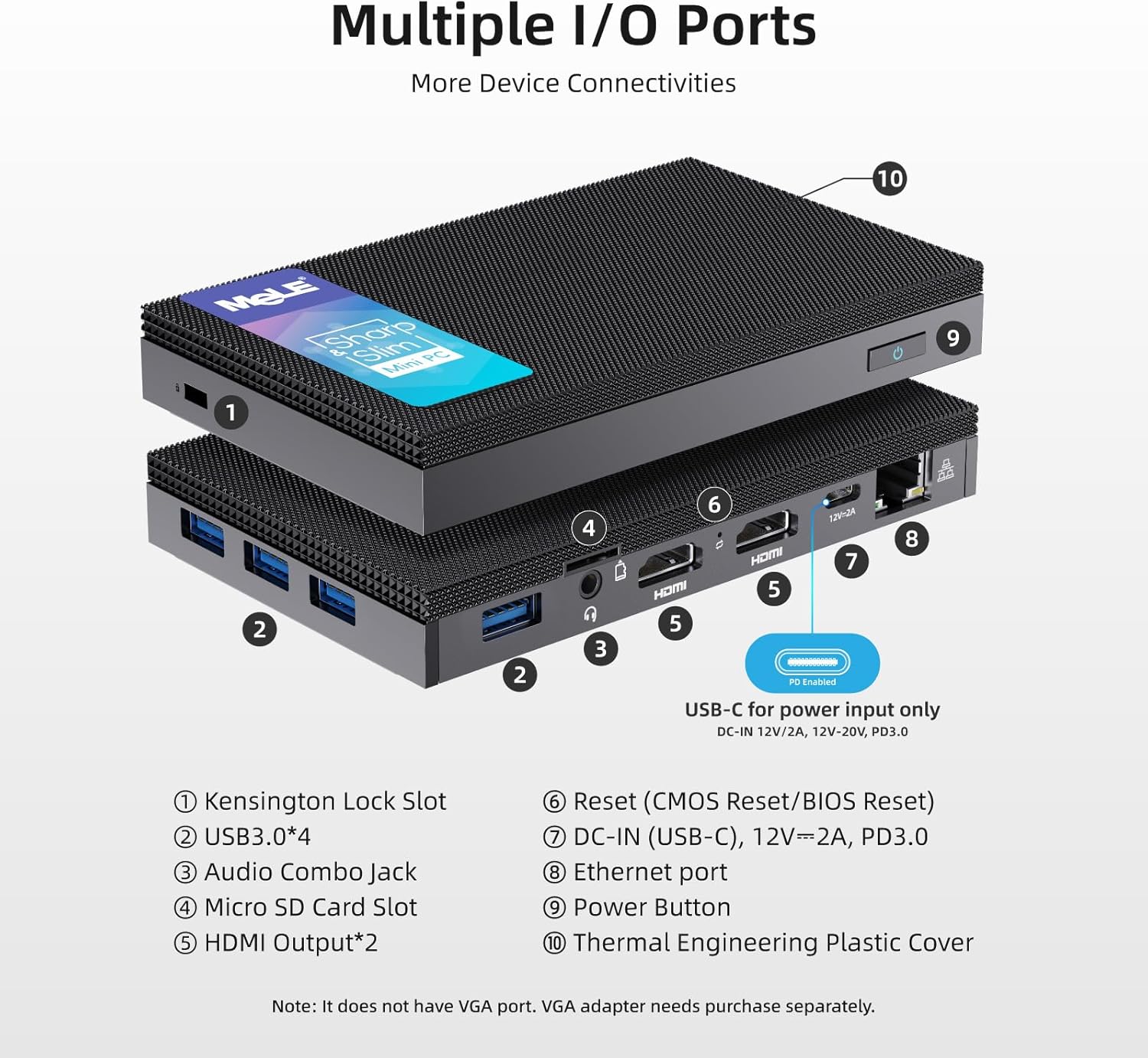
- ケンジントンロックスロット: デバイスを固定するため。
- USB 3.0 ポート (x4): キーボード、マウス、外部ストレージなどの周辺機器を接続します。
- オーディオコンボジャック: ヘッドフォンまたはマイク用。
- マイクロSDカードスロット: 追加のストレージ拡張用。
- HDMI出力(x2): デュアル 4K ディスプレイ出力をサポートします。
- Reset Button (CMOS Reset/BIOS Reset): For system reset or BIOS access.
- DC-IN (USB-C), 12V=2A, PD3.0: 電源入力ポート。
- イーサネットポート: 有線ネットワーク接続(ギガビットイーサネット)用。
- 電源ボタン: デバイスの電源をオン/オフにします。
- Thermal Engineering Plastic Cover: The fanless design ensures silent operation.
4.セットアップガイド
4.1 初期接続
- ディスプレイに接続: Use an HDMI cable to connect the Mini PC to your monitor or TV. The device supports dual 4K displays.
- 周辺機器を接続します。 利用可能な USB 3.0 ポートに USB キーボードとマウスを接続します。
- 接続電源: Connect the 12V 2A power adapter to the DC-IN (USB-C) port on the Mini PC and then to a power outlet.
- ネットワーク接続(オプション): For a wired connection, plug an Ethernet cable into the Ethernet port. For wireless, ensure your Wi-Fi network is available.
4.2 VESAマウントの取り付け
The MeLE Quieter3Q Mini PC can be mounted on the back of a VESA-compatible monitor for a clutter-free setup. The included VESA mount supports 70mm, 75mm, 80mm, 85mm, and 100mm mounting hole distances.
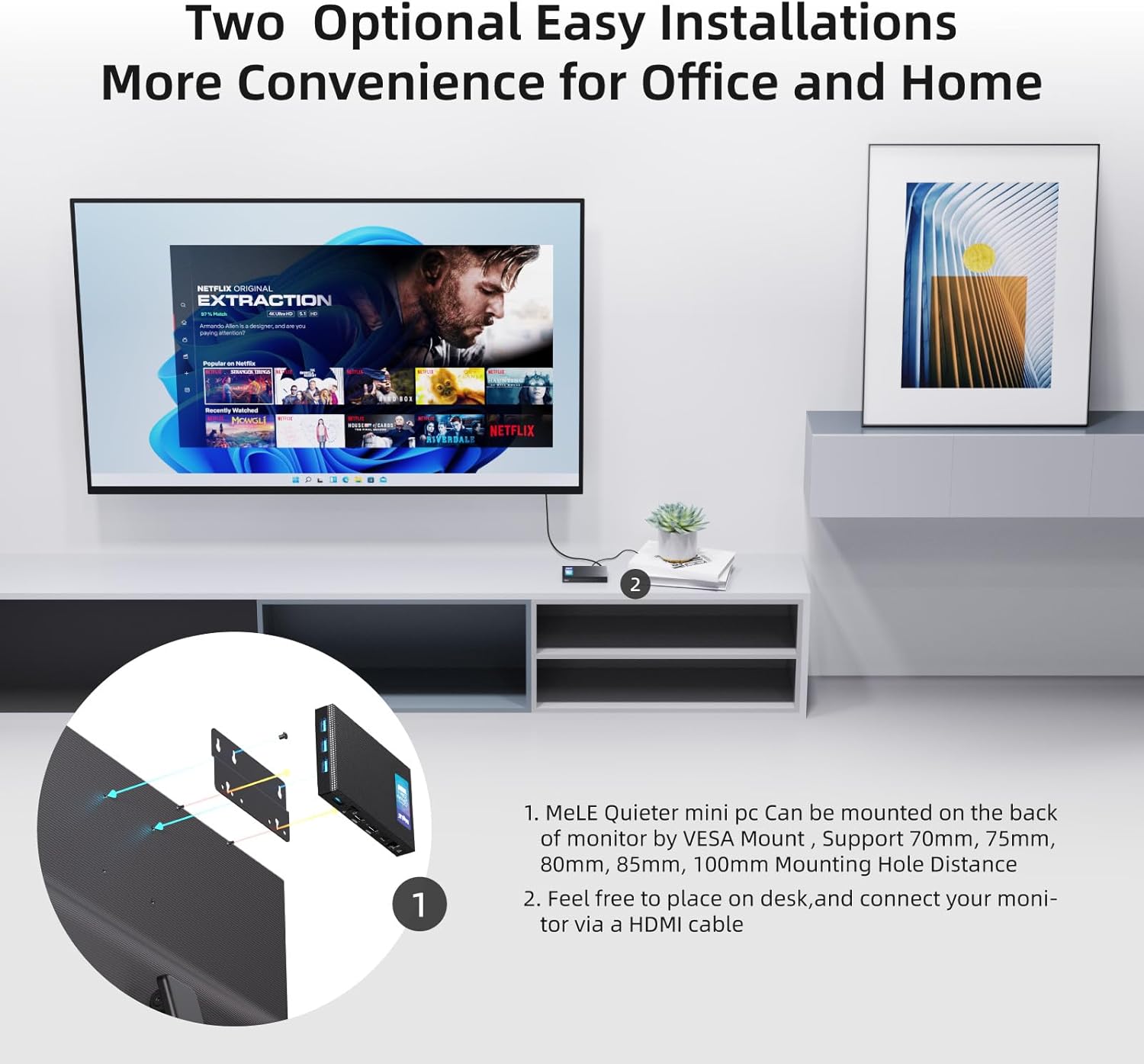
- Attach the VESA mount bracket to the back of your monitor using the appropriate screws.
- Slide the Mini PC onto the VESA mount bracket until it clicks securely into place.
5. 操作手順
5.1 電源オン/オフ
- 電源を入れるには: Press the Power Button (9 in Figure 2). The device will boot into Windows 11 Pro.
- 電源を切るには: Use the standard Windows shutdown procedure. Alternatively, press and hold the Power Button for a few seconds for a forced shutdown (not recommended for regular use).
5.2 ネットワークと接続性
The Mini PC supports both wired and wireless network connections, along with Bluetooth for peripheral devices.

- Wi-Fi 6.0(802.11ax): Connect to your wireless network through the Windows settings. Supports 2.4GHz and 5GHz bands.
- Bluetooth 5.2: Pair Bluetooth-enabled devices like headphones, speakers, or game controllers via Windows Bluetooth settings.
- ギガビットイーサネット: For a stable and high-speed wired internet connection, plug an Ethernet cable into the RJ45 port.
5.3 ストレージ拡張
The Mini PC comes with 128GB of internal storage and can be expanded significantly.
- M.2 SSD スロット: The device includes an M.2 2280 slot for SATA or NVMe SSDs, allowing storage expansion up to 5TB (SSD not included).
- マイクロSDカードスロット: Supports Micro SD cards up to 2TB for additional portable storage.

5.4 BIOS Settings and Advanced Features
- BIOS にアクセスする: To enter BIOS settings, press the power button and repeatedly press F7 or 消去 during startup. Select "Enter Setup" and press 入力.
- ウェイクオンLAN(WoL): Allows the PC to be woken up remotely over a network.
- PXE ブート: ネットワーク サーバーからの起動を有効にします。
- 自動電源オン: Configures the PC to automatically power on after a power outage.
- RTC ウェイク: 特定の時間に PC を起動するようにスケジュールします。
- These features can be configured within the BIOS settings.
6. メンテナンス
The MeLE Quieter3Q Mini PC features a fanless design, which reduces dust accumulation and eliminates fan noise, contributing to its longevity and stable operation. To ensure optimal performance and extend the lifespan of your device, follow these general maintenance guidelines:
- 清潔に保ちます: Regularly wipe the exterior of the Mini PC with a soft, dry cloth to remove dust. Avoid using liquid cleaners directly on the device.
- 換気: Ensure the device is placed in a well-ventilated area. Although fanless, proper airflow helps dissipate heat. Do not block the ventilation holes.
- 温度: ミニPCは推奨温度範囲内でご使用ください。極端な高温や低温を避けてください。
- ソフトウェアアップデート: Keep your operating system (Windows 11 Pro) and drivers updated to ensure security and optimal performance.
- データのバックアップ: データの損失を防ぐために、重要なデータを定期的に外部ドライブまたはクラウド ストレージにバックアップしてください。
7。 トラブルシューティング
7.1 一般的な問題と解決策
- Storage Capacity Displayed Incorrectly:
問題: The 128GB eMMC storage may display as approximately 114GB on the computer.
理由: This is due to the difference in how computer operating systems (1KB = 1024 bytes) and storage manufacturers (1KB = 1000 bytes) calculate storage capacity. The actual usable capacity is normal.
- 4K Performance Lagging:
問題: 4K video playback or display performance may experience lag.
理由: 4K display performance is influenced by various factors, including network speed, HDMI cable quality, monitor settings, graphics card, video decoding method, and video format/resolution. While the Mini PC features integrated graphics, demanding 4K content might require a more powerful processor and dedicated graphics card for smooth hardware decoding.
解決: If 4K video lags, consider reducing the display resolution to 1080p for smoother video playback. Ensure you are using high-quality HDMI cables.
- ディスプレイ出力なし:
問題: The monitor shows no signal after powering on the Mini PC.
解決:
- HDMI ケーブルがミニ PC とモニターの両方にしっかりと接続されているかどうかを確認します。
- Ensure the monitor is set to the correct input source (HDMI 1, HDMI 2, etc.).
- 別の HDMI ケーブルまたはモニターがある場合は、それを試してください。
- Ensure the power adapter is correctly connected and the power button is pressed.
- デバイスの電源が入っていない:
問題: The Mini PC does not respond when the power button is pressed.
解決:
- Verify the power adapter is firmly connected to both the device and a working power outlet.
- 別のデバイスで電源コンセントをテストします。
- If possible, try a different compatible 12V 2A power adapter.
8. 仕様
| 特徴 | 詳細 |
|---|---|
| ブランド | Mele |
| モデル番号 | Quieter 3Q 81E |
| オペレーティング·システム | Windows 11 Pro, Linux, Windows 10 |
| CPUモデル | インテル セレロン N5105 |
| CPU速度 | 2 GHz (Max 2.9 GHz) |
| プロセッサ数 | 4 |
| グラフィックスコプロセッサ | インテルUHDグラフィックス |
| RAMメモリインストールサイズ | 8GB LPDDR4 |
| メモリ速度 | 2933 MHz |
| ストレージ容量 | 128 GB (eMMC) |
| ハードドライブ技術 | Embedded Multi Media Card (eMMC) |
| ストレージ拡張 | 1x M.2 2280 SSD slot (SATA/NVMe up to 5TB), Micro SD slot (up to 2TB) |
| ワイヤレステクノロジー | Wi-Fi 6(802.11ax)、Bluetooth 5.2 |
| イーサネット | ギガビットイーサネット(RJ45) |
| USBポート | 4x USB 3.0 |
| ビデオ出力 | 2x HDMI (4K@60Hz max resolution: 4096x2160 Pixels) |
| オーディオ出力 | オーディオコンボジャック |
| 消費電力 | 24ワット |
| 寸法 | 6.4 x 15.5 x 10.9 cm |
| 冷却方法 | Fanless (Air) |
| 特集 | USB-C function, Unlocked BIOS, Wake On LAN, PXE Boot, RTC Wake, Auto Power On |
9. 保証とサポート
9.1 保証情報
MeLE provides the following warranty and support for your Quieter3Q Mini PC:
- 無料交換: 3 months free replacement.
- 保証期間: ご購入日より12ヶ月の保証付き。
- 生涯サービス: MeLE offers lifetime service for its products.
9.2 カスタマーサポート
For technical assistance, service inquiries, or further support, please contact MeLE customer service:
- メールアドレス: Service@mele.cn
- 応答時間: Customer service typically responds within 24 hours.
- オンラインリソース: 訪問 mele.cn for support, drivers, downloads, and community forums.
9.3 安全情報
MeLE has a global partnership agreement with Microsoft, ensuring that Windows 10/11 Pro and Home OS are officially licensed. The manufacturing of MeLE products complies with international standards such as FCC, UL, UKCA, CE, GS, CCC, PSE, Giteki, and RCM.
Ask a question about this manual
Ask about setup, troubleshooting, compatibility, parts, safety, or missing instructions. Manuals+ will review the question and use this page’s manual context to help answer it.