
1. はじめに
Thank you for choosing the MEETION MT-MK005 RGB Backlit Mini 61 Keys Wired Mechanical Keyboard. This manual provides detailed instructions for setting up, operating, and maintaining your new keyboard. Please read this manual thoroughly to ensure optimal performance and longevity of your device.

画像1: トップダウン view of the MEETION MT-MK005 keyboard, showcasing its compact 61-key layout and vibrant RGB backlighting. The wired connection is visible at the top.
2. 主な特徴
The MEETION MT-MK005 keyboard is designed for performance and durability, offering a range of features:
- コンパクトな61キーレイアウト: A 60% mini design that saves desk space while retaining essential functionality through shortcut keys.
- RGBバックライト: Approximately 16.8 million color true RGB backlighting with various customizable lighting effects.
- OUTEMU Blue Mechanical Switches: High-quality, tactile, and clicky switches suitable for gaming and typing.
- 完全なアンチゴースト: 素早い同時入力時でも、すべてのキー押下が正確に登録されることを保証します。
- ダブルインジェクションキーキャップ: Durable keycaps that are wear-proof, anti-fade, and provide comfortable keystrokes with high light transmittance.
- 人間工学に基づいたデザイン: Engineered for comfort to reduce fatigue during extended use.
- Quick Multimedia Functions: Access multimedia controls easily using FN key combinations.
- Power-Saving Function (Bluetooth Mode): Features two power-saving modes for wireless operation (though this model is listed as wired, this feature is included for completeness, assuming a potential variant or general feature set).

Image 2: Visual representation of the MEETION MT-MK005's 60% compact size compared to a full-sized keyboard, illustrating how it retains functionality despite its smaller footprint.

画像3: 角度付き view of the MEETION MT-MK005 keyboard highlighting its compact 61-key layout. The image emphasizes the ergonomic design and practicality of the smaller form factor.
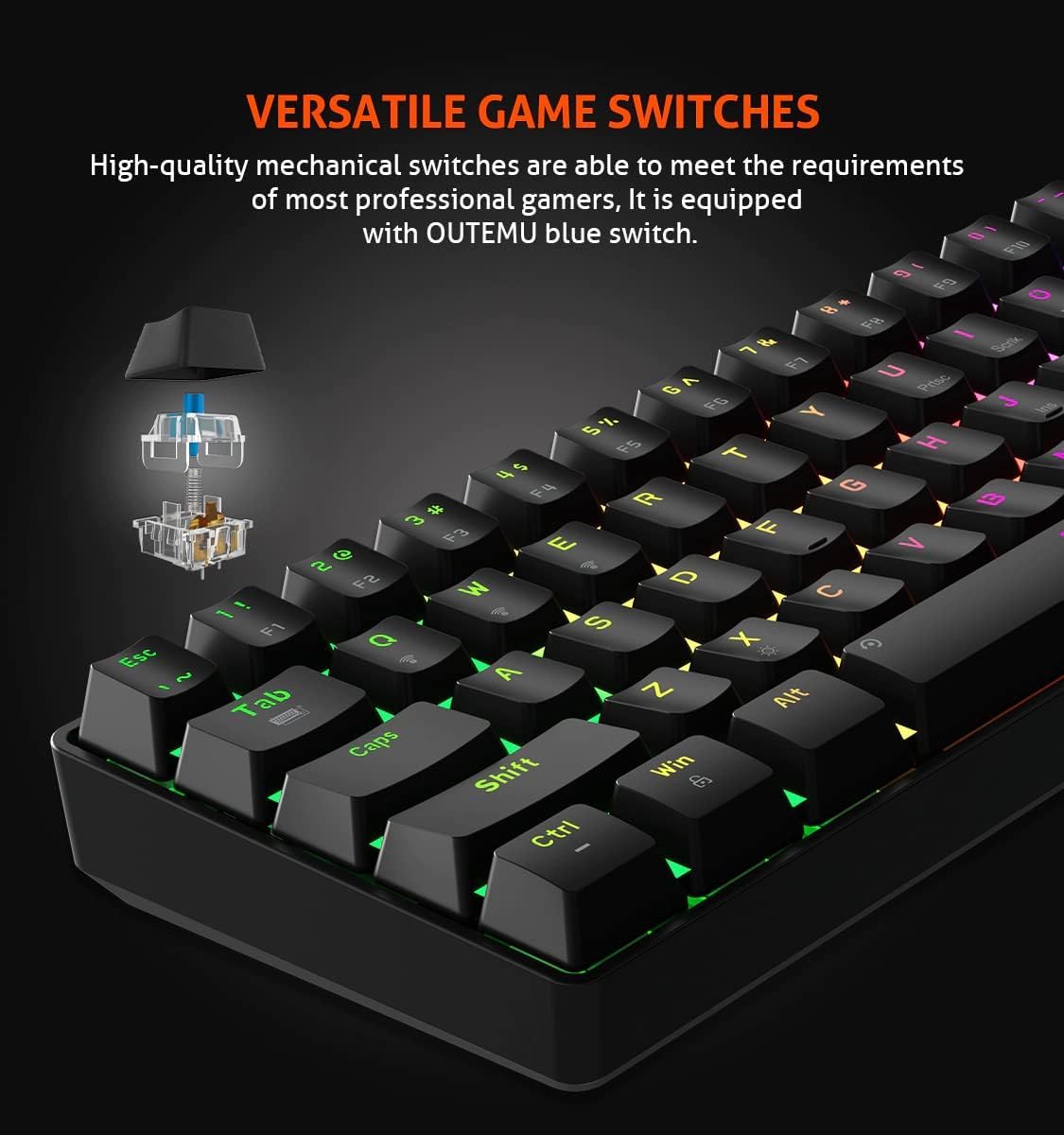
画像4: クローズアップ view illustrating the OUTEMU blue mechanical switches used in the MEETION MT-MK005 keyboard. An exploded diagram of the switch mechanism is shown, indicating its tactile and clicky nature.

画像5: 詳細 view of the double injection keycaps on the MEETION MT-MK005 keyboard. This image highlights the durability and wear-resistant properties of the keycap manufacturing process.
3. セットアップ手順
Follow these steps to set up your MEETION MT-MK005 keyboard:
- キーボードを開梱します。 キーボードをパッケージから慎重に取り出します。
- コンピュータに接続します: Plug the USB cable from the keyboard into an available USB port on your computer.
- ドライバーのインストール: Your operating system (Windows XP/Vista/7/8/10/11 or macOS) should automatically detect and install the necessary drivers. No manual driver installation is typically required.
- テスト機能: テキスト エディターまたはブラウザーを開き、入力をテストして、すべてのキーが正しく機能していることを確認します。
4. 操作手順
4.1. 基本的なキー機能
The MT-MK005 features a 61-key layout. Many standard functions are accessed via the Fn (ファンクション)キーを他のキーと組み合わせて使用します。
4.2. RGBバックライト制御
The keyboard offers customizable RGB backlighting. Specific key combinations are used to change lighting modes, brightness, and speed. Refer to the keyboard's printed legends or a dedicated software (if available, not specified in product data) for exact combinations.
- 照明モードの変更: 通常 Fn + [キー] (e.g., Fn + \ or Fn + P) to cycle through various effects.
- 明るさの調整: 頻繁 Fn + ↑ / ↓.
- 速度の調整: 頻繁 Fn + ← / →.
4.3. マルチメディア機能
マルチメディアコントロールにアクセスするには、 Fn key and pressing the corresponding function keys (e.g., F1-F12, which often have secondary multimedia legends).
4.4. アンチゴースト
The MT-MK005 features full key anti-ghosting, meaning that all simultaneous key presses will be registered accurately. This is particularly beneficial for fast-paced gaming.

画像6: クローズアップ view of the MEETION MT-MK005 keyboard, illustrating the concept of full anti-ghosting. The image visually suggests that multiple key presses are registered simultaneously without conflict.
4.5. Power-Saving Function (Wired Model Note)
While this model is primarily wired, the product description mentions power-saving features for Bluetooth mode. If a wireless variant or future update supports this, the keyboard would enter a first-level power-saving mode (lights dim) after one minute of inactivity and a full sleep mode after 30 minutes of inactivity to conserve power.
5. メンテナンス
適切なメンテナンスを行うことで、キーボードの寿命とパフォーマンスが向上します。
- クリーニング: Use a soft, dry cloth to wipe the surface of the keyboard. For deeper cleaning, you can use compressed air to remove dust and debris from between the keycaps. Avoid using harsh chemicals or abrasive materials.
- キーキャップの取り外し: 必要に応じて、キーキャッププーラー(付属していません)を使用してキーキャップを慎重に取り外し、徹底的にクリーニングすることができます。キーキャップを元の位置に合わせて、カチッと音がするまで軽く押し込み、元の位置に戻してください。
- 液体のこぼれを避ける: 内部コンポーネントの損傷を防ぐため、キーボードに液体がかからないようにしてください。
6。 トラブルシューティング
キーボードで問題が発生した場合は、次の一般的な解決策を参照してください。
- キーボードが応答しない:
- USB ケーブルがキーボードとコンピューターの両方にしっかりと接続されていることを確認します。
- キーボードをコンピューターの別の USB ポートに接続してみてください。
- コンピュータを再起動します。
- キーが登録されない:
- キーキャップの下に物理的な障害物がないか確認します。
- 特定のキーが機能しない場合は、圧縮空気でそのキーの周囲を掃除してみてください。
- バックライトが機能しない、または正しくない:
- キーボードが正しく接続されていることを確認してください。
- Cycle through lighting modes and adjust brightness using the Fn キーの組み合わせ。
- If applicable, check for any keyboard software settings that might be overriding the onboard controls.
- 予期しない動作:
- Try resetting the keyboard to its factory defaults (refer to specific key combination if available, usually Fn+Esc キー for a few seconds).
- オペレーティング システムが最新であることを確認してください。
7. 仕様
| 特徴 | 詳細 |
|---|---|
| ブランド | ミーティング |
| モデル番号 | MT-MK005 |
| キーボードタイプ | 機械式ゲーム用キーボード |
| スイッチタイプ | OUTEMU Blue Switches |
| キーレイアウト | 61 Keys (60% Mini) |
| バックライト | RGB(16.8万色) |
| 接続性 | 有線(USB) |
| アンチゴースト | フルキーアンチゴースト |
| キーキャップ | ダブルインジェクション |
| 寸法 | 29.2 x 10.2 x 3.8 cm |
| 重さ | 721グラム |
| 対応OS | Win XP/Vista/7/8/10/11, macOS |
8. 保証とサポート
MEETION products are designed for reliability and performance. For warranty information and technical support, please refer to the warranty card included with your product or visit the official MEETION webサイトでご確認ください。保証請求の際は購入証明として領収書を保管してください。
For further assistance, you may contact MEETION customer support through their official channels.