
BANIGIPA A-G2 Black
BANIGIPA Open Ear Headphones User Manual
Model: A-G2 Black
導入
Thank you for choosing the BANIGIPA Open Ear Headphones. These air conduction headphones are designed to provide a comfortable listening experience while keeping you aware of your surroundings. With advanced Bluetooth 5.4 technology and a noise-canceling boom microphone, they are ideal for various activities including office work, sports, and daily use.
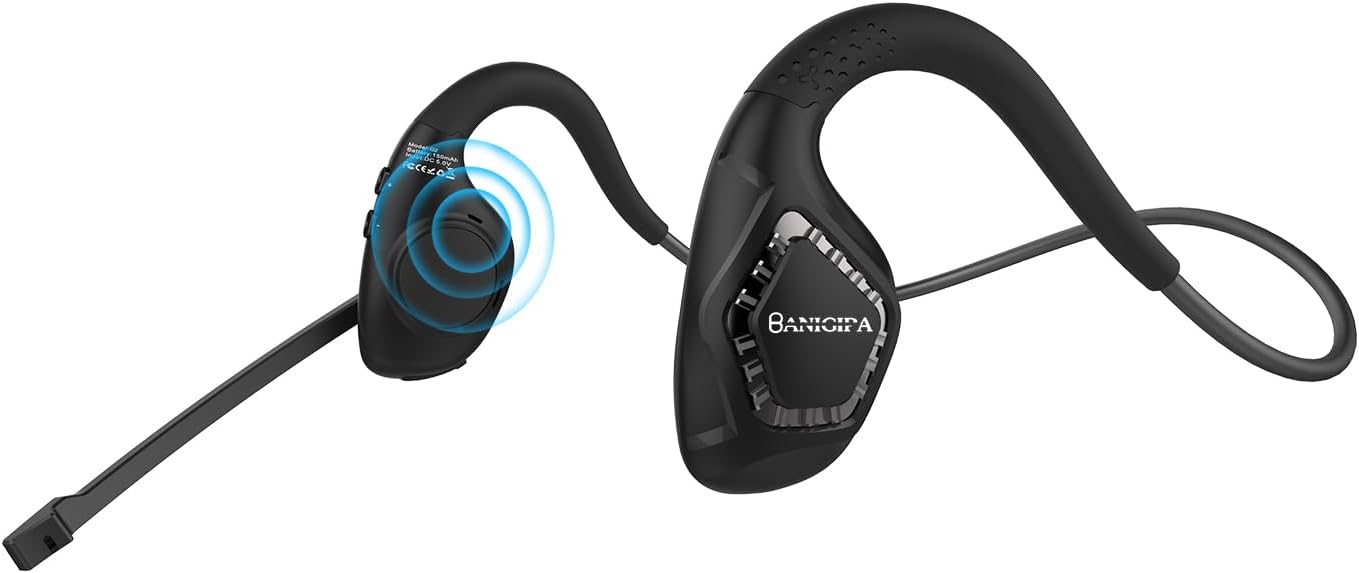
Image: The BANIGIPA A-G2 Black Open Ear Headphones, showcasing their design with the boom microphone.
箱の中には何が入っていますか?
- G1 空気伝導ヘッドセット x 2
- USB充電ケーブル x 1
- ユーザーマニュアル x 1

Image: A visual representation of the items included in the product packaging: the G2 headset, a USB charging cable, and the user manual.
主な特徴
- Open-Ear Air Conduction Design: Sound is conducted through the air, avoiding discomfort from in-ear or over-ear headphones. This design keeps the ear canal healthy and clean, and ensures situational awareness by allowing you to hear your surroundings.
- Bluetooth 5.4にアップグレード: Features the latest Bluetooth 5.4 technology for stable and fast connections up to 10m/33ft. Supports dual audio decoding (AAC and SBC) for enhanced sound quality.
- 270° Rotatable Boom Microphone: Equipped with a noise-canceling boom microphone that uses a single-mark algorithm for noise reduction, filtering out up to 95% of background noise. The flexible boom can be rotated 270° to optimize voice pickup for clear calls.
- 長いバッテリー寿命: Built-in 165mAh rechargeable lithium-ion battery provides up to 10 hours of uninterrupted music/calls and 150 hours of standby time. Fully charges in approximately 1.5 hours via Type-C USB.
- 軽量で快適: Weighing only 28g, these headphones are designed for long-term wear without ear pain. Made with skin-friendly, soft silicone and high-resilience titanium alloy memory for 360° bending without deformation.

Image: Illustrates the comfort of open-ear headphones compared to traditional headphones, highlighting health and safety benefits.

Image: A graphic depicting the advanced Bluetooth 5.4 chip, emphasizing fast and stable connection capabilities.

Image: A man wearing the headset in an office setting, illustrating the effectiveness of the DSP noise-canceling microphone for HD calling.

Image: A visual guide demonstrating the 270° rotatable boom microphone and its mute function.

Image: An infographic detailing the durable and long battery life, showing 165mAh capacity, 2 hours charging time, 10 hours working time, and USB-C charging port.

Image: A man wearing the headphones while working on a laptop, illustrating the light and comfortable design for all-day wear.
設定
ヘッドセットの充電
Before first use, fully charge your BANIGIPA G2 headphones. Connect the included USB charging cable to the Type-C port on the headset and to a compatible USB power source. A full charge takes approximately 1.5 hours.
Bluetoothペアリング
- ヘッドセットの電源がオフになっていることを確認します。
- LED インジケーターが青と赤に点滅してペアリング モードになるまで、多機能ボタンを押し続けます。
- On your device (phone, laptop, tablet), enable Bluetooth and search for available devices.
- Select "BANIGIPA G2" from the list. Once connected, the LED indicator will turn solid blue or off, depending on the model.
The headset supports simultaneous connection to two devices. To connect a second device, ensure the first device is connected, then put the headset back into pairing mode and connect to the second device. The headset will intelligently switch between devices.

Image: Shows the headphones simultaneously connected to a smartphone and a laptop, demonstrating multi-device compatibility.
ヘッドセットの装着
- Place the headphones on your head, ensuring the ear hooks rest comfortably over your ears.
- Adjust the ear hang to a comfortable and secure position.
- Rotate the boom microphone up to 270° to the most suitable position for clear voice pickup.

Image: A three-step diagram illustrating how to properly wear the headphones, adjust the ear hang, and position the microphone.
操作手順
The BANIGIPA G2 headphones feature multi-function buttons for easy control of your audio and calls.

Image: A detailed diagram showing the location and function of each button on the headset, including power, volume, track control, call management, mute, and voice assistant activation.
- 電源オン/オフ: 多機能ボタンを長押しします。
- 音楽の再生/一時停止: 多機能ボタンを1回押します。
- 次の曲: 「音量+」ボタンを押します。
- 前の曲: 「音量 -」ボタンを押します。
- ボリュームアップ: Press and hold the 'Volume +' button.
- ボリュームダウン: Press and hold the 'Volume -' button.
- 電話に出る/電話を切る: 着信中に多機能ボタンを 1 回押します。
- 通話を拒否: 着信中に多機能ボタンを長押しします。
- 音声アシスタントを有効にする: 多機能ボタンを2回押します。
- 音楽/ゲームモードを切り替える: Triple press the multi-function button. (Note: Gaming mode has approximately 70ms audio delay.)
- ミュート機能: Use the dedicated mute button on the boom microphone.
メンテナンス
- クリーニング: ヘッドセットは柔らかく乾いた布で拭いてください。刺激の強い化学薬品や研磨剤の使用は避けてください。
- ストレージ: ヘッドフォンは直射日光や極端な温度を避け、涼しく乾燥した場所に保管してください。
- バッテリーのケア: バッテリーの寿命を延ばすには、バッテリーを頻繁に完全に放電させないでください。長期間使用しない場合でも、ヘッドセットは定期的に充電してください。
- 耐水性: The headset is waterproof, but avoid prolonged submersion in water. Dry thoroughly if exposed to moisture.
トラブルシューティング
| 問題 | 考えられる原因 | 解決 |
|---|---|---|
| ヘッドセットの電源が入りません。 | バッテリー残量が少なくなりました。 | 付属のUSBケーブルを使用してヘッドセットを完全に充電します。 |
| デバイスとペアリングできません。 | ヘッドセットがペアリング モードになっていません。デバイスの Bluetooth がオフになっています。デバイスが遠すぎます。 | Ensure headset is in pairing mode (flashing blue/red LED). Turn on Bluetooth on your device. Move device closer to headset (within 10m/33ft). Restart both devices. |
| 音が出ない、または音質が悪い。 | 音量が低すぎる、オーディオ出力の選択が間違っている、干渉がある。 | Increase volume on headset and device. Check audio output settings on your device. Move away from sources of strong electromagnetic interference. |
| マイクが機能していないか不明瞭です。 | Microphone muted; incorrect microphone input selected; microphone not positioned correctly. | Ensure microphone is not muted. Check microphone input settings on your device. Rotate the boom microphone to be closer to your mouth. |
| Audio delay in gaming mode. | Normal operation for gaming mode. | The headset has an approximate 70ms audio delay in gaming mode, which is typical for this feature. |
| Headset is uncomfortable or causes ear pain. | 不適切なフィット感。 | Adjust the ear hooks and headset position for a comfortable fit. The open-ear design is intended to prevent ear pain from prolonged use. |
Note: This is an air conduction headset, not a bone conduction headset. It is not recommended for people with hearing impairments.
仕様
| 特徴 | 詳細 |
|---|---|
| モデル名 | G2 ブラック |
| 接続技術 | Bluetooth、ワイヤレス |
| 無線通信技術 | ブルートゥース |
| Bluetoothバージョン | 5.4 |
| Bluetooth範囲 | 10メートル(33フィート) |
| 耳の位置 | 耳を開ける |
| フォームファクター | 耳を開ける |
| マイクロフォン | Noise-Canceling Boom Microphone (270° Rotatable) |
| バッテリー容量 | 165 mAhリチウムイオン |
| バッテリー寿命 | Up to 10 Hours (Music/Calls) |
| 待機時間 | 最大150時間 |
| 充電時間 | 約1.5時間 |
| 充電ポート | TypeーC USB |
| アイテム重量 | 28グラム(0.988オンス) |
| 材料 | プラスチック、シリコン |
| 耐水性レベル | 防水 |
| 対応デバイス | iOS and Android Cellphones, Laptops, Tablets, PC, Desktops |
| オーディオ遅延(ゲームモード) | 70ミリ秒 |
| 含まれるコンポーネント | 1 X G2 Air Conduction Headset, 1 X USB Charging Cable, User Manual |
保証とサポート
For product support, troubleshooting assistance, or warranty inquiries, please contact BANIGIPA customer service through the retailer's platform or visit the official BANIGIPA store page on Amazon. Please refer to your purchase receipt for specific warranty terms and conditions.