
KICKASS KASTSP300
KickAss 12V 300W Super Thin Portable Solar Panel User Manual
Model: KASTSP300
1. はじめに
This manual provides detailed instructions for the safe and efficient use of your KickAss 12V 300W Super Thin Portable Solar Panel. Designed for portability and high efficiency, this solar panel is ideal for charging 12V battery systems in various outdoor and off-grid applications.
安全情報
- Always read and understand all instructions before operating the solar panel.
- Do not attempt to disassemble or modify the solar panel or its integrated controller.
- Ensure all connections are secure and correct polarity is observed to prevent damage to the panel, controller, or battery.
- Avoid exposing the panel to extreme physical impact or sharp objects.
- Keep the panel clean and free from debris for optimal performance.
- Handle with care, especially when unfolding and folding, to avoid pinching or damaging cables.
2。 構成部品
Your KickAss 12V 300W Super Thin Portable Solar Panel package typically includes:
- KickAss 300W Super Thin Portable Solar Panel with integrated PWM Controller
- Attached cables for connection to a 12V battery system
- Integrated adjustable support legs
- Carry bag (may be included depending on package)

Image: The KickAss 300W Super Thin Portable Solar Panel fully unfolded, showcasing its slim design and multiple panels.
3. セットアップ
3.1 展開と配置
- 折りたたんだソーラーパネルを平らで安定した面に置きます。
- Carefully unfold the panels completely until they lie flat.
- Extend the integrated support legs from the back of the panel. Adjust the angle of the legs to position the panel directly towards the sun for maximum efficiency.
- Ensure the panel is in an area free from shade throughout the day. Even partial shading can significantly reduce power output.
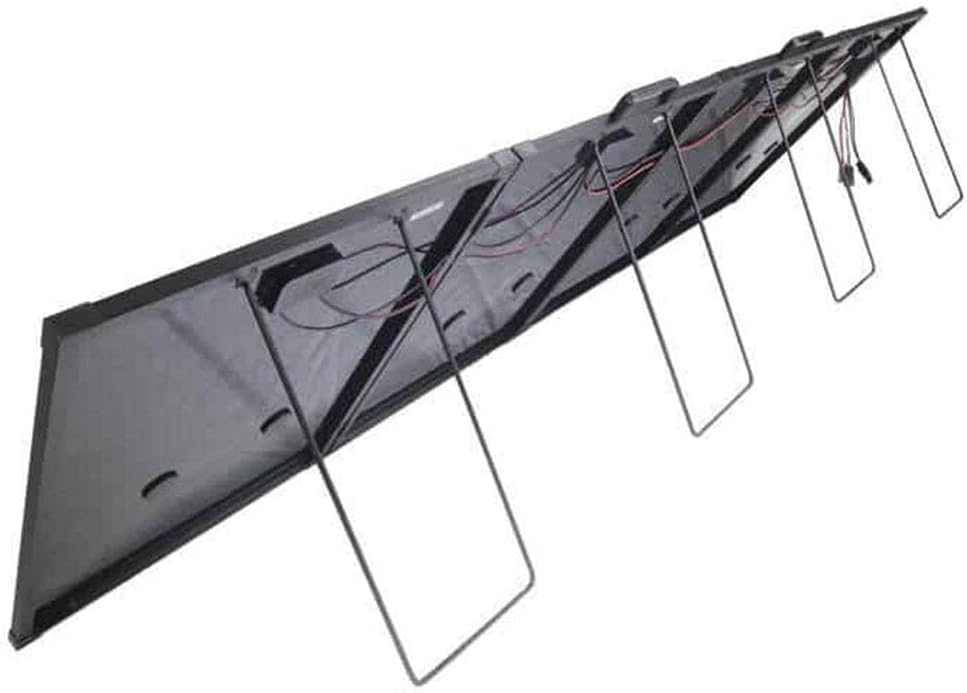
画像: 背面 view of the solar panel showing the integrated support legs extended, allowing for angled positioning.

Image: The solar panel deployed on a sandy surface next to a vehicle, demonstrating a typical outdoor setup.
3.2 電気接続
The KickAss 300W Super Thin Portable Solar Panel features an integrated PWM (Pulse Width Modulation) controller, simplifying the connection process.
- Locate the output cables from the integrated PWM controller. These typically have Anderson-style connectors or similar.
- Connect these cables directly to your 12V battery system. Ensure correct polarity: positive to positive, negative to negative. Incorrect polarity can damage the controller or battery.
- The PWM controller will automatically regulate the charging process, protecting your battery from overcharging and optimizing the charge cycle.
- Once connected, the controller's display (if present) will show charging status and battery voltage.

画像: 詳細な view of the integrated PWM controller and its various connection terminals, including the input from the solar panel and output to the battery.
4. 操作
4.1 Monitoring Charge
The integrated PWM controller typically features a display that provides real-time information. Monitor the following:
- バッテリー巻tage: Indicates the current charge level of your battery.
- 充電電流: Shows how much current is being supplied to the battery from the solar panel.
- 充電ステータス: The controller will indicate if the battery is charging, fully charged, or in float mode.
4.2 最適なパフォーマンス
- 日光への露出: Always ensure the panel receives direct, unobstructed sunlight. Reposition the panel throughout the day as the sun moves to maximize energy harvest.
- 角度: Adjust the panel's angle to be perpendicular to the sun's rays. In most cases, this means a steeper angle in winter and a flatter angle in summer.
- 温度: Solar panels perform best in cooler temperatures with strong sunlight. High temperatures can slightly reduce efficiency.
- 清潔さ: Keep the panel surface clean from dust, dirt, leaves, and bird droppings.
5. メンテナンス
5.1 クリーニング
Regular cleaning ensures maximum power output.
- Clean the solar panel surface with a soft, damp 布と、刺激の少ない、研磨剤を含まない洗剤を使用してください。
- きれいな水で十分に洗い流し、石鹸の残留物を取り除きます。
- Do not use harsh chemicals, abrasive cleaners, or sharp objects that could scratch the panel surface.
- Clean connections periodically to ensure good electrical contact.

画像: クローズアップ view of the solar panel's surface, highlighting the individual monocrystalline silicon cells and their arrangement.
5.2 ストレージ
When not in use, proper storage will prolong the life of your solar panel.
- Fold the panel carefully, ensuring cables are not pinched.
- Store the panel in its protective carry bag (if supplied) to prevent scratches and damage.
- 直射日光や極端な温度を避け、涼しく乾燥した場所に保管してください。

Image: The KickAss branded carry bag designed for the super thin portable solar panel, providing protection during transport and storage.
6。 トラブルシューティング
| 問題 | 考えられる原因 | 解決 |
|---|---|---|
| パネルから電力が出力されない | 日光が全くない、または日光が不十分 緩いまたは間違った接続 Damaged panel or controller | Ensure panel is in direct sunlight and free of shade. すべてのケーブル接続の安全性と正しい極性を確認してください。 Inspect panel and controller for visible damage. Contact support if damaged. |
| 低出力 | 部分的な陰影 パネル表面が汚れている パネルの角度が正しくありません 曇りの天気 | Relocate panel to a completely unshaded area. Clean the panel surface thoroughly. パネルの角度を調整して太陽に直接向き合うようにします。 Lower output is normal during cloudy conditions. |
| コントローラーのディスプレイが機能しない | No power input from panel No battery connected or low battery voltage コントローラの誤動作 | Ensure panel is in sunlight and connected. Connect to a battery with sufficient voltage (typically >8V). Contact support if the controller remains unresponsive. |
7. 仕様
| 特徴 | 詳細 |
|---|---|
| モデル | KASTSP300 |
| 出力 | 300W |
| 最大巻tage | 12ボルト |
| パネルタイプ | 単結晶シリコン |
| 効率 | 高効率 |
| 製品寸法(折りたたみ時) | 8.7 x 7.25 x 1.7 cm (This seems incorrect for a 300W panel, likely package dimensions. Actual unfolded dimensions will be significantly larger.) |
| アイテム重量 | 16.8 kg (16800 グラム) |
| コントローラータイプ | Integrated PWM Controller |
| メーカー | やっつける |
| 原産国 | スイス |
Note: Product dimensions provided may refer to packaging or a component, not the full unfolded panel. Refer to product packaging for precise unfolded dimensions.
8. 保証とサポート
For specific warranty terms and conditions, please refer to the documentation provided with your purchase or visit the official KickAss website. KickAss products are designed for durability and performance, and support is available for any operational queries or issues.
You can find more information and contact support via the official KickAss store page: Visit the KICKASS Store on Amazon
Ask a question about this manual
Ask about setup, troubleshooting, compatibility, parts, safety, or missing instructions. Manuals+ will review the question and use this page’s manual context to help answer it.