
製品終了view
The typecase Touch Keyboard Case is designed to enhance the functionality and protection of your iPad Air. It features a full-size keyboard with a multi-gesture trackpad, offering a laptop-like experience. The case boasts a 360° rotatable hinge, allowing for multiple viewing angles and usage modes. An adjustable 11-color RGB LED backlight provides comfortable typing in various lighting conditions. Integrated smart features like auto sleep/wake help conserve battery life, and a dedicated holder keeps your Apple Pencil secure.
主な特徴:
- 互換性: Specifically designed for iPad Air 11-inch (M3 2025 / M2 2024), iPad Air 5th Gen (2022, 10.9"), and iPad Air 4th Gen (2020, 10.9").
- 統合トラックパッド: Supports multi-gesture controls for precise navigation.
- バックライト付きキーボード: 11 adjustable RGB backlight colors with laser-etched keys and a full row of iPadOS shortcuts.
- Versatile Use Modes: 360° rotatable hinge for 7 different viewing modes (Laptop, Stand, Tent, Tablet, Corner, Share, Protect).
- スマート保護: Premium hardshell design protects all sides of your iPad, with auto sleep/wake function.
- 鉛筆ホルダー: Conveniently stores your Apple Pencil.
パッケージ内容
パッケージにすべてのアイテムが揃っていることを確認してください:
- 1 x typecase Touch Keyboard Case for iPad Air 5th/4th Gen (10.9 inch)
- 1 x USB-C充電ケーブル
- ユーザーマニュアル x 1
セットアップガイド
1. キーボードケースの充電
Before initial use, fully charge the keyboard case. Connect the provided USB-C charging cable to the charging port on the keyboard and to a USB power adapter (not included).
Charging indicator: The LED indicator will show charging status. Refer to the keyboard's specific LED behavior for full charge indication.
2. iPadをケースに挿入する
Carefully align your iPad with the protective shell of the keyboard case. Gently press the iPad into place, ensuring all corners are securely seated. The case is designed to protect all sides of your iPad.
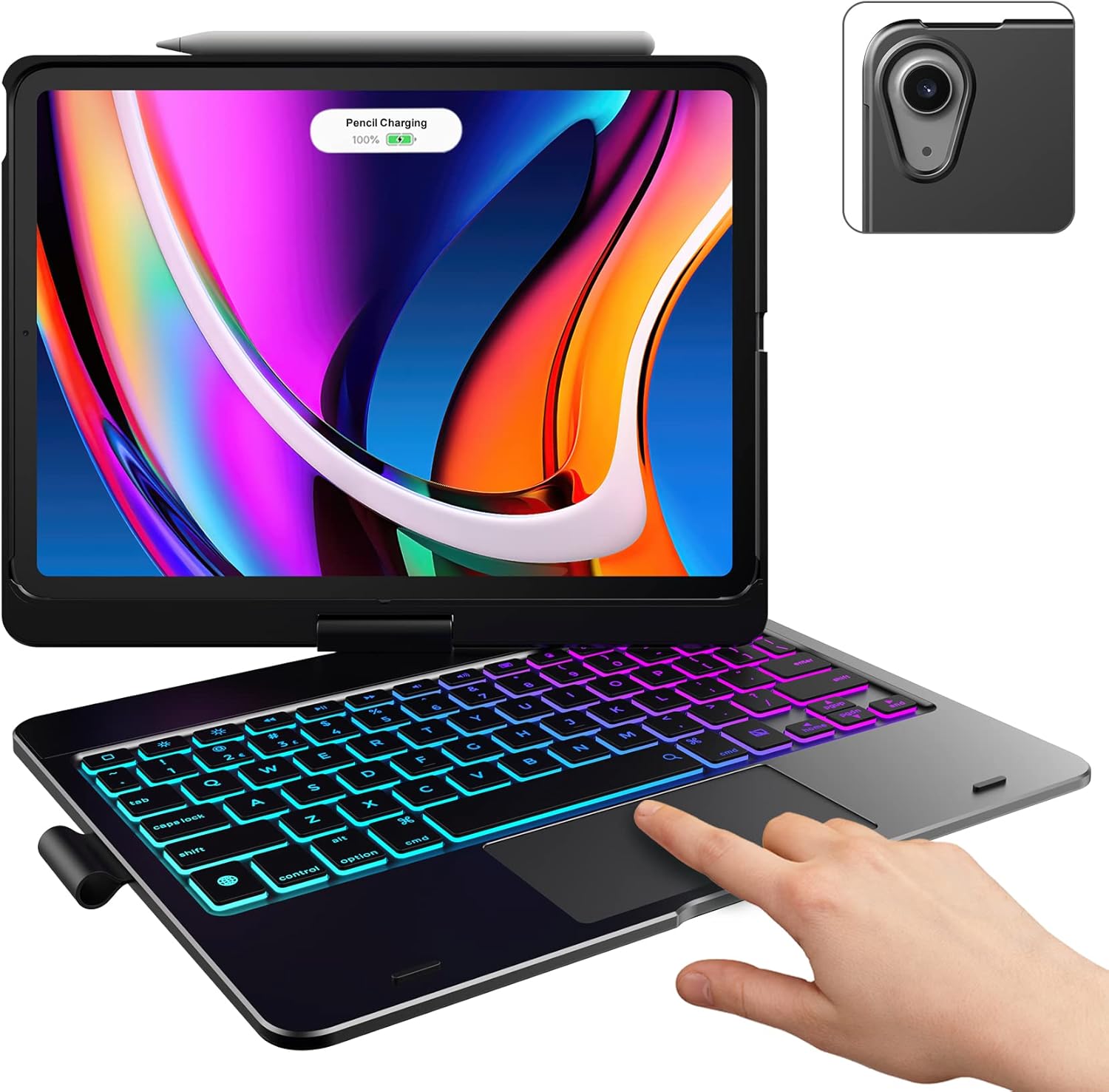
Image: The typecase keyboard case with an iPad securely inserted, ready for use. Note the integrated trackpad and backlit keys.

Image: Visual representation of the 7 versatile modes supported by the 360° rotatable hinge, including Laptop, Stand, and Tablet modes.
3. Pairing with Your iPad (Bluetooth)
- 電源スイッチをオンの位置にスライドしてキーボードの電源をオンにします。
- を押す 接続する button (or a similar Bluetooth pairing button, usually indicated by a Bluetooth icon) on the keyboard. The Bluetooth indicator light will start blinking.
- iPadで、 設定 > ブルートゥース.
- Bluetoothがオンになっていることを確認してください On.
- Locate "typecase Keyboard" or a similar name in the "Other Devices" list and tap on it to pair.
- Once paired, the Bluetooth indicator light on the keyboard will stop blinking and remain solid, or turn off.
Note: The keyboard will automatically enter sleep mode after a period of inactivity to conserve battery. Press any key to wake it up.
操作手順
キーボード機能
The keyboard features a standard layout with 78 comfortably spaced keys and a dedicated row of iPadOS shortcut keys.

画像: 詳細 view of the backlit keyboard, highlighting the iPadOS shortcut keys and the vibrant 11-color RGB backlight.
iPadOS ショートカットキー:
| キーアイコン | 関数 |
|---|---|
| 家 | ホーム画面に戻ります。 |
| ブライトネスダウン | 画面の明るさを下げます。 |
| 明るさアップ | 画面の明るさを上げます。 |
| Keyboard Hide/Show | Toggles the on-screen keyboard. |
| 検索 | Activates iPad search. |
| 前のトラック | Skips to the previous media track. |
| 再生/一時停止 | メディアを再生または一時停止します。 |
| 次のトラック | 次のメディア トラックにスキップします。 |
| ミュート | オーディオをミュートまたはミュート解除します。 |
| 音量を下げる | オーディオの音量を下げます。 |
| 音量を上げる | オーディオの音量を上げます。 |
| ロック画面 | iPad 画面をロックします。 |
トラックパッドの使い方
The integrated multi-gesture trackpad allows for precise control and navigation of your iPad. Ensure the trackpad is enabled in your iPad's settings if you experience issues.
一般的なトラックパッドのジェスチャ:
- 一本指タップ: クリック/選択します。
- 2本指スクロール: 上または下にスクロールします。
- ピンチしてズーム: コンテンツを拡大または縮小します。
- 3本指で上にスワイプ: ホーム画面に移動します。
- 3本指で左/右にスワイプ: 開いているアプリを切り替えます。
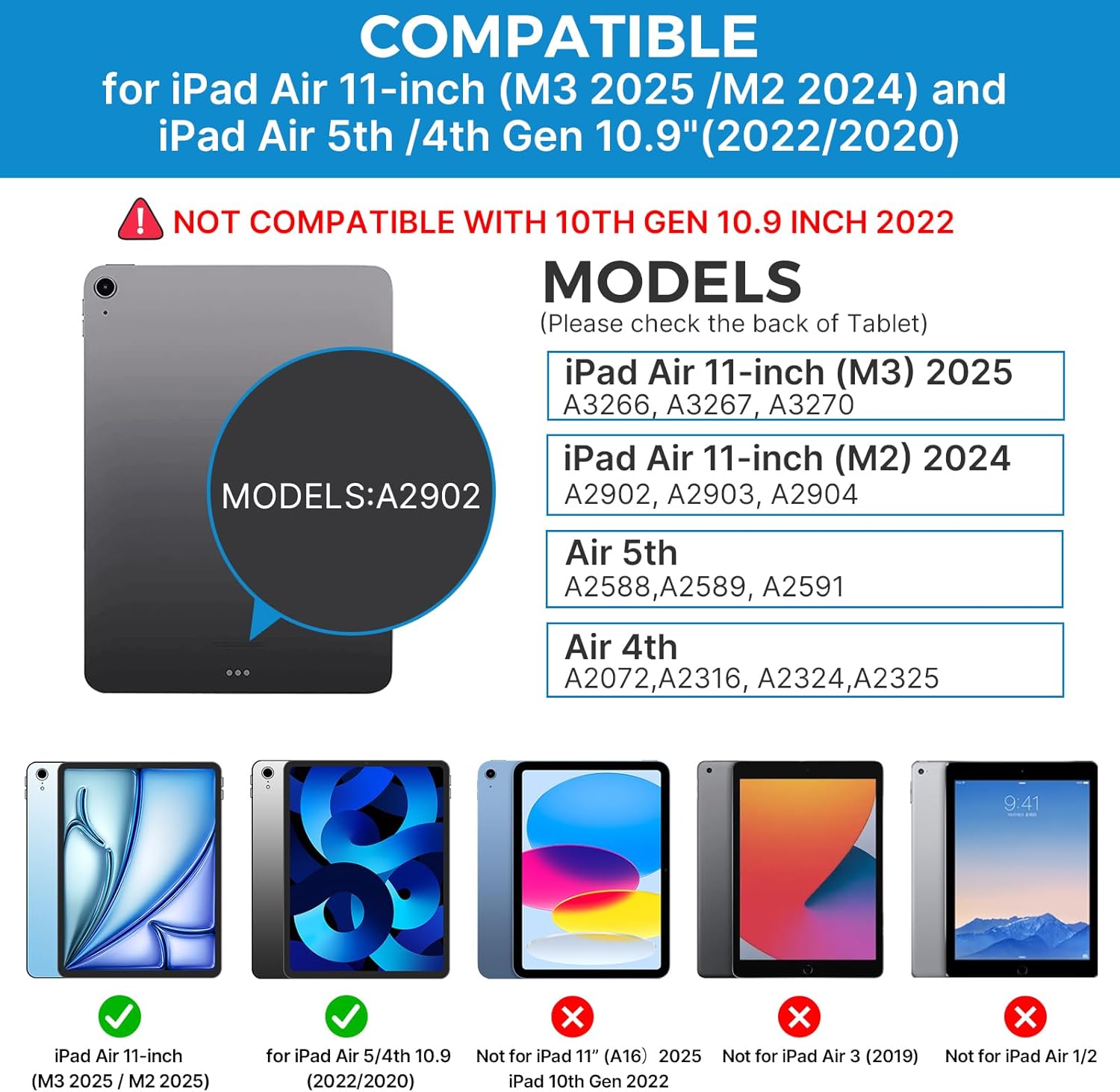
Image: A hand demonstrating the use of the multi-touch trackpad for precise cursor control on the iPad screen.
バックライトの調整
The keyboard features 11 adjustable RGB backlight colors and 3 levels of brightness. Use the dedicated backlight keys on the keyboard to cycle through colors and adjust brightness levels.
Video: This video demonstrates the 360-degree rotation feature of the typecase Touch Keyboard Case, showcasing its versatility in different viewingモード。
Video: This video provides a step-by-step guide on how to properly install and remove your iPad from the typecase Touch Keyboard Case, ensuring a secure fit and preventing damage.
メンテナンスとケア
- クリーニング: 柔らかくてamp ケースとキーボードの外側を布で拭いてください。刺激の強い化学薬品や研磨剤は使用しないでください。
- ストレージ: When not in use for extended periods, store the keyboard case in a cool, dry place. Ensure the iPad is removed if storing for very long durations.
- バッテリー寿命: To maximize battery life, turn off the keyboard when not in use. The auto sleep/wake function helps conserve power.
- 液体を避ける: Do not expose the keyboard case to excessive moisture or liquids.
- 取り扱いにはご注意ください: While durable, avoid dropping the case or applying excessive force to the hinge or keyboard.
トラブルシューティング
If you encounter any issues with your typecase Touch Keyboard Case, please refer to the following common solutions:
Keyboard Not Connecting/Typing:
- キーボードがオンになっていて、完全に充電されていることを確認してください。
- iPadのBluetooth設定を確認し、キーボードがペアリングされ接続されていることを確認してください。接続されていない場合は、再度ペアリングをお試しください。
- iPadとキーボードの両方を再起動します。
- 他の Bluetooth デバイスが接続を妨害していないことを確認してください。
トラックパッドが応答しない:
- キーボードが Bluetooth 経由で接続されていることを確認します。
- iPadの設定を確認します: 設定 > アクセシビリティ > 触る > アシスティブタッチ. Ensure "Mouse Keys" is off if it's causing interference.
- トラックパッドの表面を清掃してゴミを取り除きます。
バックライトが機能しない:
- キーボードが十分に充電されていることを確認してください。
- Press the backlight adjustment keys to cycle through brightness levels and colors.
iPadがスリープ/ウェイクモードにならない:
- iPad がケース内に正しく装着されていることを確認します。
- iPadの設定を確認します: 設定 > ディスプレイと明るさ > ロック/ロック解除. Ensure this feature is enabled.
If problems persist, please contact typecase customer support for further assistance.
仕様
| 特徴 | 詳細 |
|---|---|
| モデル | B09WVRD5JD |
| 互換性 | iPad Air 11-inch (M3 2025 / M2 2024), iPad Air 5th Gen (2022, 10.9"), iPad Air 4th Gen (2020, 10.9") |
| 接続性 | ブルートゥース |
| キーボードレイアウト | 78-key standard with iPadOS shortcuts |
| バックライト | 11色RGB、3段階の明るさ |
| トラックパッド | Multi-functional, multi-gesture |
| Hinge Rotation | 360° (20,000-cycle stress tested) |
| 電源 | 電池式 (リチウムポリマー電池 1 個付属) |
| アイテム重量 | 1.52ポンド |
| 製品寸法(長さx幅x高さ) | 11.02 x 8.66 x 0.79インチ |
| 材料 | Premium hardshell design |
保証とサポート
typecase offers a comprehensive warranty and support for your product:
- 1年間の交換サービス: Enjoy worry-free after-sales support with a 1-year replacement service for manufacturing defects.
- 30日間返金: ご購入いただいた商品にご満足いただけない場合は、ご購入後 30 日以内に返金を受けられる場合があります。
- カスタマーサポート: For any questions, technical assistance, or warranty claims, please contact typecase customer service. Refer to the contact information provided in the product packaging or on the official typecase webサイト。

画像: 上view of typecase's customer support and warranty policy, including 1-year replacement and 30-day refund.