
1. はじめに
This manual provides essential information for the safe and efficient use of your OPPO F21 Pro (5G) smartphone. Please read this manual thoroughly before using your device to ensure optimal performance and longevity.
The OPPO F21 Pro (5G) is a high-performance smartphone featuring a 2.2 GHz Octa-core processor, 8GB of RAM, and 128GB of internal storage, expandable via microSDXC. It operates on Android 12 and is powered by a non-removable 4500 mAh Li-Po battery. Key features include a 6.43-inch AMOLED display, a 64 MP AI Triple Camera system, and 5G connectivity.
2. デバイスのセットアップ
2.1 パッケージ内容
- OPPO F21 Pro (5G) Smartphone
- USBケーブル
- クイックスタートガイド(地域によって異なる場合があります)
- 安全情報(地域によって異なる場合があります)
2.2 SIMカードとMicroSDカードの挿入
Your OPPO F21 Pro (5G) supports Dual-SIM functionality and a microSDXC card for expanded storage. The device uses Nano-SIM cards.
- 携帯電話の側面にある SIM カード トレイを見つけます。
- SIM イジェクタ ツール (付属している場合) をトレイの横にある小さな穴に挿入し、トレイが飛び出すまでゆっくりと押します。
- Nano-SIMカードまたはmicroSDXCカードをトレイの指定されたスロットに挿入します。金色の接点が下を向いていることを確認してください。
- トレイが側面と面一になるまで、慎重にトレイを電話機内に押し戻します。
米国の購入者向けの重要なネットワーク互換性に関する注意事項:
このスマートフォンは、VERIZON、SPRINT、US CELLULARを含むCDMAネットワークには対応していません。ご購入前に、ネットワークプロバイダーに3Gまたは4G/LTEの互換性をご確認ください。
2.3 電源のオン/オフ
- 電源を入れるには: OPPO ロゴが表示されるまで、電源ボタン (右側面にあります) を押し続けます。
- 電源を切るには: 電源ボタンを長押しし、画面上のオプションから「電源を切る」を選択します。
- 再起動します: 電源ボタンを長押しし、オプションから「再起動」を選択します。
2.4 初期設定
Upon first power-on, follow the on-screen instructions to complete the initial setup process. This includes selecting your language, connecting to Wi-Fi, setting up your Google account, and configuring security features like Face Recognition.
3. デバイスの操作
3.1 基本的なナビゲーション
Your OPPO F21 Pro (5G) runs on Android 12, offering an intuitive user interface. Use gestures or navigation buttons (configurable in settings) to move between apps, return to the home screen, and access recent applications.
3.2 表示機能

The front of the OPPO F21 Pro (5G) features a vibrant AMOLED display with a punch-hole cutout for the front camera.

詳細な view of the punch-hole front camera, integrated seamlessly into the display.
The device features a 6.43-inch AMOLED display with a resolution of 1080 x 2400 pixels, protected by Schott Xensation glass. This display provides vivid colors and deep blacks for an enhanced viewing の経験。
3.3 カメラの使用
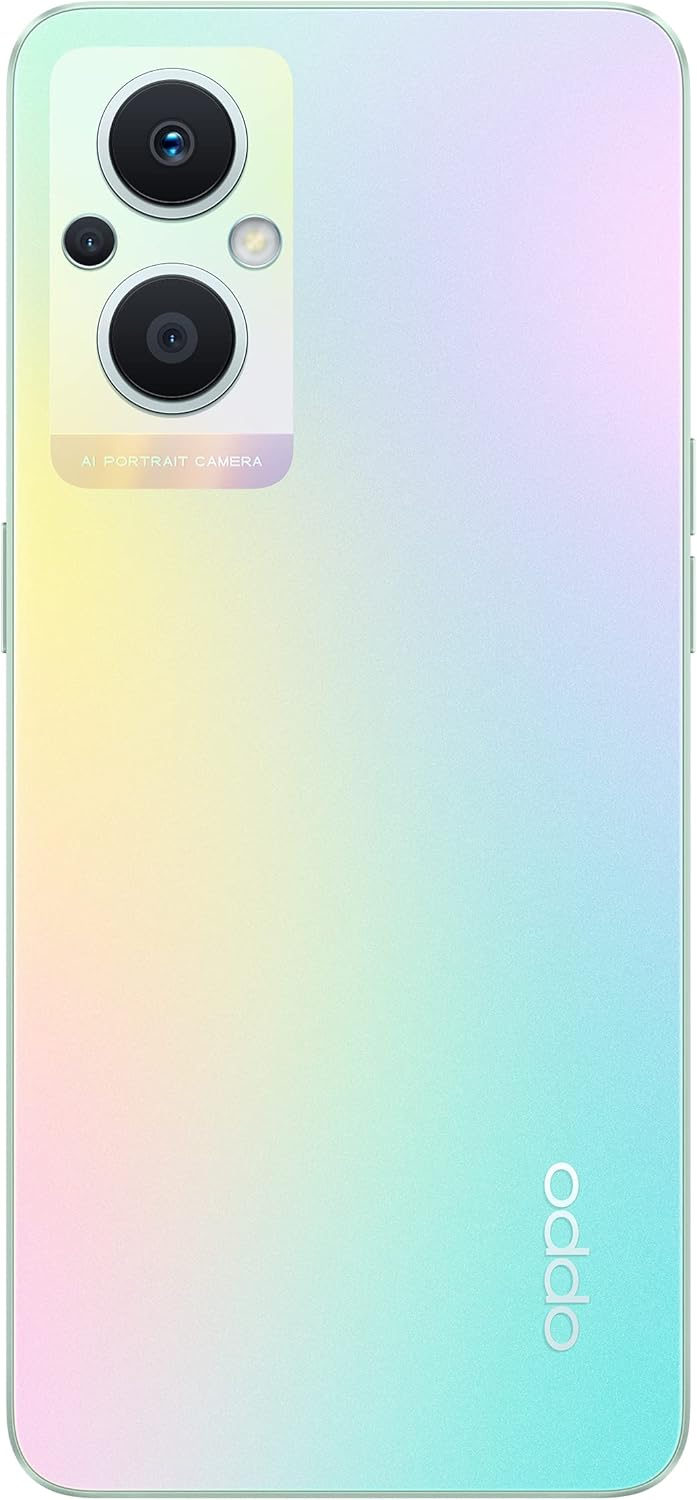
The back of the OPPO F21 Pro (5G) showcases its triple camera system and sleek design.

詳細な view of the AI Portrait Camera module on the rear, highlighting the lenses and flash.
The OPPO F21 Pro (5G) is equipped with a versatile camera system:
- リアカメラ: 64 MP (ワイド、f/1.7、PDAF)、2 MP (マクロ、f/2.4)、2 MP (深度、f/2.4)。
- フロントカメラ: 16 MP (広角、f/2.4)。
Access the Camera app from your home screen or app drawer. Select various shooting modes such as Photo, Video, Portrait, Macro, and more. Tap the screen to focus and press the shutter button to capture images or start/stop video recording.
3.4 接続性
- 5Gネットワーク: Supports N1/ N8/ N28/ N41/ N77/ N78 SA/NSA bands.
- Wi-Fi: インターネットにアクセスするには、ワイヤレス ネットワークに接続します。
- ブルートゥース: ヘッドフォンやスピーカーなどのワイヤレスアクセサリとペアリングします。
- USBタイプC: 充電やデータ転送に。
3.5セキュリティ機能
The device includes Face Recognition for convenient and secure unlocking. You can set this up in the Security settings menu.
4. メンテナンス
4.1バッテリーケア
Your OPPO F21 Pro (5G) is equipped with a 4500 mAh Lithium-Polymer battery. To maximize battery life:
- 極端な温度を避けてください。
- 付属の純正充電器とUSBケーブルを使用してください。
- バッテリーを頻繁に完全に放電することは避けてください。
- Optimize battery settings in the device's settings menu.
4.2 デバイスのクリーニング
The device is rated as Water Resistant. To clean your phone:
- クリーニングの前にデバイスの電源を切ってください。
- 柔らかく、糸くずの出ない布を使用してください。
- 強力な化学薬品、研磨剤入りの洗剤、圧縮空気の使用は避けてください。
- デバイスを水に沈めないでください。
4.3ソフトウェアアップデート
Regularly check for and install software updates to ensure your device has the latest features, security patches, and performance improvements. You can check for updates in the device's Settings menu under 'About phone' or 'Software update'.
5。 トラブルシューティング
If you encounter issues with your OPPO F21 Pro (5G), try the following basic troubleshooting steps:
- デバイスが応答しません: 電源ボタンを約 10 ~ 15 秒間押し続け、強制的に再起動します。
- ネットワークの問題: Ensure your SIM card is correctly inserted. Check your network settings and ensure mobile data or Wi-Fi is enabled. Restart your device.
- アプリのクラッシュ: アプリを一度閉じて再度開きます。「設定」>「アプリ」でアプリのキャッシュとデータを消去してください。問題が解決しない場合は、アプリをアンインストールして再インストールしてください。
- バッテリーの消耗が早い: Review battery usage in Settings to identify power-hungry apps. Reduce screen brightness, disable unnecessary features (GPS, Bluetooth, Wi-Fi) when not in use.
- ストレージがいっぱいです: 不要な削除 files, photos, and videos. Move media to a microSD card if installed. Clear app caches.
より複雑な問題については、OPPO公式サポートを参照してください。 webサイトをご覧いただくか、カスタマーサービスにお問い合わせください。
6. 仕様

オーバーview of the OPPO F21 Pro (5G) showcasing its main features including the 64MP AI Triple Camera, AMOLED screen, and Qualcomm Snapdragon 5G SoC.

The OPPO F21 Pro (5G) in Rainbow Spectrum, displaying both its front and rear aesthetics.
| 特徴 | 仕様 |
|---|---|
| ブランド | オッポ |
| モデル名 | OPPO F21 Pro (5G) |
| オペレーティング·システム | アンドロイド12.0 |
| プロセッサ | Qualcomm SM6375 Snapdragon 695 5G (6 nm)、オクタコア (2x2.2 GHz Kryo 660 Gold & 6x1.7 GHz Kryo 660 Silver) |
| ラム | 8ギガバイト |
| 内部ストレージ | 128ギガバイト |
| 拡張可能なストレージ | マイクロSDXC |
| 画面サイズ | 6.43インチ(16.33センチメートル) |
| 表示タイプ | アモルファス |
| 解決 | 1080 x 2400 ピクセル |
| リアカメラ | 64 MP(ワイド)、2 MP(マクロ)、2 MP(深度) |
| フロントカメラ | 16 MP(ワイド) |
| バッテリー容量 | 4500 mAh (Lithium-Polymer, non-removable) |
| セルラーテクノロジー | 5G(デュアルSIM) |
| ワイヤレステクノロジー | Wi-Fi、ブルートゥース |
| コネクタタイプ | USBタイプC |
| 生体認証セキュリティ | 顔認識 |
| 耐水性レベル | 耐水性 |
| 寸法 | 6.3 x 2.87 x 0.31インチ |
| アイテム重量 | 173グラム |
7. 保証情報
Your OPPO F21 Pro (5G) smartphone comes with a 1年間のメーカー保証この保証は、通常の使用状況における材料および製造上の欠陥を対象としています。保証請求の際は、購入証明書を保管してください。
The warranty does not cover damage caused by misuse, accidents, unauthorized modifications, or normal wear and tear. For full terms and conditions, please refer to the warranty card included in your product packaging or visit the official OPPO webサイト。
8. サポート
さらに詳しいサポート、技術サポート、またはサービスセンターを探すには、公式OPPOサポートにアクセスしてください。 webサイト:
You may also find helpful FAQs and community forums on the support webサイト。