
1. はじめに
The XTAR SP100 Portable 100W Solar Panel is designed to convert solar energy into electricity, providing a reliable power source for various portable power stations and electronic devices. Its compact, foldable design and high-efficiency monocrystalline cells make it suitable for outdoor activities and off-grid power needs.
2 製品の特徴
- 高い変換効率: Utilizes premium monocrystalline solar cells with up to 23% conversion efficiency.
- 耐久性のある構造: Features a 7-layer build from surface to back, including ETFE-laminated case for extended lifespan and IP65 waterproof rating (resistant to rain and splashing water, not submersion).
- 多彩な互換性: Equipped with a default 8mm male connector for power stations, a built-in 9.8 ft power cord, and EU4S DC Multi-ports supporting PD3.0 output up to 45W.
- 調節可能なキックスタンド: Includes two kickstands for optimal angling towards the sun, maximizing energy capture.
- ポータブルデザイン: Foldable and lightweight for easy transport and setup.

図1: 詳細図asing the advanced seven-layer construction of the XTAR SP100's monocrystalline solar cells, designed for high conversion efficiency and durability.
Video 1: Official product video demonstrating the features, setup, and usage of the XTAR SP100 Solar Panel, including its portability and compatibility with various power stations.
3. パッケージ内容
The XTAR SP100 package includes the following items:
- XTAR SP100 Solar Panel (2 units for 2-Pack)
- EU4S Charger
- 8mm Splitter
- ユーザーマニュアル
4. セットアップ
- ソーラーパネルを展開します。 Carefully unfold the XTAR SP100 solar panel on a flat surface in direct sunlight.
- 最適な日光を得るための位置: Extend the integrated kickstands on the back of the panel. Adjust the angle of the panel to ensure it is perpendicular to the sun's rays for maximum efficiency.
- パワーステーションに接続します: Locate the built-in 9.8 ft power cord. Connect the 8mm male connector to your compatible power station. If using multiple panels, connect them using the provided 8mm splitter.
- デバイスを接続する(オプション): For direct device charging, use the EU4S DC Multi-ports (USB-A, USB-C PD3.0) to connect your mobile phones, tablets, or laptops.

Figure 2: XTAR SP100 solar panels deployed in an outdoor setting, highlighting their suitability for various recreational activities such as RV travel, camping, and sailing.

Figure 3: Two XTAR SP100 solar panels shown connected to a power station via an 8mm male connector and a splitter, demonstrating how multiple panels can be linked for increased power input.
5. 操作手順
Once the solar panel is set up and connected, it will automatically begin generating power when exposed to sufficient sunlight. Ensure the panel is not shaded by trees, buildings, or other obstructions to maximize power output.
- モニタリング料金: Most compatible power stations will display the incoming wattage. Monitor this to ensure optimal solar input.
- デバイスの充電: Use the EU4S charger for direct charging of USB-compatible devices. The PD3.0 port offers fast charging for compatible devices.
- 並列接続: For higher power demands, connect two XTAR SP100 panels in parallel using the provided splitter to double the power output to your power station.

Figure 4: This image illustrates the XTAR SP100 solar panel's built-in 9.8 ft power cord and its compatibility with multiple devices and power stations through different connectors.
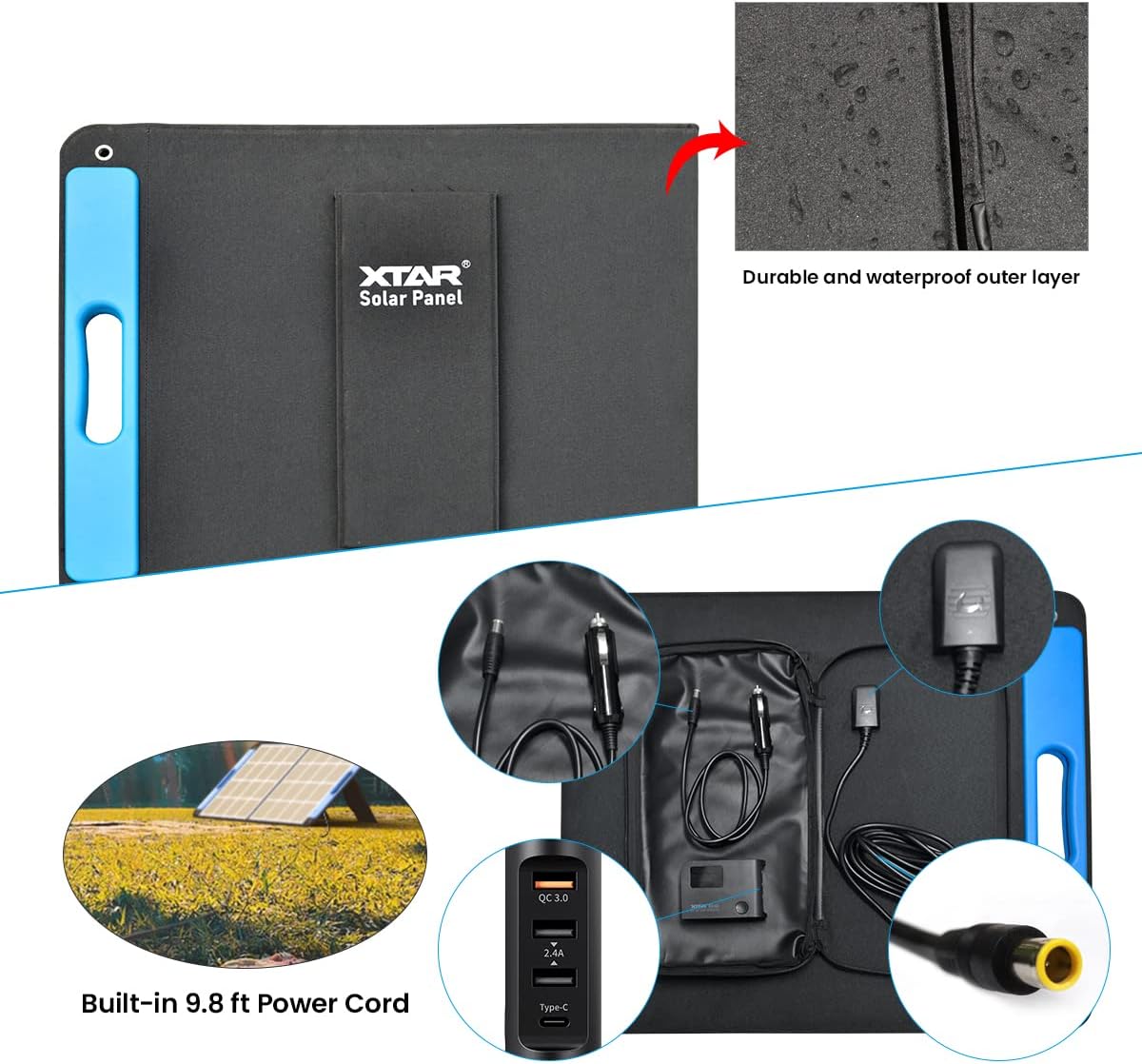
Figure 5: A close-up of the integrated storage pouch on the XTAR SP100, showing the neatly stored 9.8 ft power cord and the EU4S DC multi-ports, including a PD3.0 45W output for versatile charging.
6. メンテナンス
- クリーニング: 定期的にソーラーパネルの表面を柔らかくて乾いた布で拭いてください。amp 効率を低下させる可能性のあるほこり、汚れ、ゴミを布で取り除いてください。研磨剤入りの洗剤や刺激の強い化学薬品の使用は避けてください。
- ストレージ: When not in use, fold the solar panel and secure it with the Velcro strap. Store it in a dry, cool place away from direct sunlight and extreme temperatures.
- 検査: Periodically check cables and connectors for any signs of wear, damage, or corrosion. Ensure all connections are secure before use.
7。 トラブルシューティング
- 低出力:
- パネルが日陰ではなく直射日光に当たるようにしてください。
- パネルの角度を調整して太陽に直接向き合うようにします。
- パネルの表面を清掃して、汚れやほこりを取り除きます。
- すべてのケーブル接続が適切に接続されているかどうかを確認します。
- 電力出力なし:
- Verify that the solar panel is connected correctly to the power station.
- Confirm that the power station is turned on and configured to accept solar input.
- ケーブルとコネクタに目に見える損傷がないか検査します。
- Ensure sufficient sunlight is available; the panel may not generate power in very low light conditions.
8. 仕様

Figure 6: A visual representation of the XTAR SP100 solar panel's physical dimensions and a summary of its technical specifications.
| 仕様 | 価値 |
|---|---|
| ピークパワー | 100W |
| ワーキングVoltage | 17.6V |
| 動作電流 | 6.25A |
| オープンサーキットVol。tage | 23.76V |
| 短絡電流 | 7.5A |
| セル効率 | 23% |
| 動作温度範囲 | -10〜65℃ |
| 折りたたみサイズ | 620*536*30 mm (24.4 x 21.1 x 1.2 inches) |
| 展開サイズ | 1236*536*15 mm (48.6 x 21.1 x 0.6 inches) |
| 正味重量 | 4.4 kg (9.7 ポンド) |
| 材料 | 単結晶シリコン |
| 防水等級 | IP65 |
9. 保証とサポート
XTAR provides a 24-month friendly customer support for the SP100 solar panel. For any issues or inquiries, please contact XTAR customer service through the retailer where the product was purchased or visit the official XTAR webサポート情報のサイト。