
Baseus SUYT-D0G
Baseus Mobile Gimbal User Manual
Model: SUYT-D0G
導入
Thank you for choosing the Baseus Mobile Gimbal. This 3-axis handheld stabilizer is designed to enhance your smartphone videography and photography by providing smooth, stable footage. Its compact, foldable design makes it highly portable, while intelligent features like automatic tracking and one-key switching between horizontal and vertical shooting offer versatile creative possibilities. Please read this manual carefully before use to ensure proper operation and maintenance.
製品終了view
Familiarize yourself with the components of your Baseus Mobile Gimbal.

図1: The Baseus Mobile Gimbal with a smartphone securely mounted, showcasing its compact and ergonomic design. This image highlights the primary use case of the device.
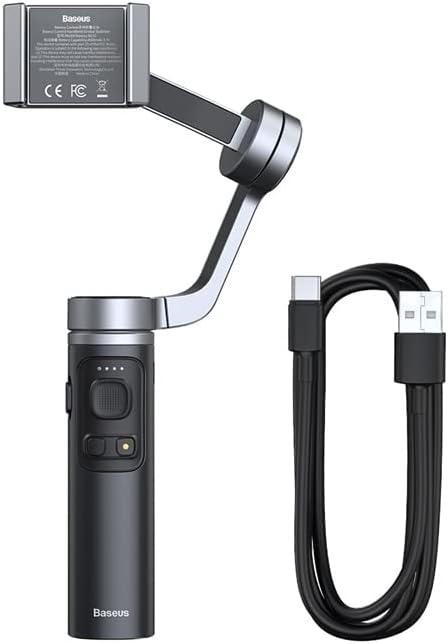
図2: The Baseus Mobile Gimbal alongside its included USB-C charging cable. This illustrates the complete package contents, ready for charging and use.
主要コンポーネント:
- スマートフォンホルダー: Securely holds your smartphone (58mm - 92mm width).
- 3軸安定化システム: Utilizes pitch, roll, and transverse axes to eliminate shakes.
- コントロールパネル: Buttons for power, mode switching, joystick for camera control.
- ハンドル: 人間工学に基づいたグリップで快適に握れます。
- Type-C充電ポート: 内蔵4500mAhバッテリーの充電用。
- 折りたたみ式アーム: コンパクトに収納でき、持ち運びも可能。
設定
1. ジンバルの充電
- Connect the provided Type-C charging cable to the gimbal's charging port.
- ケーブルのもう一方の端を 5V/1.5A 電源アダプター (付属していません) に接続します。
- インジケーターライトが充電状態を示します。フル充電には約2.5時間かかります。
- Once fully charged, the gimbal can operate for up to 12 hours.
2. スマートフォンの展開と取り付け
- Gently unfold the gimbal arm until it locks into position.
- Extend the smartphone holder and carefully place your smartphone in it, ensuring it is centered and secure. The holder supports phones between 58mm and 92mm in width.
- Ensure the phone is balanced. If the phone tilts heavily to one side, adjust its position slightly within the holder until it is as level as possible before powering on the gimbal.

図3: This diagram illustrates the three axes of stabilization (Roll, Pitch, and Transverse) that the gimbal uses to counteract involuntary hand movements, ensuring smooth video recording.

図4: The Baseus Mobile Gimbal in its folded state, easily fitting into a backpack pocket. This image emphasizes its portability and compact design for convenient transport.
3. Downloading the Baseus Control App
For full functionality and intelligent features, download the "Baseus Control" app from your smartphone's app store.
- iOSデバイスの場合: iOS 10.0以上が必要です。 App Storeからダウンロード (Link is illustrative, please search for "Baseus Control" in your app store).
- Androidデバイスの場合: Android6.0以降が必要です。 Google Playで入手 (Link is illustrative, please search for "Baseus Control" in your app store).
After installation, open the app and follow the on-screen instructions to connect your gimbal via Bluetooth 4.0.
ジンバルの操作
電源オン/オフ
- 電源オン: インジケーターライトが点灯するまで、電源ボタンを数秒間押し続けます。
- 電源を切る: インジケーターライトが消えるまで、もう一度電源ボタンを押し続けます。
基本操作
- ジョイスティック: ジンバルのパンとチルトの動きを制御します。
- モードボタン: Cycles through different operating modes (e.g., Pan Follow, Lock Mode, POV Mode). Refer to the app for detailed mode descriptions.
- シャッターボタン: 一度押すと写真が撮影され、長押しするとビデオ録画が開始/停止します (アプリ接続が必要です)。
Intelligent Features (via Baseus Control App)
- Smart Automatic Tracking: Select a face or object on your screen, and the gimbal will automatically follow it, keeping it in frame.
- One-Key Switch for Horizontal/Vertical Shooting: Easily switch between landscape and portrait orientations for different content needs (e.g., vlogs, TikTok).
- Time-lapse & Panorama: Create dynamic time-lapse videos or expansive panoramic photos.
- ズームコントロール: Use the app interface to zoom in/out.

図5: This image demonstrates the gimbal's ability to switch between horizontal (landscape) and vertical (portrait) shooting modes with a single key, catering to various content formats like vlogs or live streams.

図6: An illustration of the smart follow feature, where the gimbal uses facial recognition or object tracking to keep the subject in frame automatically, ideal for dynamic shots like skateboarding.

図7: This image showcases various creative applications of the gimbal, including capturing wide group photos, recording travel experiences smoothly, and achieving stable low-angle shots.
メンテナンス
- クリーニング: ジンバルの清掃には、柔らかく乾いた布をご使用ください。液体クリーナーや溶剤は使用しないでください。
- ストレージ: When not in use, fold the gimbal and store it in a cool, dry place away from direct sunlight and extreme temperatures.
- バッテリーのケア: To prolong battery life, charge the gimbal at least once every three months if not used regularly. Avoid completely draining the battery.
- 過負荷を避ける: Do not mount smartphones heavier than the recommended weight or outside the specified width range (58mm - 92mm).
トラブルシューティング
| 問題 | 考えられる原因 | 解決 |
|---|---|---|
| ジンバルの電源が入りません。 | バッテリー残量が少なくなりました。 | ジンバルを完全に充電します。 |
| ジンバルが揺れたり振動したりします。 | Phone not balanced; Gimbal not calibrated. | Ensure phone is centered in the holder. Calibrate the gimbal via the Baseus Control app. |
| Bluetooth経由でアプリに接続できません。 | Bluetooth がオフ; アプリが更新されていない; 干渉。 | Ensure Bluetooth is enabled on your phone. Restart both gimbal and phone. Update the app to the latest version. Try connecting in a different location. |
| ボタンが反応しません。 | Firmware issue; Low battery. | Charge the gimbal. Check for firmware updates via the app. Restart the gimbal. |
仕様
| 特徴 | 詳細 |
|---|---|
| 接続性 | ブルートゥース4.0 |
| 電池のタイプ | リチウムイオン(Li-ion) |
| バッテリー容量 | 3.7V 4500mAh |
| 入力 | 5V / 1.5A |
| 充電ポート | タイプC |
| 勤務時間 | 最大12時間 |
| 充電時間 | 約2.5時間 |
| スマートフォンホルダー幅 | 58mm - 92mm |
| 寸法(折りたたみ) | 140mm x 115mm x 64mm |
| 寸法(展開) | 263mm x 129mm x 46mm |
| 材料 | PC + アルミニウム合金 |
| サポートされているシステム | iOS 10.0以上、Android 6.0以上 |
| 重さ | 330グラム |
保証とサポート
Your Baseus Mobile Gimbal comes with a standard manufacturer's warranty. Please refer to the warranty card included in your product packaging for specific terms and conditions.
For technical support, troubleshooting assistance, or warranty claims, please contact Baseus customer service through their official webサイトまたは製品ドキュメントに記載されている連絡先情報を参照してください。
- 公式Baseus Webサイト: www.baseus.com (Illustrative link)
- カスタマーサービスメール: support@baseus.com (Illustrative email)
Please have your product model (SUYT-D0G) and purchase details ready when contacting support.
Ask a question about this manual
Ask about setup, troubleshooting, compatibility, parts, safety, or missing instructions. Manuals+ will review the question and use this page’s manual context to help answer it.