
DOOMAY 5293UK
DOOMAY デジタル目覚まし時計 ユーザーマニュアル
モデル: 5293UK
ブランド: DOOMAY
1. はじめに
ご購入ありがとうございますasing the DOOMAY Digital Alarm Clock. This compact and versatile alarm clock is designed for convenience and readability, featuring an adjustable LCD display, snooze function, weekend mode, and temperature display. This manual will guide you through the setup, operation, and maintenance of your new alarm clock to ensure optimal performance.
2. 安全情報
- デバイスを水や湿度の高い環境に置かないでください。
- Avoid exposing the clock to direct sunlight or extreme temperatures.
- ご自身でデバイスの分解や修理を試みないでください。修理は資格のある専門家にご依頼ください。
- 指定された種類の電池(単4電池2本)のみを使用してください。
- 長期間使用しない場合は、液漏れを防ぐため電池を取り外してください。
- 電池はお子様の手の届かないところに保管してください。
3. パッケージ内容
- DOOMAY デジタル目覚まし時計(1台)
- 単4電池(2本)
- ユーザーマニュアル(このドキュメント)
4.製品オーバーview
Familiarize yourself with the components and controls of your DOOMAY Digital Alarm Clock.
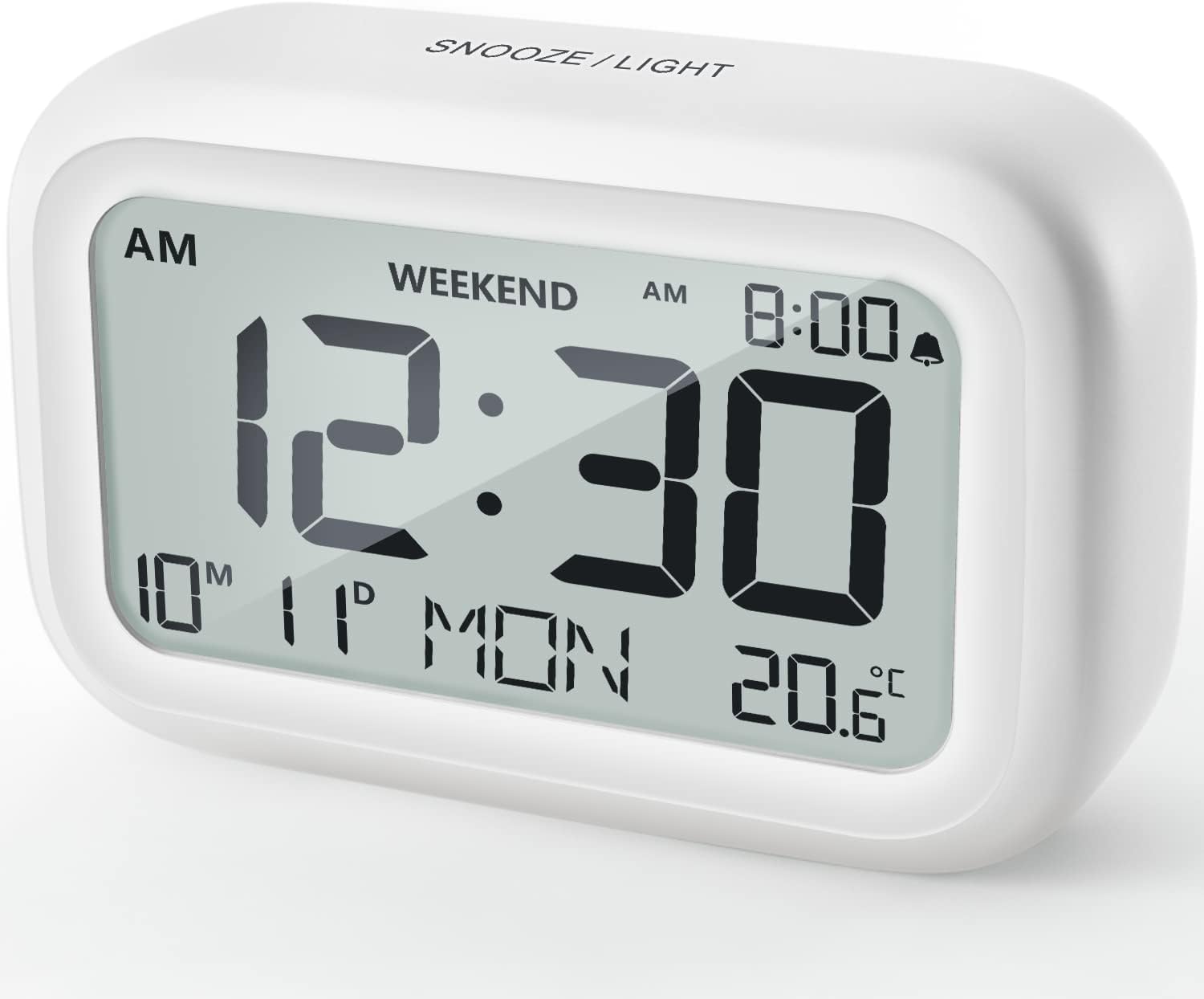
図4.1: 前面 View 目覚まし時計の
This image displays the front of the DOOMAY Digital Alarm Clock, highlighting its large, clear LCD screen. The screen shows the current time (12:30), AM indicator, day of the week (MON), date (10th month, 11th day), and indoor temperature (20.6°C). The top of the clock has a "SNOOZE/LIGHT" button.

図4.2: 主な特徴view
This diagram illustrates the main functionalities of the alarm clock: 12/24H time display, calendar, alarm setting, adjustable volume, snooze function, backlight, weekend mode, and temperature display. The clock itself is shown on a wooden table, displaying 7:00 AM, Friday, and 28.8 degrees.

Figure 4.3: Back Panel Controls
This image shows the rear of the alarm clock, detailing the various control buttons and the battery compartment. Buttons are clearly labeled for: 12/24H time format, Alarm setting, Weekend mode, Date setting, Minus (-) for decreasing values, Plus (+) for increasing values, and °C/°F for temperature unit selection. The battery compartment is visible, designed for two AAA batteries.
コントロールとディスプレイ:
- LCDディスプレイ: Shows time, date, day of week, AM/PM indicator, alarm status, and temperature.
- スヌーズ/ライトボタン(上部): Activates snooze function during alarm; illuminates backlight for 5 seconds.
- 12/24H Button (Back): 12 時間形式と 24 時間形式を切り替えます。
- ALARM Button (Back): アラーム設定モードに入ります。
- WEEKEND Button (Back): Activates/deactivates weekend mode.
- DATE Button (Back): 日付設定モードに入ります。
- MINUS (-) Button (Back): Decreases values during setting; adjusts alarm volume.
- PLUS (+) Button (Back): Increases values during setting; adjusts alarm volume.
- °C/°F Button (Back): 摂氏と華氏の温度単位を切り替えます。
5. セットアップ
5.1 バッテリーの取り付け
- 時計の背面にある電池ボックスのカバーを開きます。
- 正しい極性(+と-)を確認して、単4電池2本を挿入します。
- 電池カバーをしっかりと閉じてください。
- The display will light up, and the clock will be ready for initial setup. A low battery symbol will appear when batteries need replacement. If the display shows "8888" flashing, it's also an indication to change batteries.
5.2 初期時刻と日付の設定
- 時間設定:
- を押す 12/24時間 button to switch between 12-hour (with AM/PM) and 24-hour formats.
- を押し続けます 12/24時間 ボタンを3秒間押し続けると、時刻設定モードになります。「時」の数字が点滅します。
- 使用 + or - 時間を調整するボタン。
- を押す 12/24時間 もう一度ボタンを押すと、時間が確定し、分の設定に移ります。分の表示が点滅します。
- 使用 + or - ボタンで分を調整します。
- を押す 12/24時間 button one more time to exit time setting.
- 設定日:
- を押し続けます 日付 button for 3 seconds to enter date setting mode. The year digits will flash.
- 使用 + or - 年を調整するためのボタン。
- を押す 日付 button again to confirm the year and move to month setting.
- Adjust the month using + or -.
- プレス 日付 again to move to day setting.
- 日付を調整する + or -.
- プレス 日付 one more time to exit date setting. The day of the week will automatically adjust.
6. 操作手順
6.1アラームの設定
- を押し続けます アラーム ボタンを3秒間押し続けます。アラームの時刻の数字が点滅します。
- 使用 + or - ボタンを押して希望のアラーム時間を設定します。
- を押す アラーム もう一度ボタンを押して時間を確定し、分の設定に移ります。アラームの分表示が点滅します。
- 使用 + or - ボタンを押して希望のアラームの分を設定します。
- を押す アラーム button one more time to exit alarm setting. The alarm icon (bell symbol) will appear on the display, indicating the alarm is active.
- アラームのオン/オフを切り替えるには、 アラーム button once. The bell icon will appear/disappear.
6.2スヌーズ機能
アラームが鳴ったら、大きな スヌーズ/ライト 時計上部のボタンを押してください。アラームは9分間一時停止し、その後再び鳴ります。この動作は複数回繰り返すことができます。

Figure 6.1: Activating Snooze
This image demonstrates how to activate the snooze function by touching the top of the alarm clock. The text highlights that this action provides an additional 9 minutes of sleep after the alarm sounds.
To completely turn off the alarm after it sounds (without snoozing), press any button on the back of the clock.
6.3 週末モード
The weekend mode allows the alarm to sound only from Monday to Friday, preventing it from ringing on Saturday and Sunday.

Figure 6.2: Weekend Mode Activated
This image shows the alarm clock display with the "WEEKEND" indicator prominently displayed, signifying that the weekend mode is active. The accompanying text clarifies that in this mode, the alarm will only sound from Monday to Friday, ensuring undisturbed weekends.
- 週末モードを有効にするには、 週末 button once. The "WEEKEND" indicator will appear on the display.
- To deactivate Weekend Mode, press the 週末 button again. The "WEEKEND" indicator will disappear.
6.4 アラーム音量調節
The alarm clock offers two volume levels: Low (70 dB) and High (85 dB).

Figure 6.3: Alarm Volume Levels
This image visually represents the two available alarm volume settings: L01 (85 dB) for a louder alarm and L02 (70 dB) for a softer alarm. The alarm clock is shown in a bedroom setting, emphasizing its use as a bedside device.
- 通常の時刻表示モードで、 + or - buttons to cycle between the two alarm volume levels. The current volume level will be briefly displayed.
6.5 バックライト機能
To illuminate the display in low light conditions, simply tap the スヌーズ/ライト button on the top of the clock. The backlight will activate for approximately 5 seconds, providing clear visibility of the time and other information.
Figure 6.4: Backlight in Action
This image provides a side-by-side comparison of the alarm clock's display. On the left, the clock is shown in a well-lit environment. On the right, the same clock is shown in a dark setting with its 5-second backlight activated, demonstrating how the display becomes clearly visible at night.
6.6 温度表示
時計は室内温度を表示します。単位は摂氏(°C)と華氏(°F)を切り替えることができます。
- To change the temperature unit, press the °C /°F 時計の裏にあるボタン。
7. メンテナンス
7.1 クリーニング
時計は柔らかく乾いた布で拭いてください。研磨剤入りの洗剤や溶剤は表面を傷つける恐れがあるため、使用しないでください。
7.2 電池の交換
When the low battery indicator appears on the display, or if the display shows "8888" flashing, it is time to replace the batteries. Follow the steps in Section 5.1 Battery Installation to replace the two AAA batteries.
8。 トラブルシューティング
| 問題 | 考えられる原因 | 解決 |
|---|---|---|
| ディスプレイが空白または暗い。 | 電池が切れているか、正しく取り付けられていません。 | 正しい極性を確認して、電池を新しい AAA 電池と交換してください。 |
| アラームは鳴りません。 | Alarm is not activated, or Weekend Mode is ON. | Ensure the alarm icon is displayed. Check if Weekend Mode is active and deactivate if necessary. |
| スヌーズ機能が動作しません。 | Not tapping the SNOOZE/LIGHT button correctly. | Ensure a firm, brief tap on the top SNOOZE/LIGHT button when the alarm is sounding. |
| 時刻/日付が正しくありません。 | 正しく設定されていないか、電池が取り外されています。 | Refer to Section 5.2 Initial Time and Date Setting to re-set. |
9. 仕様
| 特徴 | 詳細 |
|---|---|
| モデル番号 | 5293イギリス |
| ブランド | ドゥーメイ |
| 寸法(長さ×幅×高さ) | 10.9 x 3.81 x 6.9 cm(4.29 x 1.5 x 2.72インチ) |
| 重さ | 127.01 グラム (0.28 ポンド) |
| 材料 | アクリロニトリルブタジエンスチレン(ABS) |
| 電源 | 単2電池XNUMX本(付属) |
| 表示タイプ | デジタルLCD |
| アラーム音量レベル | Low (70 dB), High (85 dB) |
| スヌーズ時間 | 9 minutes |
| バックライト持続時間 | 5秒 |
| 温度単位 | 摂氏 (°C) / 華氏 (°F) |
10. 保証とサポート
DOOMAY products are designed for reliability and performance. For any questions, technical support, or warranty claims, please contact your retailer or visit the official DOOMAY webサポートについては、サイトをご覧ください。保証期間内であれば、購入証明書を保管してください。
For further information, you may visit the brand's Amazon store page: DOOMAY Store on Amazon
関連文書 - 5293イギリス
 |
DOOMAY デジタル目覚まし時計 ユーザーマニュアル DOOMAY デジタル目覚まし時計の総合ガイド。設定、スヌーズや週末モードなどの機能、寝室、オフィス、旅行での使用におけるバッテリー操作などを網羅しています。 |
 |
DOOMAY 5293 Digital Alarm Clock: User Manual, Setup, and Features User manual for the DOOMAY 5293 Digital Alarm Clock. Learn how to set time, date, and alarms, use snooze and backlight features, understand temperature display, and view 保証情報。 |
 |
DOOMAY デジタル目覚まし時計 モデル 5293 ユーザーマニュアル DOOMAY デジタル目覚まし時計、モデル 5293 のユーザー マニュアル。このガイドでは、時間、日付、アラームの設定、週末モード、スヌーズ機能、バックライトの利用、温度単位と保証情報に関する詳細な手順を説明します。 |
 |
DOOMAY 5293 デジタル目覚まし時計 ユーザーマニュアル - セットアップ、機能、保証 DOOMAY 5293 デジタル目覚まし時計の包括的なユーザーマニュアル。時刻、日付、アラームの設定方法、スヌーズ、週末モード、バックライトの使い方、保証情報などをご確認ください。 |
Ask a question about this manual
Ask about setup, troubleshooting, compatibility, parts, safety, or missing instructions. Manuals+ will review the question and use this page’s manual context to help answer it.