
1. はじめに
The XTAR VC4H is an advanced 4-bay universal battery charger designed for a wide range of rechargeable batteries. It features a smart LCD display that provides real-time information on charging status, current, voltage, and charged capacity. With its USB-C input and QC 3.0 compatibility, the VC4H offers efficient and convenient charging for various battery types and sizes.
2. パッケージ内容
Upon opening your XTAR VC4H package, you should find the following items:
- 1 x XTAR VC4H 4-Bay Universal Battery Charger
- ユーザーマニュアル x 1
- USB-Cケーブル x 1
- 収納バッグ x 1

Image: Contents of the XTAR VC4H package, including the charger, USB-C cable, and user manual.
3. 特徴
- ユニバーサル互換性: Supports 3.6V/3.7V Li-ion/IMR/INR/ICR batteries (10440 to 32650) and 1.2V Ni-MH/Ni-CD batteries (AAAA, AAA, AA, A, SC, C, D).
- スマートLCDディスプレイ: Shows real-time charging current, battery voltage, charged capacity, battery type, and channel.
- 調整可能な充電電流: Selectable charging currents of 2A, 1A, or 0.5A. (Note: QC3.0 power source recommended for maximum efficiency).
- 容量表示: Accurately displays the real charging capacity of your batteries.
- USB-C電源: Compatible with all 5V USB power sources.
- 複数の保護: Includes overcharge, overvoltage, overcurrent, short-circuit, overheating, and reverse polarity protection.
- 温度監視設計: Ensures safe operation by monitoring internal temperature.
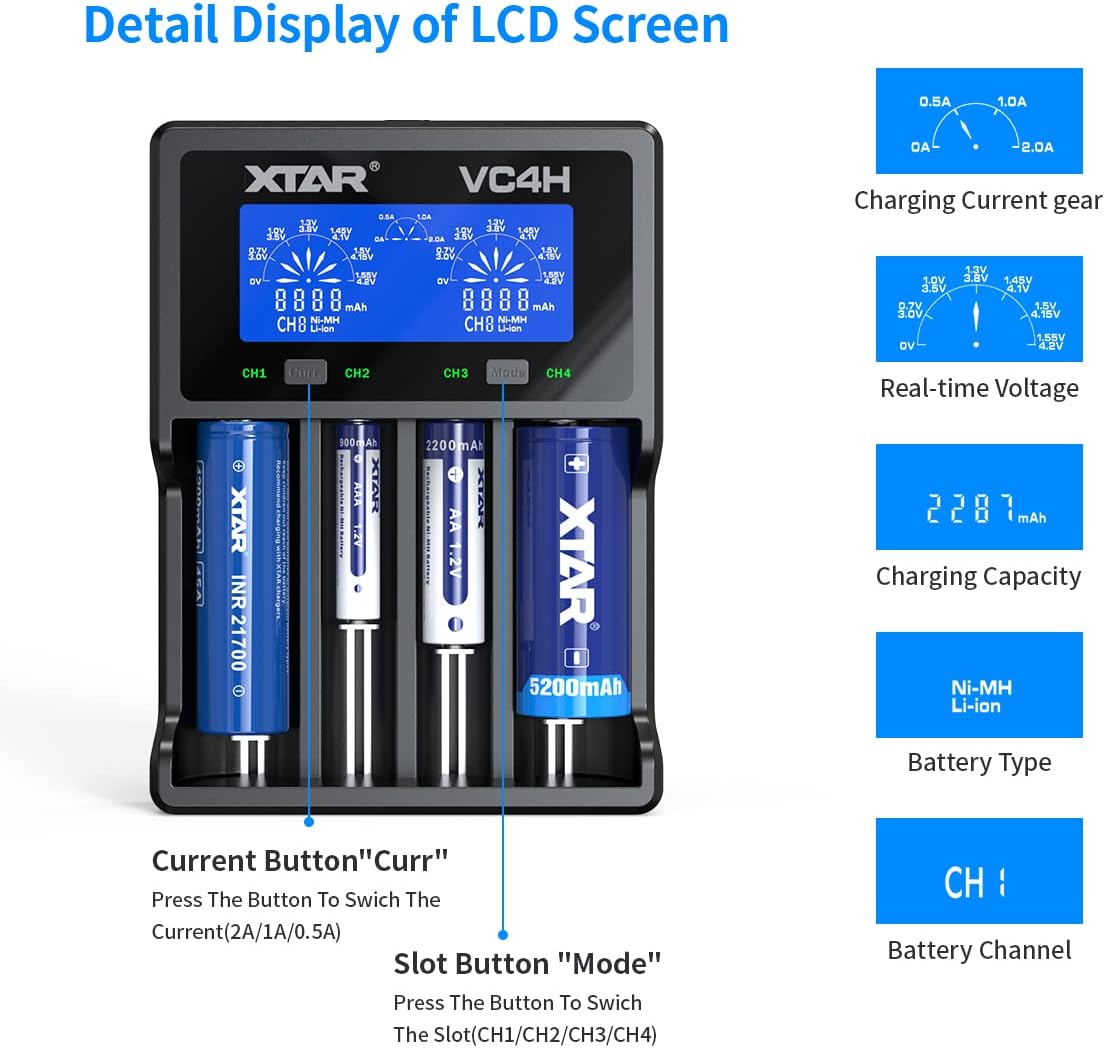
画像: 詳細 view of the XTAR VC4H LCD screen showing charging current, real-time voltage, charging capacity, battery type, and battery channel.

Image: Visual representation of the multiple protection features of the XTAR VC4H charger, including overcharge, overvoltage, overcurrent, short-circuit, overheating, and reverse polarity protection.
4. セットアップ
- 電源に接続: Connect the provided USB-C cable to the charger's Type-C input port and plug the other end into a 5V USB power source (e.g., QC 3.0 adapter, power bank, laptop).
- バッテリーの挿入: Carefully insert your rechargeable batteries into the charging bays, ensuring correct polarity (+/-). The charger will automatically detect the battery type (Li-ion or Ni-MH/Ni-CD) and begin charging.

Image: Close-up of the XTAR VC4H charger showing the Type-C input port and a USB-C cable being connected.

Image: The XTAR VC4H charger with various battery types inserted, illustrating its compatibility and different power source options like car charger, power bank, and laptop.
5. 操作手順
5.1. 充電モード
The charger defaults to charging mode when batteries are inserted. The LCD screen will display real-time information for each channel.
5.2. 充電電流の調整
を押す "Curr" button to switch between available charging currents (2A, 1A, 0.5A). The selected current will be applied to the corresponding channel.

Image: Close-up of the XTAR VC4H control panel, highlighting the 'Curr' button for current selection and 'Mode' button for slot switching.
5.3. Switching Display Content
In charging mode, press the "モード" button to switch the display content between channels (CH1, CH2, CH3, CH4) or to view different parameters like charging capacity (Cap) or internal resistance (IR).
5.4. Grad Mode (Capacity Measurement)
To enter Grad mode for capacity measurement, long-press the "モード" button. This mode charges the battery to full, then discharges it to measure its actual capacity, and finally recharges it to full. This process helps assess the battery's true health.
5.5. ストアモード
長押しすると "モード" button again to cycle to Store mode. This mode is used to charge or discharge batteries to an optimal storage voltage, preserving their lifespan.
5.6. Automatic Energy Saving
When no batteries are inserted or no operations are performed within about 60 seconds, the screen will go dim to save energy. If a battery is inserted or any button is pressed, the screen will reactivate.
Video: An official XTAR video demonstrating the features and operation of the VC4H Li-ion battery charger, including battery insertion and display functions.
6. 互換性
The XTAR VC4H charger is designed for broad compatibility with various battery chemistries and sizes:
| 電池のタイプ | 対応サイズ |
|---|---|
| 3.6V/3.7V Li-ion/IMR/INR/ICR | 10440, 14500, 14650, 16340, 17335, 17500, 17670, 18350, 18490, 18500, 18650, 18700, 20700, 21700, 22650, 25500, 32650 (Note: Can charge protected 20700/21700 batteries) |
| 1.2V Ni-MH/Ni-CD | AAAA, AAA, AA, A, SC, C, D |

Image: A table detailing the XTAR VC4H's compatibility with various battery models and types, including Li-ion and Ni-MH/Ni-CD.
7. 仕様
| 仕様 | 価値 |
|---|---|
| モデル | VC4H |
| 入力ボリュームtage | 5 Volts (USB-C, QC3.0 recommended) |
| 出力巻tage | 5 ボルト (DC) |
| Constant Charging Current (Li-ion) | 3Ax1 / 2Ax2 / 1Ax4 / 0.5Ax4 / 0.25Ax4 |
| Constant Charging Current (Ni-MH/Ni-CD) | 1Ax1 / 1Ax2 / 1Ax4 / 0.5Ax4 |
| カットオフVoltage(リチウムイオン) | 4.2V±0.05V |
| カットオフVoltage (Ni-MH/Ni-CD) | 1.45V±0.1V |
| Charging Cut-Off Current | ≤150mA |
| 動作温度 | -10~40℃ |
| アイテム重量 | 13.3オンス |
| パッケージ寸法 | 8.7 x 4.88 x 1.69インチ |
| 認定資格 | UL、FCC、CE |
8. 安全上の注意
- Use only with compatible rechargeable batteries as listed in the compatibility section.
- 損傷したバッテリーや劣化したバッテリーは充電しないでください。
- 電池を充電器に挿入するときは、電池の極性が正しいことを確認してください。
- 充電器を水や極端な温度にさらさないでください。
- お子様の手の届かない場所に保管してください。
- 充電器を分解または改造しないでください。
- Always use a recommended power source, preferably a QC 3.0 adapter, to ensure optimal performance and safety.
9。 トラブルシューティング
- 充電器の電源が入らない: Ensure the USB-C cable is securely connected to both the charger and the power source. Try a different USB-C cable or power adapter.
- バッテリーが充電されない: Verify that batteries are inserted with correct polarity. Check if the batteries are compatible with the charger. Ensure the power source is providing sufficient power.
- Incorrect display readings: Remove and reinsert the battery. If the issue persists, ensure the battery type is correctly identified by the charger.
- 過熱: If the charger or batteries become excessively hot, immediately disconnect the power and remove the batteries. Ensure adequate ventilation around the charger.
10. 保証とサポート
The XTAR VC4H battery charger comes with lifetime maintenance. For any support inquiries or issues, please refer to the contact information provided in the original product packaging or visit the official XTAR webサイト。