
1. はじめに
ご購入ありがとうございますasing the Aogamb D3000 Kids Alarm Clock. This device combines a digital alarm clock, Bluetooth speaker, wake-up light, and sleep sound machine to create a versatile and engaging experience for children's bedrooms. Please read this manual carefully to ensure proper use and maintenance of your device.
パッケージ内容:
- Aogamb D3000 Alarm Clock
- USB充電ケーブル
- ユーザーマニュアル

Image: The Aogamb D3000 Alarm Clock, USB charging cable, and user manual are shown as included items.
2. 安全情報
- デバイスを極端な温度、直射日光、高湿度にさらさないでください。
- デバイスを水やその他の液体から遠ざけてください。
- 自分でデバイスを分解したり修理したりしないでください。 サポートが必要な場合は、カスタマー サポートにお問い合わせください。
- 付属の USB 充電ケーブルまたは認定された同等品のみを使用してください。
- Ensure the device is placed on a stable surface to prevent falling.
3. セットアップ
初期充電
Before first use, fully charge the alarm clock using the provided USB cable. Connect the USB cable to the charging port on the back of the device and to a suitable USB power adapter (not included). The charging indicator light will be red during charging and turn blue when fully charged.
画像: クローズアップ view of the USB charging interface located on the back of the alarm clock.
保護フィルムの除去
Before operating the device, gently remove the transparent protective film from the black display lens.
Image: A hand is shown peeling off a transparent protective film from the black display area of the alarm clock.
4. 操作手順
コントロールオーバーview
Familiarize yourself with the buttons located on the top of the alarm clock:
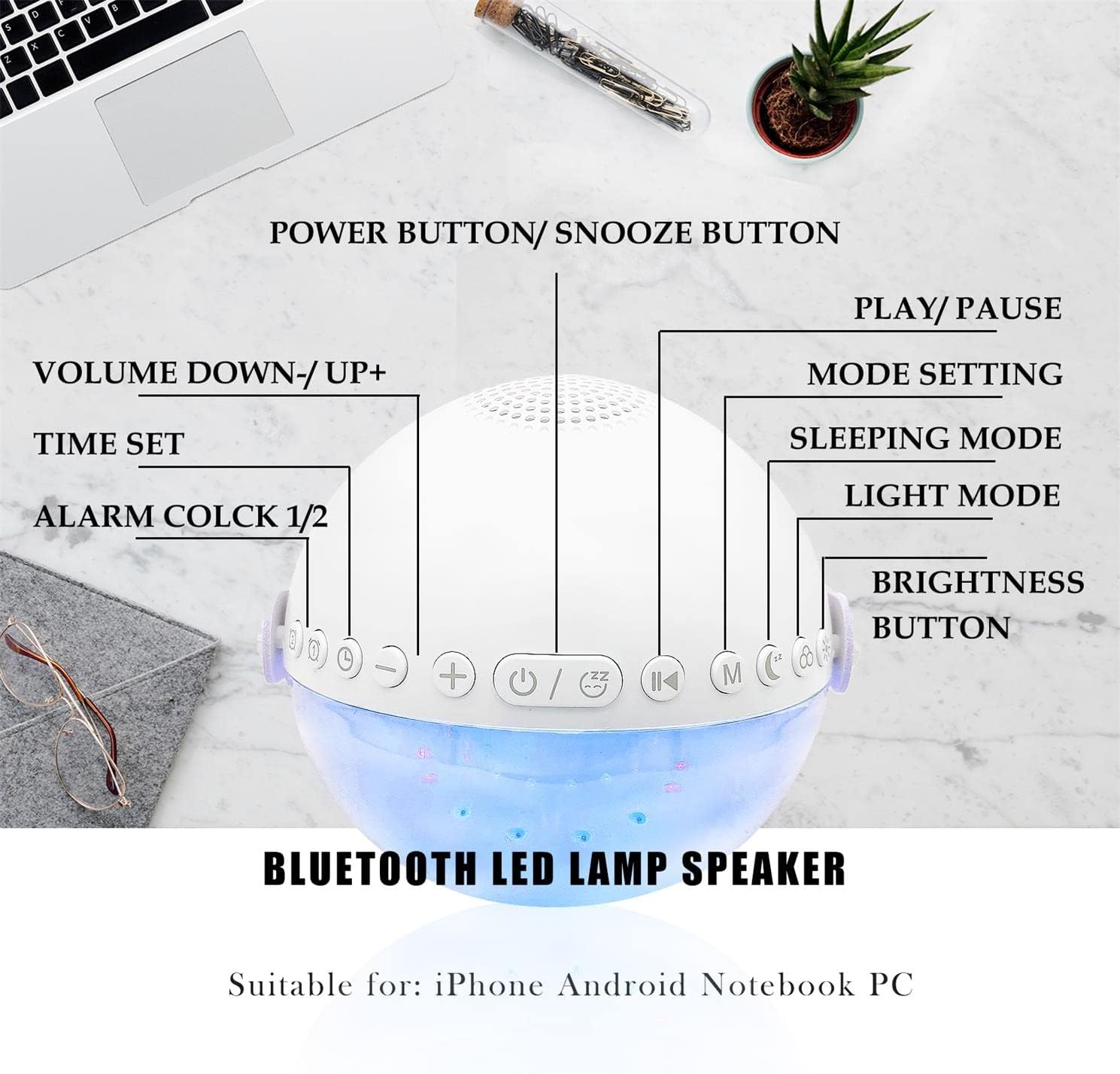
画像: オーバーヘッド view of the alarm clock with labels pointing to each button: Power/Snooze, Volume Down/Up, Time Set, Alarm 1/2, Play/Pause, Mode Setting, Sleeping Mode, Light Mode, and Brightness Button.
- Power Button / Snooze Button: Press to power on/off. Short press during an alarm to activate snooze.
- 音量を下げる (-) / 音量を上げる (+): 短く押すと音量を調整します。
- 時間設定: 押すと時間設定モードになります。
- アラーム1 / アラーム2: Press to set or activate/deactivate Alarm 1 or Alarm 2.
- 再生 / 一時停止: Controls media playback in Bluetooth or Sound Machine mode.
- Mode Setting (M): Press to cycle through modes (Bluetooth, Sound Machine).
- スリープモード: Activates sleep mode features.
- ライトモード: Cycles through light colors and effects.
- 明るさボタン: Adjusts display and light brightness.
時間設定
- を押す 時間設定 ボタンを押します。時間表示が点滅します。
- 使用 ボリュームアップ(+) or ボリュームダウン (-) 時間を調整するボタン。
- プレス 時間設定 もう一度押して時間を確定し、分の設定に移動します。
- 使用 ボリュームアップ(+) or ボリュームダウン (-) 分を調整するためのボタン。
- プレス 時間設定 もう一度確認して時間設定を終了します。
- The clock supports a 24-hour format.
アラーム設定(デュアルアラーム)
The device features two independent alarms. You can customize ringtones, alarm volume, and light color/brightness for each.
- を押す アラーム1 or アラーム2 button to select an alarm. The alarm icon will flash.
- Follow the time setting steps to set the desired alarm time.
- After setting the time, you can customize the alarm sound, volume, and wake-up light settings using the respective buttons (e.g., ライトモード, ボリューム+/-).
- を押す アラーム1 or アラーム2 button again to activate/deactivate the alarm. The alarm icon will appear/disappear on the display.
Image: Two panels illustrate customized alarm times: one for waking up at 7:30 AM and another for going to sleep at 10:00 PM, both for Monday to Friday.
スヌーズ機能
アラームが鳴ったら、 Power Button / Snooze Button to activate the snooze function. The alarm will pause for 5 minutes and then sound again. This can be repeated up to three times, after which the alarm will turn off automatically.
Image: The alarm clock is displayed with a clear indication of its snooze function.
Bluetoothスピーカーモード
The alarm clock features advanced Bluetooth 5.0 technology for wireless audio streaming.
- を押す Mode Setting (M) button repeatedly until the Bluetooth icon appears on the display.
- On your smartphone or Bluetooth-enabled device, search for "Aogamb D3000" in the Bluetooth settings and pair.
- Once connected, you can play music or audio from your device through the alarm clock speaker.
- 使用 再生 / 一時停止 再生を制御するボタン。
- 使用 ボリュームアップ(+) or ボリュームダウン (-) 音量を調整するためのボタン。

Image: A child and adult are shown with the alarm clock, which is wirelessly connected to a smartphone via Bluetooth, playing music.
スリープサウンドマシン
The alarm clock offers 8 soothing natural sounds to aid sleep or relaxation.
- を押す Mode Setting (M) button repeatedly until the Sound Machine icon appears on the display.
- を短く押す ボリュームアップ(+) or ボリュームダウン (-) buttons to cycle through the 8 available sounds: Rain, Ocean Waves, Birds, Water Stream, White Noise, Cicada, Bonfire, Tick-Tock.
- 長押し ボリュームアップ(+) or ボリュームダウン (-) buttons to adjust the volume of the sleep sounds.
- を押す 再生 / 一時停止 button to start or stop the sound.

Image: A child and adult are shown sleeping, with the alarm clock nearby. Icons for 8 natural sounds (Rain, Water Stream, Cicadas, Birds, Ocean Waves, White Noise, Bonfire, Tick-Tock) are displayed, indicating the sleep sound feature.
Wake-up Light / Night Light
The alarm clock features a touch-activated backlight and adjustable colored lights.
- Touch-Activated Backlight: Gently tap the device to activate the backlight for checking the time in the dark.
- ライトモード: を押す ライトモード button to cycle through various light colors (Warm White, Green, Red, Blue, Orange, Yellow) and lighting effects (e.g., breathing lights, flashing light).
- 明るさを調整: を押す 明るさボタン to adjust the intensity of the light (3 levels: Low, Middle, High).

Image: The alarm clock is shown displaying various colorful night light options, including 9 different colors, 3 breathing light effects, and 1 flashing light, with adjustable brightness levels (Low, Middle, High).

Image: The alarm clock is shown with various light colors and brightness settings, illustrating its wake-up light functionality.
Sleep Trainer Function (Sun & Moon Icons)
The alarm clock features sun and moon icons on the LED display to help children understand day and night cycles, promoting better sleep habits. The sun icon indicates daytime, and the moon icon indicates nighttime.
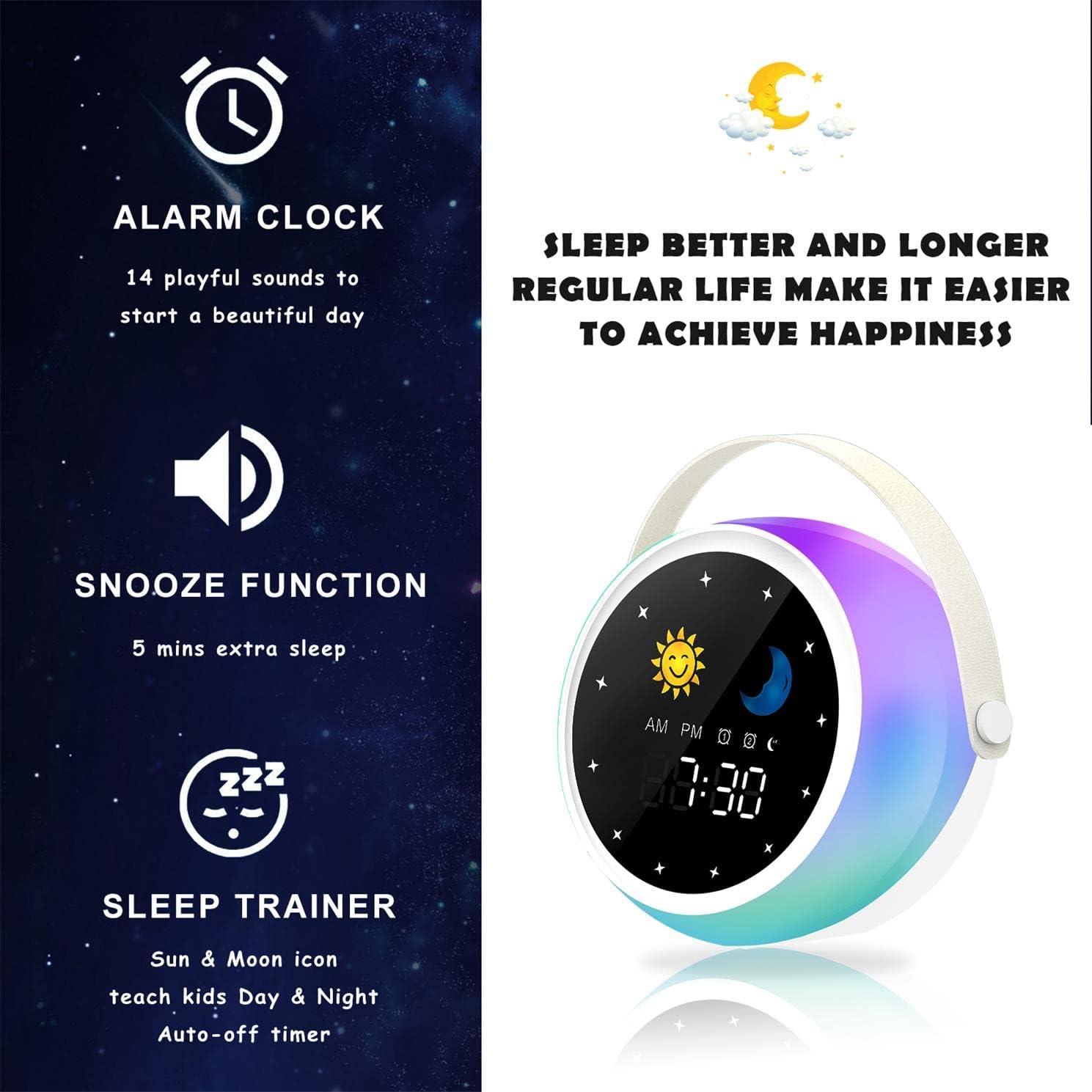
Image: A visual representation of the alarm clock's key features: alarm, snooze, and sleep trainer, with the sun and moon icons visible on the display to teach day and night.

Image: Two panels show the alarm clock display: one for sleep time (10:30 PM with moon icon) and one for wake-up time (7:00 AM with sun icon), illustrating the sleep trainer function.
5. メンテナンス
- 柔らかく乾いた布でデバイスを拭いてください。研磨剤入りの洗剤や溶剤は使用しないでください。
- 充電ポートにほこりやごみがないことを確認してください。
- 長期間使用しない場合は、デバイスを涼しく乾燥した場所に保管してください。
6。 トラブルシューティング
デバイスの電源が入らない:
- デバイスが完全に充電されていることを確認してください。USBケーブルを使用して電源に接続してください。
- 電源ボタンを数秒間押し続けます。
Bluetooth ペアリングの問題:
- Make sure the alarm clock is in Bluetooth mode (Bluetooth icon visible).
- Ensure your smartphone or device's Bluetooth is enabled and within range.
- Try restarting both the alarm clock and your Bluetooth device.
- 携帯電話の Bluetooth リストからデバイスを削除し、再度ペアリングを試みてください。
アラームが鳴らない:
- アラームが作動していることを確認します(ディスプレイにアラーム アイコンが表示されます)。
- アラームの音量設定を確認してください。
- アラーム時間が正しく設定されていることを確認してください。
7. 仕様
| ブランド | アオガンブ |
| モデル番号 | D3000 |
| 色 | 白 |
| 寸法(長さ×幅×高さ) | 12 x 12.1 x 10.5 cm |
| 重さ | 430グラム |
| 材料 | 結晶 |
| 表示タイプ | デジタル |
| 電源 | 電気ケーブル |
| 特集 | Alarm, Charging Port, Snooze, Bluetooth Speaker, Wake-up Light, Sleep Sound Machine |
| 電池付属 | いいえ |
8. 保証とサポート
This product comes with a standard manufacturer's warranty. For detailed warranty information, please refer to the product packaging or contact Aogamb customer support. If you encounter any issues or have questions not covered in this manual, please reach out to our support team for assistance.
カスタマーサポート連絡先: Please refer to the contact information provided on the product packaging or the official Aogamb webサイト。