
WGP T6 Plus
WGP Teleheer T6 Plus バイク用 Bluetooth ヘッドセット ユーザーマニュアル
Model: T6 Plus | Brand: WGP
導入
This manual provides detailed instructions for the installation, operation, and maintenance of your WGP Teleheer T6 Plus Motorcycle Bluetooth Headset. Please read this manual thoroughly before using the device to ensure proper function and safety. The T6 Plus is designed for motorcycle riders, offering full-duplex Bluetooth real-time intercom communication, hands-free calling, music playback, and voice assistant integration.
主な特徴
- Full Duplex Bluetooth Real-time Intercom: Stable signal transmission up to 1500 meters (93 MPH) with ceramic antenna.
- Hands-free & Multi-function Keys: Bluetooth 5.1 connectivity, supports call handling (answer/refuse/redial), music playback. Automatic switch to phone mode for incoming calls. Large button design for easy operation with gloves.
- IP65防水・防塵設計: Withstands various weather conditions, operational down to -15°F.
- HD Speakers & Ultra High Quality Sound: High-definition sound quality, especially for bass, with effective wind noise reduction.
- All-in-One Type-C Port: Integrated audio, data transfer, and charging.
- 長いバッテリー寿命: 850 mAh battery providing 30 hours of continuous use and 500 hours standby.
パッケージ内容
パッケージにすべてのアイテムが含まれていることを確認してください。
- WGP Teleheer T6 Plus Bluetooth Headset Unit (2 units for 2-pack)
- ヘルメットスピーカー
- マイク(オープンフェイスヘルメット用ブームマイク、フルフェイスヘルメット用ソフトマイク)
- Mounting Clip (clamp and adhesive options)
- USB Type-C充電ケーブル
- ユーザーマニュアル

Image: A detailed diagram illustrating the components of the WGP Teleheer T6 Plus headset, including the main unit with its Type-C port, indicator light, and control buttons (OFF/ON, Volume+, Volume-, Telephone, Connect). It also shows the securing clip, microphone, and trumpet (speakers), providing a clear visual guide to the parts included and their connections.
セットアップとインストール
1. デバイスの充電
Before first use, fully charge the T6 Plus headset. Connect the provided USB Type-C cable to the headset's Type-C port and the other end to a USB power adapter (not included). The indicator light will show charging status and turn off when fully charged.
- 充電時間:約2〜3時間。
- Indicator light: Red during charging, off when fully charged.
2. Installing the Headset in Your Helmet
The T6 Plus can be installed using either the clamp mount or the adhesive mount.
- 取り付け場所を選択: Select a flat area on the left side of your helmet where the headset unit can be easily accessed.
- スピーカーの取り付け: Attach the speakers inside the helmet's ear pockets using the adhesive pads. Ensure they are positioned directly over your ears for optimal sound quality.
- マイクのインストール:
- For full-face helmets: Use the soft wire microphone and position it inside the chin bar, close to your mouth.
- For open-face or modular helmets: Use the boom microphone and position it in front of your mouth.
- 本体の取り付け:
- Clamp マウント: スライドさせてamp between the helmet shell and the inner padding. Secure it tightly.
- 接着マウント: Clean the chosen surface on the helmet. Peel off the protective film from the adhesive mount and firmly press it onto the helmet for at least 30 seconds. Allow 24 hours for the adhesive to cure before use.
- ケーブルを接続する: Plug the speaker/microphone cable into the Type-C port on the main headset unit.

Image: A WGP Teleheer T6 Plus headset unit mounted on the side of a motorcycle helmet. This image demonstrates the typical installation position of the headset on a helmet, showing its compact design and how it integrates with the helmet's exterior. The control buttons are visible, indicating ease of access for the rider.
操作手順
1. 電源のオン/オフ
- 電源オン: を押し続けます 電源ボタン for 3 seconds until the indicator light flashes.
- 電源を切る: を押し続けます 電源ボタン インジケーターライトが消えるまで 3 秒間押し続けます。
2. 携帯電話とのBluetoothペアリング
- Ensure the T6 Plus is powered off.
- を押し続けます 電源ボタン インジケーター ライトが赤と青に交互に点滅し、ペアリング モードを示すまで、約 5 ~ 7 秒間押し続けます。
- On your mobile phone, enable Bluetooth and search for "Teleheer T6 Plus".
- Select "Teleheer T6 Plus" from the list of available devices to connect. Once connected, the indicator light will flash blue slowly.
3. Intercom Pairing (Two Units)
To establish intercom communication between two T6 Plus units:
- Ensure both T6 Plus units are powered off.
- On Unit 1, press and hold the 電源ボタン for 5-7 seconds until the indicator light flashes red and blue alternately.
- On Unit 2, press and hold the 電源ボタン for 5-7 seconds until the indicator light flashes red and blue alternately.
- 短く押すと 電源ボタン on either Unit 1 or Unit 2 (one short press). The units will search for each other.
- 接続されると、両方のユニットのインジケーター ライトが青色でゆっくり点滅し、確認音が聞こえます。
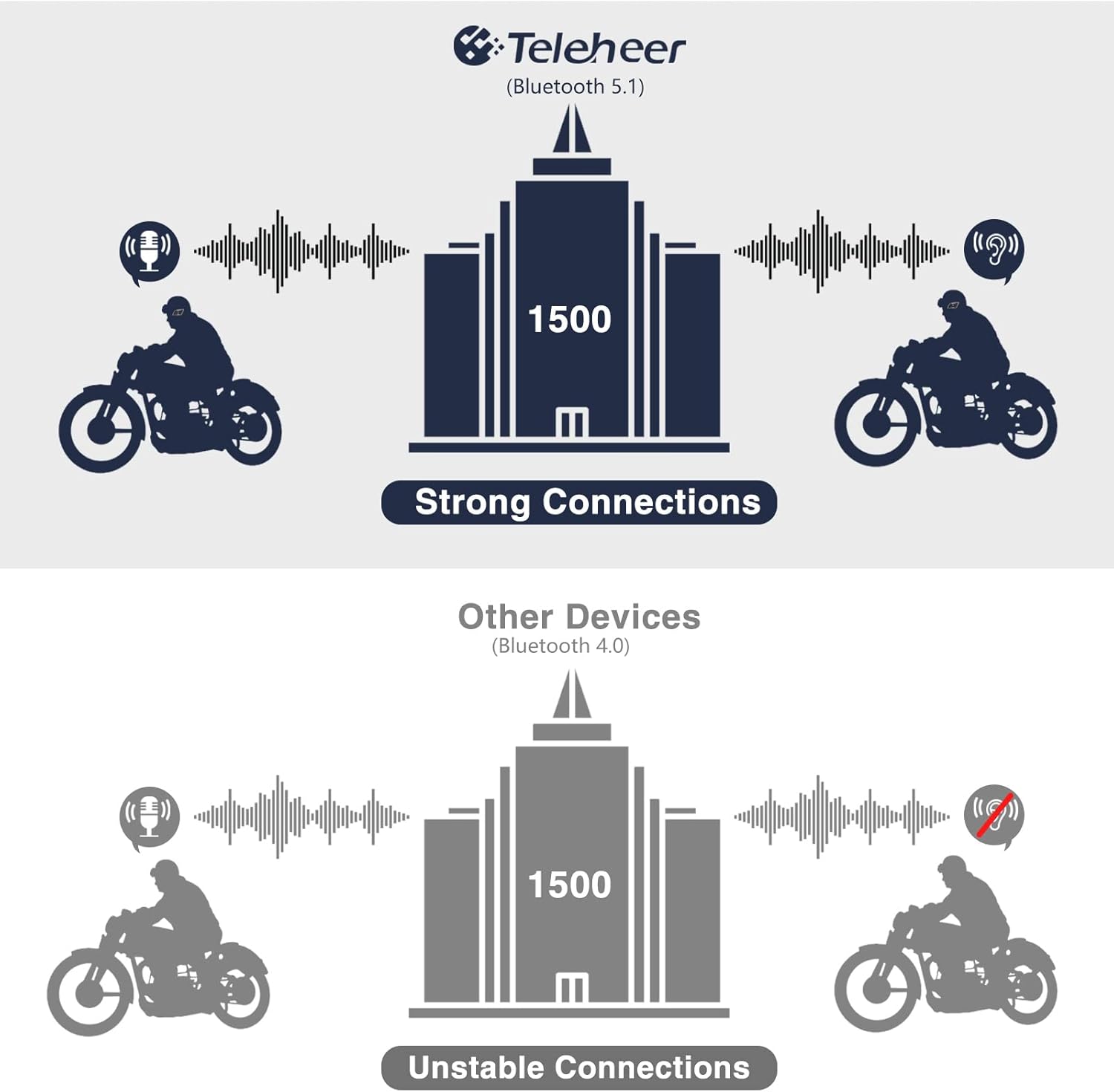
Image: A graphic illustrating the effective intercom range of the Teleheer T6 Plus (Bluetooth 5.1) compared to older Bluetooth 4.0 devices. The T6 Plus shows stable connections over 1500m, while older devices show unstable connections over shorter distances. This highlights the improved signal stability and range due to Bluetooth 5.1 and the ceramic antenna.
4. 電話機能
- 通話に応答: を短く押す 電話ボタン.
- 通話終了: を短く押す 電話ボタン.
- 電話を拒否: を押し続けます 電話ボタン 2秒間。
- 最後の番号にリダイヤル: を2回押します 電話ボタン.
5.音楽の再生
- 再生/一時停止: を短く押す 電話ボタン.
- 次のトラック: を短く押す 音量大ボタン.
- 前のトラック: を短く押す 音量ダウンボタン.
- 音量調整: を押し続けます 音量アップ/ダウンボタン 音量を上げたり下げたりします。
6. 音声アシスタント(Siri/Googleアシスタント)
- 音声アシスタントを有効にする: を2回押します 電源ボタン.

Image: A graphic depicting the voice assistant feature of the Teleheer T6 Plus, showing a helmeted rider interacting with their phone via voice commands like "Hey Siri" or "Ok Google". This illustrates the hands-free convenience for navigation, calls, and other smartphone functions while riding.
メンテナンスとケア
- クリーニング: ヘッドセットユニットを柔らかくて乾いた布で拭いてください。amp 布で拭いてください。強力な化学薬品や研磨剤入りの洗剤は使用しないでください。
- 耐水性: The device is IP65 waterproof. While it can withstand water jets, avoid submerging it in water for extended periods. Ensure the Type-C port cover is securely closed when not charging.
- ストレージ: 使用しないときは、涼しく乾燥した場所に保管してください。極端な温度を避けてください。
- バッテリーのケア: バッテリーの寿命を延ばすには、バッテリーを頻繁に完全に放電させないでください。長期間使用しない場合でも、定期的に充電してください。

Image: A WGP Teleheer T6 Plus headset unit partially submerged in water with splashes, demonstrating its IP65 waterproof rating. The image emphasizes the device's ability to withstand water exposure, making it suitable for various weather conditions during riding.
トラブルシューティング
| 問題 | 考えられる原因 | 解決 |
|---|---|---|
| デバイスの電源が入りません。 | バッテリー残量が少なくなりました。 | デバイスを完全に充電します。 |
| 電話とペアリングできません。 | デバイスがペアリング モードになっていません。電話の Bluetooth がオフになっています。ペアリングされたデバイスが多すぎます。 | Ensure device is in pairing mode (red/blue flashing). Turn on phone's Bluetooth. Delete old Bluetooth connections on phone. |
| Intercom connection unstable or short range. | Obstructions; out of range; interference. | Ensure clear line of sight. Stay within 1500m range. Avoid strong electromagnetic interference. |
| スピーカーから音が出ない。 | スピーカーが正しく接続されていないため、音量が低すぎます。 | Check speaker connection to Type-C port. Increase volume. |
| マイクが音声を拾いません。 | Microphone not connected properly; microphone position. | マイクの接続を確認してください。マイクが口元に近づいていることを確認してください。 |
| Wind noise during calls/intercom. | High speed; improper microphone placement. | Ensure microphone is positioned correctly to minimize wind exposure. The device has DSP noise suppression, but extreme conditions may affect performance. |
仕様
| 特徴 | 詳細 |
|---|---|
| モデル名 | Teleheer T6 Plus |
| Bluetoothバージョン | ブルートゥース5.1 |
| インターコム範囲 | Up to 1500 meters (93 MPH) |
| バッテリー容量 | 850mAh |
| 連続使用時間 | 30時間 |
| 待機時間 | 500時間 |
| 充電ポート | タイプC |
| 耐水性 | IP65 (Jet-proof) |
| 動作温度 | -15°Fまで |
| アンテナ材質 | セラミック |
| 制御方法 | タッチ/物理ボタン |
| アイテム重量 | 14.4オンス(約408グラム) |
| 寸法(パッケージ) | 8.54 x 3.9 x 2.95インチ |
保証とサポート
For warranty information and technical support, please refer to the official WGP web公式サイトをご覧いただくか、カスタマーサービスに直接お問い合わせください。保証請求の際は、購入証明としてレシートを保管してください。
さらに詳しいサポートが必要な場合は、 Amazonの商品ページ または、Amazon プラットフォームを通じて販売者に直接連絡してください。
Ask a question about this manual
Ask about setup, troubleshooting, compatibility, parts, safety, or missing instructions. Manuals+ will review the question and use this page’s manual context to help answer it.