
1. はじめに
The Hikvision DS-KIS604-S IP Video Intercom System is a comprehensive solution designed for secure and convenient communication in villas and residential homes. This system allows for one-button communication, providing clear video and audio interaction with visitors. This manual provides essential information for the proper installation, operation, and maintenance of your intercom system.
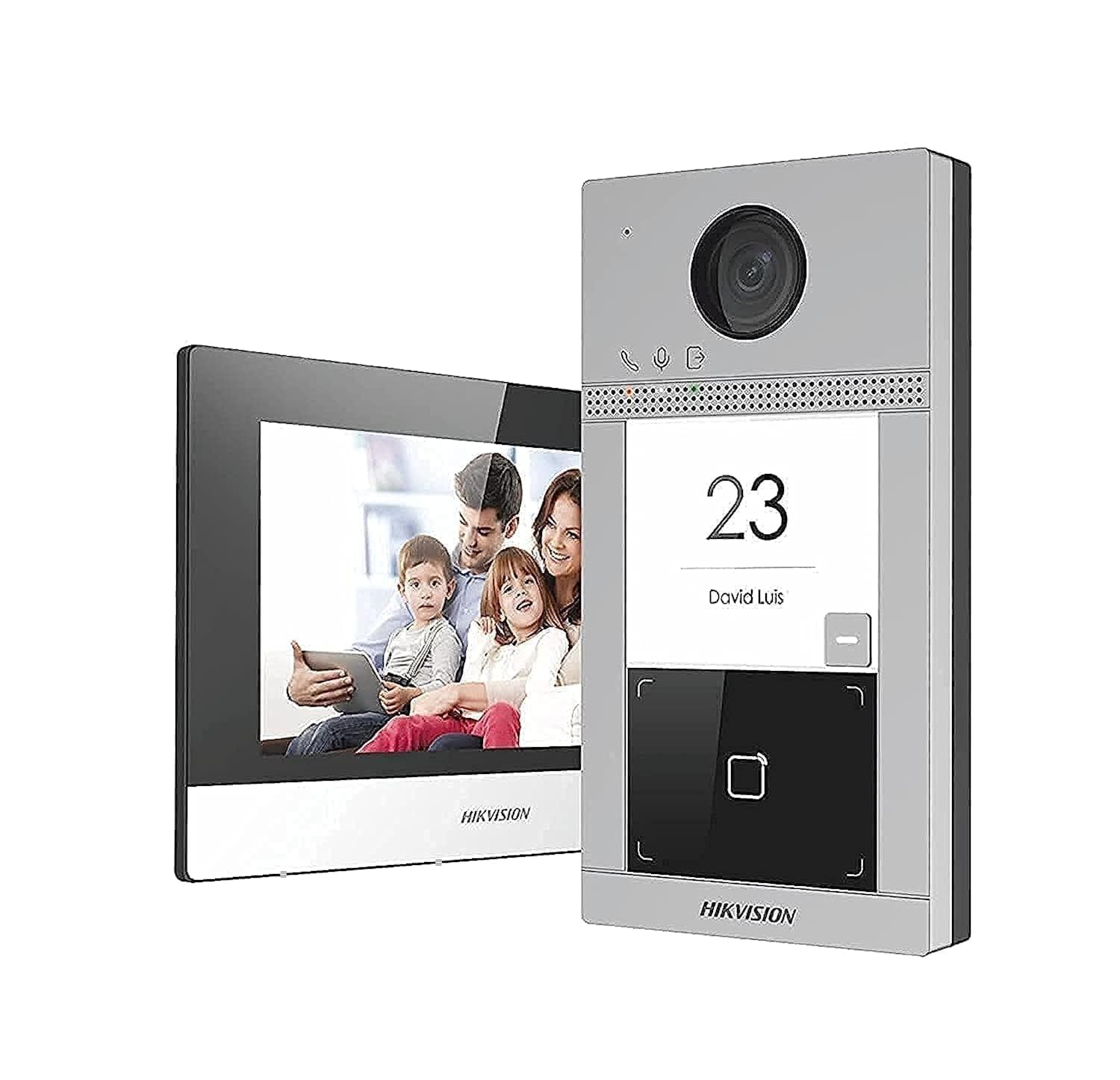
画像1.1: 以上view of the Hikvision DS-KIS604-S IP Video Intercom System components, including the outdoor station, indoor station, and power supplies.
2. 安全情報
怪我や物的損害を防ぐために、製品を使用する前にこれらの安全に関する指示をよくお読みください。
- インストール: All installation work must be carried out by qualified personnel and comply with local electrical codes.
- 電源: Use only the specified power adapters. Incorrect power sources can cause fire, electric shock, or damage.
- 環境: Do not expose the device to water, moisture, extreme temperatures, or direct sunlight. Ensure proper ventilation.
- クリーニング: 清掃する前に電源を切ってください。柔らかく乾いた布を使用してください。液体洗剤やエアゾール洗剤は使用しないでください。
- 分解: 本製品を分解または改造しないでください。修理は必ず資格のある専門家にご依頼ください。
3. パッケージ内容
パッケージにすべてのアイテムが揃っていることを確認します。
- 1 x DS-KV8113-WME1 Outdoor Station
- 1 x DS-KH6320-WTE1 Indoor Station
- 2 x Power Supply Units (PSU)
- 1GB TFカード x 16
- 1 x POE Switch
- 取り付けアクセサリ(ネジ、アンカー)
- クイックスタートガイド
4. セットアップとインストール
4.1.サイトの準備
- Choose appropriate locations for the outdoor station (near the entrance) and indoor station (convenient indoor location).
- Ensure stable Wi-Fi signal or wired Ethernet access at both locations.
- Prepare necessary tools: drill, screwdriver, network cables, etc.
4.2. Outdoor Station Installation (DS-KV8113-WME1)
- Mount the back box or bracket to the wall at the desired height using screws.
- Connect the network cable (from the POE switch) and power cable (if not using PoE) to the outdoor station.
- Secure the outdoor station to the mounted bracket.
- カメラのレンズがクリアで遮るものがないことを確認してください。
4.3. Indoor Station Installation (DS-KH6320-WTE1)
- Mount the indoor station bracket to an indoor wall.
- Connect the network cable (from the POE switch) and power cable (from one of the PSUs) to the indoor station.
- Attach the indoor station to its bracket.
4.4. POE Switch and Power Supply Setup
- Connect the POE switch to your main network router.
- Connect the outdoor station and indoor station to the POE switch using Ethernet cables. The POE switch will provide power to these devices.
- Connect the remaining PSU to the indoor station if not using PoE for the indoor unit, or as a backup.
- Insert the 16GB TF card into the designated slot on the indoor station for local storage.
5. 操作手順
5.1. 初期電源投入と設定
- 接続されているすべてのデバイスの電源をオンにします。
- The indoor station will boot up. Follow the on-screen prompts to set up language, date, time, and network settings (Wi-Fi or wired).
- Pair the outdoor station with the indoor station through the indoor station's menu. Refer to the Quick Start Guide for specific pairing steps.
- Download the Hik-Connect app on your smartphone for remote access and notifications.
5.2. 電話に出る
- When a visitor presses the call button on the outdoor station, the indoor station will ring, and a notification will appear on your Hik-Connect app.
- On the indoor station, tap the "Answer" button to establish two-way audio and video communication.
- From the Hik-Connect app, tap the notification to view ライブフィードと通信します。
5.3. ドアのロック解除
If connected to an electronic lock (sold separately), you can unlock the door from the indoor station or the Hik-Connect app during a call.
- During an active call, tap the "Unlock" icon on the indoor station screen or in the Hik-Connect app.
- Confirm the unlock action if prompted.
5.4. 監視
あなたはできる view the live feed from the outdoor station at any time:
- On the indoor station, select the "Monitor" option to view the outdoor camera feed.
- In the Hik-Connect app, select the outdoor station from your device list to view ライブフィード。
6. メンテナンス
- クリーニング: Regularly wipe the outdoor station's camera lens and microphone/speaker area with a soft, damp cloth to ensure clear video and audio. Clean the indoor station screen with a microfiber cloth.
- ファームウェアの更新: Check for and install firmware updates periodically through the indoor station settings or Hik-Connect app to ensure optimal performance and security.
- TFカード: The 16GB TF card provides local storage for recordings. Periodically review and manage recordings. Replace the card if it becomes corrupted or full.
- 電源: Ensure power cables are securely connected and not damaged.
7。 トラブルシューティング
| 問題 | 考えられる原因 | 解決 |
|---|---|---|
| デバイスに電力が供給されていません | Power cable disconnected; faulty PSU; no PoE from switch. | Check all power connections. Ensure PSU is working. Verify PoE switch is powered and functioning. |
| 通話中にビデオ/音声が聞こえない | Network connection issue; camera/microphone fault; device not paired correctly. | Check network cables/Wi-Fi connection. Re-pair devices. Contact support if hardware fault suspected. |
| Cannot unlock door | Electronic lock not connected; incorrect wiring; lock malfunction. | Verify lock wiring and connection to the outdoor station. Test the electronic lock independently. |
| Indoor station offline in app | No internet connection; app not configured correctly; device not registered. | Check home internet connection. Ensure indoor station is connected to Wi-Fi/Ethernet. Re-add device to Hik-Connect app. |
8. 仕様
| 特徴 | 詳細 |
|---|---|
| ブランド | ハイクビジョン |
| モデル番号 | DS-KIS604-S |
| 接続技術 | イーサネット |
| ビデオキャプチャ解像度 | 1080p |
| 特集 | Smooth Function (presumably for video/audio) |
| チャンネル数 | 2 |
| メモリストレージ容量 | 16 GB (TFカード) |
| 色 | 銀 |
| 電源 | Battery Powered (likely refers to internal backup or general power type, but PSUs are included) |
| オペレーティング·システム | リナックス |
| 対応デバイス | スマートフォン |
| 取り付けタイプ | ねじ込みます |
| アイテム重量 | 1.94キログラム |
| パッケージ寸法 | 38.4 x 24.6 x 17.2 cm |
9. 保証とサポート
For warranty information and technical support, please refer to the warranty card included in your package or visit the official Hikvision webサイト。 保証請求に備えて購入時のレシートを保管しておいてください。
連絡先:
- Webサイト: www.hikvision.com
- 顧客サービス: Refer to your regional Hikvision support contact details.