
1.製品オーバーview
The GOWIN JD Pantoja Bluetooth Headphones are designed to provide a high-quality wireless audio experience with an ergonomic design and extended battery life. These headphones feature Bluetooth connectivity for seamless pairing with your devices and integrated control buttons for easy management of music and calls. The package includes essential accessories for charging and portability.

画像: 正面 view of the GOWIN JD Pantoja Bluetooth Headphones, showcasing the sleek black design and the distinctive red JD Pantoja logo on the earcups.

Image: Promotional graphic for JD Pantoja Wireless Headphones by GOWIN, highlighting the brand collaboration.
2. 重要な安全情報
本製品をご使用になる前に、すべての安全に関する指示をよくお読みください。指示に従わない場合、感電、火災、その他の危険が発生する可能性があります。
- ヘッドフォンを極端な温度、湿度、または液体にさらさないでください。
- Do not disassemble, repair, or modify the headphones. This may void the warranty and pose a safety risk.
- 充電には付属の充電ケーブルまたは認定された Type-C ケーブルのみを使用してください。
- 聴覚障害を防ぐため、長時間大音量で聞くことは避けてください。
- ヘッドホンを子供やペットの手の届かないところに保管してください。
- 製品は地域の規制に従って責任を持って廃棄してください。
3. パッケージ内容
以下にリストされているすべてのアイテムが製品パッケージに含まれていることを確認してください。
- GOWIN JD Pantoja Bluetooth Headphones
- タイプC充電ケーブル
- 3.5 mm補助ケーブル
- 旅行用バッグ
- ユーザーマニュアル(このドキュメント)

Image: A visual representation of the package contents, including the headphones, USB Type-C charging cable, 3.5mm auxiliary cable, and a branded travel bag.
4.セットアップガイド
4.1 ヘッドホンの充電
初めてご使用になる前に、ヘッドホンをフル充電してください。フル充電には約2時間かかります。
- Type-C充電ケーブルをヘッドフォンの充電ポートに接続します。
- ケーブルのもう一方の端を USB 電源アダプター (別売) またはコンピューターの USB ポートに接続します。
- LED インジケーターは充電状態を示します (例: 充電中は赤、完全に充電されている場合は青)。
4.2 電源のオン/オフ
- 電源を入れるには: LED インジケーターが点灯するまで、電源ボタンを約 3 秒間押し続けます。
- 電源を切るには: LED インジケーターが消えるまで、電源ボタンを約 3 秒間押し続けます。
4.3Bluetoothペアリング
ヘッドフォンを Bluetooth 対応デバイス (スマートフォン、タブレット、ラップトップなど) とペアリングします。
- ヘッドフォンの電源がオフになっていることを確認してください。
- LED インジケーターが赤と青に交互に点滅し、ペアリング モードを示すまで、電源ボタンを約 5 ~ 7 秒間押し続けます。
- デバイスで Bluetooth を有効にし、利用可能なデバイスを検索します。
- Select "JD Pantoja Headphones" or similar from the list of found devices.
- ペアリングされると、ヘッドフォンの LED インジケーターが青色に点灯するか、青色でゆっくり点滅します。
ヘッドフォンのワイヤレス範囲は最大 10 メートル (33 フィート) です。
4.4 Wired Connection (Auxiliary Cable)
You can use the headphones with non-Bluetooth devices or when the battery is depleted using the 3.5 mm auxiliary cable.
- Connect one end of the 3.5 mm auxiliary cable to the audio input port on the headphones.
- Connect the other end to the 3.5 mm audio output jack of your device.
- ヘッドフォンは自動的に有線モードに切り替わります。
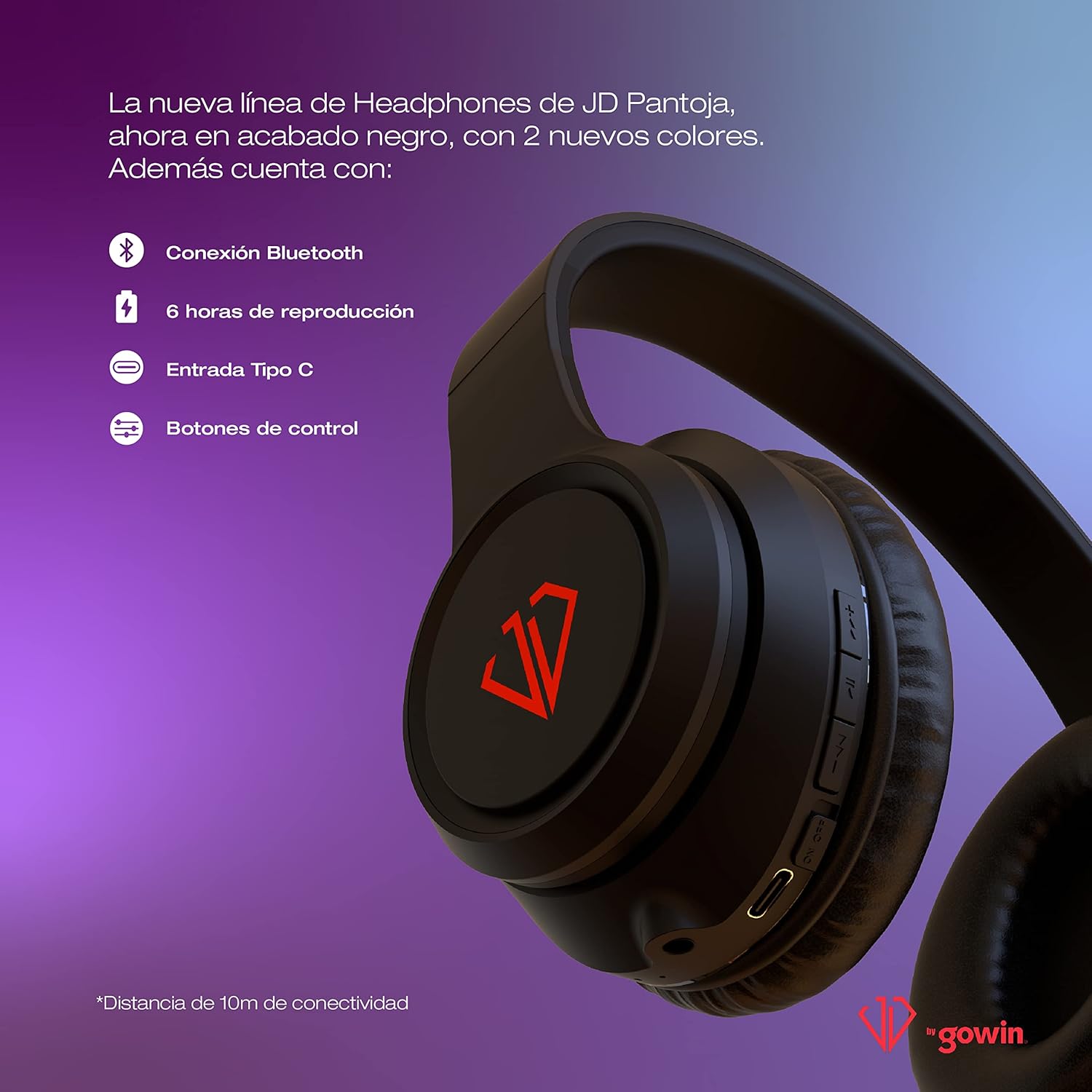
Image: Close-up of the headphone earcup showing the control buttons and Type-C charging port, illustrating Bluetooth connectivity, 6 hours of playback, and control functions.
5. 操作手順
The headphones feature intuitive control buttons located on the earcup.
5.1 音楽再生コントロール
- 再生/一時停止: Press the Multi-function button (often marked with a play/pause icon) once.
- 次のトラック: Press and hold the "Next" button (often marked with >>|) once.
- 前のトラック: Press and hold the "Previous" button (often marked with |<<) once.
- ボリュームアップ: 「+」ボタンを短く押します。
- ボリュームダウン: 「-」ボタンを短く押します。
5.2 通話管理
- 通話の応答/終了: 着信中または通話中に、マルチファンクションボタンを 1 回押します。
- 通話を拒否: 着信中にマルチファンクションボタンを約 2 秒間押し続けます。
- 最後の番号にリダイヤル: 多機能ボタンをXNUMX回押します。

画像: 正面 view of the headphones, clearly showing the control buttons on the right earcup for playback and call management.

画像: サイド view of the GOWIN JD Pantoja Headphones, highlighting the "gowin" branding on the adjustable headband and the overall ergonomic design.
6. メンテナンスとケア
- クリーニング: ヘッドホンのお手入れには、柔らかく乾いた布をご使用ください。研磨剤入りの洗剤や溶剤は使用しないでください。
- ストレージ: When not in use, store the headphones in the provided travel bag to protect them from dust and scratches. Store in a cool, dry place.
- バッテリーのケア: バッテリーの寿命を延ばすには、バッテリーを頻繁に完全に放電させないでください。長期間使用しない場合でも、定期的にヘッドホンを充電してください。
- 折りたたみデザイン: The headphones feature a foldable design for easy portability. Fold them carefully to avoid damage.

Image: A lifestyle image demonstrating the comfortable fit and foldable design of the GOWIN JD Pantoja Headphones, emphasizing features like adjustable band and comfortable earcups.
7。 トラブルシューティング
| 問題 | 考えられる原因 | 解決 |
|---|---|---|
| ヘッドホンの電源が入りません。 | バッテリー残量が少なくなりました。 | ヘッドホンを完全に充電してください。 |
| デバイスとペアリングできません。 | ヘッドフォンがペアリングモードになっていない、デバイスの Bluetooth がオフになっている、デバイスから遠すぎる。 | Ensure headphones are in pairing mode (flashing red/blue). Turn on Bluetooth on your device. Move headphones closer to the device (within 10m). |
| 音が出ない、または音量が低い。 | Volume too low on headphones or device; incorrect audio output selected; headphones not properly connected (wired). | Increase volume on both headphones and device. Check device's audio output settings. For wired connection, ensure cable is fully inserted. |
| 音声の歪みや接続の途切れ。 | 干渉、デバイスから遠すぎる、バッテリー残量が少ない。 | Move away from other wireless devices. Reduce distance between headphones and device. Charge the headphones. |
8. 製品仕様
| 特徴 | 詳細 |
|---|---|
| モデル名 | JD-2103 |
| 商品型番 | RED-2103 |
| 接続技術 | ワイヤレス(Bluetooth) |
| ワイヤレス範囲 | 最大10メートル(33フィート) |
| 電池のタイプ | リチウムイオン(付属) |
| バッテリー容量 | 400mAh |
| バッテリー寿命 | 最大6時間 |
| 充電時間 | 約2時間 |
| ドライバーサイズ | 40ミリメートル |
| 周波数応答 | 20Hz - 20KHz |
| インピーダンス | 32オーム |
| 感度 | 105+/-3dB |
| ヘッドホンジャック | 3.5ミリジャック |
| 製品寸法 | 18 x 8 x 18 cm |
| 製品重量 | 400グラム |
| 材料 | プラスチック |
| 色 | Black with Red (also available in White, Black with Purple, Black with Green) |

Image: Display of the various color options for the GOWIN JD Pantoja Headphones, including white, black with purple, black with red, and black with green.
9. 保証情報
The GOWIN JD Pantoja Bluetooth Headphones come with a 1年間保証 購入日より。
This warranty covers manufacturing defects in materials and workmanship under normal use. It does not cover damage caused by misuse, accident, unauthorized modification, or external causes such as drops or liquid exposure.
For warranty claims, please retain your proof of purchase. Contact GOWIN customer support for assistance.
10. カスタマーサポート
For further assistance, technical support, or warranty inquiries, please contact GOWIN customer service. Refer to the official GOWIN web最新の連絡先情報については、サイトまたは製品パッケージをご覧ください。
また、 GOWIN Brand Store on Amazon 詳細な製品情報については。