
1. はじめに
Thank you for choosing the Xoopar Mini Xboy Eco Bluetooth Portable Speaker. This speaker combines innovative design with eco-friendly materials, offering powerful 360° sound and an integrated selfie remote control. This manual provides essential information for setting up, operating, and maintaining your device.
The Mini Xboy Eco features a head made from recycled plastic bottles and a body incorporating non-food wheat fiber with a biosphere additive to enhance biodegradability. Its compact size and integrated wrist strap make it ideal for portable use.
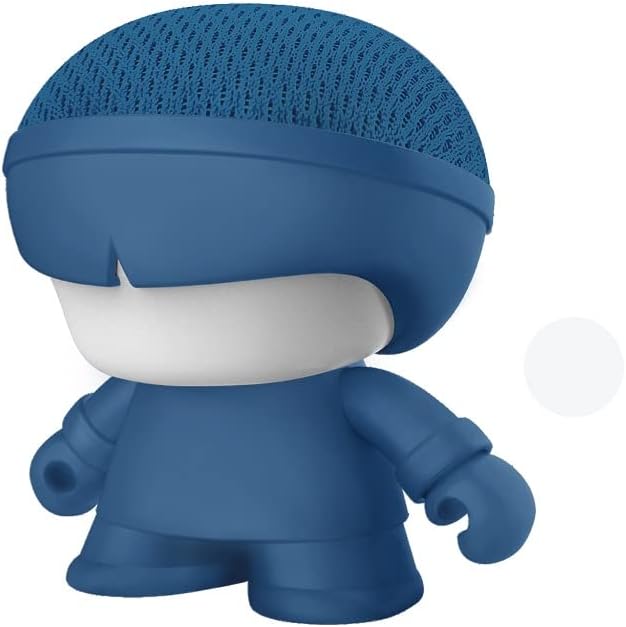
Image: The Xoopar Mini Xboy Eco Bluetooth Portable Speaker.
2. パッケージ内容
以下の項目のボックスにチェックを入れてください。
- Xoopar Mini Xboy Eco Bluetooth Portable Speaker
- Integrated Hand Strap
- USB充電ケーブル(assumed to be included for charging functionality)
- ユーザーマニュアル(このドキュメント)

画像: 正面と側面 view of the Xoopar Mini Xboy Eco speaker.
3. セットアップ
3.1 初期充電
Before first use, fully charge your Mini Xboy Eco speaker. Connect the provided USB charging cable to the charging port on the speaker and to a standard USB power source (e.g., computer USB port, USB wall adapter). The LED indicator will show charging status (refer to product packaging for specific LED behavior).
3.2 電源のオン/オフ
- 電源を入れるには: 電源ボタン(refer to speaker for button location) を押し続けます。LED インジケーターが点灯するまで押し続けます。
- 電源を切るには: LED インジケーターが消えるまで電源ボタンを押し続けます。
4. 操作手順
4.1Bluetoothペアリング
The Mini Xboy Eco uses Bluetooth 5.0 for wireless connectivity, with a transmission distance of up to 10 meters (33 feet).
- Ensure the speaker is powered on and within range of your device.
- スマートフォン、タブレット、またはコンピューターで Bluetooth を有効にします。
- 検索する available Bluetooth devices. The speaker will typically appear as "Xoopar Mini Xboy Eco" or similar.
- Select the speaker from the list to pair. A confirmation sound or LED indication will confirm successful pairing.
ペアリングが完了すると、両方の電源がオンになって範囲内にある場合、スピーカーは自動的にデバイスに接続されます。

Image: The Mini Xboy Eco speaker connected to a tablet for audio playback.
4.2 ステレオペアリング(TWS機能)
If you have two Xoopar Mini Xboy Eco speakers, you can pair them together for a stereo sound experience.
- 両方のスピーカーの電源がオンになっており、他の Bluetooth デバイスに接続されていないことを確認します。
- On one speaker (this will be the primary speaker), double-press the power button (refer to speaker for specific action) to initiate TWS pairing mode.
- スピーカーは自動的に互いを検索し、接続します。ステレオペアリングが成功すると、確認音が鳴ります。
- セクション4.1の説明に従って、Bluetooth経由でデバイスをメインスピーカーに接続します。これで両方のスピーカーからステレオ音声が再生されます。
4.3 Selfie Remote Control
The Mini Xboy Eco features an integrated selfie remote control function.
- スピーカーが Bluetooth 経由でスマートフォンとペアリングされていることを確認します。
- スマートフォンのカメラアプリを開きます。
- Press the designated button on the speaker (refer to speaker for button location) to trigger the camera shutter.
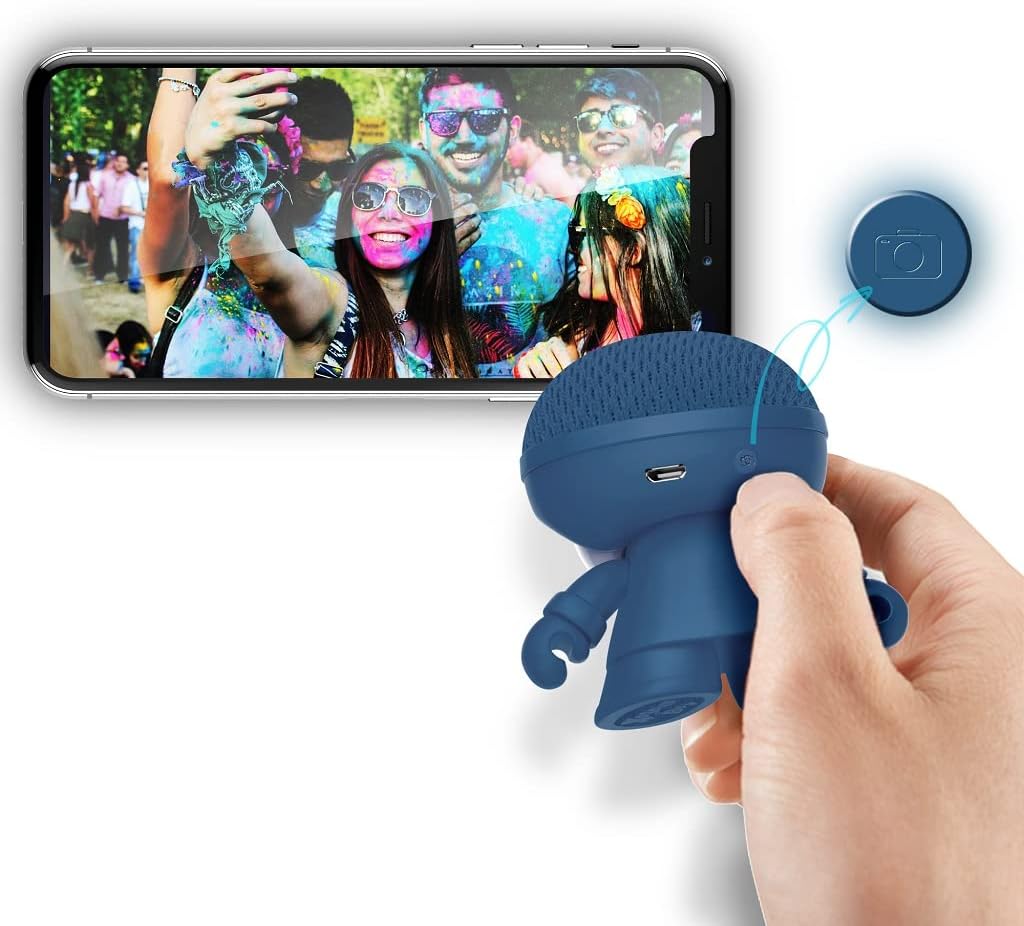
Image: The Xoopar Mini Xboy Eco speaker can be used as a remote shutter for your smartphone camera.
4.4 LEDライト機能
The Mini Xboy Eco features a multi-LED lighted face. The lights may indicate power status, charging status, or simply provide ambient lighting.

Image: The Mini Xboy Eco speaker features a multi-LED lighted face.
5. メンテナンス
5.1 クリーニング
To clean your speaker, gently wipe the surface with a soft, dry, or slightly damp cloth. Do not use harsh chemicals, solvents, or abrasive cleaners, as these may damage the finish or internal components.
5.2 ストレージ
長期間使用しない場合は、直射日光や極端な温度を避け、涼しく乾燥した場所にスピーカーを保管してください。バッテリーの良好な状態を保つため、定期的に(例えば3~6ヶ月ごと)充電することをお勧めします。
6。 トラブルシューティング
| 問題 | 考えられる原因 | 解決 |
|---|---|---|
| スピーカーの電源が入りません。 | 電池が消耗しています。 | 付属のUSBケーブルを使用してスピーカーを充電します。 |
| Bluetooth経由でペアリングできません。 | スピーカーがペアリングモードになっていないか、範囲外にあります。 | Ensure speaker is on and within 10 meters. Turn Bluetooth off/on on your device. Restart both devices. |
| 音が出ない、または音量が低い。 | スピーカーまたは接続されたデバイスの音量が低すぎます。 | スピーカーと接続されたデバイスの両方の音量を上げます。 |
| Selfie remote not working. | Speaker not paired or camera app not open. | Ensure speaker is paired and camera app is active. |
7. 仕様
- モデル名: Mini Xboy Eco
- 商品モデル番号: XBOY81001.16BO
- ブランド: ズーパー
- 接続技術: ブルートゥース5.0
- スピーカーの最大出力: 3ワット
- オーディオ出力モード: ステレオ(TWSペアリング付き)
- スピーカータイプ: 同軸
- 周波数応答: 20 GHz (Note: This value is unusually high for a speaker and may be a typo in the source data. Typical speaker frequency ranges are in Hz-kHz.)
- バッテリー: リチウムポリマー 1 個 (付属)
- バッテリーの持続時間: 約4時間
- 伝送距離: 最大10メートル(33フィート)
- 製品寸法: 1 x 1 x 1 cm
- 商品の重量: 50グラム
- 材料: ABS, Acrylonitrile Butadiene Styrene (head from recycled plastic bottles, body with non-food wheat fiber and biosphere additive)
- 取り付けタイプ: 卓上設置
- 特集: Mini portable Bluetooth speaker, integrated selfie remote, multi-LED lighted face
8. 保証とサポート
For warranty information and customer support, please refer to the documentation provided with your purchase or visit the official Xoopar webサイトでご確認ください。保証請求に備えて購入証明書を保管してください。
メーカー: ズーパー