
1.製品オーバーview
The elemage Solar Security Camera (Model ZS-GX1S) is a wireless outdoor surveillance solution designed for comprehensive home security. It features 2K resolution, 360-degree pan-tilt-zoom (PTZ) capabilities, motion detection with siren and spotlight alarms, color night vision, and two-way audio communication. Powered by a solar panel and a rechargeable battery, it offers continuous operation with IP65 weatherproof rating for outdoor durability.

Figure 1.1: The elemage Solar Security Camera (Model ZS-GX1S) with its accompanying solar panel and a smartphone displaying the camera's live feed. This image illustrates the complete product setup, highlighting its wireless nature and solar charging capability.
2. パッケージ内容
- elemage Solar Security Camera (Model ZS-GX1S)
- Solar Panel with 3m charging cable
- 取り付けブラケット
- 取り付けネジと壁アンカー
- USB充電ケーブル
- ユーザーマニュアル(このドキュメント)

Figure 2.1: A visual representation of all items included in the elemage Solar Security Camera package, including the camera unit, solar panel, mounting hardware, and cables.
3.セットアップガイド
3.1 初期充電
Before initial use, fully charge the camera's built-in rechargeable battery using the provided USB cable. The charging LED indicator on the camera will turn red while charging and blue when fully charged. This ensures optimal performance and battery life.
3.2 アプリのインストールとアカウント作成
- Download and install the "CloudEdge" app from your smartphone's app store (iOS or Android).
- アプリを開き、画面の指示に従って新しいアカウントを作成するか、既にアカウントをお持ちの場合はログインします。

Figure 3.1: Visual guide for downloading and installing the "CloudEdge" application, which is essential for operating the camera.
3.3 カメラとアプリのペアリング
- スマートフォンがインターネットに接続されていることを確認してください 2.4 GHz Wi-Fiネットワーク. The camera does not support 5 GHz Wi-Fi during the initial pairing process.
- CloudEdge アプリを開き、「+」アイコンをタップして新しいデバイスを追加します。
- Select the appropriate camera type (e.g., "Solar Camera" or "Outdoor PTZ Camera").
- Follow the app's instructions to reset the camera (usually by pressing a reset button until an audible prompt is heard).
- The app will display a QR code. Position your camera's lens approximately 15-20 cm (6-8 inches) in front of your phone's screen until you hear a confirmation sound from the camera.
- Once connected, the camera's LED indicator will change, and you can name your camera and complete the setup.

Figure 3.2: Illustrates the camera pairing process, showing a smartphone displaying a QR code for the camera to scan, facilitating quick and easy connection.
3.4 カメラとソーラーパネルの取り付け
ソーラーパネルに最適な日光が当たる場所と、 view for the camera. Use the provided mounting bracket, screws, and wall anchors to securely install the camera and solar panel. Ensure the solar panel is positioned to receive direct sunlight throughout the day for continuous charging. The 3-meter cable allows for flexible placement of the solar panel relative to the camera.
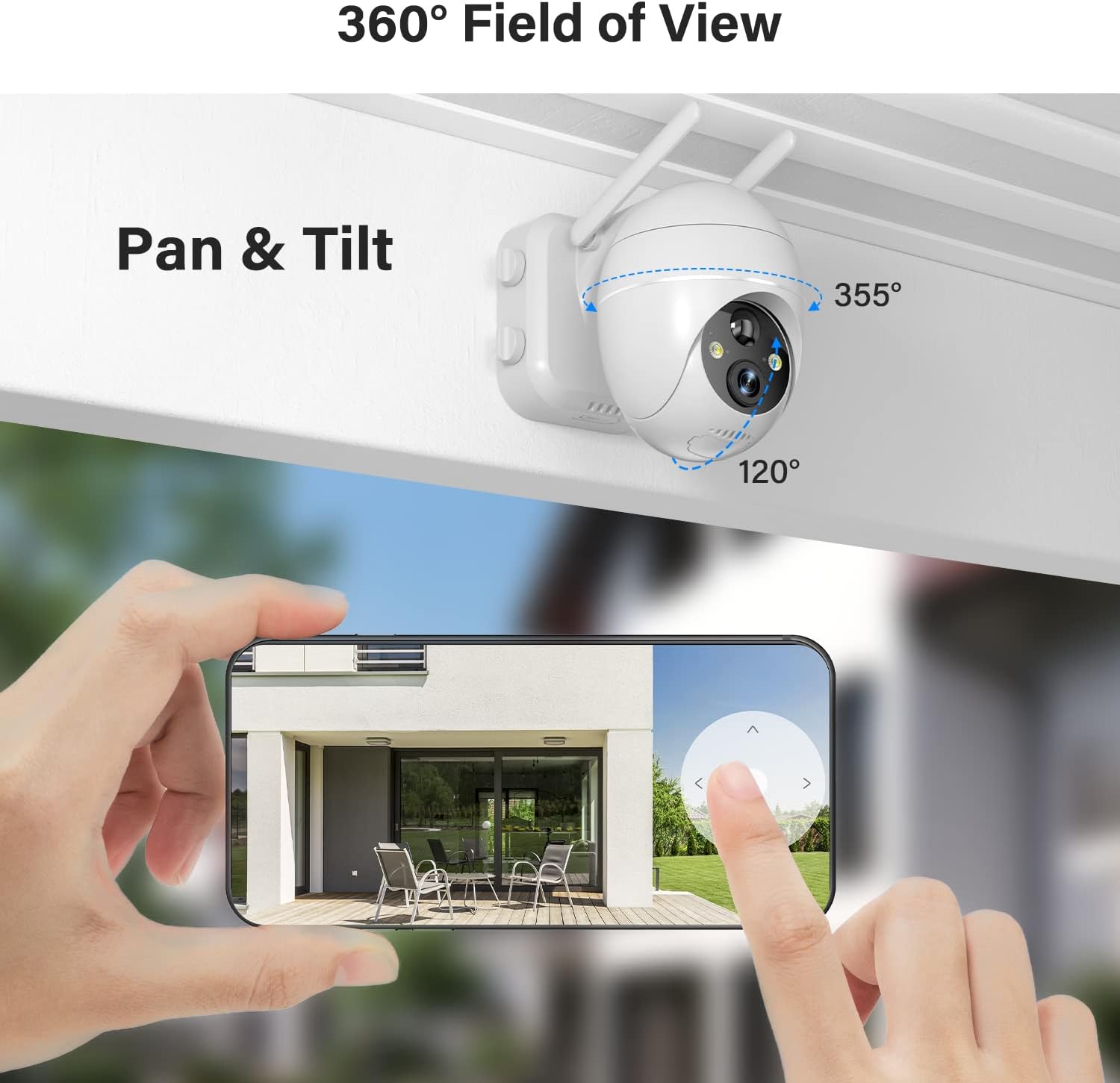
Figure 3.3: Depicts the outdoor installation of the elemage solar security camera, showcasing its pan-tilt capabilities and the separate solar panel for continuous power.

Figure 3.4: Shows the solar panel connected to the camera, illustrating how it provides continuous power to the device, ensuring 365-day non-stop protection.
4. 操作手順
4.1 ライブ View PTZコントロール
CloudEdgeアプリを開き、カメラを選択してライブにアクセスします view. Use the on-screen controls to pan (355° horizontally) and tilt (120° vertically) the camera, allowing you to monitor a wide area. Digital zoom is also available by pinching the screen.
Figure 4.1: Demonstrates the 360-degree field of view and pan-tilt functionality of the camera, controlled remotely via the smartphone application.
4.2 動きの検出とアラーム
The camera features advanced smart AI motion detection. When motion is detected, a notification will be pushed to your phone via the app. You can configure sound and light alarms to activate simultaneously or separately. The spotlight and siren can deter intruders.

Figure 4.2: Illustrates the motion-activated spotlight and siren features, which provide visual and audible warnings upon detection of activity.

Figure 4.3: Displays a smartphone screen with alert notifications and options for screenshot and playback, triggered by the smart PIR motion sensor.
4.3 双方向オーディオ
Utilize the two-way audio function to communicate directly with individuals near the camera. This feature is accessible through the live view interface in the CloudEdge app.
Figure 4.4: Highlights the two-way audio capability, showing a person interacting with a delivery driver through the camera's built-in microphone and speaker.
4.4 ナイトビジョン
The camera provides 2K FHD color night vision, ensuring clear images and videos even in low-light conditions. The intelligent night vision automatically adjusts based on ambient light.
4.5 ストレージオプション
Recordings can be saved to a local Micro SD card (not included, up to 128GB supported) or to the optional cloud storage service (subscription may be required). Ensure the Micro SD card is inserted correctly into the designated slot, typically located under a weatherproof cover on the camera body.
5. メンテナンス
- クリーニング: カメラのレンズとソーラーパネルを定期的に柔らかくて乾いた布で拭いてください。amp クリアな視界と効率的なソーラー充電を確保するため、布で拭いてください。研磨剤入りの洗剤は使用しないでください。
- バッテリーチェック: Monitor the battery level via the CloudEdge app. While the solar panel provides continuous power, occasional manual charging via USB may be necessary during prolonged periods of low sunlight.
- ファームウェアの更新: カメラに最新の機能とセキュリティ強化が適用されていることを確認するために、CloudEdge アプリでファームウェアのアップデートを定期的に確認してください。
- 天候保護: Although IP65 weatherproof, ensure the micro USB port cover is securely closed to prevent water ingress, especially after manual charging.
6。 トラブルシューティング
| 問題 | 考えられる原因 / 解決策 |
|---|---|
| カメラがWi-Fiに接続できません。 | Ensure your Wi-Fi is 2.4 GHz. Check Wi-Fi signal strength at the camera's location. Reset the camera and try pairing again. |
| バッテリーがソーラーパネル経由で充電されません。 | Ensure the solar panel is in direct sunlight and free from obstructions. Check the connection cable between the solar panel and the camera. Clean the solar panel surface. |
| 画質が悪い。 | Clean the camera lens. Ensure sufficient lighting for optimal night vision. Check your internet connection speed. |
| モーションアラートを受信できませんでした。 | Check app notification settings on your phone. Adjust motion detection sensitivity in the app. Ensure the camera is online. |
| 双方向オーディオが機能しません。 | お使いのスマートフォンのアプリのマイクとスピーカーの権限を確認してください。音量レベルが適切であることを確認してください。 |
7. 仕様
- モデル: ZS-GX1S
- 解決: 2K FHD (3 MP effective still/webcam resolution)
- パン/チルト: 横長、355°垂直°120
- 電源: Solar Powered, Rechargeable Battery (1 Lithium Ion battery included)
- 接続性: 2.4GHz Wi-Fi(IEEE 802.11b/g/n)
- ナイトビジョン: Color Night Vision, Low light technology: Night Color
- モーション検出: PIR Motion Detection with Sound and Light Alarms
- オーディオ: Two-Way Talk (Built-in Microphone and Speaker)
- 耐候性評価: IP65
- ストレージ: Supports Micro SD Card (up to 128GB, not included), Cloud Storage (optional)
- 寸法: 5.91 x 3.74 x 5.12インチ
- 重さ: 2.16 ポンド (980 グラム)
- 色: 白
- 材料: 金属
8. 保証とサポート
elemage provides customer support for their products. For warranty information, technical assistance, or further inquiries, please refer to the contact details provided on the product packaging or visit the official elemage webサイト。 保証請求に備えて購入時のレシートを保管しておいてください。
追加のリソースとよくある質問については、 elemage Brand Store on Amazon.
9. 公式製品ビデオ
No official product videos from the seller were found in the provided data. The available videos are from customer reviews and are not included as per instructions.