
ASUS PRIME B660-PLUS D4 (Model: 90MB18X0-M0IAY0)
ASUS PRIME B660-PLUS D4 マザーボード ユーザーマニュアル
Model: 90MB18X0-M0IAY0
1.製品オーバーview
The ASUS PRIME B660-PLUS D4 is an ATX motherboard designed to support the latest 12th Generation Intel CPUs with the LGA 1700 socket, including Pentium Gold and Celeron Processors, utilizing the Intel B660 Chipset. This motherboard is built to provide a stable foundation for your PC build, offering a balance of features and performance.
It features PCIe 3.0 readiness, supporting up to 128GB of DDR4 memory at speeds up to 5000MHz (OC) across four DIMM slots. The board incorporates Intel Turbo Boost Technology for enhanced performance. For storage and connectivity, it is equipped with three M.2 slots (PCIe 4.0), Realtek 2.5Gb Ethernet, USB 3.2 Gen 2x2 Type-C, multiple USB 3.2 Gen 2 and Gen 1 Type-A ports, USB 2.0 ports, four SATA 6Gb/s ports, and various display outputs including HDMI, DisplayPort, and D-Sub, with Thunderbolt 4 support.
The PRIME B660-PLUS D4 includes comprehensive cooling options configurable via Fan Xpert 4 or the UEFI BIOS, featuring VRM and PCH heatsinks, and hybrid fan headers. It also incorporates ASUS's SMT manufacturing process for SafeSlot, a reinforced metal sheath for PCIe slots, ensuring durability and high data speeds. For troubleshooting, the Q-LED Core display provides light patterns during the Power-On Self-Test (POST) to help diagnose potential issues. Additional features include Overvoltage Protection, DRAM Overcurrent Protection, Stainless-Steel Back I/O, and LANGuard for enhanced reliability.
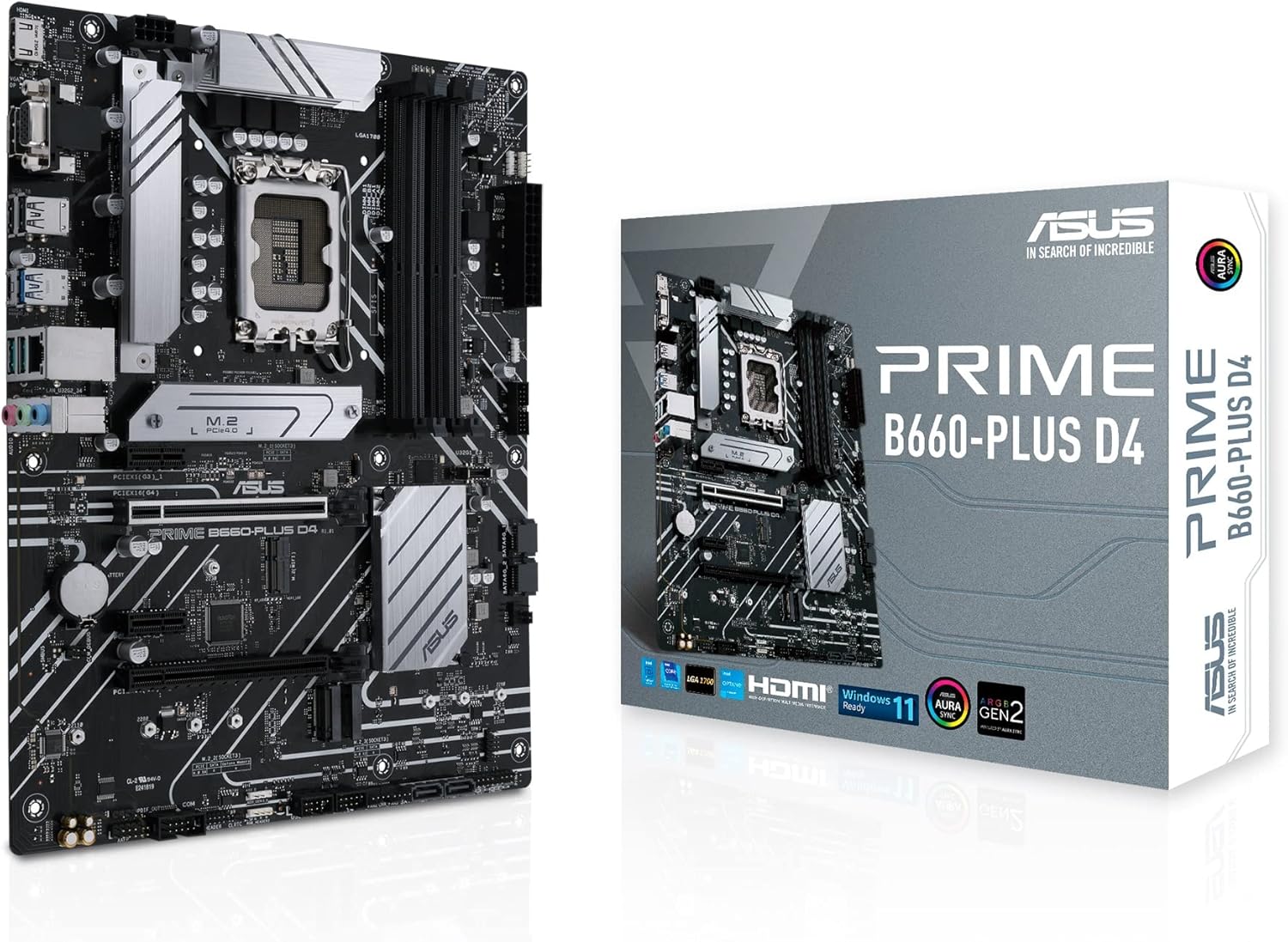
Figure 1.1: The ASUS PRIME B660-PLUS D4 Motherboard alongside its retail packaging, highlighting the product's design and branding.
2. 箱の中身
パッケージを開封したら、以下にリストされているすべてのコンポーネントが揃っていて良好な状態であることを確認してください。
- ケーブル: 2 x SATA 6Gb/sケーブル
- その他:
- I/Oシールド x 1
- 1×M.2ラバーパッケージ
- 2 x M.2 SSD screw packages
- 1 x M.2 キー E ネジ パッケージ
- Installation Media: 1xサポートDVD
- ドキュメント: ユーザーガイド x 1
3. セットアップとインストール
Before beginning installation, ensure your system is powered off and disconnected from the power outlet. It is recommended to wear an anti-static wrist strap to prevent electrostatic discharge (ESD) damage to components.
3.1. マザーボードの準備
- CPU をインストールします。 Carefully align your Intel LGA 1700 processor with the socket on the motherboard. Ensure the triangular mark on the CPU aligns with the mark on the socket. Gently lower the CPU into place and secure it by closing the load plate and lever.
- CPU クーラーを取り付けます。 Follow the cooler manufacturer's instructions to install the CPU cooler. Ensure proper thermal paste application and secure mounting.
- RAMモジュールをインストールします。 Open the clips on the DDR4 DIMM slots. Align the notch on the memory module with the key in the slot. Press down firmly on both ends of the module until the clips snap into place. Refer to the motherboard manual for recommended dual-channel configurations.
- M.2 SSD をインストールします。 Locate the M.2 slots. Remove the M.2 heatsink (if present) and the M.2 screw package. Insert the M.2 SSD into the slot at an angle, then gently push it down and secure it with the provided screw. Reattach the heatsink if applicable.

図3.1: トップダウン view of the motherboard, illustrating the placement of the LGA 1700 CPU socket, DDR4 DIMM slots, and M.2 slots for component installation.
3.2. Case Installation and Connections
- I/O シールドをインストールします。 I/O シールドを PC ケースの背面開口部に内側からカチッとはめ込みます。
- マザーボードのマウント: ネジ穴とスタンドオフの位置を合わせながら、マザーボードをケースに慎重に入れ、ネジで固定します。
- 電源の接続: Connect the 24-pin ATX power connector and the 8-pin (or 4+4-pin) CPU power connector from your power supply unit (PSU) to the corresponding ports on the motherboard.
- フロントパネルケーブルを接続します。 Connect the power button, reset button, HDD LED, power LED, and front panel USB/audio cables to the appropriate headers on the motherboard. Refer to the motherboard's user manual for exact pin layouts.
- ストレージデバイスを接続する: Connect SATA data cables from your SATA SSDs/HDDs to the SATA 6Gb/s ports on the motherboard. Connect SATA power cables from your PSU to these devices.
- 拡張カードをインストールします。 If installing a graphics card or other PCIe expansion cards, insert them firmly into the appropriate PCIe slots until they click into place. Secure them with the case's retention mechanism.

図3.2: 角度付き view of the motherboard, highlighting the rear I/O panel, PCIe slots, and various headers for connecting case components and peripherals.
4. 操作手順
Once all components are installed and connected, you can proceed with the initial boot-up and operating system installation.
4.1. 初期起動とBIOS/UEFIセットアップ
- 電源オン: モニター、キーボード、マウスを接続します。システムの電源を入れます。
- BIOS/UEFI にアクセスします。 電源投入時のセルフテスト(POST)中に、 削除 キーまたは F2 キーを押して BIOS/UEFI セットアップ ユーティリティに入ります。
- 設定を構成する: In the BIOS/UEFI, you can configure boot order, enable/disable features, set fan curves, and monitor system status. Save and exit the BIOS/UEFI after making any necessary changes.
- Q-LED Core Display: Observe the Q-LED Core display during POST. This feature uses light patterns from the power LED to indicate the status of key components (CPU, DRAM, VGA, Boot Device). Refer to the full user manual for specific light patterns and their corresponding troubleshooting steps.
4.2. オペレーティングシステムとドライバのインストール
After configuring the BIOS/UEFI, proceed with installing your preferred operating system (e.g., Windows 11, as supported by this motherboard). Ensure you have a bootable USB drive or DVD with the OS installer.
- OSのインストール: Follow the on-screen prompts to install the operating system.
- ドライバーのインストール: Once the OS is installed, install the necessary drivers for your motherboard. These can be found on the included Support DVD or downloaded from the official ASUS support website. Key drivers include Chipset, LAN, Audio, and any specific utility drivers.
5. メンテナンス
定期的なメンテナンスは、マザーボードと PC システムの寿命を延ばし、最適なパフォーマンスを確保するのに役立ちます。
- ダストクリーニング: Periodically clean dust from inside your PC case, especially from heatsinks, fans, and ventilation areas. Use compressed air or a soft brush. Ensure the system is powered off and unplugged before cleaning.
- BIOS/UEFI アップデート: ASUSサポートを確認する website for the latest BIOS/UEFI versions. Updating the BIOS can improve compatibility, stability, and performance. Follow the instructions provided by ASUS carefully when performing a BIOS update.
- ドライバーの更新: Keep your motherboard drivers (chipset, LAN, audio, etc.) updated to the latest versions available on the ASUS support website. This ensures optimal performance and compatibility with new software and hardware.
- ケーブル管理 Ensure internal cables are neatly managed to improve airflow and prevent obstruction of components.
6。 トラブルシューティング
このセクションでは、発生する可能性のある一般的な問題に関するガイダンスを提供します。
6.1. Q-LED Core Diagnostics
The PRIME B660-PLUS D4 features Q-LED Core, which uses the power LED to indicate the status of key components during POST. Observe the light patterns to identify the problematic area:
- CPU LED: Indicates an issue with the CPU. Check CPU installation, power connections, and CPU compatibility.
- DRAM LED: Indicates an issue with the memory. Check RAM installation, try one stick at a time, or test with known good RAM.
- VGA LED: Indicates an issue with the graphics card. Check graphics card installation, power connections, and monitor cable.
- ブートLED: Indicates an issue with the boot device. Check SATA/M.2 connections, boot order in BIOS, and OS installation.
6.2. よくある問題
- 電源なし: Ensure PSU is connected and switched on. Check all power cables to the motherboard and components.
- 表示なし: Verify monitor is connected and powered on. Ensure graphics card (if dedicated) is properly seated and powered. Try connecting to integrated graphics (if CPU supports it) or another display output.
- システムの不安定性/クラッシュ: This can be caused by overheating, unstable overclocks, faulty RAM, or driver issues. Monitor temperatures, reset BIOS to default, run memory tests, and update drivers.
- 周辺機器が検出されません: Ensure USB devices are properly connected. Try different USB ports. Update USB drivers.
より詳細なトラブルシューティングについては、マザーボードに付属の包括的なユーザーマニュアルを参照するか、ASUSサポートにアクセスしてください。 webサイト。
7. 仕様
Key technical specifications for the ASUS PRIME B660-PLUS D4 Motherboard:
| 特徴 | 仕様 |
|---|---|
| ブランド | エイスース |
| モデル名 | Prime B660-PLUS D4 |
| CPUソケット | 1700 号線 |
| 互換性のあるプロセッサ | Intel Celeron, Intel Pentium Gold, 12th Gen Intel Core Processors |
| チップセットタイプ | インテル B660 |
| RAMメモリ技術 | DDR4 |
| メモリクロック速度 | 最大5000 MHz(OC) |
| サポートされる最大RAM | 128GB(DIMMスロット×4) |
| PCIeスロット | PCIe 3.0 Ready (with SafeSlot) |
| M.2 スロット | 3 x M.2 slots (PCIe 4.0) |
| イーサネット | Realtek 2.5Gb イーサネット |
| USBポート | USB 3.2 Gen 2x2 Type-C、USB 3.2 Gen 2 Type-A、USB 3.2 Gen 1 Type-A、USB 2.0 Type-A |
| ビデオ出力 | HDMI, DisplayPort, D-Sub |
| 寸法 | 10.24 x 10.24 x 1.97 インチ (ATX フォーム ファクター) |
| アイテム重量 | 2.2ポンド |
| プラットフォームサポート | ウィンドウズ11 |
8. 保証とサポート
ASUS products are manufactured to the highest quality standards. For information regarding the warranty period and terms for your ASUS PRIME B660-PLUS D4 Motherboard, please refer to the warranty card included in your product packaging or visit the official ASUS support webサイト。
For technical assistance, driver downloads, BIOS updates, and further product information, please visit the ASUS Support Center:
When contacting support, please have your product model name (PRIME B660-PLUS D4) and serial number (if applicable) ready.