
1. はじめに
Thank you for choosing the E-ACE 11.26-inch Mirror Dash Cam. This device is designed to enhance your driving safety and provide comprehensive recording capabilities. It features a large, full-screen display, GPS functionality, and advanced monitoring features. This manual provides detailed instructions for installation, operation, and maintenance.
主な特徴:
- 3-Channel Simultaneous Recording: Records front, internal, and rear views concurrently.
- 11.26インチフルタッチスクリーン: Provides a clear and intuitive interface for easy operation and display switching.
- 統合された GPS: Records driving speed, direction, and route for playback.
- 高度なナイトビジョン: Equipped with a 2-megapixel CMOS sensor and STARVIS technology for clear night recordings.
- Essential Recording Functions: Includes loop recording, emergency recording (G-sensor), and 24-hour parking monitoring.
- 簡単なインストール: Designed for simple attachment over your vehicle's existing rearview 鏡。
2. パッケージ内容
以下にリストされているすべてのアイテムがパッケージに含まれていることを確認してください。
- 1x E-ACE 11.26-inch Mirror Dash Cam (Main Unit)
- 1x Built-in Internal Camera with Infrared Light
- 1xリアカメラ
- 2x Rubber Bands for Fixing
- 1x Rear Camera Mounting Sticker
- 1x English Instruction Manual
- 1x Rear Camera Cable (approx. 6 meters)
- 1x GPS Antenna (1 meter)
- 1x Cigarette Lighter Power Cord (approx. 3 meters)
- 1x Micro SD Card (32GB/CLASS10)

Image: All components included in the E-ACE Mirror Dash Cam package.
3. セットアップとインストール
Follow these steps to install your E-ACE Mirror Dash Cam:
- 本体の取り付け: Secure the main dash cam unit over your vehicle's existing rearview mirror using the provided rubber bands. Ensure it is firmly attached and does not obstruct your view.
- 接続電源: Insert the cigarette lighter power cord into your vehicle's cigarette lighter socket. Connect the other end to the Mini USB port on the main dash cam unit. Route the cable neatly to avoid interference with driving.
- リアカメラの取り付け:
- Choose a suitable location on the rear of your vehicle, typically above the license plate or on the rear window.
- Use the provided double-sided tape for attachment. If a more permanent fixture is desired, use the screws (drilling may be required).
- Connect the rear camera cable to the main unit and route it carefully through the vehicle's interior.
- GPSアンテナの取り付け: GPSアンテナをダッシュボードまたはフロントガラスの透明な場所に取り付けます。 view of the sky. Connect the GPS antenna cable to the designated GPS port on the main unit.
- マイクロ SD カードを挿入します。 Insert the included 32GB Micro SD card into the designated slot on the main unit. Ensure it is inserted correctly until it clicks into place.
- Parking Monitoring (Optional): For 24-hour parking monitoring functionality, a separate step-down cable (not included) is required. This cable connects directly to your car's fuse box to provide continuous power.

Image: E-ACE Mirror Dash Cam and its primary accessories.
4. 操作手順
This section details the primary functions and how to operate your dash cam.
4.1 基本操作
- 電源オン/オフ: The device will automatically power on and begin recording when your vehicle's engine starts. It will power off automatically when the engine is turned off.
- 画面コントロール: The 11.26-inch display is a full touch screen. Swipe the screen up, down, left, or right to adjust the camera view or switch between different display modes (front, internal, rear camera views)。
- カメラの切り替え Views: On the display, touch the car icon once to cycle through front, internal, and rear camera views.
4.2 録音機能
- ループ録音: The dash cam continuously records video in segments (1, 2, or 3 minutes). When the SD card is full, the oldest unlocked files が上書きされます。
- 緊急録画(Gセンサー): 突然の衝撃や衝突が発生した場合、内蔵の G センサーが自動的にイベントを検知し、現在のビデオ セグメントをロックして、ループ録画によって上書きされるのを防ぎます。
- 24時間駐車監視: With a connected step-down cable, the dash cam can monitor your vehicle even when parked. It will automatically start recording if an impact is detected.
- タイムラプス録画: This feature records video at a lower frame rate, compressing long periods into shorter video files, useful for extended parking monitoring.
- 音声録音: The built-in microphone allows for audio recording during driving. This can be enabled or disabled via the settings.

Image: Display showing simultaneous recording from front, internal, and rear cameras.

Image: Explanation of 24-hour parking monitoring and GPS functionality.

Image: Features like G-sensor, voice recording, and reverse assist.
5. メンテナンス
適切なメンテナンスを行うことで、ダッシュ カメラの寿命が長くなり、最適なパフォーマンスが確保されます。
- レンズとスクリーンのクリーニング: Use a soft, lint-free cloth to gently wipe the camera lenses and the display screen. Avoid using abrasive cleaners or solvents that could damage the surfaces.
- SDカード管理: Periodically format the Micro SD card (at least once a month) to prevent data corruption and ensure smooth recording. Back up any important file■フォーマットする前。
- ファームウェアの更新: Check the E-ACE official website for any available firmware updates. Follow the instructions carefully to update the device.
- 温度に関する考慮事項: ダッシュ カメラを長時間極端な温度にさらさないでください。バッテリーの寿命や電子部品に影響を及ぼす可能性があります。
6。 トラブルシューティング
If you encounter any issues with your E-ACE Mirror Dash Cam, refer to the following common problems and solutions:
| 問題 | 考えられる原因 / 解決策 |
|---|---|
| デバイスの電源が入りません。 | Ensure the cigarette lighter power cord is securely connected and the vehicle's power outlet is functioning. Check the fuse in the cigarette lighter plug. |
| Screen flickers or device stops working. | This could indicate a hardware issue. Please contact customer support for assistance. |
| GPS signal is weak or slow to acquire. | GPSアンテナが障害物のない場所に設置されていることを確認してください。 view of the sky, away from obstructions. Environmental factors (e.g., tunnels, dense urban areas) can affect signal strength. |
| Loop recording is not smooth or freezes. | Format the Micro SD card regularly. Ensure you are using a high-speed (Class 10 or higher) SD card. If the issue persists, the SD card may be faulty and require replacement. |
| リアカメラの映像が表示されません。 | Check the connection of the rear camera cable to both the rear camera and the main unit. Ensure the cable is not damaged. |
7. 仕様
| 特徴 | 仕様 |
|---|---|
| ブランド | E-ACE |
| モデル | B09Q2RT7S3 |
| 画面サイズ | 11.26 inches (LCD Touch Screen) |
| ビデオキャプチャ解像度 | 1080p (Front, Internal, Rear) |
| フロントカメラアングル | 170° |
| Internal Camera Angle | 330° |
| リアカメラアングル | 150° |
| 光センサー技術 | シーモス |
| 特集 | Built-in GPS, Night Vision, G-Sensor, Loop Recording, Parking Monitor, WDR, HDR |
| 取り付けタイプ | Clip-on (over rearview 鏡) |
| 含まれるコンポーネント | User Manual, GPS Antenna, 32GB Micro SD Card |
| 製品寸法 | 29cm(幅)×7cm(高さ)×1.5cm(奥行き) |
| パッケージ寸法 | 33.4 x 11.4 x 5.9 cm; 920 g |
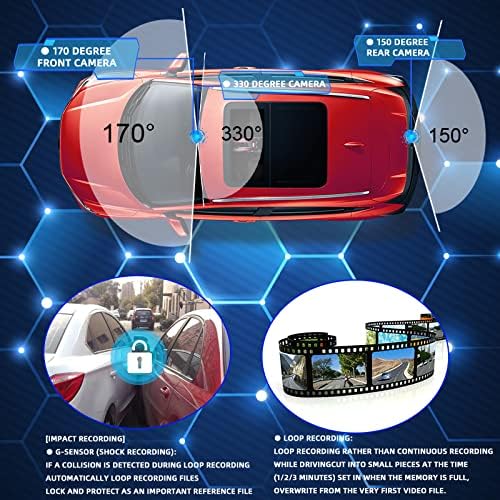
Image: Camera view包括的なカバレッジのためのさまざまな角度から撮影します。
8. 保証とサポート
E-ACE stands behind the quality of its products. Your Mirror Dash Cam comes with the following:
- 2年間の品質保証: We provide a 2-year warranty covering manufacturing defects.
- 1-Month Full Refund/Exchange: If you are not satisfied with your purchase within one month, you are eligible for a full refund or exchange.
For any questions, technical support, or warranty claims, please contact our customer service team. We are committed to providing prompt assistance.