
1.製品オーバーview
The iTOMA CKS209 is a versatile alarm clock radio designed to enhance your bedside experience. It features dual wireless charging capabilities for your smartphone and earbuds, along with two additional USB ports for other devices. Enjoy your favorite music via Bluetooth 5.1 technology or tune into digital FM radio. The clock includes dual alarms with customizable wake-up modes, a large 1.4-inch orange LED display with auto and manual dimmer control, and a 2-level orange night light.
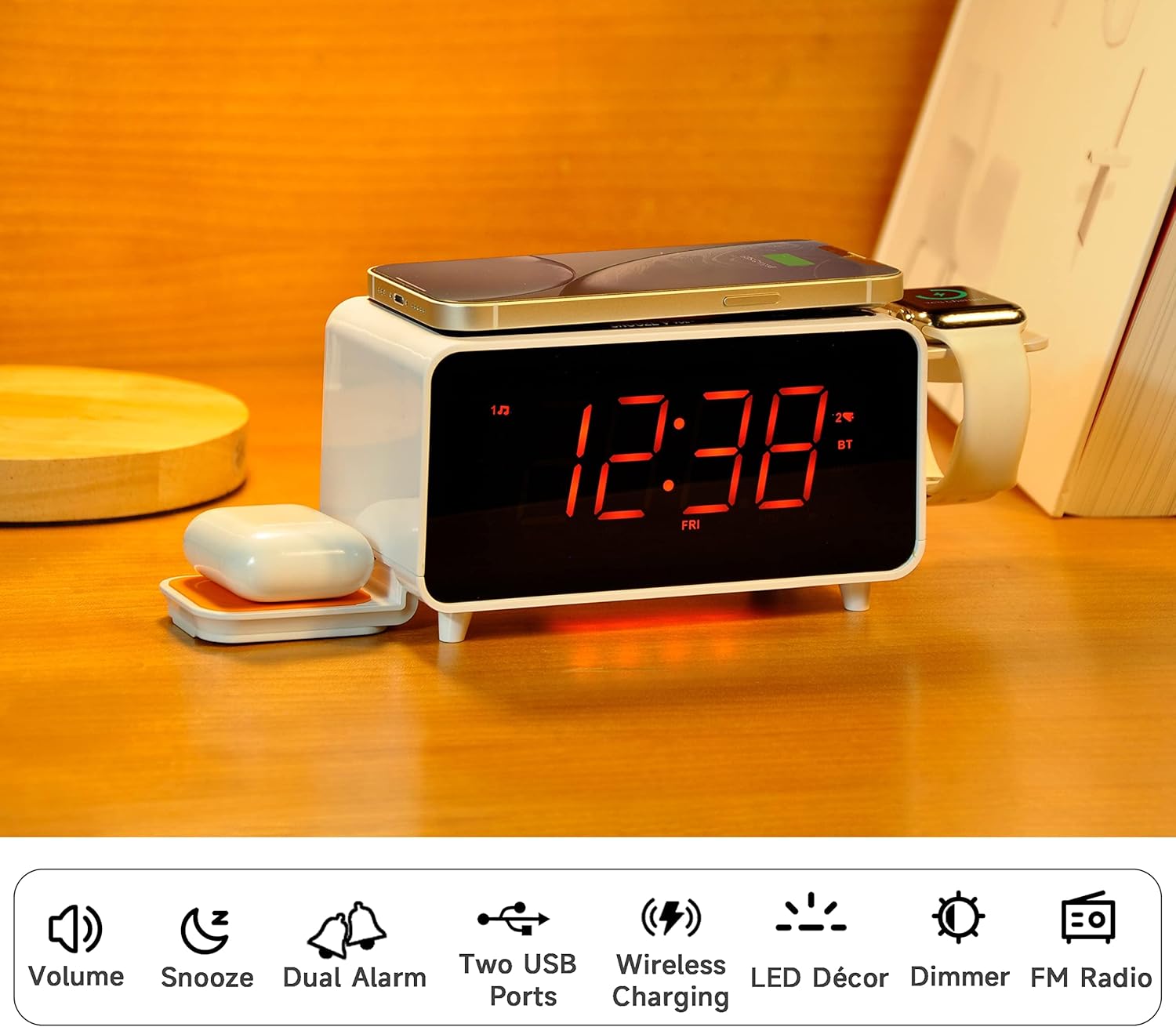
Image: The iTOMA CKS209 alarm clock radio displaying the time, with a smartphone wirelessly charging on top, earbuds on a side wireless charging pad, and a smartwatch on its holder.
主な特徴:
- ワイヤレス充電: 15W ultra-fast wireless charger for smartphones and 3W foldable earphone wireless charger. Includes a watch wireless charging support holder (charging cable not included).
- Bluetooth 5.1: Seamless audio streaming from your Bluetooth-enabled devices.
- デュアルUSBポート: One USB-A and one USB-C port (5V 2.1A) for additional device charging.
- Smart Dual Alarm: Set two independent alarms with options to wake to radio or buzzer. Features snooze, crescendo wake-up, 15-level volume control, and 4 alarm week modes (Every day, single day, weekdays, weekends).
- 1.4インチオレンジLEDディスプレイ: Clear 12/24-hour format display with 3-level dimmer brightness and auto-dimmer function.
- ナイトライト: 周囲を照らす 2 段階のオレンジ色のナイトライト。
- デジタルFMラジオ: 20 programmable preset stations with external wire antenna for enhanced reception.
- バックアップバッテリー: Maintains time and alarm settings during power interruptions.
2. セットアップ
2.1電源接続
- Unpack the iTOMA CKS209 unit and all accessories.
- 付属のACアダプターを本体背面のDC INジャックに接続します。
- Plug the AC adapter into a standard wall outlet. The display will light up, and the clock will automatically set the time.
2.2 Initial Time Setting (Manual)
While the clock features auto-time setting, you can manually adjust the time, date, and year if needed.
- を押し続けます クロックセット button located on the top panel until the year flashes on the display.
- 使用 チューン+/- buttons (or rotate the SNOOZE/VOL dial) to adjust the year.
- プレス クロックセット again to confirm and move to the month setting. Repeat the process for month, day, hour, and minute.
- プレス クロックセット one last time to save your settings.
2.3 Time Zone and Daylight Saving Time (DST)
- を押し続けます 睡眠/タイムゾーン button to enter time zone setting.
- 使用 チューン+/- buttons (or rotate the SNOOZE/VOL dial) to select your desired time zone.
- プレス 睡眠/タイムゾーン again to toggle DST ON or OFF.
- プレス 睡眠/タイムゾーン 最後にもう一度確認して終了します。
Video: This video demonstrates the time setting and Bluetooth operation for a similar iTOMA CKS207 model, which shares similar functionalities with the CKS209.
3. 操作手順
3.1ワイヤレス充電
iTOMA CKS209 には、複数のワイヤレス充電オプションが搭載されています。
- Smartphone Wireless Charging: Place your Qi-compatible smartphone on the top charging pad. The charging indicator on the display will illuminate to confirm charging.
- Earbud Wireless Charging: Place your Qi-compatible earbuds on the foldable 3W wireless charging pad located on the side.
- Smartwatch Holder: Utilize the integrated holder for your smartwatch. Note: A separate smartwatch charging cable (not included) is required and connects to one of the USB ports.
Image: A smartphone is placed on the top surface of the iTOMA CKS209, indicating wireless charging in progress.
Image: A close-up of the side of the iTOMA CKS209 showing the integrated holder designed for a smartwatch.
3.2つのUSB充電ポート
In addition to wireless charging, the unit provides two USB ports (one Type-A and one Type-C) on the back for wired charging of other devices.
- Connect your device's USB charging cable to either the USB-A or USB-C port on the back of the alarm clock.
- Ensure your device is properly connected and charging.
Image: A smartphone is connected via a USB cable to one of the charging ports on the back of the iTOMA CKS209.
3.3のBluetoothスピーカー
Bluetooth 対応デバイスからワイヤレスでオーディオをストリーミングします。
- を押す オン/オフ ユニットの電源を入れるボタン。
- を押す モード button repeatedly until 'BT' appears on the display and starts flashing, indicating pairing mode.
- On your mobile device, enable Bluetooth and search for 'iTOMA CKS209' (or similar model name).
- Select the device to pair. Once connected, 'BT' will stop flashing and remain solid.
- You can now play audio from your device through the alarm clock speaker. Adjust volume using the ボリューム +/- buttons or your mobile device.

Image: A smartphone displaying music playback is positioned near the iTOMA CKS209, indicating a Bluetooth connection.
3.4FMラジオ
お気に入りの FM ラジオ局を聴きます。
- を押す オン/オフ ユニットの電源を入れるボタン。
- を押す モード button repeatedly until the FM frequency appears on the display.
- For automatic station search, press and hold the チューン+/- buttons. The radio will scan and save available stations.
- 手動で調整するには、 チューン+/- ボタンを押すと、段階的に周波数を調整できます。
- を使用して音量を調整します ボリューム +/- ボタン。
3.5 デュアルアラームクロック
最大 2 つの独立したアラームを設定できます。
- を押す AL1 or AL2 button to select the desired alarm. The alarm time will flash on the display.
- 使用 チューン+/- buttons (or rotate the SNOOZE/VOL dial) to set the desired alarm hour and minute.
- プレス AL1 or AL2 again to select the wake-up source (Buzzer or FM Radio).
- プレス AL1 or AL2 again to select the alarm week mode (Every day, single day, weekdays, or weekends).
- プレス AL1 or AL2 one last time to confirm and activate the alarm. The alarm indicator will appear on the display.
- アラームを解除するには、対応する AL1 or AL2 アラームインジケーターがディスプレイから消えるまでボタンを押します。
- スヌーズ機能: アラームが鳴ったら、を押します スヌーズ button to temporarily silence the alarm for 9 minutes.

Image: The iTOMA CKS209 alarm clock radio displaying the time on a bedside table, ready for use.
3.6 Display & Dimmer Control
Adjust the brightness of the 1.4-inch orange LED display.
- を短く押す ディマー button to cycle through 3 brightness levels (High, Medium, Low).
- The unit also features an auto-dimmer function that adjusts display brightness based on ambient light conditions.
Image: A visual representation of the iTOMA CKS209 display at different brightness levels, from bright to invisible, and the auto-dimmer setting.
3.7 ナイトライト
Activate the ambient orange night light.
- を押す 導かれた button to turn the night light ON.
- を押す 導かれた button again to cycle through 2 brightness levels.
- を押す 導かれた button a third time to turn the night light OFF.
4. メンテナンス
iTOMA CKS209 の寿命を延ばし、最適なパフォーマンスを確保するには、次のメンテナンス ガイドラインに従ってください。
- クリーニング: 本体の外装は、柔らかく乾いた布で拭いてください。液体洗剤や研磨剤は使用しないでください。表面の仕上げが傷つく可能性があります。
- 換気: 過熱を防ぐため、本製品は必ず換気の良い場所に設置してください。通気口を塞がないでください。
- 電源コード: 電源コードに損傷がないか定期的に点検してください。損傷している場合は使用を中止し、カスタマーサポートにご連絡ください。
- ストレージ: 長期間保管する場合は、電源コンセントからプラグを抜き、涼しく乾燥した場所に保管してください。
5。 トラブルシューティング
If you encounter any issues with your iTOMA CKS209, please refer to the following common troubleshooting steps:
- 電源なし/ディスプレイオフ:
- AC アダプターが本体と正常な壁のコンセントの両方にしっかりと差し込まれていることを確認します。
- 別のデバイスを接続して、電源コンセントが機能するかどうかを確認します。
- ワイヤレス充電が機能しない:
- デバイスが Qi 対応であることを確認してください。
- Ensure your device is centered correctly on the charging pad.
- 充電の妨げになる可能性のある厚い携帯電話ケースや金属製の物体を取り外します。
- ユニットの電源がオンになっていることを確認します。
- Bluetooth ペアリングの問題:
- Ensure the alarm clock is in Bluetooth pairing mode ('BT' flashing).
- モバイルデバイスで Bluetooth が有効になっていることを確認してください。
- モバイルデバイスを目覚まし時計に近づけます。
- 以前にペアリングしていた場合は、デバイスのペアリングを解除してから再度ペアリングしてみてください。
- FM Radio Static/Poor Reception:
- Extend the external wire antenna fully for better reception.
- Reposition the antenna or the unit to find a location with better signal strength.
- アラームが鳴らない:
- Ensure the alarm (AL1 or AL2) is activated and its indicator is visible on the display.
- アラーム音量の設定を確認してください。
- Verify the alarm time and day settings are correct.
6. 仕様
| 特徴 | 詳細 |
|---|---|
| ブランド | イトーマ |
| モデル番号 | CKS209-CA |
| 色 | Orange Led Display |
| 製品寸法 | 16.8 x 3.81 x 9.1 cm |
| アイテム重量 | 820グラム |
| 材料 | プラスチック |
| 表示タイプ | 導かれた |
| 特集 | Auto Dimmable, Charging Port, Charging Station, Foldable, Multiple Time Zone |
| ワイヤレス充電 | 15W(電話)、3W(イヤホン) |
| USB充電 | USB-A, USB-C (5V 2.1A) |
| Bluetoothバージョン | 5.1 |
| FM周波数 | 87.5-108 MHz |
7. 保証とサポート
For warranty information, technical support, or any inquiries regarding your iTOMA CKS209, please refer to the documentation included in your product packaging or visit the official iTOMA webサイトをご覧ください。販売者に直接問い合わせてサポートを受けることもできます。