
1.製品オーバーview
The CCYLEZ AK-C211008 Wireless RF Remote Control Relay Module is a versatile 4-channel device designed for remote control applications. Utilizing advanced RF technology, it enables stable and reliable control of various electrical systems through walls, floors, and doors. This module is ideal for automating lighting, electric doors and windows, lifting equipment, gates, and elevators, offering high security and ease of use.

Figure 1: The AK-C211008 Relay Module and accompanying remote controls.
2. 特徴
- Advanced RF Technology: Signals can be transmitted reliably through walls, floors, and doors, ensuring stable control anywhere within the operational range.
- 高いセキュリティ: Features a high-security learning code system. If a remote control is lost, old codes can be easily deleted and new ones learned, maintaining system security.
- 使いやすい: Designed for straightforward setup, learning, relearning, and control. Offers stable and reliable performance with high reception sensitivity.
- 幅広い用途: Primarily used in lamps and lanterns, electric doors and windows, lifting equipment, gates, elevators, industrial control, and security systems.
- 複数の動作モード: Supports three distinct operating modes: Jog (Momentary), Self-Locking (Toggle), and Interlock, providing flexibility for various control needs.
- 耐干渉性: Adopts non-directional wireless encoding technology, enhancing resistance to interference and allowing independent control.
3. 仕様
| パラメータ | 価値 |
|---|---|
| 製品タイプ | リモートコントロールリレースイッチ |
| シェル素材 | アブソリュート |
| 動作周波数 | 433 MHz |
| 動作モード | Jog (Momentary), Self-Locking (Toggle), Interlock |
| 出力モード | 配線端子 |
| 復調方法 | 聞く |
| 制御方法 | リモートコントロール |
| 入力ボリュームtage | DC 12-36V or AC 100-240V |
| 最大電流 | ≦10A |
| 受信感度 | -105dBm |
| 作動距離 | > 100m(オープンエリア) |
| リモコン電池 | 4 x CR2016 (75 mAh) Button Cells (built-in) |
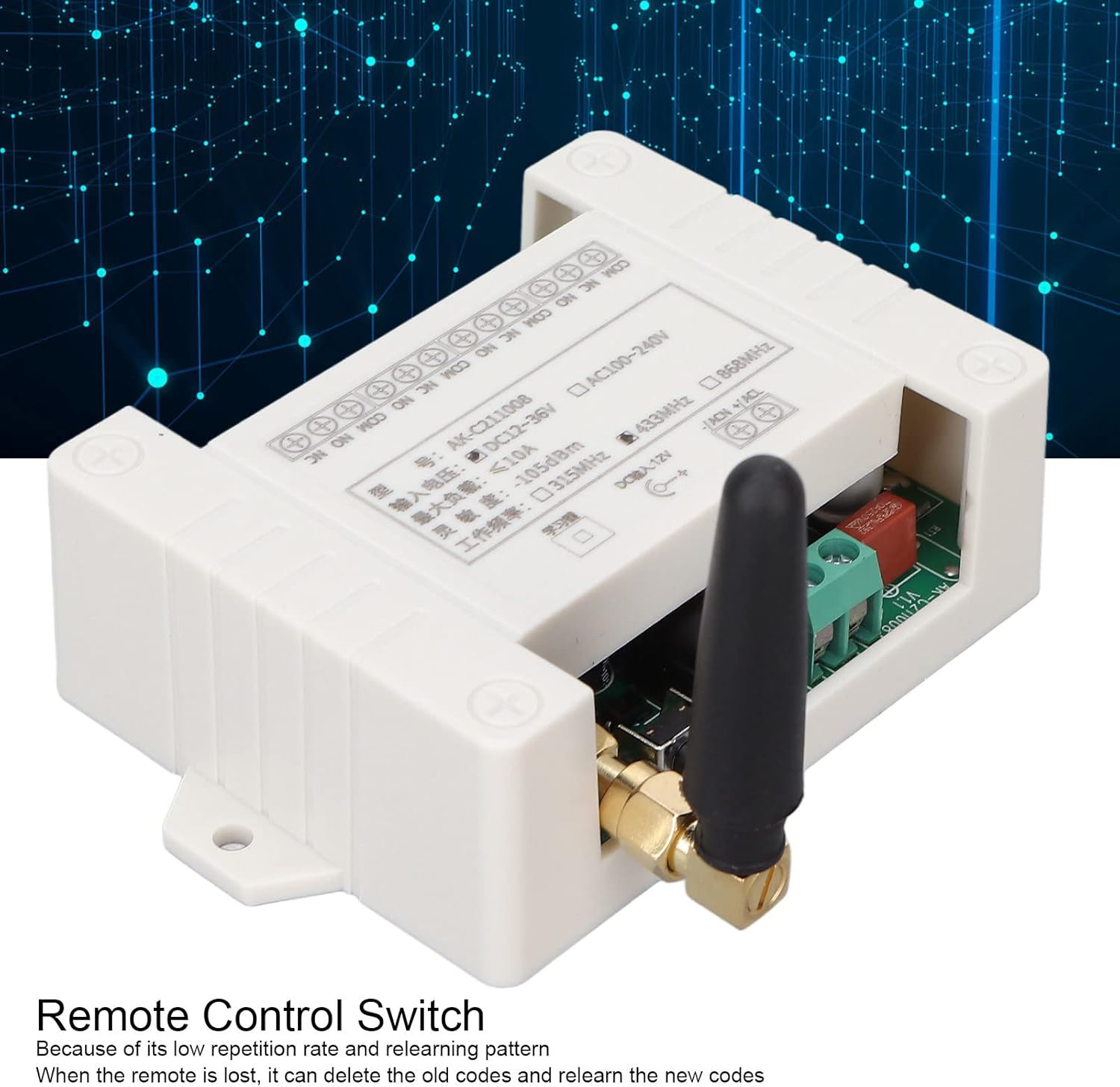
図2:詳細 view of the relay module's wiring terminals and specification label.
4. パッケージ内容
製品パッケージには通常、次の項目が含まれます。
- 1 x Wireless RF Remote Control Relay Switch Module
- リモコン x 2
5. セットアップ
The relay module and remote controls are designed for straightforward setup. Please follow these general steps:
- 電源接続: Ensure the module is connected to a compatible power source. The module supports both DC 12-36V and AC 100-240V inputs. Refer to the wiring diagram on the module for correct polarity and terminal connections.
- デバイスの配線: Wire the devices you wish to control (e.g., lights, motors) to the appropriate output terminals (NO, NC, COM) on the relay module. Ensure all connections are secure and insulated.
- リモコンのペアリング: The system uses a learning code for pairing the remote controls with the receiver. The specific learning procedure might vary slightly, but typically involves a learning button on the receiver module.

図3:内部 view of the relay module, showing the circuit board. A learning button (often a small black button) is typically located on the board.
6. 操作手順
The AK-C211008 module supports three main operating modes. The mode is typically set during the learning/pairing process. Please refer to the specific instructions provided with your module for precise mode setting and learning procedures.
6.1。 動作モード
- Jog (Momentary) Mode: The relay output is active only for as long as the corresponding button on the remote control is pressed. When the button is released, the relay deactivates.
- Self-Locking (Toggle) Mode: Pressing a button on the remote control once activates the corresponding relay output. Pressing the same button again deactivates the relay output.
- インターロックモード: In this mode, only one relay output can be active at a time. Pressing button 'A' activates relay 'A' and deactivates any other active relays (B, C, D). Pressing button 'B' activates relay 'B' and deactivates A, C, D, and so on.
6.2. Learning/Pairing Procedure (General)
While specific steps may vary, a common learning procedure for these modules is as follows:
- 既存のコードをクリア: To clear all previously learned remote controls, press and hold the learning button on the receiver module for approximately 8 seconds until the indicator light flashes rapidly and then turns off. This ensures a clean slate for new pairings.
- 学習モードに入る: Briefly press the learning button on the receiver module the required number of times for your desired mode:
- プレス 一度 for Jog (Momentary) Mode.
- プレス 2回 for Self-Locking (Toggle) Mode.
- プレス 3回 for Interlock Mode.
- リモコンのペアリング: While the indicator light is on, press the desired button on your remote control. The indicator light on the module will flash several times and then turn off, indicating successful pairing.
- テスト操作: After pairing, test the remote control to ensure the relay operates correctly in the selected mode.
7. メンテナンス
- Keep the relay module and remote controls clean and dry. Avoid exposure to dust, dirt, and moisture.
- デバイスを極端な温度や湿度にさらさないでください。
- If the remote control range decreases or it becomes unresponsive, replace the built-in CR2016 button cell batteries.
- 配線接続が確実に保たれているか定期的に確認してください。
8。 トラブルシューティング
| 問題 | 考えられる原因 | 解決 |
|---|---|---|
| Device not responding to remote control. | No power to module; Remote control battery low/dead; Remote not paired; Incorrect wiring. | Check power supply to the module; Replace remote control batteries; Re-pair the remote control (see Section 6.2); Verify wiring connections. |
| 動作範囲が制限されています。 | Obstructions (thick walls, metal structures); Radio interference; Low remote control battery. | Reduce obstructions between remote and module; Avoid sources of strong radio interference; Replace remote control batteries. |
| Relay operates incorrectly (e.g., stays on/off). | Incorrect operating mode set (Jog, Self-Locking, Interlock); Faulty wiring. | Clear all codes and re-pair the remote control, ensuring the correct operating mode is selected during learning; Check and correct wiring. |
9. 保証とサポート
保証情報、テクニカルサポート、またはサービスに関するお問い合わせは、販売元またはメーカーに直接お問い合わせください。購入証明書として、ご購入時のレシートを保管してください。